
Product: EXCAVATOR
Model: 345D L EXCAVATOR RAJ
Configuration: 345D L Excavator RAJ00001-UP (MACHINE) POWERED BY C13 Engine
Disassembly and Assembly
C11 and C13 Engines for Caterpillar Built Machines
Media Number -RENR9214-22
Accessory Drive - Install
SMCS - 1207-012
Installation Procedure

-14/11/2016
i01943324
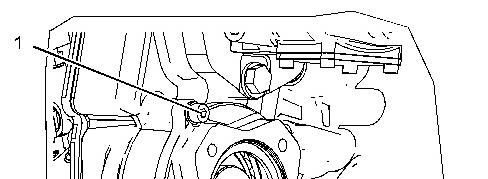
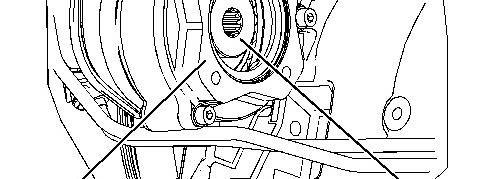
Illustration 1 g01011209
1. Raise the temperature of the bearing.
2. Lower the temperature of gear (3).
3. Install the bearing into gear (3).
4. Install gear (3), cover (2), and bolts (1). Copyright 1993 - 2020 Caterpillar Inc. All Rights Reserved. Private Network For SIS Licensees.
Product: EXCAVATOR
Model: 345D L EXCAVATOR RAJ
Configuration: 345D L Excavator RAJ00001-UP (MACHINE) POWERED BY C13 Engine
Disassembly and Assembly
C11 and C13 Engines for Caterpillar Built Machines
Media Number -RENR9214-22 Publication Date -01/05/2015 Date Updated -14/11/2016
i02250527
Accessory Drive - Remove
SMCS - 1207-011
Removal Procedure
Table 1
Required Tools

Illustration 1 g01011209
1. Remove bolts (1), cover (2), and gear (3).
2. Use Tooling (A) and a suitable pressin order to remove the bearings from gear (3).
Copyright 1993 - 2020 Caterpillar Inc. All Rights Reserved. Private Network For SIS Licensees. Mon Nov 9 10:45:41 UTC+0530 2020
Product: EXCAVATOR
Model: 345D L EXCAVATOR RAJ
Configuration: 345D L Excavator RAJ00001-UP (MACHINE) POWERED BY C13 Engine
Disassembly and Assembly
C11 and C13 Engines for Caterpillar Built Machines
Media Number -RENR9214-22
Updated -14/11/2016
i02254179
Alternator - Remove and Install
SMCS - 1405-010
Removal Procedure
Personal injury can result from failure to disconnect the battery.
First, disconnect the negative battery cable. Then, disconnect the positive battery cable.
A positive power lead cancause sparksif the battery is not disconnected. Sparks can possibly result in battery explosion or fire.
1. Disconnect the batteries.
2. Place identification marks on all of the harnessassembliesand disconnect the harness assemblies.
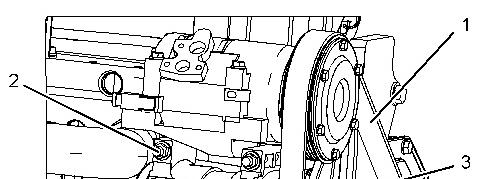
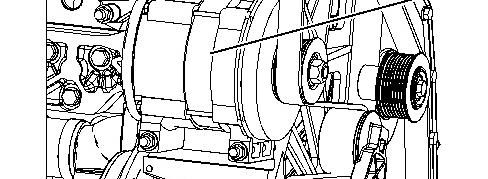

Illustration 1 g01135438
3. Remove belt (1).
4. Remove bolts (2) and alternator (3).
Installation Procedure
Illustration 2 g01135438
1. If necessary, install the pulley on alternator (3). Install the nut and tighten the nut to a torque of 127 ± 10 N·m (94 ± 7 lb ft).
2. Position alternator (3) on the alternator mounting bracket. Install bolts (2).
3. Install belt (1).
4. Connect the harness assembly to alternator (3) and install the bolt. Tighten the bolt to a torque of 4.4 ± 1.0 N·m (39 ± 9 lb in).
5. Connect the harness assembly to alternator (3) and install the nut. Tighten the nut to a torque of 18 ± 2 N·m (13 ± 2 lb ft).
6. Connect the batteries.
Product: EXCAVATOR
Model: 345D L EXCAVATOR RAJ
Configuration: 345D L Excavator RAJ00001-UP (MACHINE) POWERED BY C13 Engine
Disassembly and Assembly
C11 and C13 Engines for Caterpillar Built Machines
Media Number -RENR9214-22 Publication Date -01/05/2015 Date Updated -14/11/2016
Atmospheric Pressure Sensor - Remove and Install
SMCS - 1923-010
NOTICE
Keep all parts clean from contaminants.
Contaminants may cause rapid wear and shortened component life.
i05196645
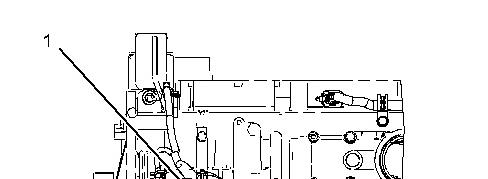
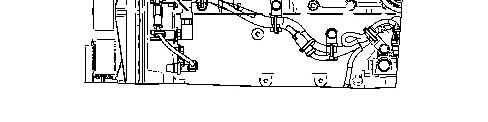
Illustration 1 g01134780
(1) Atmospheric pressure sensor ... 10 ± 2 N·m (88 ± 18 lb in)
Note: Atmospheric pressure sensor (1) is to be installed at an angle of 40+/-15 degrees from vertical.
Copyright 1993 - 2020 Caterpillar Inc. All Rights Reserved. Private Network For SIS Licensees.
Mon Nov 9 10:53:05 UTC+0530 2020
Product: EXCAVATOR
Model: 345D L EXCAVATOR RAJ
Configuration: 345D L Excavator RAJ00001-UP (MACHINE) POWERED BY C13 Engine
Disassembly and Assembly
C11 and C13 Engines for Caterpillar Built Machines Media Number -RENR9214-22
Bearing Clearance - Check
SMCS - 1203-535; 1219-535
Measurement Procedure
Table 1 Required Tools
Plastic Gauge (Green)
to 0.076 mm (0.001 to 0.003 inch)
Plastic Gauge (Red)
to 0.152 mm (0.002 to 0.006 inch)
Plastic Gauge (Blue) 0.102 to 0.229 mm (0.004 to 0.009 inch)
Plastic Gauge (Yellow) 0.230 to 0.510 mm (0.009 to 0.020 inch)
Note: Plastic gauge may not be necessary when the engine is in the chassis.
NOTICE
i05977048
Keep all parts clean from contaminants.
Contaminants may cause rapid wear and shortened component life.
Note: Cat does not recommend the checking of the actual bearing clearancesparticularly on small engines. Thisisbecause of the possibility of obtaining inaccurate results and the possibility of damaging the bearing or the journal surfaces. Each Cat engine bearing is quality checked for specific wall thickness.
Note: The measurements should be within specifications and the correct bearings should be used. If the crankshaft journals and the bores for the block and the rods were measured during disassembly, no further checks are necessary. However, if the technician still wants to measure the bearing clearances, Tooling (A) is an acceptable method. Tooling (A) is less accurate on journalswith small diametersif clearancesare less than 0.10 mm (0.004 inch).
NOTICE
Lead wire, shim stock or a dial bore gauge can damage the bearing surfaces.
The technician must be very careful to use Tooling (A) correctly. The following points must be remembered:
• Ensure that the backs of the bearings and the bores are clean and dry.
• Ensure that the bearing locking tabs are properly seated in the tab grooves.
• The crankshaft must be free of oil at the contact pointsof Tooling (A).
1. Put a piece of Tooling (A) on the crown of the bearing that is in the cap.
Note: Do not allow Tooling (A) to extend over the edge of the bearing.
2. Use the correct torque-turn specifications in order to install the bearing cap. Do not use an impact wrench. Be careful not to dislodge the bearing when the cap isinstalled.
Note: Do not turn the crankshaft when Tooling (A) is installed.
3. Carefully remove the cap, but do not remove Tooling (A). Measure the width of Tooling (A) while Tooling (A) is in the bearing cap or on the crankshaft journal. Refer to Illustration 1.
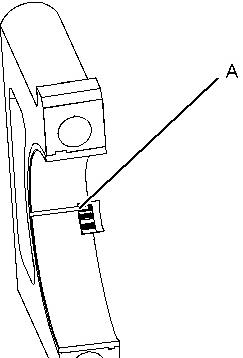

Illustration 1 g01152855
TypicalExample
4. Remove all of Tooling (A) before you install the bearing cap.
Note: When Tooling (A) is used, the readings can sometimes be unclear. For example, all parts of Tooling (A) are not the same width. Measure the major width in order to ensure that the parts are within the specification range. Refer to SpecificationsManual, "Connecting Rod Bearing Journal" and Specifications Manual, "Main Bearing Journal" for the correct clearances.
Copyright 1993 - 2020 Caterpillar Inc. All Rights Reserved. Private Network For SIS Licensees. Mon Nov 9 10:52:50 UTC+0530 2020
Product: EXCAVATOR
Model: 345D L EXCAVATOR RAJ
Configuration: 345D L Excavator RAJ00001-UP (MACHINE) POWERED BY C13 Engine
Disassembly and Assembly
C11 and C13 Engines for Caterpillar Built Machines
Media Number -RENR9214-22 Publication Date -01/05/2015 Date Updated -14/11/2016
i02253255
Boost Pressure Sensor - Remove and Install
SMCS - 1917-010
NOTICE
Keep all parts clean from contaminants.
Contaminants may cause rapid wear and shortened component life.
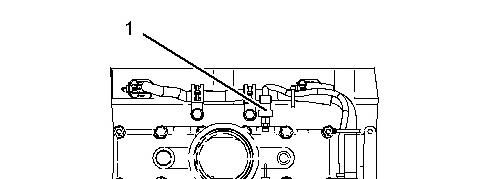
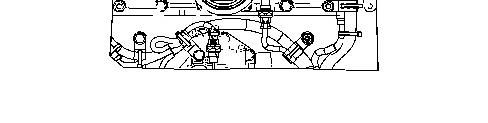
Illustration 1 g01134727
(1) Boost pressure sensor ... 10 ± 2 N·m (88 ±18 lb in)
Copyright 1993 - 2020 Caterpillar Inc. All Rights Reserved. Private Network For SIS Licensees.
Mon Nov 9 10:54:22 UTC+0530 2020
Product: EXCAVATOR
Model: 345D L EXCAVATOR RAJ
Configuration: 345D L Excavator RAJ00001-UP (MACHINE) POWERED BY C13 Engine
Disassembly and Assembly
C11 and C13 Engines for Caterpillar Built Machines
Media Number -RENR9214-22 Publication Date -01/05/2015 Date Updated -14/11/2016
i02251403
Camshaft - Install
SMCS - 1210-012
Installation Procedure
Table 1 Required Tools
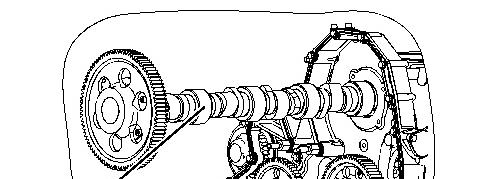
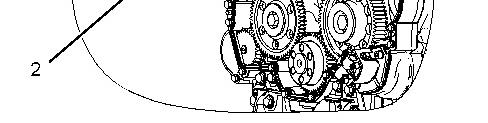
Illustration 1 g01144336
1. Install Tooling (A).
Note: Apply clean engine oil to the lobes and journals of camshaft (2) and Tooling (A).
Note: During installation of camshaft (2), rotate the camshaft in both directionsin order to prevent binding in the camshaft bearing bores.
2. Carefully install camshaft (2) in the engine.
NOTICE
When installing the camshaft, make sure the number one cylinder is at top center of the compressionstroke with the timing bolt installed in the flywheel. The camshaft timing isvery important. The timing mark on the camshaft drive gear must line up withthe timing mark onthe idler gear. Refer to the Specifications Manual for more information.
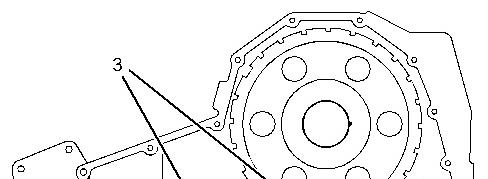
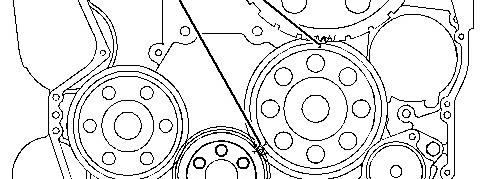

Illustration 2 g01144422
3. Ensure that timing marks (3) on the idler gear are aligned with the timing markson the crankshaft gear and the camshaft drive gear.
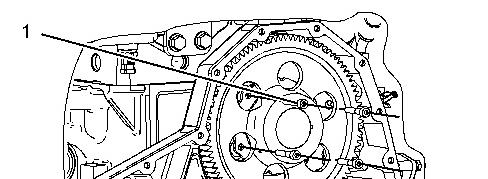
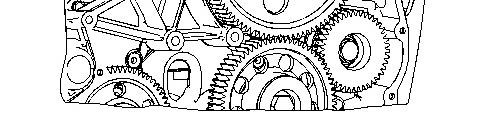
4. Install bolts (1).
5. Remove the wires that were used to hold the valve lifters.
End By:
a. Install the camshaft position sensor. Refer to Disassembly and Assembly, "Camshaft Position Sensor - Remove and Install".
b. Install the front cover. Refer to Disassembly and Assembly, "Front Cover - Install".
c. Install the rocker shaft and the pushrods. Refer to Disassembly and Assembly, "Rocker Shaft and Pushrod - Install".
Product: EXCAVATOR
Model: 345D L EXCAVATOR RAJ
Configuration: 345D L Excavator RAJ00001-UP (MACHINE) POWERED BY C13 Engine
Disassembly and Assembly
C11 and C13 Engines for Caterpillar Built Machines
Media Number -RENR9214-22
i02250956
Camshaft - Remove
SMCS - 1210-011
Removal Procedure
Table 1
Tools
201-4211 Camshaft Pilot 1 201-4212 Camshaft Pilot 1
Start By:
a. Remove the rocker shaft and the pushrods. Refer to Disassembly and Assembly, "Rocker Shaft and Pushrod - Remove".
b. Remove the front cover. Refer to Disassembly and Assembly, "Front Cover - Remove".
c. Remove the camshaft position sensor. Refer to Disassembly and Assembly, "Camshaft Position Sensor - Remove and Install".
NOTICE
Keep all parts clean from contaminants.
Contaminants may cause rapid wear and shortened component life.
1. Turn the crankshaft to top center compression stroke for the No. 1 piston.
2. Ensure that the timing marks on the following gears are aligned: the camshaft drive gear, the idler gear and the crankshaft gear.
3. Wire the valve lifters away from the camshaft.
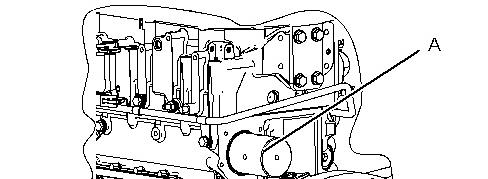
1 g01133114
4. Remove bolts (1).
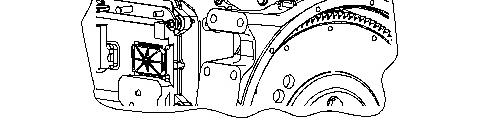
2 g01144335
5. Install Tooling (A) on the rear of the camshaft.
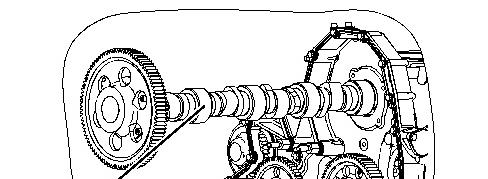
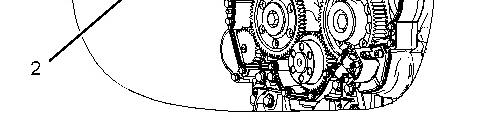
Illustration 3 g01144336
Note: Lubricate Tooling (A) with clean oil.
6. Carefully remove camshaft (2) from the engine.
Copyright 1993 - 2020 Caterpillar Inc. All Rights Reserved. Private Network For SIS Licensees.
Mon Nov 9 10:48:27 UTC+0530 2020
Product: EXCAVATOR
Model: 345D L EXCAVATOR RAJ
Configuration: 345D L Excavator RAJ00001-UP (MACHINE) POWERED BY C13 Engine
Disassembly and Assembly
C11 and C13 Engines for Caterpillar Built Machines Media
Camshaft Bearings - Install
SMCS - 1211-012
Installation Procedure
Table 1 Required Tools
( 1) Part of 8S-2241Camshaft BearingToolGroup.
Keep all parts clean from contaminants.
Contaminants may cause rapid wear and shortened component life.
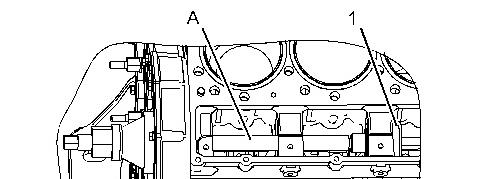
1 g01133376
1. Position new camshaft bearing (1) in Tooling (A) and install the bearing from the rear to the front of the engine.
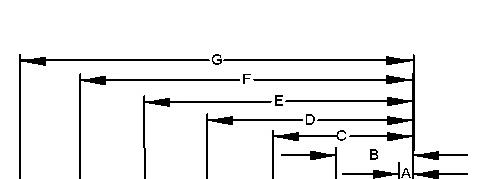
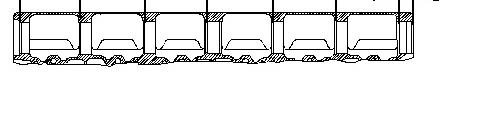
Illustration 2 g01133395
2. The camshaft bearings are installed with Tooling (A) . Measure the depth of the camshaft bearings from the front face of the cylinder block to the following distances:
a. Dimension (A) is 36.50 mm (1.437 inch).
b. Dimension (B) is 192.50 mm (7.579 inch).
c. Dimension (C) is 348.50 mm (13.720 inch).
d. Dimension (D) is 504.50 mm (19.862 inch).
e. Dimension (E) is660.50 mm (26.004 inch).
f. Dimension (F) is 816.50 mm (32.146 inch).
g. Dimension (G) is 972.50 mm (38.287 inch).
NOTICE
Camshaft bearings must be installedinto their correct position. Failure to do so will result inengine damage.
3 g01133403
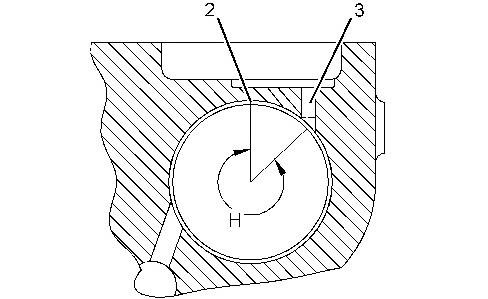
(2) Bearing joint
(3) Oil hole
(H) Bearing oil hole islocated at a 45 degree angle from vertical. All seven bearings have the same angle.
End By:
a. Install the camshaft. Refer to Disassembly and Assembly, "Camshaft - Install".
b. Install the lifter group. Refer to Disassembly and Assembly, "Lifter Group - Remove and Install". Copyright 1993 - 2020 Caterpillar Inc. All Rights Reserved. Private Network For SIS Licensees.