
Note: Use Bookmarks panel to navigate

Product: EXCAVATOR
Model: 345C EXCAVATOR JAR
Configuration: ISJ HEX COMMONALITY CHART JAR00001-UP (MACHINE)
Disassembly and Assembly
C11 and C13 Engines for Caterpillar Built Machines
Media Number -RENR9214-22
Fuel Transfer Pump - Remove
SMCS - 1256-011
Removal Procedure
NOTICE
Care must be taken to ensure that fluids are contained during performance of inspection, maintenance, testing, adjusting, and repair of the product. Be prepared to collect the fluid with suitable containers before opening any compartment or disassembling any component containing fluids.
Refer to Special Publication, NENG2500, "Dealer Service Tool Catalog" for tools and supplies suitable to collect and contain fluids on Cat products.
Dispose of all fluids according to local regulations and mandates.
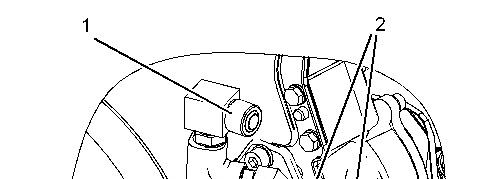
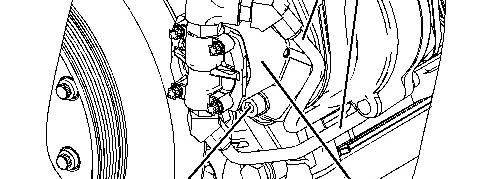

Illustration 1 g01131526
1. Disconnect hose assembly (1).
2. Disconnect tube assemblies (2).
3. Remove bolts (3).
4. Remove fuel transfer pump (4).
Copyright 1993 - 2023 Caterpillar Inc. All Rights Reserved. Private Network For SIS Licensees. Sat Aug 12 09:10:50 UTC+0530 2023
Product: EXCAVATOR
Model: 345C EXCAVATOR JAR
Configuration: ISJ HEX COMMONALITY CHART JAR00001-UP (MACHINE)
Disassembly and Assembly
C11 and C13 Engines for Caterpillar Built Machines
Media Number -RENR9214-22 Publication Date -01/05/2015
Fuel Transfer Pump - Install
SMCS - 1256-012
Installation Procedure
Updated -14/11/2016
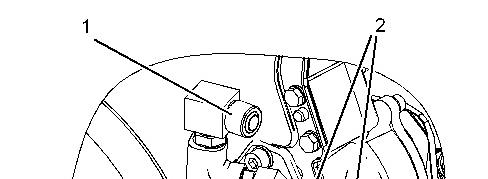
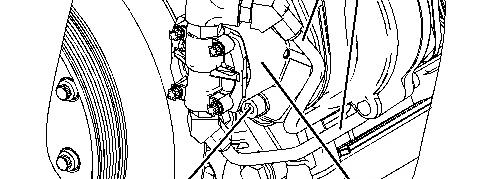

1. Position fuel transfer pump (4).
2. Install bolts (3).
3. Connect tube assemblies (2).
4. Connect hose assembly (1). Copyright 1993 - 2023 Caterpillar Inc. All Rights Reserved. Private Network For SIS Licensees. Sat Aug 12 09:22:08 UTC+0530 2023
Product: EXCAVATOR
Model: 345C EXCAVATOR JAR
Configuration: ISJ HEX COMMONALITY CHART JAR00001-UP (MACHINE)
Disassembly and Assembly
C11 and C13 Engines for Caterpillar Built Machines
Media Number -RENR9214-22
Electronic Unit Injector - Remove
SMCS - 1290-011
Removal Procedure Table 1
Required Tools
Start By:
a. Remove the rocker shafts. Refer to Disassembly and Assembly, "Rocker Shaft and Pushrod - Remove".
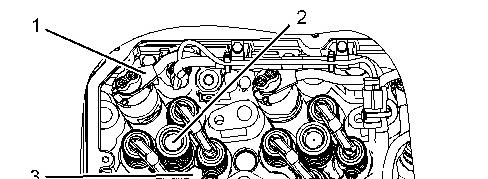
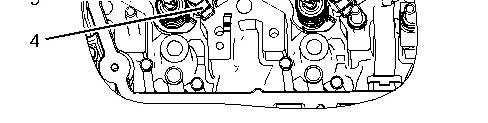
Illustration 1 g01135732
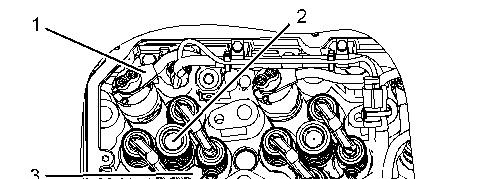
1. Disconnect harness assembly (1) from electronic unit injector (2).
2. Remove bolt (3).
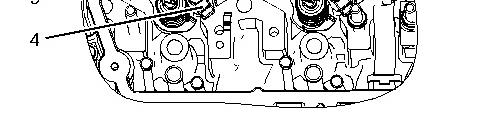
3. Position Tooling (A) under unit injector clamp (4) in order to remove electronic unit injector (2).
Copyright 1993 - 2023 Caterpillar Inc. All Rights Reserved. Private Network For SIS Licensees. Sat Aug 12 09:22:40 UTC+0530 2023
Product: EXCAVATOR
Model: 345C EXCAVATOR JAR
Configuration: ISJ HEX COMMONALITY CHART JAR00001-UP (MACHINE)
Disassembly and Assembly
C11 and C13 Engines for Caterpillar Built Machines Media
Electronic Unit Injector - Install
SMCS - 1290-012
Installation Procedure Table 1
Keep all parts clean from contaminants.
Contaminants may cause rapid wear and shortened component life.
1. Evacuate as much fuel and oil as possible from the cylinder head before installing the injector. Several evacuations may be necessary. Use Tooling (E) to remove the fuel and oil from the cylinder head.
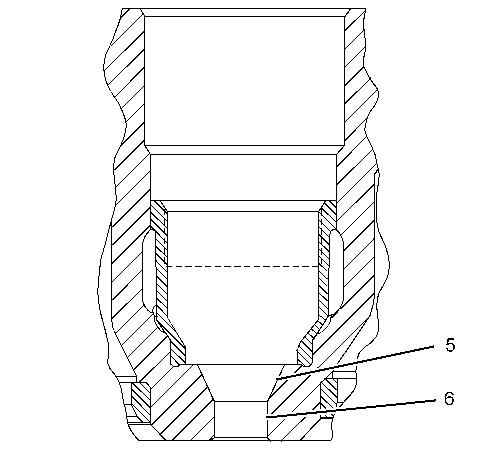
Illustration 1
2. Use Tooling (B) to clean injector seating (5) .
3. Use Tooling (C) to clean tip bore (6) .
Note: Do not reuse seals. Use new seals for installation.
g01135874
4. Lubricate the bore lightly with a 50/50 mix of clean engine oil and Tooling (D) .
2
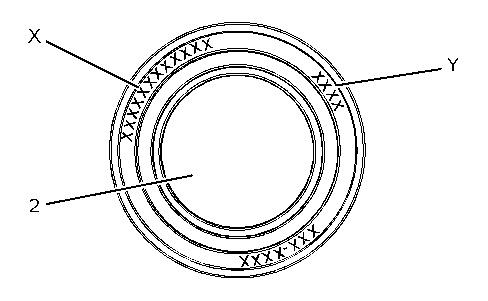
Illustration 3
5. When you install a new injector the E-Trim value must be programmed into the engine control module. The injector confirmation code may need to be programmed into the engine control module. E-Trim Value (X) is a twelve digit alphanumeric code that is supplied with the data sheet that comes with the new injectors. Injector Confirmation Code (Y) is a four digit numeric code. Both of the codes are located on the top of electronic unit injector (2) . Use the following menu to program the E-Trim value.
ECM Summary Screen
Service Menu
Calibration
NOTICE
When an electronic unit injector is replaced, the new electronic injector code must be programmed into the engine's personality module software by using the calibration menu on the Electronic Service Tool. If the new electronic injector code is not entered, the characteristics of the previous electronic unit injector is assumed.
If it is not possible to immediately reprogram the electronic injector code into the personality module software, the engine will not be severely harmed. The new electronic injector code should be reprogrammed as quickly as possible in order to optimize engine performance.
6. Install electronic unit injector (2) and unit injector clamp (4) .
Note: Use new bolt (3) .
7. Install bolt (3) .
8. Connect harness assembly (1) to electronic unit injector (2) . Tighten harness assembly (1) to a torque of 2.50 ± 0.25 N·m (22 ± 2 lb in).
End By: Install the rocker shafts. Refer to Disassembly and Assembly, "Rocker Shaft and Pushrod - Install".
Product: EXCAVATOR
Model: 345C EXCAVATOR JAR
Configuration: ISJ HEX COMMONALITY CHART JAR00001-UP (MACHINE)
Disassembly and Assembly
C11 and C13 Engines for Caterpillar Built Machines
Media Number -RENR9214-22 Publication Date -01/05/2015
Electronic Unit Injector Sleeve - Remove
SMCS - 1713-011
Removal Procedure
Type 1
Table 1
Required Tools
Tool Part Number Part Description Qty A 9U-6891 Injector Tool Group 1
NOTICE
Care must be taken to ensure that fluids are contained during performance of inspection, maintenance, testing, adjusting and repair of the product. Be prepared to collect the fluid with suitable containers before opening any compartment or disassembling any component containing fluids.
Refer to Special Publication, NENG2500, "Caterpillar Dealer Service Tool Catalog" for tools and supplies suitable to collect and contain fluids on Caterpillar products.
Dispose of all fluids according to local regulations and mandates.
-14/11/2016
NOTICE
Keep all parts clean from contaminants.
Contaminants may cause rapid wear and shortened component life.
1. Remove the electronic unit injectors. Refer to Disassembly and Assembly, "Electronic Unit Injector - Remove".
2. Drain the coolant from the cooling system into a suitable container for storage or for disposal. Refer to Operation and Maintenance Manual, "Capacities (Refill)" for the capacity of the cooling system. Refer to the Operation and Maintenance Manual, "Cooling System Coolant (DEAC) - Change" or Operation and Maintenance Manual, "Cooling System Extended Life Coolant - Change".
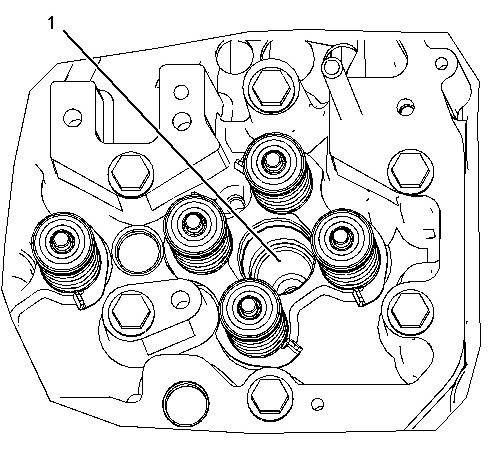
3. Install Tooling (A) into electronic unit injector sleeve (1) .
4. Tighten the nut until electronic unit injector sleeve (1) is pulled free of the cylinder head assembly. Type 2
Required Tools
Tool
A (1)
221-9778 Puller Stud 1 128-7889 Bridge Puller 1
9U-6877 Thrust Bearing 1
5P-8247 Hard Washer 1
4K-0367 Nut 1
( 1 ) The tools that are listed in the chart are part of the 9U-6891 Injector Tool Group .
1. Remove the electronic unit injector. Refer to Disassembly and Assembly , "Electronic Unit Injector - Remove".
2. Drain the coolant from the cooling system into a suitable container for storage or for disposal. Refer to Operation and Maintenance Manual, "Capacities (Refill)" for the capacity of the cooling system. Refer to the Operation and Maintenance Manual, "Cooling System Coolant (DEAC) - Change" or Operation and Maintenance Manual, "Cooling System Extended Life Coolant - Change".

3. Install the puller stud from Tooling (A) into unit injector sleeve (1) .
4. Install the following parts from Tooling (A) over the stud: bridge puller, thrust bearing, hard washer and nut.
5. Tighten the nut until unit injector sleeve (1) is pulled free of the cylinder head assembly.
Copyright 1993 - 2023 Caterpillar Inc. All Rights Reserved. Private Network For SIS Licensees. Sat Aug 12 09:23:16 UTC+0530 2023
Product: EXCAVATOR
Model: 345C EXCAVATOR JAR
Configuration: ISJ HEX COMMONALITY CHART JAR00001-UP (MACHINE)
Disassembly and Assembly
C11 and C13 Engines for Caterpillar Built Machines
Electronic Unit Injector Sleeve - Install
SMCS - 1713-012
Installation Procedure Type 1 Table 1
NOTICE
Care must be taken to ensure that fluids are contained during performance of inspection, maintenance, testing, adjusting and repair of the product. Be prepared to collect the fluid with suitable containers before opening any compartment or disassembling any component containing fluids.
Refer to Special Publication, NENG2500, "Caterpillar Dealer Service Tool Catalog" for tools and supplies suitable to collect and contain fluids on Caterpillar products.
Dispose of all fluids according to local regulations and mandates.
NOTICE
Keep all parts clean from contaminants.
Contaminants may cause rapid wear and shortened component life.
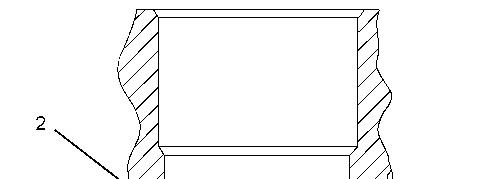
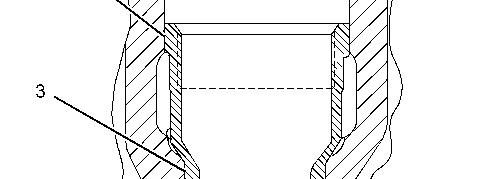

Illustration 1
1. Use Tooling (B) to clean the electronic unit injector bore.
2. Use Tooling (C) to clean the electronic unit injector seat.
3. Apply Tooling (E) to upper land (2) and lower land (3) on the electronic unit injector sleeve.
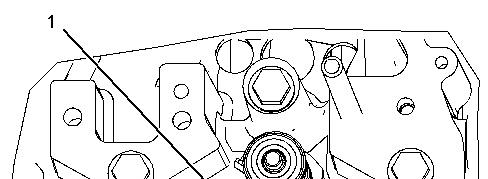
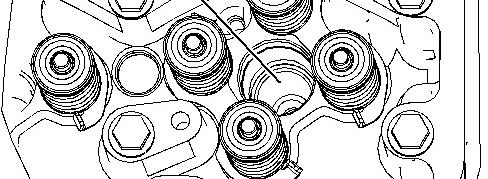

4. Position electronic unit injector sleeve (1) in the cylinder head assembly. Use Tooling (D) and a hammer to seat the sleeve.
5. Install the electronic unit injectors. Refer to Disassembly and Assembly , "Electronic Unit Injector - Install".
6. Fill the cooling system with coolant. Refer to Operation and Maintenance Manual, "Capacities (Refill)" for the cooling system capacity. Refer to Operation and Maintenance Manual, "Cooling System Coolant (DEAC) - Change" or Operation and Maintenance Manual, "Cooling System Extended Life Coolant - Change" for the proper filling procedure.
Type 2
Table 2
4C-5552 Large Bore Brush 1
C (1) 221-9778 Puller Stud 1
D (1) 9U-7258 Driver Cap 1
E 4C-9507 Retaining Compound -
( 1 ) Part of the 9U-6891 Injector Tool Group
1. Use Tooling (B) to clean the bore in the cylinder head for the electronic unit injector sleeve.
NOTICE
Ensure that the electronic unit injector sleeve and the cylinder head bore are completely free of oil, dirt, and sealant debris.
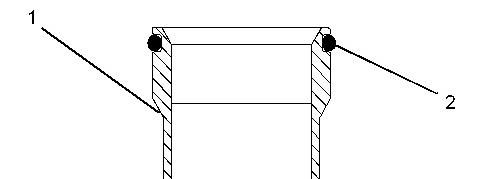
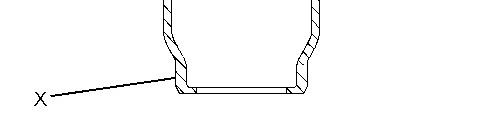
Illustration 3
2. Install new O-ring seals (2) on electronic unit injector sleeve (1) .
g01120522
Note: Do not apply Tooling (E) to the cylinder head surfaces. Apply Tooling (E) on the electronic unit injector sleeve only.
3. Apply Tooling (E) to the contact surface of electronic unit injector sleeve (1) on the surface that is marked "X".
4. Lubricate O-ring seals (2) with clean engine oil.
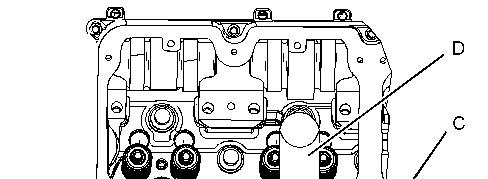
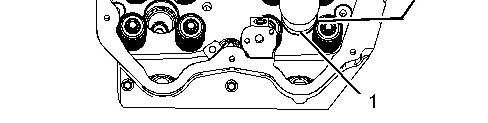
4 g01076119
5. Install Tooling (C) into the threads of electronic unit injector sleeve (1) .
6. Position Tooling (C) and the electronic unit injector sleeve in the cylinder head. Use care not to damage the O-ring seal on the electronic unit injector sleeve.
7. Use Tooling (D) and a hammer to install electronic unit injector sleeve (1) in the cylinder head.
NOTICE
Ensure that the electronic unit injector sleeve is properly seated in the cylinder head. The Tooling will "RING" when the electronic unit injector sleeve is fully seated in the bore of the cylinder head.
8. Remove Tooling (D) and Tooling (C) . Use a clean towel and remove excess Tooling (E) .
9. Install the electronic unit injector. Refer to Disassembly and Assembly , "Electronic Unit Injector - Install".
10. Fill the cooling system with coolant. Refer to Operation and Maintenance Manual, "Capacities (Refill)" for the cooling system capacity. Refer to Operation and Maintenance Manual, "Cooling System Coolant (DEAC) - Change" or Operation and Maintenance Manual, "Cooling System Extended Life Coolant - Change" for the proper filling procedure.
Copyright 1993 - 2023 Caterpillar Inc. All Rights Reserved.
Network For SIS Licensees.
Sat Aug 12 09:23:33 UTC+0530 2023
Product: EXCAVATOR
Model: 345C EXCAVATOR JAR
Configuration: ISJ HEX COMMONALITY CHART JAR00001-UP (MACHINE)
Disassembly and Assembly
C11 and C13 Engines for Caterpillar Built Machines
Media Number -RENR9214-22 Publication Date -01/05/2015
Turbocharger - Remove
SMCS - 1052-011
Removal Procedure
Updated -14/11/2016
NOTICE
Keep all parts clean from contaminants.
Contaminants may cause rapid wear and shortened component life.
NOTICE
Care must be taken to ensure that fluids are contained during performance of inspection, maintenance, testing, adjusting, and repair of the product. Be prepared to collect the fluid with suitable containers before opening any compartment or disassembling any component containing fluids.
Refer to Special Publication, NENG2500, "Dealer Service Tool Catalog" for tools and supplies suitable to collect and contain fluids on Cat products.
Dispose of all fluids according to local regulations and mandates.
1. Drain the coolant system. Refer to Operation and Maintenance Manual, "Refill Capacities and Recommendations".
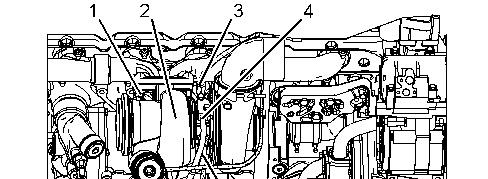
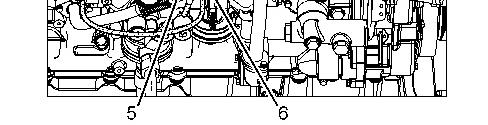
2. Disconnect hose assemblies (3), (4), and (6).
3. Disconnect tube assembly (5).
1. Remove nuts (1).
2. Remove turbocharger (2) and the gasket.
1993 - 2023 Caterpillar Inc. All Rights Reserved. Private Network For SIS Licensees. Sat Aug 12 09:24:25 UTC+0530 2023
Product: EXCAVATOR
Model: 345C EXCAVATOR JAR
Configuration: ISJ HEX COMMONALITY CHART JAR00001-UP (MACHINE)
Disassembly and Assembly
C11 and C13 Engines for Caterpillar Built Machines
Media Number -RENR9214-22 Publication Date -01/05/2015 Date Updated -14/11/2016
Turbocharger - Install
SMCS - 1052-012
Installation Procedure Table 1
Required Tools
Tool Part Number
A 5P-3931 Anti-Seize CompoundNOTICE
Keep all parts clean from contaminants.
Contaminants may cause rapid wear and shortened component life.
Illustration 1 g01131603
1. Apply Tooling (A) to the turbocharger mounting studs on the exhaust manifold.
2. Position the gasket and turbocharger (2) on the engine.
Note: Discard the nuts after use. Use new nuts for installation.
3. Install nuts (1).
4. Connect tube assembly (5).
5. Connect hose assemblies (3), (4), and (6).
6. Fill the coolant system. Refer to Operation and Maintenance Manual, "Refill Capacities and Recommendations". Copyright 1993 - 2023 Caterpillar Inc. All Rights Reserved.
Network For SIS Licensees. Sat Aug 12 09:24:51 UTC+0530 2023