Product:EXCAVATOR
Model:330FLEXCAVATORMBX
Configuration:330FLExcavatorMBX00001-UP(MACHINE)POWEREDBYC7.1Engine
OperationandMaintenanceManual CatGradeControlfor2Dand3DExcavators
MediaNumber-M0077726-01PublicationDate-01/12/2017DateUpdated-19/12/2017
Foreword
LiteratureInformation
Thismanualshouldbestoredintheliteratureholder.
Thismanualcontainssafetyinformation,operationinstructions,andmaintenance recommendations.
Somephotographsorillustrationsinthispublicationshowdetailsorattachmentsthatcanbe differentfromyourproduct.
Continuingimprovementandadvancementofproductdesignmighthavecausedchangestoyour productwhicharenotincludedinthispublication.Read,studyandkeepthismanualwiththe product.
Wheneveraquestionarisesregardingyourproduct,orthispublication,pleaseconsultyourCat dealerforthelatestavailableinformation.
Safety
Thesafetysectionlistsbasicsafetyprecautions.Inaddition,thissectionidentifiesthetextand locationsofwarningsignsandlabelsusedontheproduct.
Operation
Theoperationsectionisareferenceforthenewoperatorandarefresherfortheexperienced operator.Thissectionincludesadiscussionofgauges,switches,productcontrols,attachment controls,andprogramminginformation.
Photographsandillustrationsguidetheoperatorthroughcorrectproceduresofchecking,starting, operatingandstoppingtheproduct.
Operatingtechniquesoutlinedinthispublicationarebasic.Skillandtechniquesdevelopasthe operatorgainsknowledgeoftheproductanditscapabilities.
s00514343
Themaintenancesectionisaguidetoequipmentcare.
Copyright1993-2024CaterpillarInc. AllRightsReserved. PrivateNetworkForSISLicensees.
ThuJul1110:32:04UTC+05302024
Product:EXCAVATOR
Model:330FLEXCAVATORMBX
Configuration:330FLExcavatorMBX00001-UP(MACHINE)POWEREDBYC7.1Engine
OperationandMaintenanceManual CatGradeControlfor2Dand3DExcavators
MediaNumber-M0077726-01PublicationDate-01/12/2017DateUpdated-19/12/2017
SafetyMessages
SMCS-7405
Donotoperateorworkonthismachineunlessyouhavereadand understandtheinstructionsandwarningsintheOperationand MaintenanceManuals.Failuretofollowtheinstructionsorheedthe warningscouldresultininjuryordeath.ContactyourCatdealerfor replacementmanuals.Propercareisyourresponsibility.
Failuretouseanapprovedaccesssystemduringinstallationand removalofcomponentscouldresultinslippingandfallingwhichcould resultinpersonalinjuryordeath.Topreventinjuryordeath,usean approvedaccesssystemtoreachtheappropriatemountinglocationsof thecomponents.Donotclimbonthemachine.Maintainthree-pointsof contactand/oruseasafetyharness.
Unexpectedblademovementmayoccurwhenthebladecontrolsystem isinautomaticmode.Unexpectedblademovementsthatoccurwhile mountingordismountingthemachinemayresultininjuryordeath.
i06858456
This is the sample of the manual if you need complete manual Click Here to download
Beforedismountingthemachine,alwaysplacetheautomaticblade controlsystemintomanualmodeandfollowthemachineparking proceduresspecifiedinthemachineOperationManual.
CrushingPreventionandCuttingPrevention
Supporttheequipmentproperlywhenyouworkbeneaththeequipment.Donotdependonthe hydrauliccylinderstoholduptheequipment.Anattachmentcanfallifacontrolismoved,orifa hydrauliclinebreaks.
Unlessyouareinstructedotherwise,neverattemptadjustmentswhilethemachineismoving. Also,neverattemptadjustmentswhiletheengineisrunning.
Wheneverthereareattachmentcontrollinkages,theclearanceinthelinkageareawillincreaseor theclearanceinthelinkageareawilldecreasewithmovementoftheattachment.Stayclearofall rotatingandmovingparts.
Keepobjectsawayfrommovingfanblades.Thefanbladewillthrowobjectsorcutobjects.Do notuseakinkedwirecableorafrayedwirecable.
Weargloveswhenyouhandlewirecable.Whenyoustrikearetainerpinwithforce,theretainer pincanflyout.Thelooseretainerpincaninjurepersonnel.Makesurethattheareaisclearof peoplewhenyoustrikearetainerpin.
Inordertoavoidinjurytoyoureyes,Wearprotectiveglasseswhenyoustrikearetainerpin.
Chipsorotherdebriscanflyoffobjectswhenyoustriketheobjects.Makesurethatnoonecanbe injuredbyflyingdebrisbeforestrikinganyobject.
Operation
Clearallpersonnelfromthemachineandfromthearea.
Clearallobstaclesfromthepathofthemachine.Bewareofhazards(wires,ditches,andsoon).
Besurethatallwindowsareclean.
Securethedoorsandthewindowsintheopenpositionorintheshutposition.
Adjusttherearmirrors(ifequipped)forthebestvisibilityclosetothemachine.
Makesurethatthehorn,thetravelalarm(ifequipped),andallotherwarningdevicesareworking properly.
Fastentheseatbeltsecurely.
Warmuptheengineandthehydraulicoilbeforeoperatingthemachine.
Onlyoperatethemachinewhileyouareinaseat.Theseatbeltmustbefastenedwhileyouoperate themachine.Onlyoperatethecontrolswhiletheengineisrunning.
Whileyouoperatethemachineslowlyinanopenarea,checkforproperoperationofallcontrols andallprotectivedevices.Beforeyoumovethemachine,makesurethatnoonewillbe endangered.
Donotallowridersonthemachineunlessthemachinehasthefollowingequipment:
•Additionalseat
•Additionalseatbelt
•RolloverProtectiveStructure(ROPS)
Noteanyneededrepairsduringmachineoperation.Reportanyneededrepairs.
Avoidanyconditionsthatcanleadtotippingthemachine.Themachinecantipwhenyouworkon hills,onbanksandonslopes.Also,themachinecantipwhenyoucrossditches,ridges,orother unexpectedobstructions.
Avoidoperatingthemachineacrosstheslope.Whenpossible,operatethemachineuptheslopes anddowntheslopes.
Maintaincontrolofthemachine.
Donotoverloadthemachinebeyondthemachinecapacity.
Besurethatthehitchesandthetowingdevicesareadequate.
Neverstraddleawirecable.Neverallowotherpersonneltostraddleawirecable.
Beforeyoumaneuverthemachine,makesurethatnopersonnelarebetweenthemachineandthe trailingequipment.
AlwayskeeptheRolloverProtectiveStructure(ROPS)installedduringmachineoperation.
Monitorthelocationofcomponentsthataremountedtotheblade.Ensurethatthecomponentsdo notcomeintocontactwithotherpartsofthemachineduringoperation.
Copyright1993-2024CaterpillarInc. AllRightsReserved. PrivateNetworkForSISLicensees. ThuJul1110:32:34UTC+05302024
Product:EXCAVATOR
Model:330FLEXCAVATORMBX
Configuration:330FLExcavatorMBX00001-UP(MACHINE)POWEREDBYC7.1Engine
OperationandMaintenanceManual CatGradeControlfor2Dand3DExcavators
MediaNumber-M0077726-01PublicationDate-01/12/2017DateUpdated-19/12/2017
DisplayDescription
SMCS-7490
MachineDisplay
Introduction
i07231229
TheMachinedisplayismountedontheright-handsideofthecab.TheMachinedisplayprovides usefulmachineinformationtoassisttheoperatorinoperationofthemachine.TheMachineDisplay alsoprovidesauserinterfaceforbothmachineoperationandfor2DGradesystemusage.For3D Gradesystemusage,refertoSection"TD520GradeDisplay".
WorkingwiththeDisplay
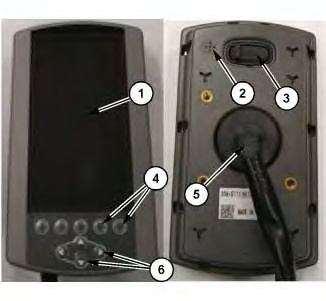
(1)LCDdisplay (2)Beeper (3)USBport (4)Softkeybuttons (5)Mainconnector (6)Arrowbuttons
Table1
ItemFeature Function
1LCDdisplayTheLCDdisplay(1)showstheinformationfromthemachineand2D Gradesystemneededbytheoperator.
2BeeperTheBeeper(2)allowsthedisplaytoprovideaudibleindicationofcertain functionsbythesystemandthedisplay.
3USBportTheUSBport(3)canbeusedtooffloadalimitedamountofdatafromthe displaysuchastheworktoollist.
4Softkey buttons
5Main connector
TheSoftkeybuttons(4)allowtheoperatortoselectthefunctionindicated bytheiconinthespacedirectlyabovethebutton.
TheMainconnectorport(5)connectsthedisplaytothemachineand providespowertothedisplay.
6ArrowbuttonsTheArrowbuttons(6)allowtheoperatortonavigatemenus,scroll settings,andadjustnumericalvalues.
NavigationandSelection
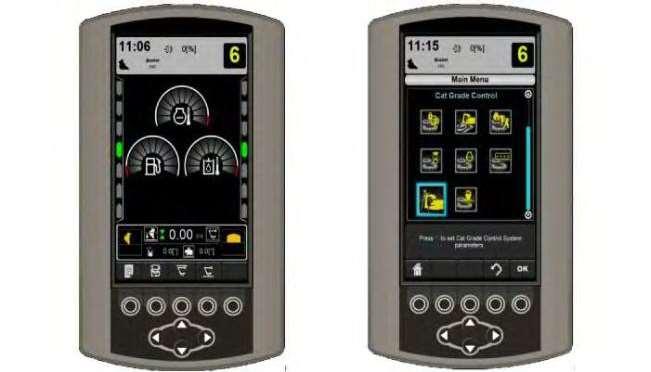
TheMachineMonitorprovidestheuserinterfacefortheoperationandconfigurationofthesystem. TooperateandconfiguretheGradesystem,navigatingtheMachineMonitormenusandscreensas wellasselectingandconfiguringsettingsisessential.
Operationscanbeactivatedorsetusingthesoftkeys(4)shownatthebottomoftheLCDdisplay(1). Thesoftkeybuttonoperationisindicatedbytheicondirectlyabovethebutton.
Tonavigatethesystem,theArrowbuttons(6)maybeusedtoadjustvaluesandsettingsortomove thehighlightedselectionthroughthemenustructure.Oncemenuitemsorvaluesarehighlighted usingtheArrowbuttons(6),thehighlighteditemmaybeconfirmedwiththe"OK"softkeybutton.
GradeInformationontheMachineDisplay
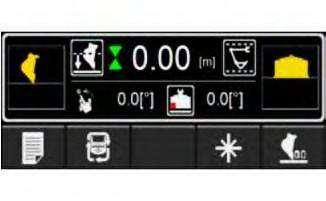
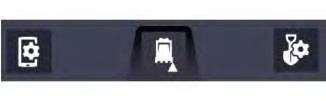
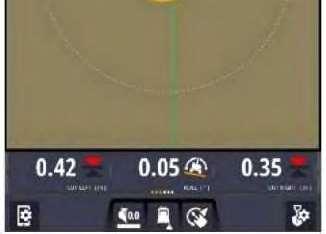
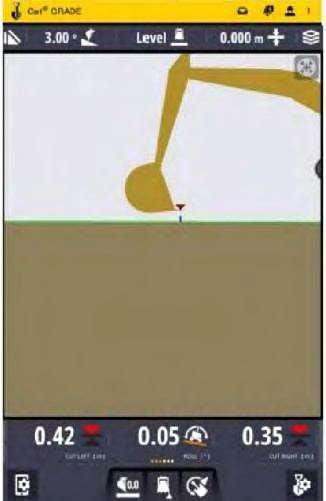
TheGradeinformationontheMachineMonitorisshowninthefooterofthemainscreen. Illustration3g06181332
TheGradeinformationontheMachineMonitorshowscriticalGradeinformationsuchastheDepth toGrade,BucketSlopeAngle,BenchMode,LinkageElevationMonitorSystemlimits,andBucket Focus.TherearemultiplepatternsofsoftkeybuttonsthatcanbechangedbyusingthePattern Changesoftkeyonthismainscreen.RefertoTheOperationforMachineMonitorsectionformore details.
TD520GradeDisplay Introduction
TheGradeDisplayisacomputerthatisusedtointerfacewiththeCat®GradeControlsystem.This sectiondescribestheoperationofthedisplay.
WorkingwiththeDisplay
Illustration4g06151218
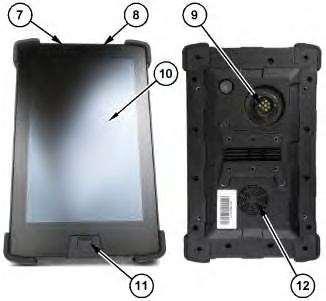
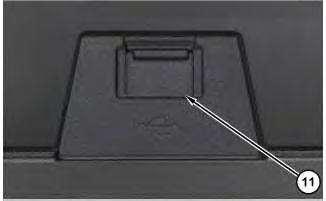
(7)Suspend/resume(power)button (8)Volumerocker (9)Mainconnectorport (10)LCDdisplay (11)USBport (12)Speaker
Table2
ItemFeature Function
7Suspend/Resume (power)button
TheSuspend/Resume(power)button(7)isusedtopowerthe displayupandpoweritdown.
8VolumerockerTheVolumeRocker(8)isusedtoturnthedisplayvolumeup ordown.
9MainconnectorportTheMainConnectorPort(9)connectsthedisplaytothe machinesensorsandprovidespowertothedisplay.
10LCDdisplayTheLCDdisplay(10)showsthemachineviewsanddesign plans.
11USBport
12Speaker
Gestures
TheUSBport(11)isprimarilyusedformovingdatafilesto andfromthedisplay.
TheSpeaker(12)isthedisplayaudiooutputdevice.
Thedisplayrecognizesuniversaltouchgesturestoenableanoperatortointeractwiththesystem.
GesturesUsedtoInteractwiththeDisplay
Tap:-brieflytouchthedisplayscreen withfingertip.
Doubletap:-tapthedisplayscreentwo timesinquicksuccessionwithfingertip.
Touch:-placefingertipondisplayscreen surfaceasifpressingaphysicalbutton.
Doubletouch:-quicklytapdisplayscreen twotimesandbrieflypressonthesecond tap.
Touchandhold:-placefingerondisplay screenanddonotremove.
Drag:-touchatargetonthedisplay screenandmovefingertipacrossthe displayscreenwithoutlosingcontact.
Touch,hold,anddrag:-Touchatarget andholdbrieflyto"grab"thetargetand thendrag.
Swipe:-quicklybrushfingertipondisplay screensurface.
Pinch:-touchtwofingerstodisplay screenadistanceapartandbringthesame twofingersclosertogetherwhilestill touchingthescreen.
Spread:-touchtwofingerstodisplay screenclosetogetherandmovethesame twofingersfurtherapartwhilestill touchingthescreen.
Illustration5g06151230
(11)USBport
USBport(11)allowstheusertoperformthefollowingtasks:
•LoaddesigndatafromtheUSBtothesystem.
•SavedesigndatafromthesystemtotheUSB.
USBPortandDisplayMemory
Filesanddataarestoredonthedisplayinsystemmemory.Toaccessthefiles,thefilesneedtobe transferredfromthedisplayontoaUSBflashdrive.ThefilesanddataontheUSBflashdrivecan thenbedirectlyaccessedfromalaptop,desktopcomputer,orSiteVisionOfficesoftware.
Note:WhenaUSBflashdriveisinsertedintothedisplay,systemoperationistemporarilydisabled. SystemoperationresumeswhentheUSBflashdriveisremoved.
Illustration6g06152068
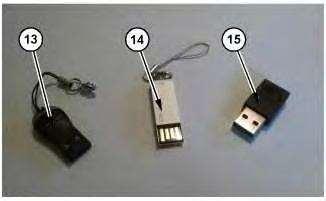
(13)Plasticcoveredconnector
(14)Unprotectedconnector (15)Metalcoveredconnector
Note:OnlyuseaUSBflashdrivewithametalcoveredconnector(15).WhenusingaUSBflash drivewithplasticsurroundingtheconnector(13),thedisplaymayfailtorecognizethedrive.When usingaUSBflashdrivewithnometalsurroundontheconnector(14),thedrivecanbeinserted upsidedownorcontactcanbebrokeninterruptingthefiletransfer.
Note:ThesystemonlysupportsUSBflashdrivesformattedasFAT32
WorkingWithDisplayInformation
Whenworkingwiththedisplay,amixofmenus,dialogs,andscreensareused.Theavailabilityof someuserinterfacefeaturesmaybelimitedbytheabsenceorpresenceofparticularsensorsonthe machine.
WorkingwithTD520GradeDisplayScreens
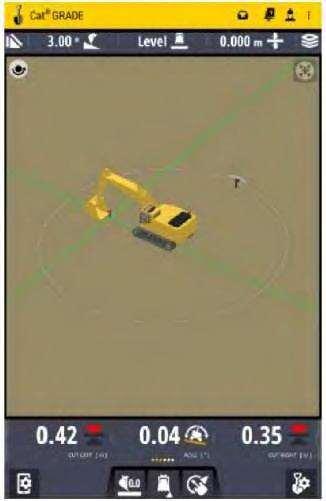
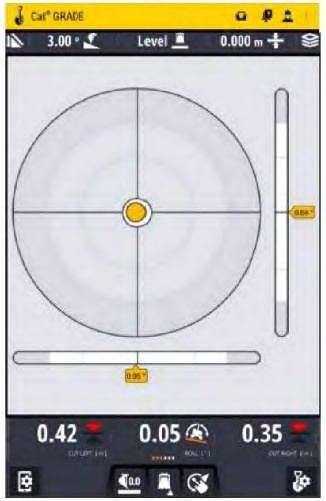
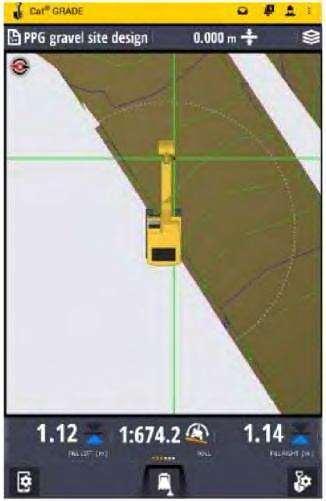
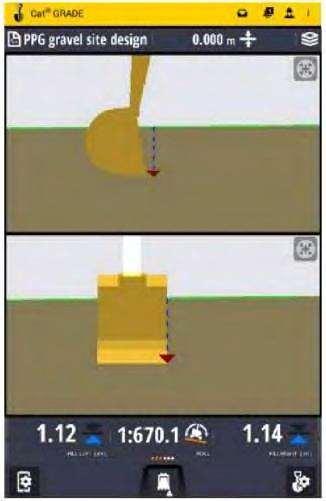
TD520GradeDisplayscreensdisplayamixoftextandgraphicsthatprovideinformationsuchasthe slopeorelevationofthecuttingedgeorthepositionofthemachine.Dependingontheconfiguration ofthesystem,varyingnumbersofTD520GradeDisplayscreenscanbeviewed,suchas:
•Planview
•Terrain
•Cut/Fill
•Cross-sectionview
•Profileview
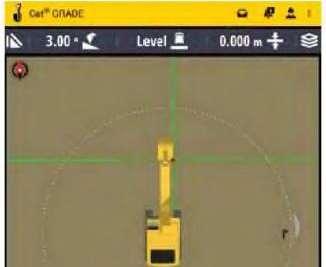
•Level(bubble)view
WorkScreenFeatures
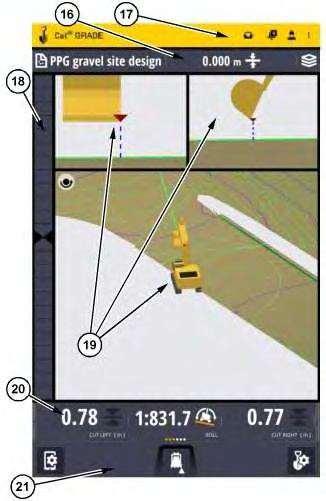
Illustration7g06241744
(16)Guidancebar (17)Actionbar (18)Lightbar (19)Viewstage (20)Textitemribbon (21)Settingbar
Table3
ItemFeature Description
16GuidancebarThecurrentdesign
17ActionbarAlarms/alerts,messages,andhelpaccess
18LightbarNeedlegaugesforvariouspositioningfeedback
19ViewstageAnarrangementofviews
20TextitemribbonNumericalgauges
21SettingbarSettingsMenusforscreenelementsanduserinterfacefeatures
ContextualHelpFloatingIcon
TheContextualHelpFloatingIconisamovablebuttonthatappearsoneveryscreen.TheContextual HelpFloatingIconcanberelocatedbytouchinganddraggingtheicontoanewlocationonthe screen.TappingtheContextualHelpFloatingIconwillactivateadialoguethatdescribesthecurrent screenorprovidesbasicinstructionsforusingthescreenitisactivatedon.
Lightbar
RefertoSection"On-ScreenLightbars".
ActionBar
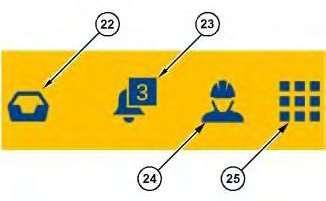
Illustration8g06155234
(22)Systemmessages (23)Messages (24)OperatorMenu (25)Overflowmenu
Theactionbarisalwaysvisible.Theinformationintheactionbarispresentonallscreensexceptthe SplashScreenandtheLoginScreen.
Table4
ItemFeature Description
22SystemmessagesTheinboxformessages,userprompts,andrequeststotheoperator.
23AlarmsandalertsMessagesthathighlightProblems.
24OperatormenuDisplaysabannerwiththeusernameofthecurrentlyloggedinoperator andaLogoutbutton.
25OverflowmenuOpensamenuforHelp,About,zSnap,andotherlinkedapplications.
GuidanceBar
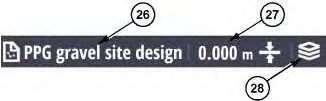
Illustration9g06155236
(26)Filename(whenindesignmode) (27)Elevationoffset (28)Designoverlays
TheGuidancebarcontainsdesignmeasurementdefinitions.
Table5
ItemFeature Description
26Filename(whenindesignmode)Displaysthenameofthedesignfile
27ElevationoffsetMaydisplaybothmainfallslopeandcrossslopeoronlymainfall slope(Illustration9isdisplayingElevationOffsetonly).
28DesignoverlaysOpensthedialogtoturnon/offthevisualizationofthemachine,the focuspoint,points,mapping,linework,etc.
ViewStage
Referto"Views"Section.
TextItemRibbon
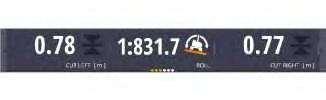
Illustration10g06155237
TheTextItemRibbonprovidesarowoflivefeednumericalgaugeviews.Thenumberofgaugescan exceedthevisiblewidthoftheribbon.Inthosecasestheothergaugeviewscanbeseenbyswiping leftorrightontheribbonwithonefinger(refertoSection"Gestures"forswipinginstruction).
SettingsBar
Illustration18g06241721
Twoviews
Twoviewssplittheviewingstageequallyinhalfhorizontallywhichprovidestwoseparateviews, eachhalfofthetotalverticalviewingstage.
Illustration19g06241725
Threeviews
Threeviewssplittheviewingstagehorizontallyintoanuppersectionthatisonethirdofthetotal verticalviewingstageandalowersectionthatistwothirds.Theuppersection,theonethatisone thirdoftheverticalviewingstageissplitequallyinhalf.Thisprovidestwoviewingpanelsinthetop sectionandoneinthelowersection.
ViewManipulation
ZoomingtheView
Anyviewpanelcanbezoomedinorzoomedouttoenableanoperatortoseemoreofaviewor greaterdetailinaview.
Illustration20g06241727
Whenzoomedinmoredetailcanbeseenonthescreen.Zoomedin,lessofthedesignandlinework arevisible.
•Usethepinchgesturetozoomin.RefertoIllustration20.
Illustration21g06241728
Whenzoomedoutlessdetailisvisibleonthescreen.Zoomout,moreofthedesignandlineworkare visible.
•UseSpreadgesturetozoomout.RefertoIllustration21.
PanningViews
Anyviewpanelimagecanbemovedup,down,left,orright.Thisis"Panning".
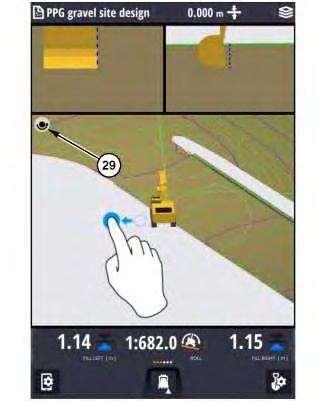
Topanaviewinanydirection,theoperatorusesthedraggestureslidingthefingeroftheoperatorin anydirectiontopulltheviewpanelimageinthatdirection.RefertoIllustration23.RefertoSection "Gestures"formoredetails.
Note:Illustration23isusedtoshowviewmanipulationforthe3DView.However,theprincipleof thatmanipulationisthesameforanyview.
Centeringaview
Anyviewcanbepannedandalmostanyviewcanbezoomed.Ifanoperatorhasintentionallyor accidentallypannedand/orzoomedaviewandneedstoresetthatview,the"Centering"buttoncanbe
used.The"Centering"buttonwillrecentertheviewandsettheviewbacktoitsdefaultzoom (magnification).The"Centering"buttonwillappearintheupperrightcornerofaviewingpanel.The "Centering"buttonwillonlyappeariftheviewinaviewingpanelhasbeenpannedorzoomed.Ifa viewhasnotbeenpannedorzoomed,theCenteringbuttonwillnotbevisible.
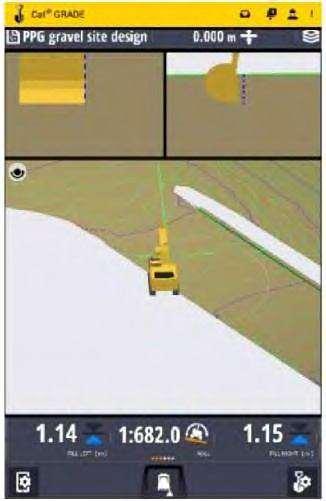
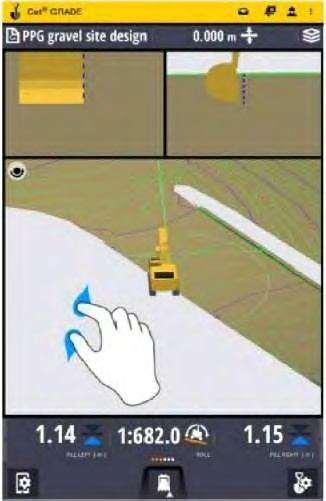
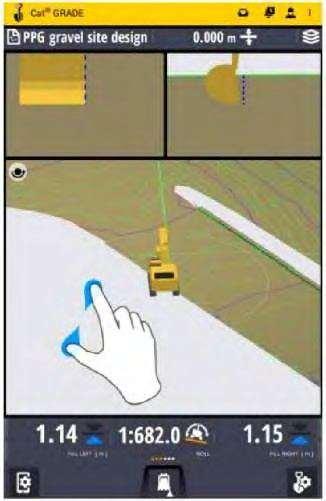
PanningandRotatingthe3DView
Rotateconfiguration
Panconfiguration
The3Dviewcanrotate,pan,andzoom.Bydefaultthe3DViewissettoberotated.Thisisindicated bythe"Rotate/Pantoggle"buttonintheupperleftcornerofthe3dView.Toswitchbetweenrotate andpan,tapthe"Rotate/Pantoggle"button.Itwillswitchfromtherotateconfiguration(Illustration 18)tothepanconfiguration(Illustration19).Tappingthe"Rotate/Pantoggle"buttonagainwill returnittotherotateconfiguration.
Illustration22g06241729 (29)"Rotate/Pantoggle"buttoninthePanconfiguration
Torotatethe3Dimage,usethedraggesture.RefertoSection"Gestures"formoredetails.
This is the sample of the manual if you need complete manual Click Here to download