

Product: MULTI TERRAIN LOADER
Model: 257B MULTI TERRAIN LOADER SLK
Configuration: 247B 257B Multi Terrain Loader SLK00001-07299 (MACHINE) POWERED BY 3024C Engine
Operation and Maintenance Manual
Caterpillar Corporate Radio
Media Number -M0085473-03
Publication Date -01/02/2018
General Hazard Information
SMCS - 7606
Date Updated -14/02/2018
i07214428
Do not operate or workon this equipment unless youhave read and understandthe instructions andwarnings in the Operation and Maintenance Manuals. Failure to followthe instructions or heed the warnings could result in injury or death. Contact your Caterpillar dealer for replacement manuals. Proper care isyour responsibility.
Foreword
This document is a supplement to the Operation and Maintenance Manual for the equipment. Permanently attach this document to the Operation and Maintenance Manual for the equipment.
Introduction
This document provides information about the operation of the Caterpillar AM/FM Radio System.
Operation of the equipment and the maintenance of the equipment must not occur unless the instructions and warnings in the Operation and Maintenance Manual for the equipment have been read and the instructionsand the warningsare understood. The contents of thisdocument must be understood before the equipment that is equipped with the CaterpillarAM/FM Radio System is operated.
Warnings and Compliance
Thank you for purchasing this product, read the manual carefully before operating, and reserve manual for future reference.
Precaution
• Use only in a 12-volt DC negative- ground electrical system.
• Disconnect the vehiclesnegative battery terminal while mounting and connecting the unit.
• When replacing the fuse, be sure to use one with an identical amperage rating.
• Using a fuse with a higher amperage rating may cause serious damage to the unit.
• Make sure that pins or obstacles do not get inside the unit, pins and obstacles may cause malfunctions, or create safety hazards such as electrical shock.
• If you have parked the vehicle for a long time in hot or cold weather, wait until the temperature in the vehicle becomes normal before operating the unit.
Before Operation
Do not raise the volume level too high. Keep the volume at a level at which you can hear outside warning sounds (horns sirens, and so on).
Stop the vehicle before performing any complicated operations.
Caution
Do not open the cover and do not repair. Ask your authorized dealer for help.
Note: According to models with different wiring harness to connect the definition of the specific content, refer to the model label.
Note: Specificationsand the design are subject to change without notice due to improvements in technology.
Operation and Maintenance Manuals(OMM) are currently available at: www.cat.com/radio-ownersmanual
For mobile equipment or equipment that is located in areaswhere direct internet accessis not available while the product isin use, a paper copy of the OMM must be printed and kept with the product.
For more information or for a paper copy of the OMMcontact your nearest Cat Dealer: www.cat.com/en_US/support/dealer-locator.html
Copyright 1993 - 2020 Caterpillar Inc.
All Rights Reserved.
Private Network For SIS Licensees. Tue Feb 18 12:41:28 UTC+0530 2020
This is the sample of the manual click on the download link for complete manual
DOWNLOAD LINK
For some reason if link does not work download this pdf and then click
Product: MULTI TERRAIN LOADER
Model: 257B MULTI TERRAIN LOADER SLK
Configuration: 247B 257B Multi Terrain Loader SLK00001-07299 (MACHINE) POWERED BY 3024C Engine
Operation and Maintenance Manual
Caterpillar Corporate Radio
Media Number -M0085473-03
Foreword
SMCS - 7000
Literature Information
Publication Date -01/02/2018
Date Updated -14/02/2018
s02590205
This manual should be read carefully before using this product for the first time and before performing maintenance. Thismanual should be stored in the product literature holder or in the product literature storage area. Immediately replace this manual if lost, damaged, or unreadable. This manual may contain safety information, operation instructions, transportation information, lubrication information, and maintenance information. Some photographsor illustrations in this publication show details or attachments that can be different from your product. Guards and coversmight have been removed for illustrative purposes. Continuing improvement and advancement of product design might have caused changes to your product, which are not included in thispublication. Whenever a question arises regarding your product, or thispublication, consult your dealer for the latest available information.
Safety
The safety section, if present, lists basic safety precautions. In addition, this section identifies the text and locations of safety messages used on the product. Read and understand the basic precautionslisted in the safety section before operating or performing lubrication, maintenance, and repair on thisproduct.
Operation
The operation section, if present, isa reference for the new operator and a refresher for the experienced operator. This section includes a discussion of gauges, switches, controls, attachment controls, transportation, and towing information (if applicable). Photographs and illustrations guide the operator through correct procedures of checking, starting, operating, and stopping the product. Operating techniques outlined in this publication are basic. Skill and techniques develop asthe operator gains knowledge of the product and its capabilities.
Product Information
The product information section, if present, may provide specification data, product intended use, product identification plate locations, and certification information.
Maintenance
The maintenance section, if present, is a guide to equipment care. Proper maintenance and repair are essential to keep the equipment and systems operating correctly. As the owner, you are responsible for the performance of the required maintenance listed in the Owner Manual, Operation and Maintenance Manual, and Service Manual. The Maintenance Interval Schedule liststhe items to be maintained at a specific service interval. Items without specific intervalsare listed under the "When Required" service interval. The Maintenance Interval Schedule lists the page number for the step-by-step instructions required to accomplish the scheduled maintenance. Use the Maintenance Interval Schedule asan index or "one safe source" for all maintenance procedures.
Maintenance Intervals
Use the service hour meter to determine servicing intervals. Calendar intervalsshown (daily, weekly, monthly, etc.) can be used instead of service hour meter intervals if they provide more convenient servicing schedules and approximate the indicated service hour meter reading. Recommended service should always be performed at the interval that occursfirst. Under extremely severe, dusty, or wet operating conditions, more frequent lubrication than is specified in the maintenance intervalschart might be necessary. Perform service on items at multiples of the original requirement. For example, at every 500 service hours or 3 months, also service those items listed under every 250 service hours or monthly and every 10 service hours or daily.
Product Capacity
Additional attachments or modifications may exceed product design capacity, which can adversely affect product performance characteristics, safety, reliability, and applicable certifications. Contact your dealer for further information.
Product: MULTI TERRAIN LOADER
Model: 257B MULTI TERRAIN LOADER SLK
Configuration: 247B 257B Multi Terrain Loader SLK00001-07299 (MACHINE) POWERED BY 3024C Engine
Operation and Maintenance Manual
Caterpillar Corporate Radio
Media Number -M0085473-03
Publication Date -01/02/2018
Declaration of Conformity
SMCS - 7606 Table 1 CATERPILLAR®
EU Declaration of Conformity
Date Updated -14/02/2018
This Declaration of Conformity is issued under the sole responsibility of the manufacturer.
The undersigned, representing the manufacturer:
Caterpillar, Inc.
100 N.E. Adams Peoria, IL 61629
USA hereby declares that the product, object of this description:
Caterpillar DEA500 model entertainment radios
Brand: Caterpillar Model: DEA500
Part Numbers: 462-9618, 462-9619, 462-9620, 462-9621, 439-1562, 439-1563, 439-1564
Is in conformity withthe relevant Union harmonization legislation: Directive 2014/53/EU
Conformity is shownby compliance with the applicable requirements of the following documents:
Conformity Assessment Procedure: ____Annex II, ___ X ___Annex III, _______Annex IV
2014/53/EU
LVD(Sec 3.1a):
EMC (Sec 3.1b):
RF (Sec 3.2)
Table 2
EN 60950-1:2006 + A11:2009 + A12:2011 + AC:2011 + A2:2013
EN 62479:2010
EN 301 489-1 V2.2.0
EN 301 489-17 V3.2.0
EN 55020:2007+ A11:2011
EN 55032:2015
EN61000–3–2:2006 + A1:2009 + A2:2009
EN 61000–3–3:2008
EN 300 328 V2.1.1
Final Draft EN 303 345 V1.1.7
Notified Body Name: Dekra Testing and Certification, S.A.U.
Notified Body Number: 1909
Examination Certificate #: 53627RNB.001 Illustration 1

Copyright 1993 - 2020 Caterpillar Inc. All Rights Reserved. Private Network For SIS Licensees.
Product: MULTI TERRAIN LOADER
Model: 257B MULTI TERRAIN LOADER SLK
Configuration: 247B 257B Multi Terrain Loader SLK00001-07299 (MACHINE) POWERED BY 3024C Engine
Operation and Maintenance Manual
Caterpillar Corporate Radio
Media Number -M0085473-03
Regulatory Compliance
SMCS - 7606
FCC Notice
The following notices are provided.
Modification Statement
Publication Date -01/02/2018
Date Updated -14/02/2018
Caterpillar has not approved any changes or modifications to thisdevice by the user. Any changes or modificationscould void the users authority to operate the equipment.
Interference
This device complieswith Part 15 of the FCC Rules and Industry Canada license - exempt RSS standards. Operation is subject to the following two conditions: (1) this device may not cause interference, and (2) thisdevice must accept any interference, including interference that may cause undesired operation of the device.
Radiation Exposure
This device complieswith FCC/IC radiation exposure limits set forth for an uncontrolled environment and meets the FCC radio frequency (RF) Exposure Guidelines. RFExposure guidelines can be found in Supplement C to OET65. The device also complies with RSS-102 of the IC radio frequency (RF) Exposure rules. Do not locate the transmitter near an antenna or operating with any other antenna or transmitter.
FCC Class B digital device notice
This equipment hasbeen tested and found to comply with the limits for a ClassB digital device, pursuant to part 15 of the FCC Rules. These limits are designed to provide reasonable protection against harmful interference in a residential installation. This equipment generates, uses, and can radiate radio frequency
energy. if the equipment is not installed and used in accordance with the instructions, may cause harmful interference to radio communications. However, there is no guarantee that interference will not occur in a particular installation. If this equipment does cause harmful interference to radio or television reception, which can be determined by turning the equipment off and on. The user is encouraged to try to correct the interference by one or more of the following measures:
• Reorient or relocate the receiving antenna. Increase the separation between the equipment and receiver.
• Connect the equipment into an outlet on a circuit different from that to which the receiver is connected.
• Consult the dealer or an experienced radio/TV technician for help.
Changes or modifications to thisdevice without the express approval may void the usersauthority to use this device.
CAN ICES-3 (B) / NMB (B)
This Class B digital apparatuscomplies with Canadian ICES-003.
Simplified EU Declaration of Conformity/RED 2014/53/ EU Directive
This device has been evaluated against the essential requirements of the 2014/53/EU Directive.
Radio Frequency Range
The following Driver Safety System communication device specifications are provided to aid in conducting any related hazard assessment and to ensure compliance with all local regulations:
Table 1 Bluetooth
Frequency Range: 2402–2480 MHz carrier frequencies
Maximum RF output power: +4dBm
Modulations:
Channel Spacing: 1 MHz
Number of channels: 79
Channel bandwidth: 1 MHz for GFSK,
Type of Antenna: Brand Amotech part number: AL.A321C3 chip antenna/Gain 2.3dbi
Antenna gain: +2.3dBi Max
Note: The DEA 500 radio can operate in Belgium without infringing on applicable requirements on the use of Belgiumsradio spectrum.
Table 2 AM
Frequency Range: 531 kHz to 1602 kHz
Maximum RF output power: +/- 6dBi typical
Modulations: Amplitude modulation
Channel Spacing: 9kHz
Type of Antenna: 0.75m typical monopole
Antenna gain: 0dBuV to 130dBuV
Table 3 FM
Frequency Range: 87 MHz to 108 MHz
Maximum RF output power: +/- 6dBi typical
Modulations: Frequency modulation
Channel Spacing: 100 kHz
Type of Antenna: 0.75m typical monopole
Antenna gain: 0dBuV to 130dBuV
Table 4
English Hereby, Caterpillar declaresthat this DEA500 isin compliance with the essential requirements and other relevant provisions of Directive 2014/53/EC.
To satisfy the essential requirements of 2014/53/EC Directive, the product is compliant with the following standards:
Caterpillar declares on our sole responsibility that the following product is in compliance with Directive 2014/53/EU and the essential requirements of Car Radio.
Type Designation:
• DEA500
• HW Rev ASW Rev B Services
• Frequency range and max output power: Bluetooth 2402 - 2480 Mhz 4dBm (2.5 mW) EIRP
• AM 531–1602 kHz
• FM 87.5–108.0 MHz
The conformity assessment per Directive 2014/53/EC has been followed with the involvement of the following Notified Body: DEKRA Testing and Certification no: 1909, S.A.U. Parque Technologico de
Andalucla C/Servero Ochoa 2 29590 Campanillas - Malaga SPAINperformed an EU type examination and issued the certificate: 53627NRB.001.
Table 5
3.1 (a): Health and Safety of the User EN 60950-1:2006 + A11:2009 + A12:2011 + AC:2011 + A2:2013
3.1 (b): Electromagnetic Compatibility EN 301 489-1 V2.2.0, EN 301 489-17 V3.2.0, EN55020:2007+ A11:2011
3.2: Effective use of spectrum allocated EN 300 328 V2.1.1, EN 303 345 V1.1.1
There isno restriction for the commercialization of this device in all the countries of the European Union.
Copyright 1993 - 2020 Caterpillar Inc. All Rights Reserved. Private Network For SIS Licensees. Tue Feb 18 12:42:11 UTC+0530 2020
Product: MULTI TERRAIN LOADER
Model: 257B MULTI TERRAIN LOADER SLK
Configuration: 247B 257B Multi Terrain Loader SLK00001-07299 (MACHINE) POWERED BY 3024C Engine
Operation and Maintenance Manual
Caterpillar Corporate Radio
Media Number -M0085473-03
Publication Date -01/02/2018
Radio - Entertainment If Equipped
SMCS - 7338
Date Updated -14/02/2018
i07316460
Whendriving, alwayskeep your eyeson the road and hands on the steering wheel, paying careful attention to normal driving tasks. As always, the driver is responsible for safe vehicle operation. Not keeping your eyes on the road and hands onthe wheel while driving could result in injury to you or others.
Introduction
Information included in this ownersmanual wasaccurate at the time of publication. Caterpillar, however, reserves the right to and performance without prior notice. Check with your dealer for details regarding changes that may have occurred since time of printing.
The Radio system is controlled by using the buttons, RSA, or steering wheel controls.
Stereo Receivers
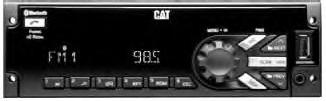
Illustration 1 g03566500
MP3/USB/iPod/Aux/Bluetooth Receiver
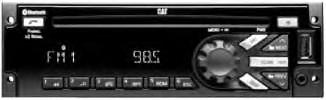
Illustration 2 g03566527
MP3/USB/iPod/Aux/Bluetooth/CDReceiver
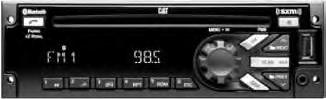
Illustration 3 g03566571
MP3/USB/iPod/Aux/Bluetooth/CD/SAT Receiver
Radio Pin out
Radio pinout is shown below
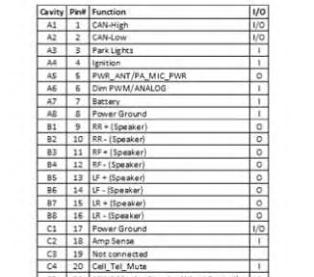
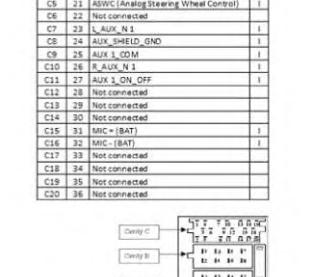
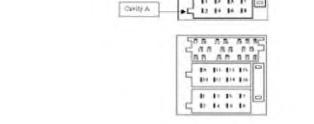
4
General Radio Receiver Functions
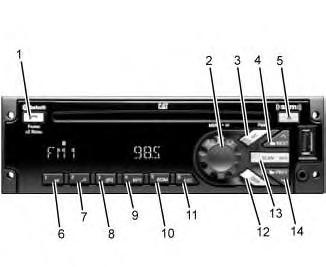
Illustration 5 g03566592
(1) Phone (2) Knob
(3) SRC/PWR (Source/Power)
(4) Next (5) Eject (6) Play/Pause (7) Browse (8) Clock/Alarm (9) RPT (Repeat) (10) RDM (Random) (11) ESC (Escape) (12) DISP (Display) (13) SCAN/ASCN (Scan/Autoscan) (14) PREV (Previous)
Options
• An AM band with 6 AMpresets
• Three FM bands with a total of 18 FM presets
• One weather band with six WX presets
SRC/PWR (Source/Power)
Press to switch to FM -> AM-> WX -> SXM -> CD-> USB/iPod ->AUX-> Bluetooth Audio (if equipped) and to turn Radio ON. Press and hold to turn radio OFF.
One Hour Timer
With the ignition off, pressing the SRC/PWR button will turn on the receiver and activate the receivers one-hour timer. The receiver will turn off after 1 hour or by pressing and hold the SRC/PWR button.
VOLUME KNOB/OK
Press for less than 3 secondsto display Audio Control Menu. Pressfor more than 3 seconds to showthe user menu. Rotate to increase/decrease volume or during a menu for navigation. Press while in a menu to confirm the selected action.
PREV (Previous/Reverse)
Press to select previous track or station. Press and hold for FR or Tune Down
NEXT (Next/Forward)
Press to select next track or station. Pressand hold for FF or Tune Up
EJECT
Press to eject the CD
Phone (if equipped)
Press the Phone button for more than 3 secondsto show the Bluetooth Menu. When Bluetooth is enabled, press the button to display the Dial Menu or to accept an Incoming Call (if a Phone is paired). During a call pressthe button for more than 3 seconds to transfer the call from the radio to the Phone.
CLOCK/ALARM
Press during Alarm activation to cancel the Alarm.
SCAN/ASCAN
Scansstations/CD tracks/MP3/WMAfiles and folder and in tuner, storesstations to presets
PLAY/PAUSE
Press to pause / un pause current Media.
RPT (Repeat)
Press to repeat current track. Press again to stop repeat. Look for the RPT icon in the radio display to turn this feature ONor OFF.
BROWSE
Press to navigate on the device and select a specific song or play context (Applicable to USB sticks, CD MP3 discs and iPod).
RDM (Random)
Press to play the tracks randomly. Pressagain to stop random mode. Look for the RDMicon to turn on in the radio display.
ESC (ESCAPE)
Press to exit one Menu Level.
If the system is equipped with Bluetooth, press the ESC button during Bluetooth call operation to reject or cancel a call.
DISP (DISPLAY)
If vehicle ignition is ON: Pressto change source display
Press for more than 3 seconds to show the Clock for a short time.
Radio (Audio source)
To accessAM, FM, WX, SXM (if equipped), iPod, USB, Rear Aux, Front Aux, CD, or BT Audio do one of the following:
1. Press the SRC radio button to scroll through the options and select desired option.
2. Press the SRC radio button and then scroll the source menu by knob rotation or NEXT/PREV short presses and then select by short-pressing the knob.
The CD/MP3, USB/iPod, Front AUX, and BT Audio shall be accessed only if the radio model supports those options and a device is connected/inserted for that specific source.
Note, if a device is connected through different sources at the same time, the functionality cannot be guaranteed (Device Dependent). Example: Device connected through Front Aux and Bluetooth or USB and Bluetooth at the same time.
AM-FM-WX Radio
Tuning: Set the desired "Tuner Configuration" following the steps in the Menu section.
If the radio is set to manual, the radio will allowfor execution of the following functions:
• Execute manual tuning when the NEXT or PREVbuttons are short pressed.
• Execute Seek when the NEXT or PREV buttons are long pressed.
If the radio is set to Auto, the radio will allow for execution of the following functions:
• Execute Seek when the NEXT or PREV buttons are short pressed.
• Execute manual tuning when the NEXT or PREVbuttons are long pressed.
Manual tuning
The current frequency will be increased/ decreased by 1 step of 0.2MHz (USA FMmode), 10 kHz (USA AM mode) and one channel (25 kHz) in WX mode.