140K MOTOR GRADER
Tip; Use Bookmarks panel to navigate
Product: MOTOR GRADER
Model: 140K MOTOR GRADER SZL
Configuration: 140K Motor Grader SZL00001-UP (MACHINE) POWERED BY C7 Engine
Operation and Maintenance Manual
12K, 140K and 160K Motor Graders
Media Number -SEBU8249-17
Foreword
California Proposition 65 Warning
Diesel engine exhaust and some of its constituents are known to the State of California to cause cancer, birth defects, and other reproductive harm.
WARNING - This product can expose you to chemicals including ethylene glycol, which is known to the State of California to cause birth defects or other reproductive harm. For more information go to:
www.P65Warnings.ca.gov
Do not ingest this chemical. Wash hands after handling to avoid incidental ingestion.
WARNING - This product can expose you to chemicals including lead and lead compounds, which are known to the State of California to cause cancer, birth defects, or other reproductive harm. For more information go to:
www.P65Warnings.ca.gov
Wash hands after handling components that may contain lead.
Literature Information
s03548206
This manual should be stored in the operator's compartment in the literature holder or seat back literature storage area.
This manual contains safety information, operation instructions, transportation information, lubrication information, and maintenance information.
Some photographs or illustrations in this publication show details or attachments that can be different from your machine. Guards and covers might have been removed for illustrative purposes.
Continuing improvement and advancement of product design might have caused changes to your machine which are not included in this publication. Read, study, and keep this manual with the machine.
Whenever a question arises regarding your machine, or this publication, please consult your Cat dealer for the latest available information.
Safety
The safety section lists basic safety precautions. In addition, this section identifies the text and locations of warning signs and labels used on the machine.
Read and understand the basic precautions listed in the safety section before operating or performing lubrication, maintenance, and repair on this machine.
Operation
The operation section is a reference for the new operator and a refresher for the experienced operator. This section includes a discussion of gauges, switches, machine controls, attachment controls, transportation, and towing information.
Photographs and illustrations guide the operator through correct procedures of checking, starting, operating, and stopping the machine.
Operating techniques outlined in this publication are basic. Skill and techniques develop as the operator gains knowledge of the machine and its capabilities.
Maintenance
The maintenance section is a guide to equipment care. The Maintenance Interval Schedule (MIS) lists the items to be maintained at a specific service interval. Items without specific intervals are listed under the "When Required" service interval. The Maintenance Interval Schedule lists the page number for the step-by-step instructions required to accomplish the scheduled maintenance. Use the Maintenance Interval Schedule as an index or "one safe source" for all maintenance procedures.
Maintenance Intervals
Use the service hour meter to determine servicing intervals. Calendar intervals shown (daily, weekly, monthly, etc.) can be used instead of service hour meter intervals if the calendar intervals
provide more convenient servicing schedules and approximate the indicated service hour meter reading. Perform the recommended service at the interval that occurs first.
Under severe, dusty, or wet operating conditions, more frequent lubrication than is specified in the maintenance intervals chart might be necessary.
Perform service on items at multiples of the original requirement. For example, at every 500 service hours or 3 months, also service those items listed under every 250 service hours or monthly and every 10 service hours or daily.
Certified Engine Maintenance
Proper maintenance and repair are essential to keep the engine and machine systems operating correctly. As the heavy-duty off-road diesel engine owner, you are responsible for the performance of the required maintenance listed in the Owner Manual, Operation and Maintenance Manual, and Service Manual.
It is prohibited for any person engaged in the business of repairing, servicing, selling, leasing, or trading engines or machines to remove, alter, or to render inoperative, any emission-related device or element of design installed on or in an engine or machine that is in compliance with all applicable regulations of the intended country to which it has been shipped. Certain elements of the machine and engine such as the exhaust system, fuel system, electrical system, intake air system, and cooling system may be emission-related and should not be altered unless approved by Caterpillar.
Machine Capacity
Additional attachments or modifications may exceed machine design capacity which can adversely affect performance characteristics. Included would be stability and system certifications such as brakes, steering, and rollover protective structures (ROPS). Contact your Cat dealer for further information.
Product Identification Number
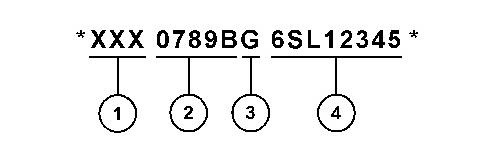
Effective First Quarter 2001 the Product Identification Number (PIN) has changed from 8 to 17 characters. To provide uniform equipment identification, construction equipment manufacturers are moving to comply with the latest version of the product identification numbering standard. Non-road machine PINs are defined by ISO 10261. The new PIN format will apply to all machines and generator sets. The PIN plates and frame marking will display the 17 character PIN. The new format will look like the following:
DOWNLOAD LINK
For some reason if link does not work download this pdf and then click
Illustration 1 g03891925
Where:
1. World Manufacturing Code (characters 1-3)
2. Machine Descriptor (characters 4-8)
3. Check Character (character 9)
4. Machine Indicator Section (MIS) or Product Sequence Number (characters 10-17). These were previously referred to as the Serial Number.
Machines and generator sets produced before First Quarter 2001 will maintain their 8 character PIN format.
Components such as engines, transmissions, axles, and work tools will continue to use an 8 character Serial Number (S/N).
Copyright 1993 - 2024 Caterpillar Inc. All Rights Reserved.
Private Network For SIS Licensees. Tue Oct 22 09:07:26 UTC+0530 2024
Product: MOTOR GRADER
Model: 140K MOTOR GRADER SZL
Configuration: 140K Motor Grader SZL00001-UP (MACHINE) POWERED BY C7 Engine
Operation and Maintenance Manual
12K, 140K and 160K Motor Graders
Media Number -SEBU8249-17 Publication Date -01/07/2015 Date Updated -09/12/2019
Access Doors and Covers
SMCS - 7251; 7263; 7273
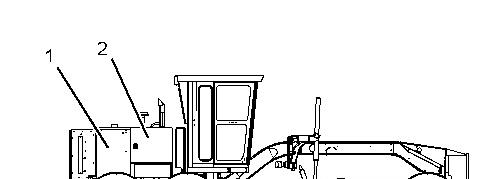
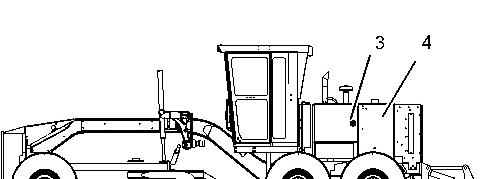
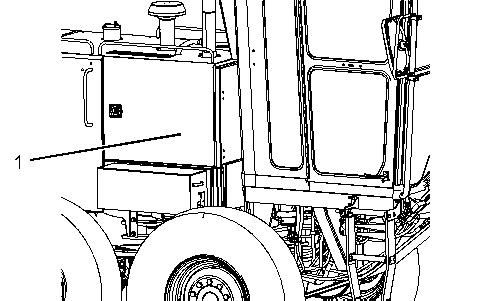
Illustration 1 g01393732 Right Side View
Opening access door (1) will allow access to the following items:
• The circuit breakers
• The air conditioner condenser (If Equipped)
• The fan belt
• The fan belt drive
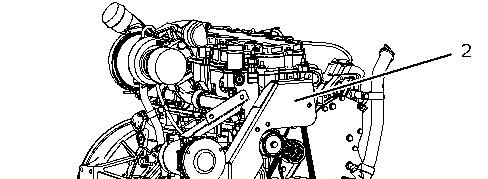
Opening access door (2) will allow access to the following items :
i02789949
• The air dryer (If Equipped)
• The coolant sampling valve
• The engine drive belt
• The engine oil filter
• The ether cylinder (If Equipped)
• The sampling port for the engine oil
Illustration 2
Opening access door (3) will allow access to the following items:
• The battery disconnect switch
• The engine air filters
• The engine air filter service indicator
• The engine crankcase breather
• The engine oil filler
• The fuel priming pump
• The primary fuel filter and water separator
• The refrigerant compressor
• The secondary fuel filter
g01393733
Left Side View
• The transmission dipstick
• The transmission oil filler tube
Opening access door (4) will allow access to the following items:
• The radiator
Copyright 1993 - 2024 Caterpillar Inc. All Rights Reserved. Private Network For SIS Licensees.
Tue Oct 22 09:27:34 UTC+0530 2024
Product: MOTOR GRADER
Model: 140K MOTOR GRADER SZL
Configuration: 140K Motor Grader SZL00001-UP (MACHINE) POWERED BY C7 Engine
Operation and Maintenance Manual
12K, 140K and 160K Motor Graders
Media Number -SEBU8249-17
Date -01/07/2015
Air Dryer Desiccant - Replace
SMCS - 4285-510
Updated -09/12/2019
The air lines to and from the air dryer must be at atmospheric pressure. If the air lines are not at atmospheric pressure, personal injury could result. Release the air pressure from the air system completely before performing maintenance.
Refer to the Operation and Maintenance Manual, "Access Doors and Covers" for the location of the service points.
i07244085
Illustration 1 g01463969
Type 1
Illustration 2 g06263712
Type 2
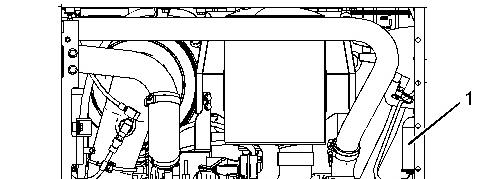
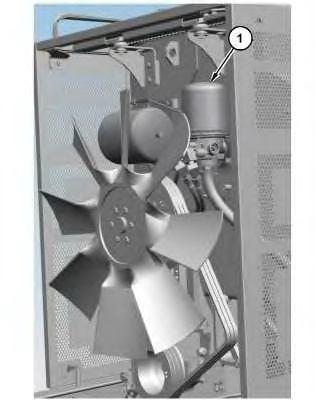
Air dryer (1) is positioned on the right side at the front of the machine.
1. Open the access door to service the air dryer.
2. Replace the air dryer desiccant cartridge when the water cannot be absorbed. Consult your Caterpillar dealer for service or for replacement parts.
3. Close the access door.
Copyright 1993 - 2024 Caterpillar Inc. All Rights Reserved. Private Network For SIS Licensees. Tue Oct 22 09:29:57 UTC+0530 2024
Product: MOTOR GRADER
Model: 140K MOTOR GRADER SZL
Configuration: 140K Motor Grader SZL00001-UP (MACHINE) POWERED BY C7 Engine
Operation and Maintenance Manual
12K, 140K and 160K Motor Graders
Media Number -SEBU8249-17
Date -01/07/2015
Air Tank Moisture and Sediment - Drain
SMCS - 4272-543-M&S; 5505-543
Updated -09/12/2019
Refer to the Operation and Maintenance Manual, "Access Doors and Covers" for the location of the access doors.
1. Open the access door in order to service the drain valve for moisture and sediment.
Illustration 1
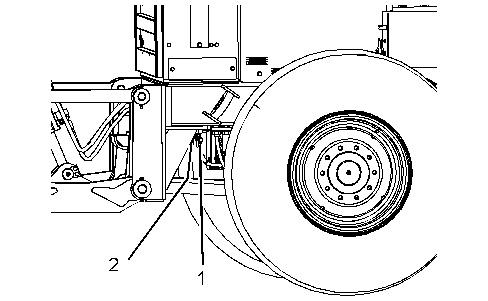
2. The air tanks are located at the rear of the machine under the frame. Pull down the lever to open drain valve (1) in order to drain one air tank. Pull down the lever to open drain valve (2) in order to drain the other air tank. Close the drain valve.
3. Close the access door.
i02958107
Note: Small amounts of moisture may be in the system due to condensation in the system. Moisture may also be in the system if an air dryer is installed on a machine that has been operating without an air dryer. Several weeks may be required in order to completely dry the system. Copyright 1993 - 2024 Caterpillar Inc. All Rights Reserved.
Tue Oct 22 09:30:12 UTC+0530 2024
Product: MOTOR GRADER
Model: 140K MOTOR GRADER SZL
Configuration: 140K Motor Grader SZL00001-UP (MACHINE) POWERED BY C7 Engine
Operation and Maintenance Manual
12K, 140K and 160K Motor Graders
Media Number -SEBU8249-17
Articulation Bearings - Lubricate
SMCS - 7057-086-BD
-09/12/2019
Wipe all the fittings before you apply lubricant through the fittings. The fittings for the articulation bearings are located under the cab on the left side of the machine.
Illustration 1 g00811301
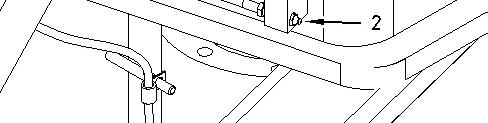
The upper articulation bearing has one fitting (1). In order to lubricate the upper articulation bearing, use 183-3424 Grease Cartridge to apply lubricant through fitting (1).
The lower articulation bearing has one fitting (2). In order to lubricate the lower articulation bearing, use 183-3424 Grease Cartridge to apply lubricant through fitting (2).
Copyright 1993 - 2024 Caterpillar Inc. All Rights Reserved. Tue Oct 22 09:30:26 UTC+0530 2024
i01671010
Product: MOTOR GRADER
Model: 140K MOTOR GRADER SZL
Configuration: 140K Motor Grader SZL00001-UP (MACHINE) POWERED BY C7 Engine
Operation and Maintenance Manual
12K, 140K and 160K Motor Graders
Media Number -SEBU8249-17
Date -01/07/2015 Date Updated -09/12/2019
Axle Oscillation Bearings - Lubricate
SMCS - 3268; 4313
i01671028
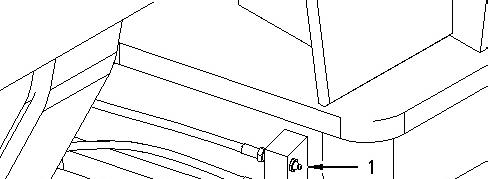
The lubrication fitting is located in the middle of the front axle. Wipe the fitting before you apply lubricant to the fitting.
Illustration 1
g00811688
In order to lubricate the axle oscillation bearings, use 183-3424 Grease Cartridge to apply lubricant to the one fitting.
Copyright 1993 - 2024 Caterpillar Inc.
All Rights Reserved.
Private Network For SIS Licensees.
Tue Oct 22 09:30:38 UTC+0530 2024
Product: MOTOR GRADER
Model: 140K MOTOR GRADER SZL
Configuration: 140K Motor Grader SZL00001-UP (MACHINE) POWERED BY C7 Engine
Operation and Maintenance Manual
12K, 140K and 160K Motor Graders
Media Number -SEBU8249-17 Publication Date -01/07/2015 Date Updated -09/12/2019
Backup Alarm - Test
SMCS - 7406-081
Turn the engine start switch to the ON position in order to perform the test.
Apply the service brake. Move the transmission control (lever) to the REVERSE position.
The backup alarm should sound immediately. The backup alarm should continue to sound until the transmission control (lever) is moved to the NEUTRAL position or to any FORWARD position.
The backup alarm is located at the rear of the machine.
Copyright 1993 - 2024 Caterpillar Inc. All Rights Reserved. Private Network For SIS Licensees.
Tue Oct 22 09:30:52 UTC+0530 2024
i02307698
Product: MOTOR GRADER
Model: 140K MOTOR GRADER SZL
Configuration: 140K Motor Grader SZL00001-UP (MACHINE) POWERED BY C7 Engine
Operation and Maintenance Manual
12K, 140K and 160K Motor Graders
Media Number -SEBU8249-17
Battery or Battery Cable - Inspect/Replace
SMCS - 1401-510; 1402-510
1. Turn the engine start switch key to the OFF position. Turn all the switches to the OFF position.
2. Turn the key for the battery disconnect switch to the OFF position. Remove the key.
3. Disconnect the negative battery cable at the battery disconnect switch. The battery disconnect switch is connected to the machine frame.
Note: Do not allow the disconnected battery cable to contact the battery disconnect switch or the machine.
4. Disconnect the negative battery cable from the battery.
5. Disconnect the positive battery cable from the battery.
6. Inspect the battery terminals for corrosion. Inspect the battery cables for wear or damage.
7. If necessary, make repairs. If necessary, replace the battery cable or the battery.
8. Connect the positive battery cable at the battery.
9. Connect the negative battery cable at the battery.
10. Connect the battery cable at the battery disconnect switch.
11. Install the key for the battery disconnect switch. Turn the battery disconnect switch to the ON position.
Copyright 1993 - 2024 Caterpillar Inc. All Rights Reserved. Private Network For SIS Licensees. Tue Oct 22 09:31:06 UTC+0530 2024
i01770781
Product: MOTOR GRADER
Model: 140K MOTOR GRADER SZL
Configuration: 140K Motor Grader SZL00001-UP (MACHINE) POWERED BY C7 Engine
Operation and Maintenance Manual
12K, 140K and 160K Motor Graders
Media Number -SEBU8249-17
Belts - Inspect/Adjust/Replace
SMCS - 1357-025; 1357-040; 1357-510
Air Conditioner Belts
Updated -09/12/2019
Refer to Operation and Maintenance Manual, "Access Doors and Covers" for the location of the service points.
Illustration 1 g01705935
i07498877
Illustration 2 g01951149
3 g01464169
Inspect
1. Stop the engine.
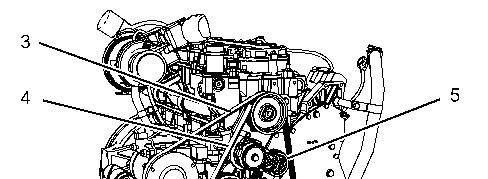
2. Open access cover (1). Remove bolts from belt access cover (2). Remove the belt access cover.
Illustration
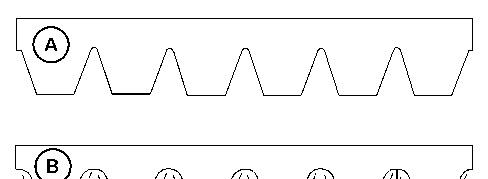
Illustration 4 g06114636 (A) New belt (B) Worn belt
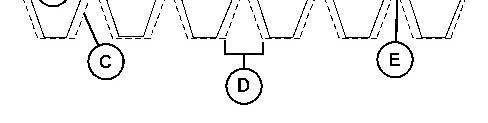
3. Inspect the condition of serpentine belts (3) and (4). Over time the belt ribs will lose material (C). The space between the ribs will increase (D). The loss of material will cause the pulley sheave to contact the belt valley. This will lead to belt slippage and accelerated wear (E).
4. Replace the belts if any of the following conditions exist:
excessive cracking
excessive wear
excessive damage
5. Inspect the free arm stop of belt tensioner (5). The free arm stop must be aligned with the green zone which is on the decal of the belt tensioner. If the free arm stop is in either of the red zones, replace the belt.
Adjust/Replace
1. Release the tension on belt (3) and (4). Insert a 12.7 mm (0.50 inch) ratchet into the square hole in belt tensioner (5) and pry the belt tensioner in a clockwise direction.
2. Remove the belts.
3. Install the new belts around the pulleys.
4. Release the belt tensioner in order to put tension on the belts.
5. Check the belt tension after 30 minutes of operation.
Note: The break-in period for the belts is considered to be 30 minutes.
6. Inspect the free arm stop of the belt tensioner. The free arm stop must be aligned with the green zone which is on the decal of the belt tensioner.
Alternator and Fan Drive Belt
Refer to Operation and Maintenance Manual, "Access Doors and Covers" for the location of the service points.
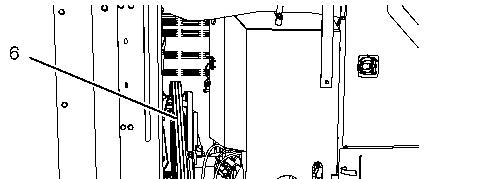
Illustration 5 g01734394
Inspect
1. Stop the engine.
2. Inspect the condition of the belt (6).
3. Replace the belt if any of the following conditions exist: excessive cracking excessive wear excessive damage
Adjust/Replace
1. Remove the belt.
2. Install the new belt around the pulleys.
Product: MOTOR GRADER
Model: 140K MOTOR GRADER SZL
Configuration: 140K Motor Grader SZL00001-UP (MACHINE) POWERED BY C7 Engine
Operation and Maintenance Manual
12K, 140K and 160K Motor Graders
Media Number -SEBU8249-17 Publication Date -01/07/2015 Date Updated -09/12/2019
Blade Cushion Accumulator - Check
SMCS - 5077-535-BG
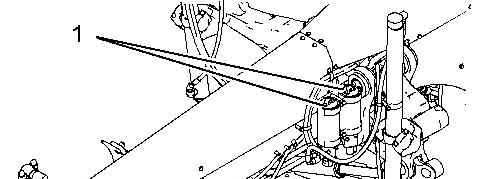
Illustration 1 g01075458
Blade cushion accumulators (1) are located on the left side of the front frame.
Consult your Caterpillar dealer for the correct checking procedure, the correct filling procedures and the recommended pressure.
Copyright 1993 - 2024 Caterpillar Inc. All Rights Reserved. Private Network For SIS Licensees.
Tue Oct 22 09:31:34 UTC+0530 2024
i02112051
Product: MOTOR GRADER
Model: 140K MOTOR GRADER SZL
Configuration: 140K Motor Grader SZL00001-UP (MACHINE) POWERED BY C7 Engine
Operation and Maintenance Manual
12K, 140K and 160K Motor Graders
Media Number -SEBU8249-17
Blade Lift Cylinder Socket - Check/Adjust/Replace
SMCS - 5102-535; 5102-025; 5102-510; 5103-025; 5103-510; 5103-535
1. Rotate the blade. Position the blade at an angle of 90 degrees to the frame. Lower the blade to the ground.
2. Operate the blade lift cylinders. Observe the socket. If the socket moves without blade movement, adjustment is necessary.
Illustration 1 g03833677
Typical example shown
3. Remove two bolts (1) from each cap (2). Remove the cap (2).
4. Install two new inserts.
i06881772