How to Access Learning Paths on GS Learn GS Learn is your space for taking online trainings. Find and register for live webinars and in-person trainings in ActiveNet
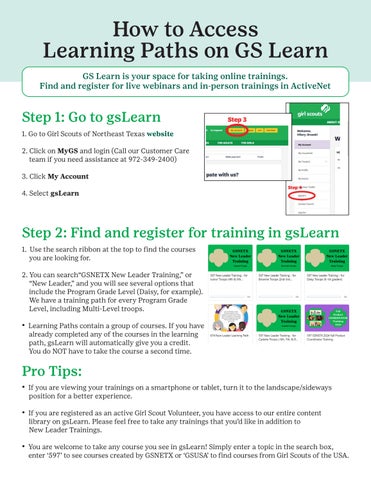
Step 1: Go to gsLearn 1. Go to Girl Scouts of Northeast Texas website 2. Click on MyGS and login (Call our Customer Care team if you need assistance at 972-349-2400) 3. Click My Account 4. Select gsLearn
Step 2: Find and register for training in gsLearn 1. Use the search ribbon at the top to find the courses you are looking for. 2. You can search“GSNETX New Leader Training,” or “New Leader,” and you will see several options that include the Program Grade Level (Daisy, for example). We have a training path for every Program Grade Level, including Multi-Level troops. • Learning Paths contain a group of courses. If you have already completed any of the courses in the learning path, gsLearn will automatically give you a credit. You do NOT have to take the course a second time.
Pro Tips: • If you are viewing your trainings on a smartphone or tablet, turn it to the landscape/sideways position for a better experience. • If you are registered as an active Girl Scout Volunteer, you have access to our entire content library on gsLearn. Please feel free to take any trainings that you’d like in addition to New Leader Trainings. • You are welcome to take any course you see in gsLearn! Simply enter a topic in the search box, enter ‘597’ to see courses created by GSNETX or ‘GSUSA’ to find courses from Girl Scouts of the USA.