Out Now
Whole Lotta Red


On All Streaming Platforms
https://www.google.com/url?sa=i&url=https%3A%2F%2F9to5toys.com%2F2025%2F01%2F20%2Fhow-much-will-nintendo-switch-2-cost-insiders-suggest-the-new-console-will-start-at-449%2F&psig=AOvVaw3EOnBtY4LVSzBxmbqHEau3&ust=1745430905550000&source=images&cd=vfe&opi=89978449&ved=0CBQQjRxqFwoTCKDUl6-b7IwDFQA-
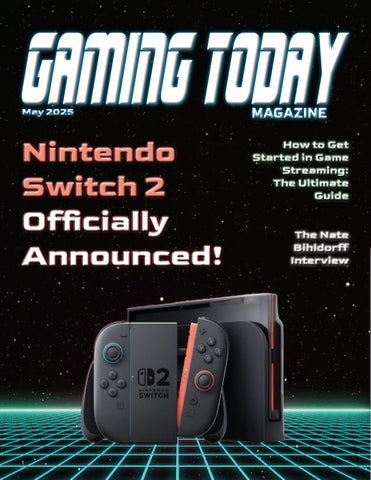
04 Nintendo Switch 2 Officially Announced! System Provides Powerful New Hardware, Reimagined Online Capabilities and a Broad Range of Games!

06 How To Get Started In Game Streaming
Here's all the gear you'll need to get started with game streaming on PC, plus helpful tips for setting it all up.
08 An Interview with Nate Bihldorff
We speak with Nate regarding his contribution to Metroid: Other M and his involvement in the Metroid franchise over the years.
10 The Best Nintendo Switch Accessories In 2025
We've logged countless hours on the Nintendo Switch using a variety of different accessories to help direct you to the most essential add-ons.


All Together, Anytime, Anywhere. With new ways to play and new ways to connect players, the Nintendo Switch 2 system arrives June 5 for a suggested retail price of $449.99 in the United States.
Discover reimagined Joy-Con 2 controllers, each of which can now be used as a mouse in compatible games and that snap to the system with magnetic connectors.
Experience the system’s powerful processing speeds delivering visuals via a bigger screen showcasing vibrant color and clarity.
From Nintendo Switch 2 games to compatible games in existing Nintendo Switch libraries – connect and play with friends and family in surprising new ways!
With the new online feature GameChat**, people can play games and talk like everyone is in the same room, even if they are miles apart. Whether sharing a victory or just waving hello, GameChat makes it feel like online friends around the world are on the same couch.
Once GameChat is up, players can start a chat with friends anytime by pressing the C Button on the right Joy-Con 2 controller. The system’s built-in mic can be used to voice chat while playing games with up to 12 people in different locations.
Up to four friends can share their screen, and if they connect a compatible USB-C camera, such as the Nintendo Switch 2 camera (sold separately), they can also video chat, seeing each other’s faces as they cheer, shout, or laugh while playing.
Additional friends can join the chat via audio only. Until the end of March 2026, GameChat can be used without the need to have a Nintendo Switch Online membership. Afterwards, a
Nintendo Switch Online membership will be required.
Nintendo Switch 2 will launch with games that highlight its new capabilities while bringing everyone along for the ride.
From brand new titles and system exclusives, like Mario Kart World and Donkey Kong Bananza, to exhilarating experiences like EA SPORTS Madden NFL and Cyberpunk 2077: Ultimate Edition, to upgraded versions of Nintendo Switch games like Super Mario Party Jamboree – Nintendo Switch 2 Edition + Jamboree TV and Sid Meier's Civilization VII – Nintendo Switch 2 Edition, there is much to share and play.
For more information on Nintendo Switch 2, please visit the Nintendo website at Nintendo.com and the free Nintendo Today App!


How to Get Started in Game Streaming: The Ultimate Guide
Do you dream of streaming video games for a live audience? Here's all the gear you'll need to get started with game streaming on PC, plus helpful tips for setting it all up.
By: Matthew Buzzi
Updated November 4th, 2022
First Off, What Is Game Streaming?
If you’re reading this, you probably understand what streaming is, or at least the basic idea. In case you’re coming in fresh, though, here's the short version.
In recent years, many thousands of people have taken to broadcasting their video-game gameplay live for millions of online viewers. Only a handful of streamers find huge regular audiences, with many more of them populating a middle tier with modest audiences, and an even greater number scrapping it out to build small communities. You can do this on a PC, or with one of the modern gaming consoles. The more streamlined, plug-and-play nature of the latter, however, means this guide will focus on PC-based streaming.
You have many options for where and how to stream, which I’ll be breaking down below. In terms of the tools and services, you’ve likely heard of Twitch, the largest such service, but you have some other alternatives for broadcasting, though a combination of other software and hardware is required. To stream PC games, the key things you need in addition to a Twitch (or other streaming service) account: a good gaming computer, some accessories, and software.
How to Choose the Right Game-Streaming PC
The biggest hurdle to streaming efficiently is having the right hardware, so that’s where we’ll start. Streaming services and software have come a long way in ease of use, often at no cost, but there’s no getting around the fact that you’ll likely need to buy a few physical items to make your streams come to life. The single largest obstacle, and item, is a powerful enough PC. There’s a lot that goes into a computer that makes it fit for streaming, so this requires the most in-depth explanation.
This system will probably serve double duty as your gaming and streaming machine (more on that issue later), so it needs to be fast. If you’re planning on streaming PC gameplay, it should be obvious that your computer will need to be up to the task of playing modern games as a minimum baseline. This is the most expensive item you’ll need for streaming, and there are a lot of factors that go into a decision.
The Best Graphics Card for Game Streaming: GeForce RTX and More
To accomplish the above, you need the right core parts. Encoding and broadcasting your gameplay to Twitch or another site is a strenuous task for any processor (also referred to here as the CPU) and graphics card (GPU), because your computer is
already using resources to power the game you're playing. Rather than run you through every component option here for either building your own desktop or buying a prebuilt PC, I’ll point you to our deep guide for gaming desktops, which already provides this info in full. There’s plenty to consider, and it would take a lot to run it all down here. In the guide, you’ll find buying advice on each component, as well as our list of best current prebuilt machines, so read it over if you’re not current on PC parts.
The Best CPU for Game Streaming: Why the Processor Is Key, Too
While your graphics card, no doubt, has its work cut out, your processor will be the vital part of your gaming and streaming computer. Multi-threaded and multi-core processors are the norm these days, but even modern chips meant for everyday use will bend under these demands, reducing your stream and gameplay quality. You can use your GPU to help with the encoding workload, but your processor will still have its resources split among the game, streaming, and running all of your stream-related applications. However you slice it, you'll need a great CPU.


Nate Bihldorff
Voice Actor on The Super Mario, The Legend of Zelda and Metroid Game Series
Localisation Manager for Nintendo Treehouse
We are thrilled to be speaking with Nate Bihldorff, localisation manager for Nintendo Treehouse. Nate has worked on some of the biggest games for Nintendo, including seven Metroid games. We speak with Nate regarding his contribution to Metroid: Other M and his involvement in the Metroid franchise over the years.
So first of all Nate, please tell us a bit about the work you do at Nintendo and your involvement with Metroid over the years.
I’m the senior localization manager in the Treehouse at Nintendo essentially, I manage all the writers in our group as well as working as a writer on projects. The first project I ever worked on was Paper Mario for the N64 in late 2000, and I’ve been localizing first- and second-party Nintendo games ever since. As far as Metroid goes, I was the localization writer on Metroid Fusion and Metroid Zero Mission, and did lots of writing with Retro on the first Metroid Prime. Most recently, of course, I worked on Metroid: Other M.
You were one of the very first people to actually see and play Metroid: Other M. Tell us about the moments you first heard about, and saw the game, along with your thoughts and feelings at the time.
I remember being blown away when I heard about the concept—I mean, I’m a huge freak for Metroid games in general, but the idea of switching between traditional 2D game play and first-person exploration sounded so immersive and unique that I couldn’t wait to check it out. The first time I saw some of Samus’s melee moves in action, I could tell that the game was going to be something special.

For the first time in Metroid history, Samus Aran was given a voice in the form of the actress Jessica Martin. After working with her closely, what are your opinions of her? Do you think she did a great job as the leading role and do you feel she has a future as Samus in any future games?
Jessica did a fantastic job with an extremely difficult role, and I would love to work with her again should the opportunity arise. Not only was she working under the mighty expectations of a huge and passionate fan base, but she had a room full of directors. Mr. Sakamoto’s vision for the character called for a very detached delivery for much of the voice over, but also required passion and pain as the story progressed. Jessica handled long sessions without flinching, and her voice quality never stuttered.
There was a wide range of voice talent in Other M such as Dave Elvin who played Adam Malkovich and Mike McGillicuty who played Anthony Higgs. What were they like to work with?
Dave was awesome—his timbre just sounds naturally cool, and he never had problems with giving us alternate reads. He was especially good when we did simultaneous sessions with him and Jessica. And Mike did an incredible job—the amount of energy he brought to the

studio was a huge boon. I thought the scene where he’s calling out Ridley was one of the best in the game.
After working on many Metroid games and being a keen Nintendo gamer yourself, tell us which game is your favorite of the franchise and why.
Can’t pick just one, I really can’t. Super Metroid remains the greatest adventure game I’ve ever played, Metroid Prime is the most immersive, and Metroid Zero Mission is the most refined Metroid experience out there. I 100% all three of those pretty much every year.
There are a handful of websites on the internet that are dedicated to Metroid, with many passionate fans. Does Nintendo visit these websites often for feedback and have any of them made any impact on the company?
I can’t speak for Nintendo as a company, but personally, I dip around the enthusiast websites for all of our franchises. I like seeing people’s reactions to our games. Nintendo fans are easily the most passionate out there.
Thank you for taking the time to speak with us Nate!
Thank you and to all of the fans, on behalf of Nintendo!

The Best Nintendo Switch Accessories
In 2025
Whether you own a Nintendo Switch, a Switch Lite, or a Switch OLED, you know how versatile and fun this console can be. To make the most of your gaming experience, investing in a few accessories – some of which are Switch 2 compatible, including the Pro Controller as we've learned from the April Nintendo Direct – can take things to the next level.
From Switch controllers allowing better control (and less cramping) during intense gameplay, to screen protectors keeping your Switch safe from any scratches, the right accessories enhance performance and protection. We've logged countless hours on the Nintendo Switch using a variety of different accessories to help direct you to the most essential add-ons.

1.
The Nintendo Switch Pro Controller works wireless and charges using a USB-C cable. Boasting a 40-hour battery life, you’re all set for an all-day gaming marathon. The larger, easier-to-use controls and real D-pad provide undeniable improvement to your gameplay, while HD Rumble should immerse you further into the action. It even supports Amiibo with its NFC chip. Best of all, this controller should last the duration of your Switch's life cycle, making it a very sound investment.
$59.98

The screen protector is built to take the brunt of an impact, so you don't have to live with your Switch permanently in docked mode. At under 10 bucks for a two-pack and an installation kit, it’s hard to come up with an excuse not to buy this. A cracked display on a Nintendo Switch will set you back a lot more than this economical solution, and the device's touchscreen capabilities and screen clarity remain the same.
$8.49
Nintendo Switch Pro Controller
2. AmFilm Tempered Glass Screen Protector

3. RDS Carry Case
When taking your Switch on the go, you want a hardy case to protect it from the elements, possible scratches, and the inevitable drop. The RDS Carry Case does just that, thanks to its hard-shelled exterior and fitted linen interior with a padded screen protector. There’s even a handy rubber handle to make toting it around easy.

5. CRKD Nitro Deck
Don’t love the Switch’s traditional JoyCon? Well, our hands-on review of the CRKD Nitro Deck offers upgrades to the controllers and offers a slew of other features to make your gaming experience on the device even better. Rather than attaching Joy-Con to either side of the Switch, the Nitro Deck lets you slide the screen into it, connecting via USB-C, providing a sturdy, secure, and more comfortable-to-hold option.

4. SanDisk 128GB Ultra
Unless you're comfortable carrying around a bunch of game cartridges, you’ll want your favorite games installed directly on your Nintendo Switch. However, there's a little hitch in that plan, given how little storage the Switch actually has for games. So, it's worth it to pony up for a Switch microSD card, especially if you're going to shop several game deals.

6. Razer Barracuda X Wireless Headset
Although our Razer Barracuda X review won't blow you away in terms of overall sound quality, what you get for the price is quite good.. For under $100, you get excellent audio quality and a lagfree wireless connection through the low-latency 2.4GHz USB dongle. This headset also offers seamless Bluetooth connectivity for your Nintendo Switch as well any of your other Bluetooth devices.