



Your journey to a recognised Handicap Index® starts here
Your journey to a recognised Handicap Index® starts here
On behalf of everyone at England Golf, thank you for joining iGolf — the official platform for non-club members to access a Handicap Index® under the World Handicap System™ (WHS™).
As an iGolfer, you can:
• Obtain and maintain a Handicap Index®
• Submit scores from rated courses
• Calculate your Course Handicap™
iGolf is proudly operated by England Golf, the national governing body for amateur golf in England, ensuring your experience is guided by trusted expertise and national standards.



• Download the MyEG App
• Purpose of a Handicap Index®
• How do I get a Handicap Index®
• How is a Handicap Index® calculated?
• Pre-registering Your Round
• Before and After Your Round
• Know Your Course Handicap ™
• Know Where You Get Stroke s
• Stableford Scoring Explaine d
• Know Your Maximum Hole S core
• Check Your Score Differenti al
• Submitting Your Score
• Missed a Hole? Here's What to Do
• 9-hole scorecards - Expecte d score
• What Happens If You Have An Exceptional Round?
• If Your Handicap Index® Is Going Up
• How to Add a Scorecard an d
Send to Attester

Input scores, manage your Handicap Index®, and access your iGolf account with ease using the MyEG app.
• Apple users – Download here
• Android users – Download here
Search "My England Golf" or "My EG" in your app store to get started. Log in with your iGolf membership number and password to begin submitting scores.

Forgot your login details? Reset your password here


A Handicap Index is a numerical measure of a golfer's demonstrated ability under the World Handicap System™ (WHS™), designed to allow players of all skill levels compete fairly by adjusting scores based on course difficulty.
it matters

Updates as your game improves

The maximum Handicap Index® is 54.0, and it’s designed to support all golfers - from beginners to experienced players - in both 9-hole and 18-hole formats. Promotes fair play across all abilities Works at any rated course across the world
Enables you to enjoy both casual and competitive golf


To get a Handicap Index®, simply go out, play and submit 54 complete holes.
Please note you must declare your score intent before your round.
What counts?
• Scores from individual stroke-play
• Rounds played by the Rules of Golf
• Scores that are attested by another MyEG app user
• Once you've completed your round, remember to your score before midnight on the day of play
Key things to know:
During your first 54 holes, maximum score per hole is par + 5
(If you exceed par +5, just pick up, record the hole data, and move on)
You can submit 9-hole or 18-hole scores
You’ll need to log a total of 54 holes (any combination)
Once you’ve submitted a total of 54 holes, your Handicap Index® will be calculated, usually by the next day or shortly after.


A Handicap Index® is designed to reflect your potential ability - how well you play when you're playing at your best. So, if you play to your Handicap Index® - or even better - it's a sign that you’re performing at your best.
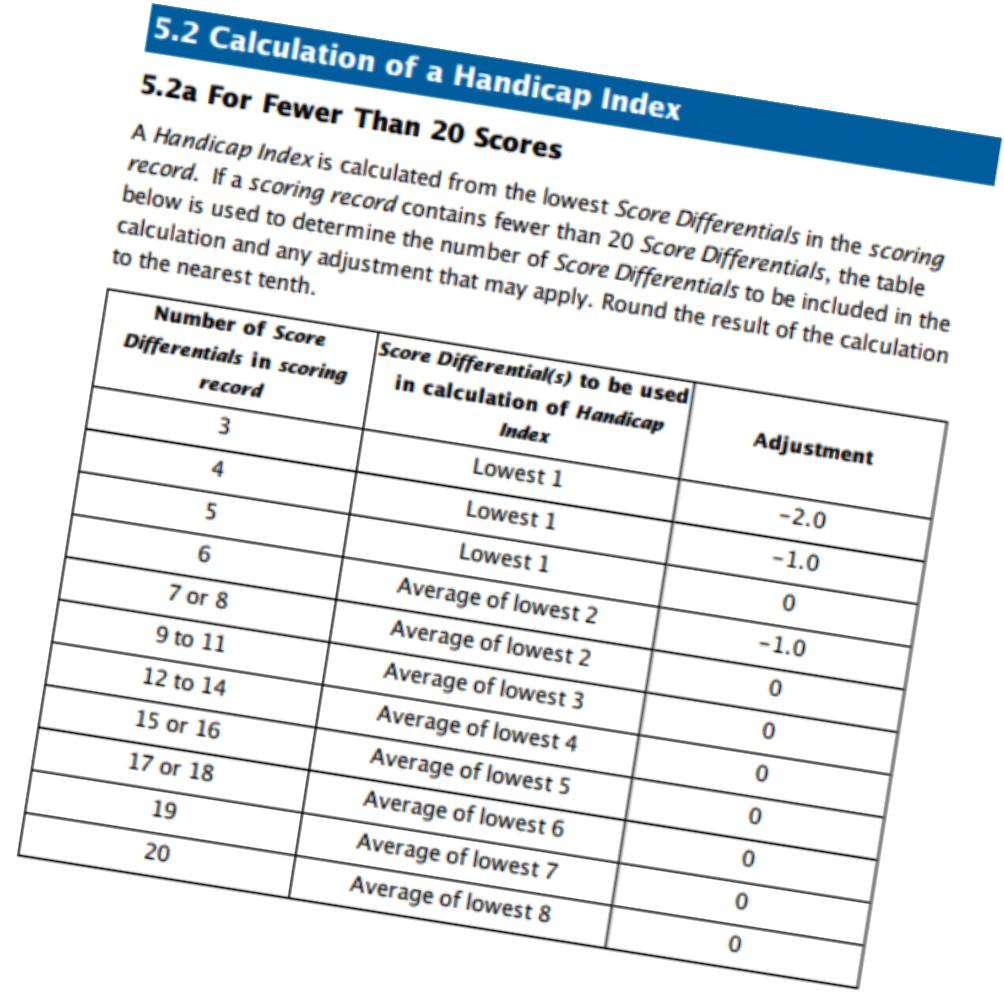
The simple calculation: Your Handicap Index® is based on the average of: Your best 8 Score Differentials from your most recent 20 rounds


Before you tee off, you’ll need to pre-register your intent to submit a score for handicap purposes.
This ensures your round meets the requirements of the World Handicap System™ and can be included in your scoring record.

What you need to do:
• Sign in via the MyEG app
• Create your 9-hole or 18-hole scorecard on the correct course.
• Ensure your chosen playingpartners is a MyEG app user.
• Proceed to create to create your score intent.
Once your round is complete, your playing partner (marker) must attest your score via the MyEG app.
Before your round
Make sure you're set up for a valid submission:
Pre-register your round in the MyEG app before teeing off
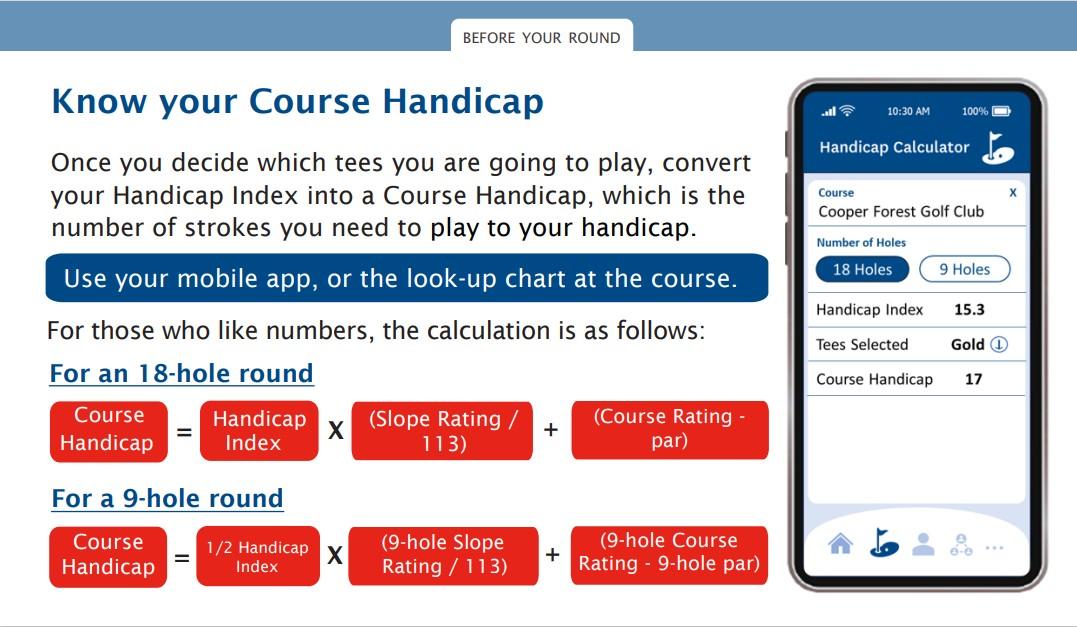
Know your Course Handicap™ –this tells you how many strokes you receive on that course
After your round
Once you've played, don’t forget these steps:
Enter your hole-by-hole scores in the MyEG app
Search for your attester –someone who played with you and can verify your round
Set a personal target to stay focused (optional, but helpful!)
Submit your score before midnight on the day you played
Once your score has been attested, you’ll be able to:
View your updated Score Differential™
See how it impacts your Handicap Index®


To know which holes you will receive strokes on compare your Course or Playing Handicap to the stroke index (SI) of the holes.
The stroke index assigned determines the relative difficulty of each hole, for example the hole set as SI 1 is the hardstand SI 18 is the easiest.

User G (Course Handicap™ 10) gets one extra shot on holes with Stroke Index 1–10.
User T (Course Handicap™ 29) gets two extra shots on Stroke Index 1–10 and one extra shot on Stroke Index 11–18.

Stableford is a scoring system in golf that focuses on scoring points based the number of strokes taken on each hole rather than counting the total number of strokes taken during a round.
Stableford scoring for each hole is then calculated using your score against the net par for that hole with points awarded as follows:
4 points – Two strokes under 3 points – One stroke under 2 points – Level par
1 point – One stroke over
0 points – Two strokes or more over

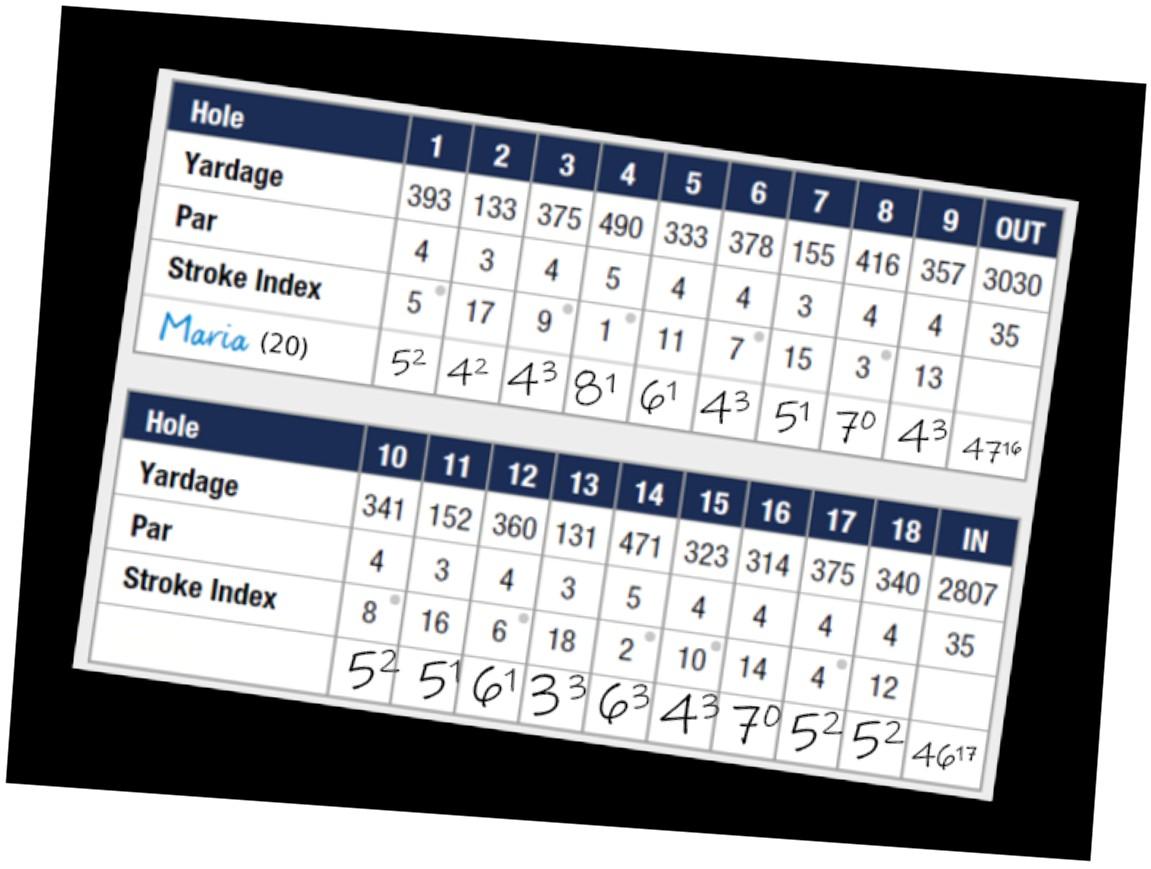

The number of points awarded on each hole is determined by comparing a player’s score to the par, with adjustments based on their handicap. To calculate this, you need to refer to the stroke index listed on the scorecard.

When submitting a score for handicap purposes, the maximum score you can record on any hole is a net double bogey. This helps protect your Handicap Index® from being too affected by a single bad hole and helps keep play moving at a good pace.

A player with a Course Handicap of 13 receives 1 stroke on holes with a stroke index of 1–13.
If they play a par 4 with a stroke index of 5, their maximum score for that hole is:
4 (Par) + 2 + 1 = 7
Par + 2 + any handicap strokes you receive on the hole

Once your round has been verified, your Score Differential™ will be calculated and added to your scoring record.
A score of 80 on a difficult course might reflect a better performance than a 77 on an easier course.
The Score Differential™ calculation adjusts for this to ensure a fairer reflection of your ability.
Score Differential™ = (113 ÷ Slope
A Score Differential™ helps reflect how well you played, by taking into account the difficulty of the course, not just your gross score.
How it's calculated:
This number feeds into your Handicap Index®, helping you track your performance round by round.
Rating™) ✕ (Adjusted Gross Score – Course
Rating™ – PCC adjustment)
This is automatically calculated for you after submission of your score

To keep your Handicap Index® accurate, it’s important to submit all acceptable scores as soon as possible, ideally on the same day you play.
Here’s why:
• Your Handicap Index® will be Updated overnight
• Your score will be included in the daily Playing Conditions Calculation (PCC)
Each day, the Playing Conditions Calculation automatically runs in the background to see if scoring conditions were unusually difficult or easy.
If scores were noticeably higher or lower than expected, your Score Differential™ will be adjusted: Submitting promptly ensures your Handicap Index remains accurate and that your round is factored into daily playing condition adjustments. +1 to +3 Course played harder than expected 0 Conditions were as expected (most common) -1 Course played easier than expected

If you are unable to complete all 18 holes due to extreme weather conditions or course maintenance, you can still submit your round for handicap purposes if you’ve played at least 10 holes, all other rules have been followed, and finally if you have pre-registered your round via the MyEG app.
How it works:
If you complete 10 to 17 holes, your final 18-hole Score Differential™ will be made up of:
• Your actual Score Differential™ from the holes you did play
• A calculated expected Score Differential for the holes you missed
Example:
You played 16 holes before severe weather stopped play:
➡ Score Differential™ from 16 holes
➕ Expected Differential for 2 missed holes
= 18-hole Score Differential™
➕ If fewer than 9 holes are played, your score can’t be used for handicap purposes.
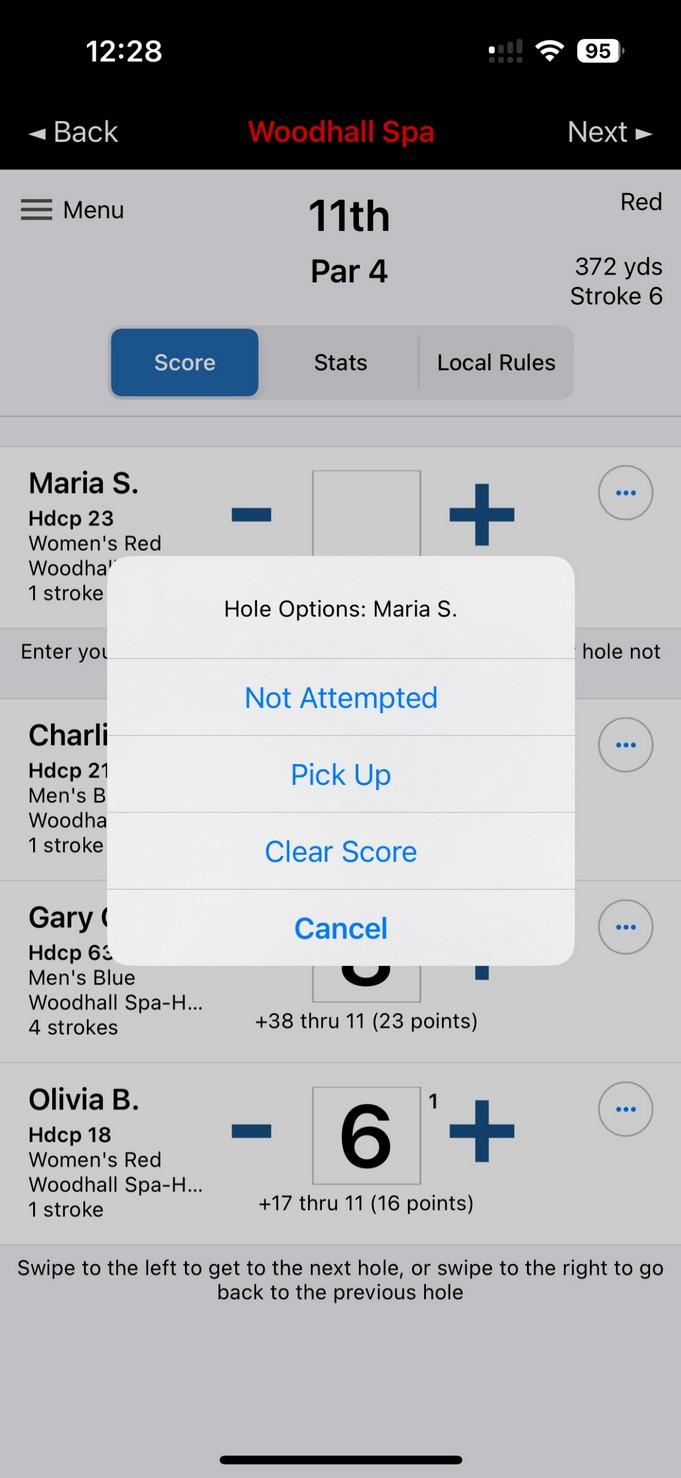

When you submit a 9-hole score, it will be scaled up to make an 18-hole Score Differential so it can immediately count toward your Handicap Index.

Important to know: Expected is the score a player is expected to achieve over a specified number of holes on a course of standard difficulty. It is calculated using the player’s Handicap Index and attributes a numerical value against any hole or holes not played during a round.
➡ For example: A player with a Handicap Index of 10.0 will have a lower expected score than someone with a Handicap Index of 15.0.



If your submitted round results in a Score Differential that is 7.0 strokes or better than your Handicap Index at the time, a reduction will be applied to reflect your improved performance.
How it works: 10.0 or more strokes better than your Handicap Index → Handicap Index reduced by 2.0 strokes 7.0 – 9.9 strokes better than your Handicap Index → Handicap Index reduced by 1.0 stroke


Everyone has dips in form, and while your scores may change, your underlying ability doesn't shift overnight. That’s why the system includes safeguards to make sure your Handicap Index doesn’t rise too quickly.
What’s in place:

• Soft Cap – If your Handicap Index increases by 3.0 strokes compared to your Low Handicap Index™ over the last 12 months, further increases are slowed by 50%
• Hard Cap – If your Handicap Index reaches a 5.0 stroke increase no further upward movement will be applied.

Important to know: All players can request a review of their Handicap Index if they believe that it no longer reflects their current ability.

This section will guide you through the simple process of creating a scorecard. Use the interactive phone screen below to click through each step and follow along in real-time. Ready to get started?
We have created an easy to follow video to guide you through the steps.
The closest courses will appear at the top of your list


Swipe LEFT to delete scorecard