Career Blade Database-Administrator-Working-with-Data
DATABASE ADMINISTRATOR: WORKING WITH DATA
LESSON PLAN OVERVIEW
Career: Database administrators collect, sort, and store data, such as financial, product, and customer information. They work to keep data secure and safe from unauthorized access
Lesson: This lesson plan provides activities to introduce students to the database administration career by understanding the basics of collecting and sorting data. Students will complete an activity to collect data and then analyze the data by performing calculations.
Grade Level: Elementary Grades
Learning Objectives:
〉 Students will explore the career of a database administrator and learn how data is collected, sorted, and analyzed.
〉 The teacher will ask students a series of questions to collect the data and students will post the results in a data table.
〉 Students will then sort and analyze the data by performing calculations.
〉 Students will gain an insight into the database administrator profession, including common job tasks, salary, career pathway, and credentials required to perform the job.
Materials
Activity #2: Analyzing Data
〉 Completed table from Activity #1
〉 Student Worksheet: Analyzing Data
TABLE OF CONTENTS
〉 Access to a computer with spreadsheet software such as Microsoft Excel, or Google Sheets (If a computer is not available, students can use paper and pencil for the exercise.)
TEACHER GUIDE
Lesson Instructions: This lesson plan will help you demonstrate to students some of the basic skills and procedures used by database administrators. Begin the lesson by reading the Class Message below to your students, then have them watch the recommended career video. Afterwards, facilitate a discussion using the Class Questions listed below.
After the discussion, students will work on two activities. Each activity has a printable worksheet with student instructions and areas to record their work. Have students read their worksheets before beginning each activity.
You should also familiarize yourself with the student worksheets to provide assistance when needed and help in facilitating the discussion that ends the activity.
Class Message: Today, we are going to explore the career of a database administrator. How many of you play games or use apps on a cell phone, tablet, or game system? Database administrators work behind the scenes to collect data on how you play or interact with games and apps. They then sort this data and use it to develop new games or apps or improve the existing ones.
Let’s watch this brief video to learn more about what database administrators do and how they affect our everyday lives
Database Administrators Career Video (http://tn-caps.com/r/35VDA)
Class Discussion Questions:
〉 Do any of you collect toys or other things? Possible responses: model planes or cars, souvenirs from trips, dolls, action figures, etc.
〉 Do you have chores at home where you have to sort things to put them up? Possible responses: empty dishwasher and sort silverware, help with laundry and sort clothes – match up socks, pickup toys and sort them into correct container
〉 Do you have a hobby that involves collecting and sorting things? Possible responses: coin collection, video games, movies, action figures, etc.
Activities Overview: This lesson plan includes two student activities. In Activity #1, the teacher will survey the class to collect data and students will document the information in a data table. Students will then sort and summarize the data. In Activity #2, students will analyze and make calculations using the data table from Activity #1.
Read and familiarize yourself with the student worksheet for each activity.
Activity #1: Collecting and Sorting Data
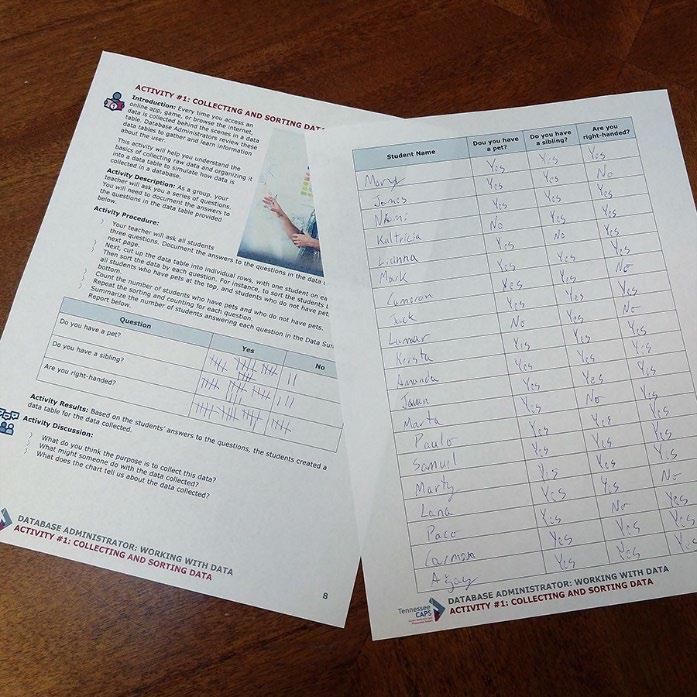
In this activity, the teacher will ask students questions and students will record the findings in a data table. They will then cut the table into rows using scissors and sort the data in different ways. This data table will be used for Activity #2.
Activity Instructions:
〉 Hand out the student worksheet.
〉 Facilitate an introduction to the activity.
〉 Walk students through the instructions for the activity.
〉 After completion, facilitate a discussion of the questions for the activity.
Activity Discussion:
〉 What is the purpose for collecting this data? Possible responses: to get to know each other better, find out things we didn’t know about each other, discover similar interests, etc.
〉 What could someone do with the data we collected? Possible responses: compare similarities, compare differences, etc
〉 What does the Data Summary Report tell us about the data we collected? Possible responses: it tells us information for the whole class, it shows how many people answered yes and no to each question, etc
Activity #2: Analyzing Data
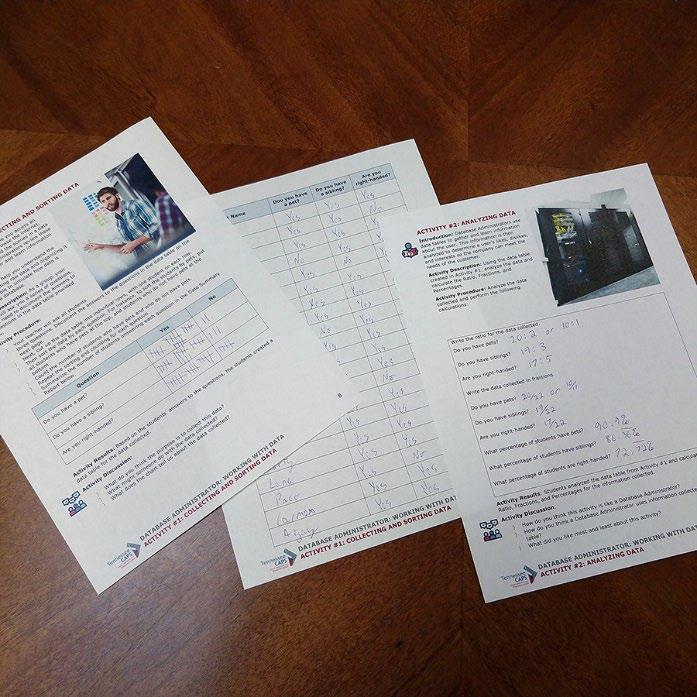
In this activity, students will analyze the information collected in Activity #1 and perform calculations to write the ratio, fractions, and percentages for the information collected.
Activity Instructions:
〉 Hand out the student worksheet.
〉 Facilitate an introduction to the activity.
〉 Walk students through the instructions for the activity.
〉 After completion, facilitate a discussion of the questions for the activity.
Activity Results: Students analyzed the data table from Activity #1 and calculated the ratio, fractions, and percentages for the information collected. Sample calculations based on sample data: (Actual data will be based on class results.)
Write the ratio for the data collected.
Do you have pets? 10:5
Do you have siblings? 8:7
Are you right-handed? 14:1
Write the data collected in fractions.
Do you have pets? 10/15
Do you have siblings? 8/15
Are you right-handed? 14/15
What percentage of students have pets?
10 ÷ 15 = 0.66666667 X 100 = 66.6 rounded: 67% of students have pets.
What percentage of students have siblings?
8 ÷ 15 = 0.53333333 X 100 = 53.3 rounded: 53% of students have siblings.
What percentage of students are right-handed?
14 ÷ 15 = 0.93333333 X 100 = 93.3 round: 93% of students are right-handed.
Activity Discussion:
〉 How is this activity similar to what database administrators do? Possible responses: they collect data to answer questions or provide statistics; they analyze data to find similarities and differences, etc
〉 How do you think database administrators might use information they store in a data table? Possible responses: they sort data to find information on different things, they use information to sell more products, they use information to develop new products, etc.
〉 What did you like most about this activity? What did you like least? Why? Allow students to share their experience.
CAREER INSIGHT
Career Highlight: This lesson plan highlights some of the basic skills a database administrator uses daily to collect and analyze data. See the Employers in My Area section to contact businesses and organizations in your area about classroom demonstrations, on-site visits, or other additional career exposure opportunities
Featured Career:
Database Administrator
Career Descriptions:
A database administrator, also known as a DBA, is a career in the Information Technology industry sector. Database administrators use specialized software to store and organize data, perform capacity planning, installation, configuration, database design, data migration, performance monitoring, data security, troubleshooting, and data backup and recovery.
Database administrators typically do the following:
〉 Ensure that organizational data are secure
〉 Backup and restore data to prevent data loss
〉 Identify user needs to create and administer databases
〉 Ensure that databases operate efficiently and without error
〉 Make and test modifications to database structures when needed
〉 Maintain databases and update permissions
〉 Merge old databases into new ones.
Other Names for this Career: Data Architect, Database Administration Manager, Database Administrator (DBA), Database Analyst, Database Coordinator, Database Developer, Database Programmer, Information Systems Manager, Management Information Systems Director (MIS Director), System Administrator
STANDARDS ALIGNMENT
Mathematics Standards
Understand a fraction, 1/ ���� , as the quantity formed by 1 part when a whole is partitioned into b equal parts (unit fraction); understand a fraction ����/���� as the quantity formed by a parts of size 1/ ���� . For example, 3/4 represents a quantity formed by 3 parts of size ¼
Explain equivalence of fractions and compare fractions by reasoning about their size.
a. Understand two fractions as equivalent (equal) if they are the same size or the same point on a number line.
b. Recognize and generate simple equivalent fractions
Interpret the dividend, divisor, and quotient in whole number division equations (e.g., 28 ÷ 7 can be interpreted as 28 objects divided into 7 equal groups with 4 objects in each group or 28 objects divided so there are 7 objects in each of the 4 equal groups).
Compare two fractions with different numerators and different denominators by creating common denominators or common numerators or by comparing to a benchmark fraction
Read and write decimal notation for fractions with denominators 10 or 100.
Science and Engineering Practices
• Analyzing and interpreting data with appropriate data presentation (graph, table, statistics, etc.), identifying sources of error and the degree of certainty. Data analysis is used to derive meaning or evaluate solutions.
• Planning and carrying out controlled investigations to collect data that is used to test existing theories and explanations, revise and develop new theories and explanations, or assess the effectiveness, efficiency, and durability of designs under various conditions.
• Using mathematics and computational thinking as tools to represent variables and their relationships in models, simulations, and data analysis in order to make and test predictions Links Among Engineering, Technology, Science, and Society 1) Use appropriate tools to make observations, record data, and refine design ideas.
School Counseling Standards
Work effectively in diverse groups by developing and employing leadership and teamwork skills
Research and appraise characteristics of a variety of traditional and nontraditional occupations
Model a sense of belonging in the school environment
Respect diversity in culture, perspectives, values, and experiences
Recognize each person is a part of a diverse local and global community
EDUCATOR RUBRIC
ITEM
Does Not Meet Expectations
Data Collection Student did not accurately collect the student data for one or more of the questions asked
Sorting Data Student was unable to sort the data based on the given sorting prompt
Meets Expectations Exceeds Expectations
Student accurately collected student data for all questions asked
Student accurately and neatly collected student data for all the questions asked
Student was able to sort the data based on the given sorting prompt
Using the Data Student was unable to correctly turn the data into a fraction
Student was able to correctly depict the data as a fraction
Student was able to sort the data based on the given sorting prompt and make inferences and observations based on the sorting of data
Student was able to correctly depict all of the data as a fraction and was able to also represent the data as a ratio
Discussion Student did not participate in the discussion
Student actively participated in the discussion
Student actively participated in the discussion and demonstrated ability to extrapolate to other scenarios
ACTIVITY #1: COLLECTING AND SORTING DATA
Introduction: Every time you sign into an online app, game, or browse the internet, data is collected behind the scenes in data tables. Database administrators review these data tables to gather and learn information about the game and app users.
This activity will help you understand the basics of collecting raw data and organizing it into a data table. This is similar to how data is collected in a database
Activity Description: Your teacher will ask your class a series of questions. You will need to write each student’s answers to the questions in the data table on the next page
Activity Procedure:
〉 Your teacher will ask each student three questions. Document their answers to the questions in the data table on the next page.
〉 Next, cut up the data table into individual rows with one student on each row
〉 Then sort the data by each question. For example, to sort the students by pets, put all students who have pets at the top and students who do not have pets at the bottom.
〉 Count the number of students who have pets and those who do not have pets.
〉 Repeat the sorting and counting for each question.
〉 Write the total number of students answering each question yes or no in the Data Summary Report below.
DATA SUMMARY REPORT
Question
Do you have a pet?
Do you have a sibling?
Are you right-handed?
Yes No
Activity Results: Each student created and sorted a data table based on each student’s answers to three questions and summarized the results in a data summary report
Activity Discussion:
〉 What is the purpose for collecting this data?
〉 What could someone do with the data we collected?
〉 What does the Data Summary Report tell us about the data we collected?
Student Name
Dou you have a pet? Do you have a sibling? Are you right-handed?
ACTIVITY #2: ANALYZING DATA
Introduction: Database administrators often use data tables to gather and learn information about people who use their games or apps. This information is then analyzed to see what users like or dislike, or how they use the games or apps. This information helps companies how to make their products better or easier to use
Activity Description: Using the Data Summary Report you completed in Activity #1, look at the data and calculate ratios, fractions, and percentages for the answers to each question that was asked.
Activity Procedure: Use the summarized data to make the following calculations:
Write the ratio for the data results for these questions:
Do you have pets?
Do you have siblings?
Are you right-handed?
Show the data results in fractions for these questions:
Do you have pets?
Do you have siblings?
Are you right-handed?
Calculate percentages for the data results:
What percentage of students have pets?
What percentage of students have siblings?
What percentage of students are right-handed?
Activity Results: Students analyzed the Data Summary Report in Activity #1 and calculated the ratios, fractions, and percentages for the answers to three questions.
Activity Discussion:
〉 How is this activity similar to what database administrators do?
〉 How do you think database administrators might use information they store in a data table?
〉 What did you like most about this activity data? What did you like least? Why?