Career Blade Database-Administrator-Managing-Critical-Data
DATABASE ADMINISTRATOR: MANAGING CRITICAL DATA
LESSON PLAN OVERVIEW
Career: Database administrator is a career in Information Technology. Database administrators use special software to store and organize data, perform capacity planning, design and configure databases, monitor performance, maintain data security, troubleshoot problems, and backup and recover data.
Lesson: This lesson will introduce students to ways database administrators make decisions by analyzing large amounts of data. The lesson will challenge students to create and manage a database with significant amounts of data in Microsoft Excel.
Grade Level: Middle Grades
Learning Objectives:
〉 Students will explore the role of database administrators and how they maintain large amounts of data.
〉 Students will understand the relationship between data and a database and how to analyze information.
〉 Students will create a spreadsheet to understand the collection and management of data.
〉 Students will also gain an insight into the database administration profession, including common job tasks, salary, career pathway, and credentials required to perform the job. Materials
〉 Student Worksheet: Cartesian Planes and Quadrant Graphing
Activity #2: Creating and Managing a Database
〉 Student Worksheet: Creating and Managing a Database
〉 Access to a computer with spreadsheet software like Microsoft Excel or Google Sheets. (If a computer is not available, students can use paper and pencil.)
TEACHER GUIDE
Lesson Instructions: This lesson plan will help you demonstrate some basic skills and procedures used in database management to students. Begin each lesson by reading the Class Message below to your students, then have them watch the recommended career video. Afterwards, facilitate a discussion using the Class Questions listed below.
After the discussion, students will work on two activities. Each activity has a printable worksheet with student instructions and areas to record their work. Have students read their worksheets before beginning each activity.
You should familiarize yourself with the student worksheets to provide assistance when needed, help demonstrate procedures, and facilitate a discussion that ends the activity.
Class Message: Today, we are going to explore some of the responsibilities and duties of a database administrator, also known as a DBA. Database administrator is a career in the Information Technology industry. DBAs use specialized software to store and organize data. The data could include a variety of information, such as user personal identifiable information and protected personal information , confidential company information, product and performance data, and financial information. DBAs are responsible for ensuring data is available to users but kept secure from unauthorized access, accidental loss, or corruption.
In this lesson, we will learn some basic database administration concepts and tasks. These include understanding different types of databases, collecting and analyzing data, and creating databases. We’ll also discuss common problems with data storage and explore innovative ways to collect and manage big data for the future.
Watch this brief video to better understand the role of a database administrator.
Database Administrator Career Video (http://tn-caps.com/r/68VDB)
Class Discussion Questions:
〉 How many of you are already familiar with what a database administrator does?
〉 What types of job tasks do you think a database administrator performs?
〉 Have you ever researched or bought something on the internet? Do you think a database administrator collected information about you and your interests?
〉 What are some challenges a database administrator might face when managing large amounts of data?
Activities Overview: This lesson plan includes two student activities. Activity #1 conveys a basic understanding of databases. Activity #2 challenges students to create and manage a database in Microsoft Excel.
Read and familiarize yourself with the student worksheet for each activity.
Activity #1: Understanding Data and a Database
This activity demonstrates how a database administrator collects and maintains data in a database
Activity Instructions:
〉 Hand out the student worksheet.
〉 Facilitate an introduction to the activity.
〉 If needed, walk students through the activity procedure.
〉 After completion, facilitate a discussion using the questions for the activity.
Activity #2: Creating and Managing a Database
Strategic planning is a way of solving complex problems through a creative process that integrates brainstorming, collaboration, and the possibilities of new technologies. In this exercise, students will use strategic planning to create a database in Microsoft Excel to collect and manage data for a start-up company.
Instructions are shown below along with handouts that students can use to document their progress in the project. You may decide to extend this project over several class periods in order to let students develop and create a database to manage their start-up.
Activity Instructions:
〉 Hand out the student worksheet.
〉 Assign students into groups.
〉 Facilitate an introduction to the activity.
〉 Have students access spreadsheet software like Google Sheets, Apple Numbers, Microsoft Excel, or similar software (If not available, use paper and pencil to design database screens.)
〉 After completion, facilitate a discussion of the questions for this activity.
Activity Results: Students will create a spreadsheet to understand the basics of a database and how to manage a database.
CAREER INSIGHT
Career Highlight: This lesson plan highlights some of the basic skills a database administrator uses on a daily basis to collect and maintain data. See the Employers in My Area section to contact businesses and organizations in your area about classroom demonstrations, on-site visits, or other additional career exposure opportunities
Featured Career:
Database Administrator
Career Descriptions:
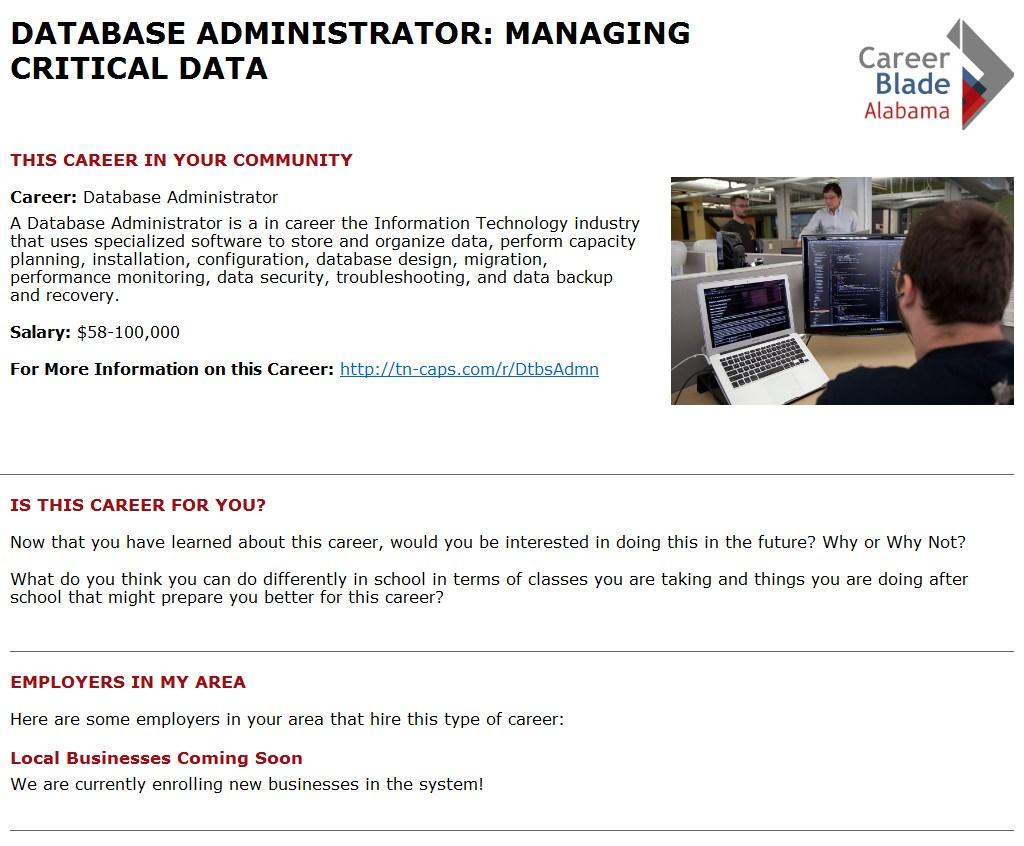
A database administrator, also known as a DBA, is a career in the Information Technology industry that uses specialized software to store and organize data, perform capacity planning, and design, install, and configure databases. DBAs monitor performance, work to ensure data security, troubleshoot problems, and backup and recover data.
Database administrators typically do the following:
〉 Ensure that organizational data are secure
〉 Backup and restore data to prevent data loss
〉 Identify user needs to create and administer databases
〉 Ensure that databases operate efficiently and without error
〉 Make and test modifications to database structure when needed
〉 Maintain databases and update permissions
〉 Merge old databases into new ones.
Other Names for this Career: Data Architect, Database Administration Manager, Database Administrator (DBA), Database Analyst, Database Coordinator, Database Developer, Database Programmer, Information Systems Manager, Management Information Systems Director (MIS Director), System Administrator
STANDARDS ALIGNMENT
Activities #1 and #2:
Science and Engineering Practices
Engineering Design
A. Defining and Delimiting and Engineering Problems
B. Developing Possible Solutions
C. Optimizing the Solution Design
〉 Analyzing and interpreting data with appropriate data presentation (graph, table, statistics, etc.), identifying sources of error and the degree of certainty. Data analysis is used to derive meaning or evaluate solutions
〉 Obtaining, evaluating, and communicating information from scientific texts in order to derive meaning, evaluate validity, and integrate information.
〉 Explanations and designing solutions to explain phenomena or solve problems.
〉 Engaging in argument from evidence to identify strengths and weaknesses in a line of reasoning, to identify best explanations, to resolve problems, and to identify best solutions
English Language Arts Standards
Demonstrate command of the conventions of standard English grammar and usage
c. When writing or speaking, produce simple, compound, complex, and compound-complex sentences with effectively-placed modifiers.
When writing and speaking, choose precise language to express ideas concisely
Acquire and accurately use grade-appropriate general academic and domain specific words and phrases; develop vocabulary knowledge when considering a word or phrase important to comprehension or expression.
School Counseling Model and Standards
Develop and practice effective technology skills
Demonstrate critical thinking and decision-making skills to make informed decisions
Communicate effectively using oral, written, and listening communications skills
EDUCATOR RUBRIC
ITEM
Identify Product/Service and the Information Needed for Company Data Collection Policy
Does Not Meet Expectations
Team was unable to complete either or both parts of Identify Product/Service and the Information Needed for Company Data Collection Policy. The information they chose to collect was limited and would hinder their company’s performance.
Meets Expectations Exceeds Expectations
Team was able to complete both parts of Identifying the Product/Service and the Information Needed for Company Data Collection Policy. The information they chose to collect was well thought out and sufficient to support business success.
Team was able to complete both parts of Identifying the Product/Service and the Information needed for Company Data Collection Policy. The information they chose to collect was superbly thought out and more than sufficient to support business success.
Designing a Database
Presentation
Student database was limited in its design and lacked more than one key component discussed in class.
Team Work
The presentation indicated a lack of understanding of the task. The explanation lacked detailed information.
Student database was well designed, containing abundant fields for gathering information on clients.
The presentation was clear and concise and demonstrated a complete and thorough understanding of the task through the addition of supporting details and explanation.
Student did not work well in their team.
Student worked well in their team and contributed equally.
Student database consisted of multiple tables allowing for increased sorting of information and the gathering of additional useful client information.
The presentation was clear and concise and demonstrated a complete and thorough understanding of the task through the addition of supporting details and explanation. The presentation included nuances not captured easily by other groups.
Student worked well in their team, contributed equally, and exhibited leadership.
ACTIVITY #1: UNDERSTANDING DATA AND A DATABASE
Introduction: To start, let’s discuss what a database is and its purpose. A database is an organized collection of data, usually stored in and accessed from a computer system. For example, when someone buys something online, their name, order information, how they pay, the delivery address, and other information will be collected and stored in a database.
A database is made up of fields, records, and tables. Using the example above, as you enter information into the order form fields to buy something, the database creates a record of your order, your payment, and personal information and stores this information in a database table. The database administrator is responsible for maintaining all of these records and ensuring the information is properly stored and secure.
Databases typically have one of two basic forms:
〉 Single-file or flat file database – stores data in a single plain text file, with each line of text typically holding one record. Commas or tabs separate the fields of information. A flat file database does not contain multiple tables.
〉 Multi-file relational or structured database – also referred to as a relational database These databases contain multiple tables of data with rows and columns that are related to each other through special key fields. These databases are more flexible than single file databases and make creating, reading, analyzing, updating, and deleting data across tables easier.
Activity Description: Now that you know about the two types of databases, let’s complete an exercise. Pretend you are a database administrator for an online shopping network. It is your responsibility to maintain and secure the customer information and company inventory databases.
Activity Procedure:
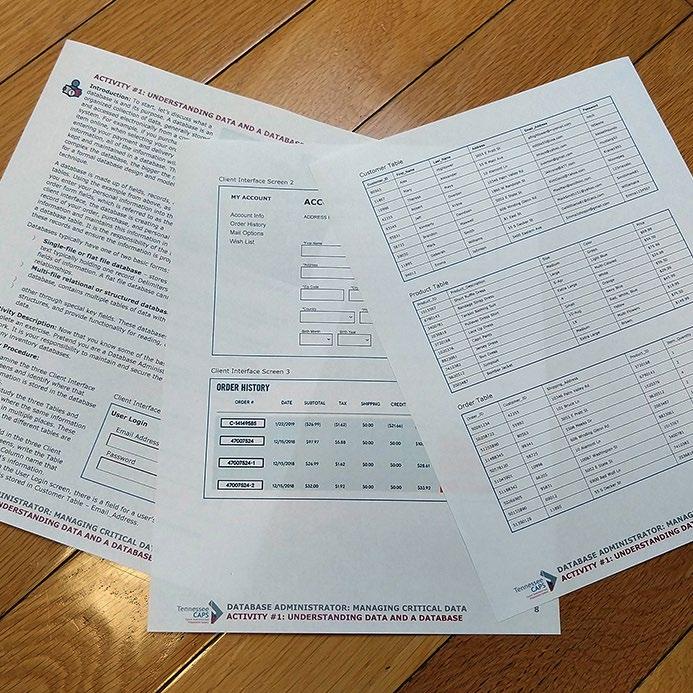
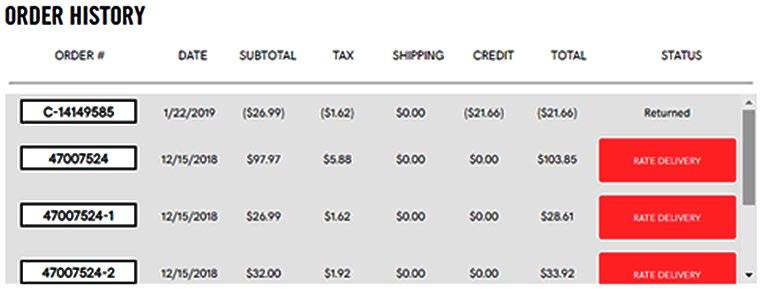
〉 Examine the three Client Interface Screens and find where that information is stored in the database tables.
〉 Next, study the three tables and find where the same information is stored in multiple places. This shows how the different tables are related to each other
〉 For each field in the three Client Interface Screens, write the table name and the column name that contains that field’s information.
Client Interface Screen 1
For example: in the User Login screen, there is a field for a user’s email address. That information is stored in the Customer Table – Email Address column.
MY ACCOUNT ACCOUNT
INFORMATION
Account Info Order History Mail Options
Wish List ADDRESS INFO *Required
Client Interface Screen 3
Customer Table
Product Table
The purpose of this exercise is to gain an understanding of how companies collect and maintain your personal information when you look at or buy things from their website. All of the data stored in the database can be used to monitor your buying habits and encourage you to buy more. For example, when products are on sale, have special discounts, or are discontinued, companies will market directly to customers who have purchased them before to increase their sales.
Activity Discussion:
〉 Was it difficult to read and understand the client interface screens? Why or why not?
〉 How difficult was it to read and understand the data tables?
〉 Were you able to see the relationship between the client interface screens and the data tables?
〉 Do you have a better understanding of how companies use databases to collect and store information you enter online?
ACTIVITY #2: CREATING AND MANAGING A DATABASE
Introduction: In Activity #1, you learned some database management basics such as how data is collected and stored in database tables. Now we are going to focus on how all of the information collected is stored, analyzed, and managed.
Activity Description: Imagine you are part of a team of database administrators for a new start-up company. You are responsible for designing and maintaining the company database. Before creating the database, you need to decide what product or service your company is offering and determine what information needs to be captured and maintained in the database.
Activity Procedure:
DISCUSSING IDEAS FOR YOUR START-UP COMPANY
Separate into groups and discuss the following questions:
〉 What is the name of your start-up company?
〉 What products or services will you provide?
〉 What information needs to be collected and maintained in a database?
Discuss these questions in your group and assign a team member to take notes below:
USING SPREADSHEETS TO CREATE AND DESIGN YOUR DATABASE
Using the internet, search for videos or websites on creating basic MS Excel spreadsheets and tables to help you design your company database. If you do not have access to a computer, use the database table examples from Activity #1 to help design your own tables on paper. Be creative!
Here are some links to get you started:
〉 Microsoft Excel Tutorial – Beginner (http://tn-caps.com/r/68DL1)
Discuss your database design and assign a team member to take notes below:
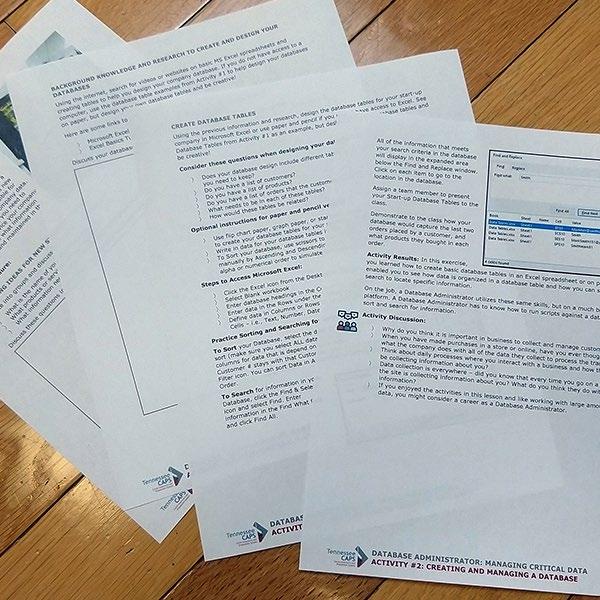
Based on what you learned about spreadsheets, design the database tables for your startup company using Microsoft Excel or Google Sheets or use paper and pencil if you do not have access to a computer.
Consider these questions when designing your database tables:
〉 Does your database design include different tables and columns for all of the things you need to collect information on?
〉 Do you have a list of customers?
〉 Do you have a list of products?
〉 Do you have a list of orders that customers have placed?
〉 What information fields need to be in each of the tables?
〉 In what ways might these tables be related to each other?
Optional instructions for paper and pencil version:
〉 Use flip chart paper, graph paper, or standard size paper to draw columns and rows to create the database tables for your start-up company.
〉 Write in data for your database tables in the correct columns and rows.
〉 To sort your database, use scissors to cut the rows and practice sorting the data manually by ascending and descending order. For example, reorder the cut rows by alphabetical or numerical order to simulate sorting data in your database.
Steps to Access Microsoft Excel:
〉 Click the Excel icon from the computer desktop or taskbar.
〉 Double click on Blank Workbook to open a new spreadsheet.
〉 Enter the database headings in the columns. E xpand column width as needed.
〉 Enter data in the rows under the correct columns.
〉 Define the data type in columns or rows by right clicking within the cell to open Format Cells and choose Text, Number, Date, etc.
Practice Sorting and Searching for information in your Database:
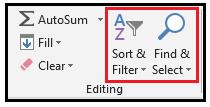
To sort your database, select the data in your database to sort. Make sure you select ALL data in the rows and columns for data that are dependent on each other For example, the customer number and customer name should be selected together. After selecting the data you want, click the Sort & Filter icon. You can sort data in ascending or descending order.
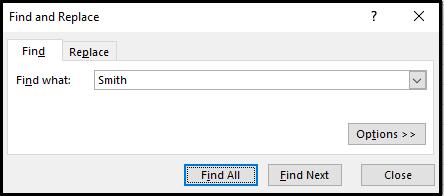
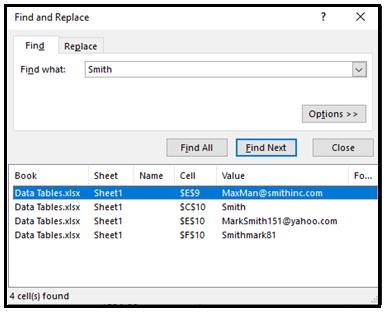
To search for information in your Database, click the Find & Select icon and select Find. Enter the information in the Find What field and click Find All.
All of the information that meets your search criteria in the database will display in the expanded area below the Find and Replace window. To go to the location of the data in the database, click on the item.
Assign a team member to present the database tables for your start-up company to the class.
Demonstrate to the class how your database would show the last two orders placed by a customer and what products they bought.
Activity Results: In this exercise, you learned how to create basic database tables in a spreadsheet or on paper. This enabled you to see how data can be organized in a database table and how you can sort and search a database to locate specific information.
Database administrators use these same skills in their work, but on a much larger scale. A database administrator has to know how to write and run scripts (series of commands) against a database to sort and search for information.
Activity Discussion:
〉 Why is it important for businesses to collect and manage customer data?
〉 Do you have a better idea of what companies do with the data they collect when someone buys something online?
〉 How do you interact with companies online or by using apps? What data might they be collecting about you?
〉 Data is collected every time you go on a website What do you think companies you visit online do with this information?
〉 If you enjoyed the activities in this lesson and like working with data, you might be interested in learning more about careers in database administration