Oxford University Press is a department of the University of Oxford. It furthers the University’s objective of excellence in research, scholarship, and education by publishing worldwide. Oxford is a registered trade mark of Oxford University Press in the UK and certain other countries.
Published in the United States of America by Oxford University Press 198 Madison Avenue, New York, NY 10016, United States of America.
For titles covered by Section 112 of the US Higher Education Opportunity Act, please visit www.oup.com/us/he for the latest information about pricing and alternate formats.
All rights reserved. No part of this publication may be reproduced, stored in a retrieval system, or transmitted, in any form or by any means, without the prior permission in writing of Oxford University Press, or as expressly permitted by law, by license, or under terms agreed with the appropriate reproduction rights organization. Inquiries concerning reproduction outside the scope of the above should be sent to the Rights Department, Oxford University Press, at the address above.
You must not circulate this work in any other form and you must impose this same condition on any acquirer.
Library of Congress Cataloging-in-Publication Data
CIP data is on file at the Library of Congress 978-0-19-087267-0
Printing number: 9 8 7 6 5 4 3 2 1
Printed by Marquis, Canada.
DEDICATIONS
Donald H. Cunningham
To Thomas M. Davis, Professor Emeritus of English, Kent State University; Howard W. Fulweiler, Jr., Professor Emeritus of English, University of Missouri; John S. Harris, Professor Emeritus, Brigham Young University; and Thomas E. Pearsall, Professor Emeritus of Rhetoric, University of Minnesota—with thanks for participating in my search for myself as a teacher, program administrator, researcher, and writer.
Edward A. Malone
To my father, Richard G. Malone, a graphic artist who worked for Lily-Tulip Cups for many years. He once forgot to add the red dot to the 7Up logo, and the mistake wasn’t caught until the cups were being printed in the plant. He might have lost his job over this costly mistake if the flawed artwork had not been approved by so many other people in the communication chain.
Joyce M. Rothschild
To my parents, Etta Scheiner Rothschild and Richard Rothschild, who nurtured my curiosity about the world and love of reading (and gave me Bulfinch’s Mythology for my 10th birthday), and to my husband, Patrick Morrow, for his love and his bravery.
CONTENTS
Preface ix Acknowledgments xiii
Chapter 1 Introduction: Looking Back and Moving Forward 1
Job Responsibilities 2
Required Knowledge and Skills 3
Readers and Users 6
Types of Documents 9
Working Methods 10
Work Environments 13
Training and Education 15
Exercises 17
Chapter 2 Preparing for an Editing Project 20
Understanding the Rhetorical Situation 21
Analyzing the Communicators 21
Analyzing the Audiences 24
Analyzing the Contexts 32
Appraising the Document 34
Understanding the Constraints of Time, Budget, and Equipment 38
Using a Completed Worksheet as a Project Resource 41
Exercises 41
Chapter 3 Planning and Implementing the Editing 43
Planning the Editing 44
Determining the Type of Editing 45
Determining the Level of Editing 47
Determining the Scope of Editing 47
Establishing Editing Goals and Tasks 48
Creating an Editing Plan 49
Implementing the Editing 50
Getting Feedback, Buy-In, and Sign-Off 50
Making Edits 51
Monitoring the Editing 52
Conducting the Final Review 53
Exercises 54
Chapter 4 Editing for Organization 63
Editing Organization to Harmonize Conflicting Purposes 64
Editing Organization to Conform to a Genre Convention 65
Editing Organization to Comply with a Document Specification 68
Editing Organization to Follow an Established Pattern 70
Alphabetical Order 70
Chronological Order 72
Spatial Arrangement 72
Order of Importance, Complexity, or Familiarity 73
Classification Pattern 74
Comparison or Contrast Patterns 75 Argumentative Arrangement 76
Editing to Improve Paragraph Unity and Coherence 78
Exercises 81
Chapter 5 Editing for Navigation 87
Two Ways of Creating Navigational Content 88
Adjusting the Way Informative Content Appears on Pages or Screens 88
Adding Textual Cues and Visuals to Indicate Organization 91
Navigation Aids in Print and Electronic Documents 92
Titles 92
Tables of Contents 94
Lists of Figures and Lists of Tables 95 Indexes 97
Cross-References 100
Forecast Statements 100
Main Headings and Subheadings 101
Cutaway and Extended Tabs 104
Headers and Footers (and Pagination) 104
In-Text References to Visuals 105
Navigation Aids Specific to Electronic Documents 105
Navigation Bars and Menus 106
Site Directories 109
Site Maps 111
Image Maps 111
Paging Buttons 111
Site-Specific Search Engines 115
Breadcrumb (or Pebble) Trails 115
Tag Clouds and Folksonomies 116
Exercises 120
Chapter 6 Editing for Completeness 122
Editing to Add Standard Document
Parts 123
Editing to Add Legally Mandated Content 130
Editing to Add Necessary Safety Content 133
Editing to Add Content
Necessary for Comprehension and Use 135
Assumptions Causing Omissions 135
Strategies for Detecting Omissions 137
Exercises 139
Chapter 7 Editing for Accuracy 142
Statements of Fact 143
Repeated Information 147
Names, Titles, and Addresses 148
Numbers and Math 151
Terminology 152
Visuals 154
Instructions 156
Documentation of Sources 156
Exercises 158
Chapter 8 Editing for Style 160
Readability 161
Clarity 162
Use Specific Words 163
Use Unambiguous Words 164
Use Terms Consistently 166
Use Words Affirmatively 166
Use Proximity to Highlight Grammatical
Relationships 168
Emphasis 170
Use the Emphatic Do 171
Use Intensive Pronouns 171
Use Emphasizers 171
Use Figures of Speech 172
Use Fronting 175
Use Cleft Constructions 175
Use End Focus 176
Use Verbs Instead of Nominalizations 177
Economy 178
Eliminate Redundancies 178
Delete Words That Are Understood 179
Delete Other Unnecessary Words 180
Replace Words with Pronouns and Abbreviations 181
Replace a Phrase or Clause with a Word 181
Convert a Clause into a Phrase 182
Combine Two Sentences 182
Novelty 184
Eliminate Clichés 184
Limit the Number of Quotations from Sources 185
Rewrite Overused Text and Be Alert to Plagiarism 187
Exercises 188
Chapter 9 Editing Visuals 193
Preparing to Edit a Visual 194
Editing a Visual 196
Is the Visual Necessary and Appropriate? 196
Has the Correct Type of Visual Been Used? 199 Does the Visual Follow Conventions and Meet Standards? 209
Is the Visual Sufficiently Informative? 212
Is the Visual Easy to Read and Use? 216 Does the Visual Meet Ethical and Legal Standards? 220
Checking the Placement of and References to a Visual 224 Exercises 226
Chapter 10 Editing Page Design 231
Principle of Alignment 231
Left Justified (or Flush Left) Alignment 232
Right Justified (or Flush Right) Alignment 234
Right and Left Justified (or Fully Justified)
Alignment 234
Center (or Centered) Alignment 234
Other Patterns of Alignment 236
Principle of Repetition 238
Repeated Font Families and Faces 238
Repeated Patterns 241
Other Repeated Elements 244
Principle of Contrast 246
Contrast in Text 246
Color Contrast 248
White Space as Contrast 249
Other Design Principles 249
Proximity 249
Balance 251
Direction 251
Exercises 252
Chapter 11 Editing for Reuse 253
Concepts: Understanding Content in a World of Devices 254
The Meaning of Content 255
Levels of Granularity 255
Content Management Systems 257
Metadata and Structured Content 258
Repurposed versus Multipurpose Content 261
Coupled versus Decoupled Content 263
Process: Identifying, Structuring, and Maintaining Multipurpose
Content 265
Identifying Your Content 266
Structuring Your Content 267
Maintaining Your Content 274
Exercises 277
Chapter 12 Copyediting: Principles and Procedures 281
Copyediting and Your
Career 283
Understanding the Copyediting Assignment 284
The Levels of Copyediting 284
Maintaining an Editorial Style Sheet 288
Style Manuals, Dictionaries, and Other Resources 290
Communicating with Writers and Others 292
Explanations 294
Queries 294
Requests 295
Copyediting on Paper 295
The Stet Command 299
General Guidance on Deletions 300
General Guidance on Insertions 300
Inserting Punctuation Marks 300
Structural Markup in Copyediting 304
Copyediting on Screen 305
Preparing to Use Track Changes 305
Creating a New Comment 309
Entering a Comment and a Reply 309
Making Deletions and Insertions 311
Hiding Formatting Changes 312
Helping Writers Use Track Changes 314
Using Spelling and Grammar Checkers and Search 316
Using Styles and Templates 317
Exercises 318
Chapter 13 Copyediting for Grammar:
Verbs 321
Introduction to Verbs 322
The Principal Parts of a Verb 323 Inflection of Verbs: Conjugation 326
Verb Aspect and Tense 327
Aspect 328
Tense 331
Verb Transitivity and Voice 332
Transitive and Intransitive Verbs 332
Active and Passive Voice 334
Verb Mood 339
Subjunctive Mood 339
Imperative Mood 343
Exercises 346
Chapter 14 Copyediting for Grammar:
Subject-Verb Agreement 371
Verb Number and Person 371
Subject-Verb Agreement in Number 373
Singular Nouns as Subjects Followed by Prepositional Phrases 374
Indefinite Pronouns as Subjects Followed by Prepositional Phrases 375
Expletives as Dummy Subjects 378
Compound Subjects 380
Subject-Verb Agreement in Person 383
Exercises 385
Chapter 15 Copyediting for Grammar: Nouns 393
Nouns with Faulty Plural Forms 394
Look for Nouns That Have Faulty Regular Plurals 397
Look for Nouns That Have Faulty Irregular Plurals 399
Look for Noncount Nouns That Have Been Improperly Pluralized 399
Look for Nouns That Should Be Plural in Form but Singular in Construction 402
Look for Singular Nouns That Should Be Plural in Form in Certain Senses 402
Nouns with Faulty Possessive Forms 403
Look for Possessive Forms That Are Mistakenly Plural, or Vice Versa 404
Look for Singular Nouns Ending in S that Have Only an Apostrophe after Them 404
Look for Compound Nouns That Show Joint Ownership When They Should Show Separate Ownership, and Vice Versa 405
Problems with Count and Noncount Nouns 406
Look for the Improper Use of Much (Of) and Less (Of) with Count Nouns 406
Look for Singular Count Nouns That Are Used Improperly with Kinds/Types/Sorts Of and Plural Count Nouns That Are Used Improperly with Kind/Type/Sort Of 408
Look for Unmodified Singular Count Nouns in Of-Phrases after Terms of Measurement 408
Problems with Collective Nouns 409
Inconsistencies in Number Among Nouns 411
Exercises 413
Chapter 16 Copyediting for Grammar: Pronouns 417
Vague Pronoun Reference 418
Vague Personal Pronouns 418
Vague Demonstrative Pronouns 419
Vague Relative Pronouns 420
Pronoun-Antecedent
Disagreement 422
Disagreement in Number 422
Disagreement in Gender 424
Problems with Pronoun Case 425
Problems with Subjective Case 425
Problems with Objective Case 426
Problems with Possessive Case 428
Problems with Relative Pronouns 430
Problems with Essential Phrases and Clauses 431
Problems with Nonessential Phrases and Clauses 433
Misuse of Reflexive Pronouns 434
Exercises 438
Chapter 17 Copyediting for Punctuation 443
Uses of the Apostrophe 444
To Form the Possessive of a Noun 444
To Form the Possessive of an Indefinite or Reciprocal Pronoun 445
To Form a Contraction 446
To Form the Plural of a Number or a Letter in Some Style Systems 446
Uses of Brackets 447
To Mark Material Inserted into a Direct Quotation 447
To Indicate an Obvious Error in a Quoted Passage 447
To Enclose a Parenthetical Statement within a Parenthetical Statement 447
Uses of the Colon 447
To Introduce a List 447
To Introduce a Direct Quotation 448
To Introduce a Phrase or Clause That Elaborates upon Information in the Preceding Clause 449
Additional Uses of the Colon 450
The Colon and Capitalization 450
Uses of the Comma 451
To Separate Items in a Series 451
To Separate Independent Clauses Joined by a Coordinating Conjunction 451
To Separate a Word, Phrase, or Clause from the Rest of a Clause 453
Additional Uses of the Comma 455
Uses of the Dash 456
To Introduce a List 456
To Set Off Parenthetical Material 456
To Emphasize a Shift or an Interruption in a Sentence 457
Uses of the Ellipsis 457
Uses of the Exclamation Point 458
Uses of the Hyphen 459
To Form a Compound Noun 459
To Form a Compound Adjective 459
To Form a Compound Verb 460
To Prevent Confusion of Words of Similar Construction 460
Other Uses of the Hyphen 460
Uses of Parentheses 461
To Enclose Additional Information 461
To Enclose Numbers or Letters in an In-Sentence List 461
Use of the Period 461
Uses of the Question Mark 463
To Indicate a Direct Question 463
To Punctuate a Polite Request 463
To Express Uncertainty or Speculation 464
Using a Question Mark Next to Another Punctuation Mark 464
Uses of Quotation Marks 464
To Identify a Direct Quotation 464
To Signify a Title of an Article, Essay, Report, Poem, Song, or Subordinate Part of a Longer Work 465
To Identify a Quotation within a Quotation 465
Other Uses of Quotation Marks 466
Using a Quotation Mark Next to Another Punctuation Mark 466
Uses of the Semicolon 467
To Separate Two Independent Clauses Connected by a Conjunctive Adverb 467
To Separate Two Independent Clauses Not Connected by a Coordinating Conjunction 467
To Separate Elements in a Series When Some of the Elements Contain Commas 468
Using a Semicolon Next to Another Punctuation Mark 469
Use of the Virgule 469
Exercises 470
Chapter 18 Proofreading 472
Copyediting versus Proofreading 473
Preparing to Proofread 474
Make Sure You Have the Most Recent Version of the Document 474
Clarify the Scope of the Proofreading to Be Done 475
Determine the Extent of Your Authority 475
Confirm Your Deadlines 475
Proofreading in Focused Passes 476
Formatting 477
Punctuation 477
Grammar and Usage 478
Spelling 479
Proofreading on Paper 479
Marks for Insertions 482
Marks for Deletions 484
Marks for Substitutions/Replacements 485
Marks for Making Font- and CharacterRelated Changes 487
Marks for Changing Formatting 490
Proofreading on Screen 491
Exercises 494
Glossary of Grammar Terms 497 notes 528
Index 562
PREFACE
Our world today runs on technical communication—or, more accurately, on the communication of technical information. In every sector of the economy or society— business and finance, education, engineering, the hard and soft sciences, the military, technology—a vast amount of technical information is continually being generated and needs to be conveyed to the readers who require it. Much of this information is transmitted in the form of reports, letters, manuals, brochures, websites, web pages, and multimedia presentations, and even stand-alone visuals or animations. And no matter what the form the documents take, at some point they may require the efforts of technical editors.
Technical editing—the topic of this book—is actually a form of quality assurance that helps ensure that documents in any medium are appropriate for their context and are produced at the highest quality for the lowest cost. Those who perform technical editing may or may not have the job title technical editor. In fact, in recent decades, the conflation of responsibilities of technical communicators and editors has become more common in business, industry, nonprofit organizations, and government and has led to a noticeable increase of self and peer editing—that is, writers editing their own work and that of other writers.
Whether professional or peer, technical editors are communication specialists with specialized knowledge and experience. When they put on their editing caps, they aim to ensure that the documents they edit meet the purposes, needs, expectations, and preferences of intended readers and users. They also endeavor to make the information that readers or users seek easy for them to locate and understand. Just as important, they strive to ensure that every document meets the objectives and purposes of the organization and individuals who are funding, authorizing, or originating it.
Technical editors usually work closely with writers and subject-matter experts who have definite purposes of their own and who are more experienced in writing for a professional audience of their peers than for readers outside their areas of specialization. As this description makes clear, technical editors often need to understand the complexities of the rhetorical situation into which they are thrust.
As you learn more about the varied responsibilities assumed by and competencies expected of professional and peer technical editors, we hope that you come to appreciate technical editing as a professional and dynamic practice. We intend to give you a lot to learn and think about. Bear in mind, though, that—no matter what field or profession you enter—your education will need to continue throughout your working life. This is certainly true of technical editing, which has been and will continue to be affected by changes in technology, communication practices, the conventions of language and usage, economic and political realities, and management practices. The pace of these changes will undoubtedly accelerate throughout the coming decades. The
many challenges and opportunities ahead will make technical editing an exciting field for the foreseeable future.
Our Audience
We wrote this book as a textbook with diverse audiences in mind. We hope you belong to one of them.
Our book is written primarily for students who are preparing themselves for technical communication careers and therefore need to understand and gain experience in the practice of technical editing. We would not have written this book if we did not think we could help students master the knowledge and skills they need to be technical editors.
This book also seeks to inform three secondary, but important, audiences who may already be engaged in working with technical editors, but who are interested in broadening and deepening their knowledge of technical editing:
■ Technical communicators already in the workforce who have some experience in editing or perhaps have ripened into experienced editors, but who are open-minded and adventurous enough to hone their practice and, in recognition that much has changed in the past few decades, view their work in new and enriched ways
■ Professionals in any field—perhaps competent writers—who wish to develop new work patterns and improve their ability to plan, write, revise, and evaluate documents and become better writers but also better editors of their own work and that of others
■ Writers and managers who need to understand what technical editors do and why and to develop better ways of working with them and of managing document projects that require editing
The primary and secondary audiences we just described are the ones we hope to reach. We assume they are reasonably proficient in writing and reading skills and know how to use a word processing program like Microsoft Word. We also hope that they keep in mind that the scope of and the responsibility for technical editing has expanded and is ubiquitous among technical communicators of all stripes.
The Aims of Our Book
We wrote Technical Editing: An Introduction to Editing in the Workplace as a textbook to support junior- and senior-level undergraduate courses and graduate courses in technical editing. It is both an overview and a practical introduction to the rapidly expanding and changing practice of technical editing. In writing this book, we aim to advance the practice of technical editing by presenting a comprehensive and up-to-date view of the field and practice that can be offered in a reasonable-sized book.
We have been governed by five major concerns.
First, we want to emphasize that technical editing—like technical communication more broadly—is a professional practice that has evolved over time and continues to change. Yet the professional identities of practitioners and the longevity of their interests are rooted in the field’s historical continuities rather than its discontinuities. A narrow focus on current technologies and the latest trends can foster a blinding and
debilitating presentism. It is difficult to manage change without an understanding of what has or has not worked in the past. Throughout our book, we promote a historical perspective as we cover recent developments and new directions in the field. Our goal is to prepare you to cope with and adapt to the frequent changes that may disrupt your professional life but also offer opportunities for professional growth.
Second, since technical editing has become an essential skill for anyone who plans to be a technical communicator, we want to help you learn how to edit documents intelligently and effectively in ways that fit the situation. We try to make clear what any person needs to know who plans to become either a technical communicator who occasionally edits or a professional technical editor. Among the most challenging tasks you will face will be working to bring in the highest-quality document in times when editing resources are limited and schedules are compressed; working with writers who are reluctant to have their documents edited either because they are worried about preserving their own voice in the document or about maintaining technical accuracy in the document; working under the pressure of a looming deadline; and deferring to writers who sometimes reject your editorial suggestions. To be an effective technical editor, you must learn to cope with these and similar situations.
Third, we try to provide an expanded and capacious view of technical editing. Technical editing is an elastic term, reflecting its interdisciplinarity and the varied policies and practices from one writer or organization to another. Thus, we view technical editing as including the following:
■ Performing all kinds of editing (light, medium, and heavy levels of substantive editing and copyediting) on all kinds of documents from proposals to marketing literature to company websites and social media
■ Collaborating with individual writers who range from subject-matter experts to technical communicators to managerial personnel, all of whom may have a wide range of writing abilities
■ Coordinating the editing of documents involving multiple writers and editors
■ Working in all types of business, industry, government, and non-government organizations
Fourth, we want to promote the importance and value of technical editing. Technical documents must be capable of withstanding critical scrutiny after they are published or released. In your editing, you will add value to other people’s documents by ensuring that they meet the needs of readers and users as well as the needs of your employer.
Fifth, while we draw heavily on years of experience as researchers, practitioners, and teachers, we acknowledge the many researchers, practitioners, and teachers who have helped shape the practice of technical editing. In chapter notes (located in a section at the back of the book), we point to published articles and books directly related to technical editing. These citations are intended to ground our discussion in the profession’s body of knowledge and present our information and advice as matters of research as well as expert knowledge and experience. To illustrate points about editing for style and copyediting grammar, we provide many examples from authentic technical and business documents along with full bibliographic information.
The Organization of Our Book
Much has changed in the field of technical editing in the past 70 years, so we open with a chapter that discusses the changes and continuities in technical editing since the mid20th century when technical writing and editing became a separate profession. Even though technical editing has undergone—and is still undergoing—significant changes, many practices and conventions have remained essentially the same and those continuities are reflected in this first chapter.
The seventeen remaining chapters provide a thorough understanding of technical editing as a systematic, rational, flexible, and learnable process that is always embedded in a specific rhetorical situation. They offer guided practice in the core competencies of technical editing: situational analysis, planning, substantive editing, copyediting, and proofreading. Yet each chapter was written to be relatively self-contained so that it could be read and understood on its own. You may wish to read selected chapters out of sequence. The book ends with a glossary of grammar terms and an index.
Special Features of Our Book
This book incorporates the following features that augment the chapters and that we hope you will find engaging:
■ Each chapter contains a list of learning objectives and a set of exercises that are tied to those learning objectives. The exercises are intended to be both interesting and challenging; they enable you to practice editing skills, solve editorial problems, and demonstrate your understanding of key concepts.
■ Each chapter contains one or more boxes that connect the content of the chapter to seven themes running throughout the book. These box themes have the following headings: “Defining Key Terms,” “Focus on Technology,” “Focus on Ethics,” “Focus on Global Issues,” “Focus on History,” “On the Contrary,” and “On the Record.” A “Focus on Global Issues” box, for example, covers a topic relevant to editing in international contexts; an “On the Contrary” box features an opposing view on a subject discussed in the chapter; and an “On the Record” box presents an extended quotation from a published source or from an interview with a technical editor or technical communicator (often one of our former technical editing students).
■ Each chapter includes notes that either provide further explanation of concepts or identify our sources of information or sources for further study of a topic.
■ Each chapter begins with an epigraph that relates to—and often comments upon—the main topic of the chapter. We intend the epigraphs to be thoughtprovoking and (sometimes) even amusing.
To support instructors’ use of this textbook, we have created an instructor’s manual that includes discussion questions, commentary on the exercises and suggested answers to some exercises, additional activities, and lists of resources for each chapter. The instructor’s manual also includes editable text versions of the chapter exercises. Instructors may download the instructor’s manual as a PDF from www.oup-arc.com after logging into the password-protected site.
Acknowledgments
Cunningham would like to acknowledge longstanding debts to those who helped him improve his teaching of technical editing.
■ Myron (Mike) L. White and James (Jim) W. Souther, professors emeriti of technical communication at the University of Washington, who shared their knowledge and wisdom of the practice and teaching of technical editing. Mike generously shared in a series of letters his philosophy and approach to teaching technical editing and copies of his syllabus and some of his assignments when Cunningham first began teaching technical editing over forty years ago. From Jim he benefitted immensely from a week of hours-long chats while a guest at Jim and his wife Rose’s cabin on the south fork of the Snoqualmie River.
■ Carolyn D. Rude and M. Jimmie Killingsworth, who back in the mid- to late-1980s, not content in merely talking about teaching technical editing, invited Cunningham to observe their teaching while they were colleagues at Texas Tech University.
■ Jeanette G. Harris and Isabelle K. Thompson, whose thoughtful responses to the earliest drafts of three chapters in Technical Editing were encouraging and helpful.
■ Don, as always, thanks his wife, Pat, for her support and encouragement.
Malone would like to thank the students in his technical editing classes for using draft chapters of this textbook and providing feedback on the chapters and exercises. He would also like to thank and acknowledge the contributions of the following individuals: Puspa Aryal, Amra Mehanovic, William Reardon, Nora Dunn, Sarah Hercula, and David Wright. Elizabeth (Libby) Richardson is “Helen” in Box 2.3; she is also the editor who noticed that the wrong variety of Portuguese had been used in a translation of a document. In particular, Ed appreciates the patient and loving support of his wife, Havva, and his children, Ayşen and Adem, who had to compete with this project for his time and attention.
Rothschild would like to thank the many eager and talented students in undergraduate and graduate technical editing courses at Auburn University who inspired her work on this book. She also thanks the technical editing students of Susan Youngblood at Auburn for their willingness to participate in a survey of student attitudes and skills. Gratitude is also due Tiffany Portewig and Kimberly McGhee, friends and former colleagues who contributed to an early draft of this textbook. Finally, Joyce thanks her family—Mark, Paul, Maggie, Sam, and Tabitha—and many wonderful friends for their moral support over the long course of this project.
Finally, all three authors would like to thank Steve Helba, Kora Fillet, Jodi Lewchuk, Garon Scott, and other present and past employees of Oxford University Press for their support, patience, and contributions to this book; Patricia Berube and the other professionals at SPi-Global for their hard work, good will, and guidance; and the many external reviewers who evaluated chapters of this book during its drafting and provided valuable and actionable feedback. In response to a recurring suggestion from the reviewers, we added four chapters about copyediting for grammar and a grammar
glossary. We made many other, smaller changes, as well, and we hope to have a chance to make improvements in future editions.
The following reviewers are responsible for some of this book’s strengths, but none of its weaknesses:
Mary Baechle, Indiana University–Purdue University Indianapolis
Michael J.K. Bokor, Long Island University
Hannah Bellwoar, Juniata College
Jonathan Buehl, Ohio State University
Megan Condis, Stephen F. Austin State University
Paul Cook, Indiana University of Kokomo
Keith Grant-Davie, Utah State University
Joshua DiCaglio, Texas A&M University
Mike Duncan, University of Houston-Downtown
Margaret Thomas Evans, Indiana University East
Catherine Gouge, West Virginia University
Teresa Henning, Southwest Minnesota State University
Jeffrey Jablonski, University of Nevada
Steven M. Kendus, University of Delaware
David Kmiec, New Jersey Institute of Technology
Erika Konrad, Northern Arizona University
Karen McGrane, School of Visual Arts
David McMurrey, Austin Community College
Cynthia A. Nahrwold, University of Arkansas at Little Rock
Traci M. Nathans-Kelly, Cornell University
Roland Nord, Minnesota State University
Kathryn Raign, University of North Texas
Colleen A. Reilly, University of North Carolina Wilmington
Adele Richardson, University of Central Florida
Benjamin Smith, Northeastern State University
Stephanie Turner, University of Wisconsin-Eau Claire
Laura Vernon, Radford University
Aimee Whiteside, University of Tampa
Bill Williamson, Saginaw Valley State University
We invite instructors and students to send feedback to us at the following email addresses:
■ Don Cunningham (cunnidh@mail.auburn.edu)
■ Ed Malone (malonee@mst.edu)
■ Joyce Rothschild (rothsjm@mail.auburn.edu)
Instructors using this textbook will find the instructor’s manual with answer keys, editable text versions of the chapter exercises, and the chapter notes with clickable URLs by going to www.oup-arc.com or sending a request to Ed Malone (malonee@mst.edu).
CHAPTER 1
Introduction: Looking Back and Moving Forward
The role of the technical editor in the modern organization is evolving. As a matter of necessity, the role is growing and changing with the technologies, the fast-paced processes, and the new growing and social writing environments. As much as the role changes, though, it remains grounded in its traditional publishing roots. . . . I believe that as we participate in the whirlwind evolution, we must remember where we came from.
—Michelle Corbin 1
Technicalcommunication involves speaking, writing, editing, illustrating, translating, and related activities. (See Box 1.1 for an explanation of the term technical.) It is an ancient practice that predates the invention of writing. World War II spurred the growth and recognition of technical communication as an occupation—so much so that by the mid-1950s it had become a separate academic discipline and a profession in the United States.2 Like so much else in our world, technical communication has undergone major changes since the mid-20th century because of societal and economic transformations and revolutionary developments in communication technologies and practices. Editing technical documents was never a simple or easy process. It required some knowledge of the document’s specialized content; an understanding of government specifications and the technologies of printing; expertise in grammar, spelling, and punctuation; and the ability to multitask. Now, in addition to those skills, technical editing involves more diverse audiences, new organizational roles, and a broader array of complex tools and modes of communication. The major changes in editing parallel the transition of most of the world’s economy from manufacturing based to service, technology, knowledge, and information based. With this transition has come the need to embrace rapid and frequent change as a constant and think about editing in new ways.3
The notes for each chapter can be found in a separate section near the end of this book.
The Technical in Technical Communication
Technical communication is often thought to be communication that uses—or is mediated by— technology. But that alone is not enough. Whether communication is technical is determined by its content and purpose, not by its genre or delivery mode. The adjective technical means specialized or practical. Content is specialized if it is particular to one
discipline or subject area. It is practical if it enables users to perform an action, such as a task, or make a decision. Content is not technical if its purpose is mainly or solely entertainment or artistic expression or if it is general in nature. Communication is more likely to be technical if it occurs in the context of work rather than leisure activities.
Whether you believe that the role of full-time technical editor is giving way to technical communicators as peer editors or that technical editors are expanding their roles by taking on new responsibilities and job titles, the necessity of knowing how to edit in the workplace is greater than ever. Those who assume the responsibility of editing their own documents or those of others need to know how to think and work like a professional editor. Thus, much of what we say about professional editors and editing in this book applies more broadly to all technical communicators who will have to edit documents as part of their jobs.
In this chapter, we focus on seven major topics as we compare and contrast technical editing in the past with technical editing in the present:
■ Job responsibilities
■ Required knowledge and skills
■ Readers and users
■ Types of documents
■ Working methods
■ Work environments
■ Training and education
Job Responsibilities
Several surveys of editors in the mid-20th century shed considerable light on the job responsibilities of technical editors in the past.4 Working on paper, they checked and fixed the organization and formatting of reports, corrected usage mistakes, and revised text for clarity. Occasionally they might have to rewrite or reorganize all or part of a manuscript. Later they might check the layout dummy to see whether the blocks of text had been pasted on in the correct order; they might also check the illustrations and write captions and labels for them; sometimes they even checked the photographic negatives before the images were transferred to plates for printing.5
These editors sometimes doubled as writers or managers of writers. Although they might create the company’s style guide; shepherd reports through security clearance, reproduction, and distribution; supervise the production of artwork; and even teach
knowledge and Skills 3
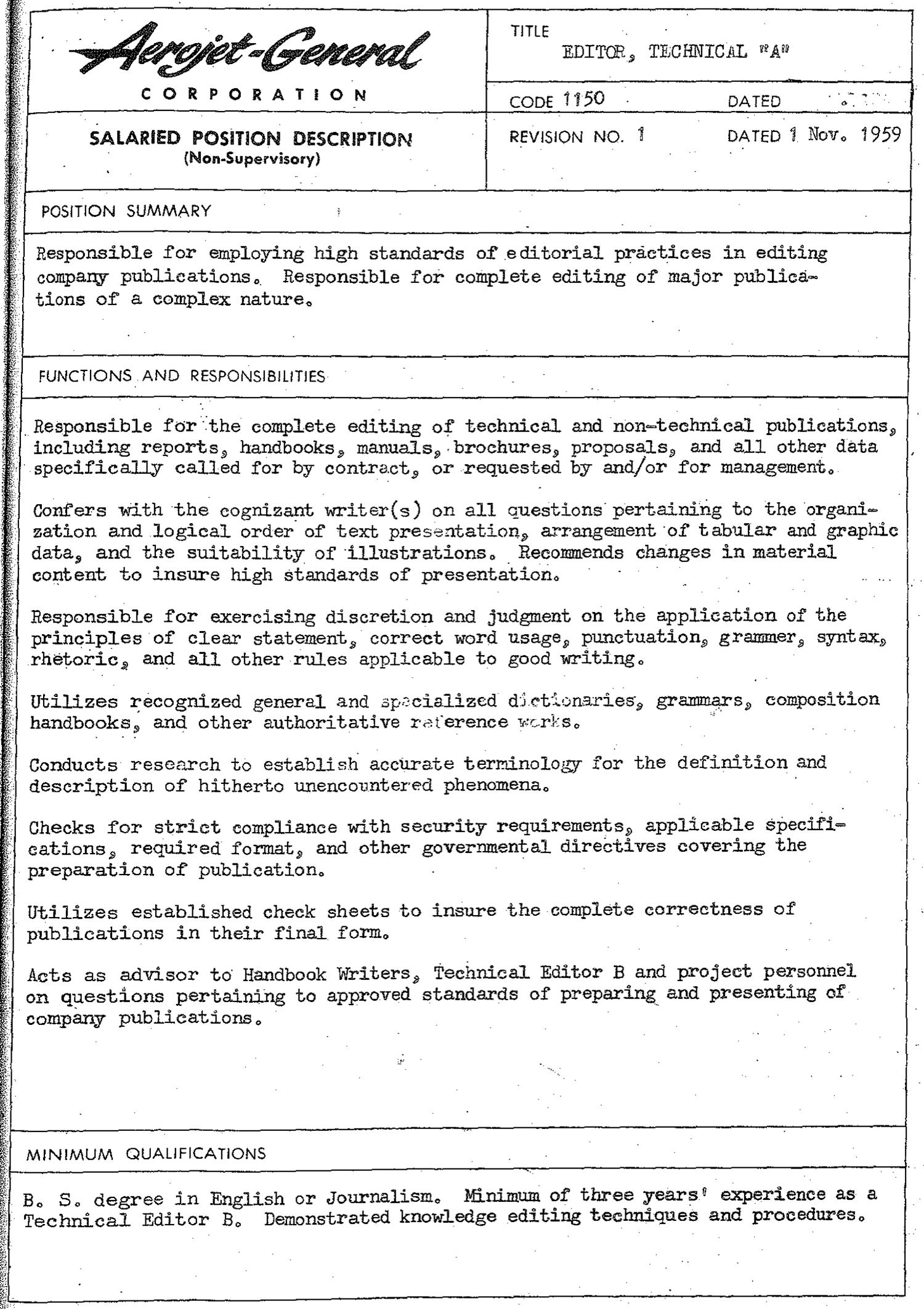
writing courses in the workplace, their main responsibility was to ensure the accuracy, readability, logical organization, and standard formatting of documents. (See Figure 1.1 for a representative job description for a technical editor in the 1950s.)
Today, technical editors are still concerned with the accuracy, readability, logical organization, and formatting of documents, but they are more likely than in the past to edit substantively, and some even see themselves as information architects.6 Among members of the Society for Technical Communication (STC), there are vocal proponents of the view that editing is a form of quality assurance7 and that editors act as advocates for the reader or user as they strive to ensure the overall quality of the communication. Information products (e.g., manuals, help systems, websites) can undergo testing just as software or military equipment does, and in an ideal world all such documents would be subjected to rigorous usability testing under the supervision of an editor, but many factors—such as cost, time, and tradition—militate against this ideal. The only “testing” that most documents receive is when an editor evaluates them against established standards and best practices.
Editors may double as writers and supervisors, as in the past, or as translation managers, usability analysts, and information architects. In fact, in some settings, the role of technical writer, or content developer, is being transformed into that of a multimodal editor—one who edits content in multiple modes, such as text, video, and sound.8 The editing of existing content is edging out the authoring of original content as the main activity of technical communicators.
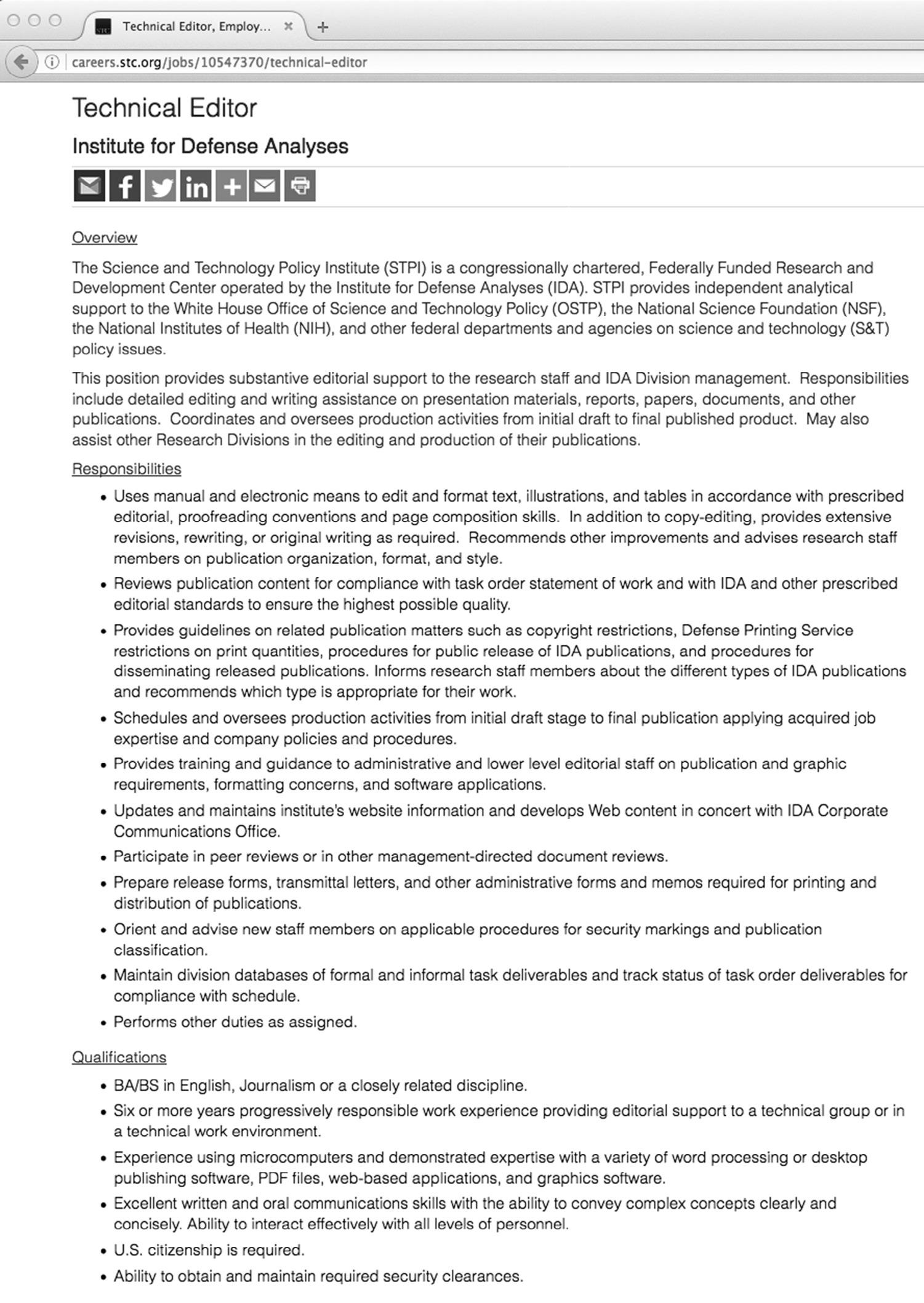
In addition to substantive editing, copyediting, and proofreading, editors may be called upon to create RoboHelp and FrameMaker templates for content developers; plan and maintain collections of modular content; synthesize the many voices of a collaboratively written document into one unified voice; make sure that audio is properly synchronized with text in a presentation; verify that links and other navigation aids are working on a web page; check the responsiveness of a touch-screen interface in relation to content; and help make documents world-ready for a global audience. (See Figure 1.2 for a representative job description for a technical editor in 2018.)
Required Knowledge and Skills
Editors in the past—like editors today—needed to have some knowledge of the subject matter of the documents they were editing, but they did not have to be subject-matter experts (SMEs). In fact, unless other experts were the intended audience for a document (e.g., a journal article), the editing process benefited from having an editor who knew less about the content than the writer did. Less knowledge meant that it was easier for the editor to assume the point of view of a member of the nonspecialist audience and ask the right questions about the content. One of the challenges that editors faced then (and still do today) was trying to anticipate all the possible misunderstandings that readers might have. (See Box 1.2 on the different functions of writer and editor.)
Soft skills such as tact, curiosity, and meticulousness have always been part of the job. Editors needed to be competent at managing projects, following instructions,
Chapter 1: Introdu C t I on: Look I ng Ba C k and Mov I ng Forward
Figure 1.1 Job Description for a Technical Editor, 1959.
Note the similarities and differences between this 1959 job ad and the 2018 job ad in Figure 1.2.
Source: Reprinted with permission of Aerojet Rocketdyne.
Figure 1.2 Job Description for a Technical Editor, 2018.
This employer seeks a technical editor who has a degree in English or journalism rather than specifically in technical communication. The public’s awareness of the academic preparation available in technical communication has improved very little over the past sixty years.
Source: Copyright 2017 Institute for Defense Analysis. Reprinted with permission.
The Difference between a Writer and an Editor
I never considered myself a technical writer because I didn’t have the technical expertise in any field. But as Joe [Chapline]1 came to realize, a technical editor performs a completely different function, and can truly serve in just about any field. I know that I edited many a paper that I barely understood, yet still satisfied the author. One special requirement in the electronics field is the need to make sure that the material not only can be clearly understood, but also that it cannot be misunderstood. In many cases, that can be as important as life itself.
—Eleanor M. McElwee, a long-time technical editor at Radio Corporation of America (RCA) and one of the founders of the IRE Professional Group on Engineering Writing and Speech, the ancestor of the IEEE Professional Communication Society, in an email interview with Edward A. Malone on November 3, 2007
and communicating with coworkers or clients. Some academics in the 1950s and 1960s advised technical editors to study psychology, communication theory, linguistics, and management theory,9 but few editors had the time or inclination to take this advice.
Editors today must possess an even broader spectrum of skills and knowledge than in the past: visual literacy (the ability to obtain and share information through images and other visuals); an understanding of interaction design (the facilitation of a successful interaction between a user and an app, website, or other document); and familiarity if not proficiency in a broad range of software applications (help authoring, image editing, database management), markup languages (HTML, XML, CSS), and online collaboration tools and social media. Rather than knowledge of printing processes, editors must have a working knowledge of single-source publishing, iterative software development, and cloud computing. (See Box 1.3 for a chronology of relevant tools and technologies.)
The offshoring of technical writing jobs—as well as the increasing number of scientists and engineers who use English as a second language (ESL)—has created a need for editors who can edit deeply for style and mechanics.10 Moreover, the shift from local to global markets and audiences has created a need for technical communicators, including editors, who are culturally informed and sensitive; environmentally aware and responsible; and global thinkers.
Readers and Users
Editors in the 1950s and 1960s typically edited reports written by content specialists for other content specialists or manuals for nonexpert users, but the focus was not on the needs of the reader, per se. It was on grammar and usage rules, government specifications, and the exigencies of production. They talked about readability (the ease
BoX 1.3
Focus on technology
Chronology of Technical Editing and Its Tools
In the 1950s, the common tools of the technical editor were pencils, erasers, and sometimes scissors and tape, as well as reference books and style manuals. In the 2010s, the common tools were computer
hardware and software and reference books and style manuals, both online and in print. The following chronology highlights selected developments in technical editing and related technologies.
1952 IBM introduces a typewriter with changeable typebars that have special symbols on them. Earlier typewriters provided various means to type these symbols that were not as user-friendly as IBM’s changeable typebars.1 The work of technical typists had to be checked by technical editors.
1958 The first book on technical editing includes a chapter titled “Editing Know-How—Techniques and Tools,” but the tools referred to are dictionaries, grammar books, and style manuals. Another chapter, “Training the Internal Editor,” states that technical editors must be familiar with printing technologies such as Ozalid, offset lithography, and letterpress.2
1961 IBM markets the Selectric typewriter, which uses a “spherical typing element” instead of typebars. A technical typist could remove the “ball” and insert another one that had special characters and symbols on it.3
1969 A UCLA student sends the first email message from UCLA to Stanford via ARPANET, one of the networks that would evolve into the Internet.4 One of the first managers of domain names on ARPANET was Jeanne B. North, a technical librarian. A decade earlier, North played a significant role in the formation of the Society of Technical Writers and Publishers, later called the Society for Technical Communication.5
1971 IBM Researcher Charles Goldfarb coins the term markup language. He is the inventor of Generalized Markup Language (GML) and later Standard Generalized Markup Language (SGML).6 In years to come, some technical editors would use such markup languages extensively.
1976 IBM files for a patent on a “System for automatically proofreading a document.” Patent 4136395 is granted in 1979. This is one of the first spell checkers for a word processing application.7
1980s Several articles about online/onscreen editing are published in technical communication journals.8 Technical editors are experimenting with onscreen editing.
1984 Apple joins Commodore and IBM in the personal computer market with the Apple Macintosh (128k). The following year, Aldus releases PageMaker 1.0 for the Macintosh, ushering in the era of desktop publishing.9
1986 Microsoft introduces “Redlining” in Word 3.11. A year later, this style sheet capability morphs into “Marked Revisions” in Word 4.0. The tool continues to evolve with the program and is renamed “Track Changes” in Word 97.10
1989 CERN Fellow Tim Berners-Lee submits a proposal to his supervisor for the creation of the World Wide Web and soon thereafter invents Hypertext Markup Language (HTML).11
1992 Carolyn Rude and Elizabeth Smith survey technical editors and conclude that “Very little software has been designed specifically for editing the work of others, but more is available than editors are using widely.” They mention DocuComp (for document comparison) and WordPerfect’s “Comment feature” and its “Redlining and strikeout options” (for commenting and revising).12
1995 Thomas M. Duffy reports that some of the technical editors he surveyed were using software applications such as Novell’s (later Corel’s) WordPerfect, Microsoft’s Word, Corel’s (originally Aspen’s) Grammatik, Petroglyph’s Editorial Advisor, and Frame Technology’s (later Adobe’s) FrameMaker.13
1996 The World Wide Web Consortium (W3C) publishes a working draft memo on Extensible Markup Language (XML).14 Over the next decade, XML eclipses HTML in importance as a markup language used in authoring.
2001 IBM unveils the Darwin Information Typing Architecture (DITA), an XML-based system for structuring content. Credited with naming this new architecture is Gretchen Hargis, an IBM employee and co-author of Developing Quality Technical Information 15 Six years later, three IBM technical editors declare, “This new focus on DITA elements and technology has re-created the role of the technical editor in the age of topic-based authoring.”16
(continued )
Chapter 1: Introdu C t I on: Look I ng Ba C k and Mov I ng Forward
2007 Geoff Hart, a technical and scientific editor, publishes the first edition of Effective Onscreen Editing: New Tools for an Old Profession, which explains the use of Microsoft Word in onscreen editing. (The third edition, published in 2016, still includes the chapter titled “Overcoming Resistance to Onscreen Editing.”)17
2007 Adobe Systems releases the Technical Communication Suite 1.0, consisting of FrameMaker, RoboHelp, Captivate, and Acrobat.
2016 For the first time in history, more people access the Internet with mobile devices and tablets than with desktop computers.18
2018 Information 4.0—content tailored on the fly to each individual when needed—becomes a hot topic of discussion as technical communicators acclimate to the so-called Fourth Industrial Revolution (or Industry 4.0).19
of reading) rather than usability (the ease of using) and located readability in the text rather than the audience’s interaction with the text.
Both content specialists and nonexpert users were accustomed to reading long documents of mainly text. Most had the patience and attention to read such a document and could be expected to read linearly from beginning to end (if they had the time and need to read the document in the first place). Although they appreciated illustrations and effective page layout, they did not require either to hold their attention. They were more likely to be disconcerted by grammar and punctuation mistakes than by too much gray space or too few headings on the typed or printed page.
Reading in general has been on the decline in America; the percentage of individuals who read a substantial piece of text on a daily basis reportedly fell from 26.3 in 2003 to 19.5 in 2016.11 In our current attention economy, attention is a limited resource in high demand.12 Reading long texts may require more attention than users are willing to give. Experts and students in science, technology, engineering, and mathematics (STEM) disciplines tend to read selectively, paying attention to what is important to them at the moment.13 There is nothing new about selective reading, but now it may be the typical way of reading most texts.
Marc Prensky described digital natives—those born in the digital age—in the following way: “They like to parallel process and multi-task. They prefer their graphics before their text rather than the opposite. They prefer random access (like hypertext). They function best when networked. They thrive on instant gratification and frequent rewards. They prefer games to ‘serious’ work.”14 Subsequent research has called this set of assumptions into question, but there is ample evidence that people in general and young people in particular are spending many hours a day online, playing interactive games, viewing multimedia more than reading text, and communicating with others in new ways.15 The belief persists among academics and others that these activities are affecting the way digital immigrants, as well as digital natives, think and behave.16
The majority of users may have always preferred to learn socially—that is, through observation of and interaction with other users—rather than on their own.17 In the past, users often had no choice but to read a print manual or learn through trial and error. Recent communication technologies are facilitating social learning and giving technical communicators new ways to reach audiences. Today, users communicate on Facebook,
types of documents 9
Twitter, and LinkedIn, less frequently by email than in the past, and they often get their information from Wikipedia and YouTube.18 They may need video or audio delivery of content in addition to (or instead of) paper- or text-based content.19 As information architects, editors must take into account these changes in reading, learning, and social behaviors when choosing media and designing information for audiences.
The users of technical information include people with disabilities ranging from hearing problems to color blindness to arthritis. Accommodations are not only ethically desirable but also, in many cases, legally required. Editors must be familiar with accessibility issues and the standards for complying with the Americans with Disabilities Act and Section 508 of the Workforce Rehabilitation Act, and sometimes international laws.20 They must also help create world-ready documents for international users by implementing controlled forms of English and preparing documents for machine translation.
Types of Documents
Although motion pictures were used to communicate technical information in the 1950s and even earlier, and scripts, story boards, and the films themselves required editing,21 the average editor’s duties in the past were limited to print media. Editors usually worked on manuals and reports or articles intended for publication in professional journals or the texts of speeches intended for presentation at professional conferences. Depending on where they worked, they might edit proposals, brochures, bulletins, sales literature, translations, data sheets, magazines (e.g., house organs) or journals, and company correspondence. At large government facilities such as the Los Alamos Scientific Laboratory and the Oak Ridge National Laboratory, an editor might even be called upon to edit the thesis or dissertation of a scientist who was working at the facility and simultaneously pursuing a graduate degree.
Like editors today, editors in the past often wrote or edited the text associated with illustrations such as graphs, diagrams, charts, maps (especially legends), drawings (labels), and photographs. They might be tasked to compile and/or edit tables of information, usually numerical data. These tables were common in technical manuals and scientific reports and often required careful, tedious checking. Editors sometimes proofread slides—not the PowerPoint type, but the positive-film type.22 Some of them routinely inspected layout dummies, photographic proofs, and the finished (printed) products of their labor. Most editors, though, spent most if not all their time editing one type of document, usually proposals, reports, or manuals.
Editors today work with images, as well as text, and the number and diversity of images are far greater than they were sixty years ago or even thirty years ago. Much information is communicated through the careful integration of multiple media— i.e., text, images (static and dynamic), and sound. A technical document can be a video that includes text, overlaid sound, and static images, or a text that incorporates video and static images—to name just two of the possible combinations. The editor is concerned with the proper integration of these media and the resulting message.
Interactivity also plays a major role in the communication of technical information in our age—not just on websites, but in interfaces for mobile devices, physical
wayfinding systems, and even digital games.23 Just as the topics of discussion shifted from “readers” and “readability” to “users” and “usability” in the 1990s, they are now shifting from “users” to “participants,” “collaborators,” and “experience design.” An editor might be called upon to perform an interactivity or experience edit of a Flashbased game that a company is using to train employees.24
Many of the genres that existed in the 1950s and 1960s—such as reports, manuals, and proposals—still exist today and still require editing, but they are more likely to be published or delivered online, as well as—or instead of—in print. And digital publishing environments have spawned new genres, such as the help system, website, podcast, screencast demonstration, and wiki-based documentation.
Contemporary editors help prepare documents for multiple outputs ranging from print media (brochures, catalogs, data sheets) to various electronic media (websites, DVDs, podcasts) and from hand-held devices (smartphones, tablets, and electronic readers) to laptop and desktop computers. The emphasis often falls on reduction of content—not to save money on paper, but to facilitate such goals as reuse of content, usability on small-screen devices, and retention of readers with increasingly limited attention spans. Because new media and devices are springing into existence seemingly overnight, editors must anticipate future developments and edit strategically.25
Working Methods
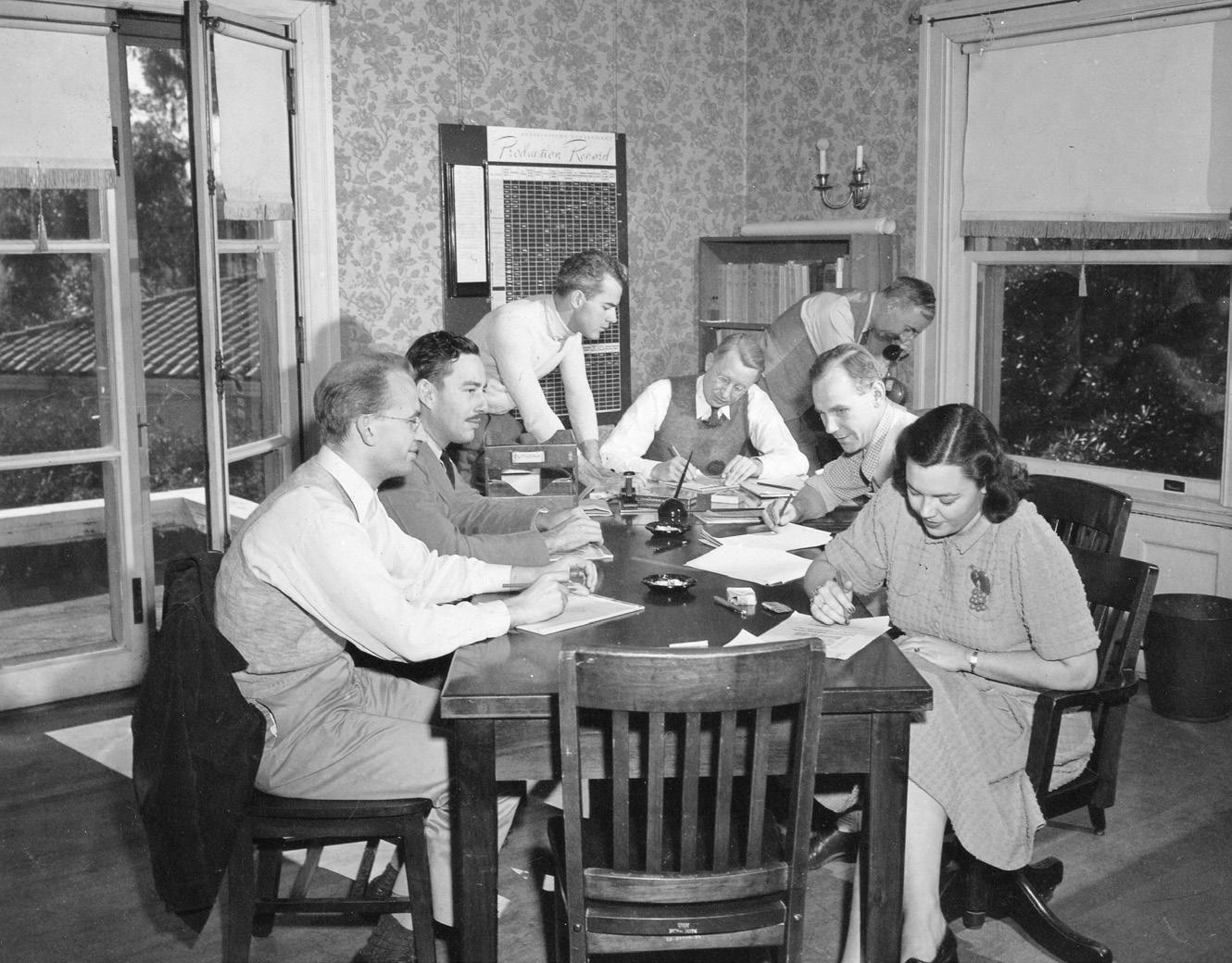
Editors used to work exclusively on paper, using a set of age-old symbols to communicate insertions, deletions, substitutions, and comments to the author or instructions to a typist or typesetter. They did not usually make changes to documents directly and silently. Instead they marked on the paper in pencil or pen so that someone else (the author or a member of the production staff) could make the changes. (Figure 1.3 shows technical communicators at work in the 1940s.)
If the document included tables of dense numerical or other data, two editors might work together, one reading the dead copy and the other checking the live copy.26 They had checklists of things to look for and areas to cover, but in practice they did as much editing as they could in the time they had, sometimes settling for light edits.
In the past, as in the present, editors often met with the authors in person or over the telephone, and a great deal of information was exchanged by word of mouth. At large government facilities and companies, there might be six or seven editors under the supervision of a manager (likely a former editor). These colleagues could consult one another for advice. If they wanted to talk with editors at other facilities or companies, they could pick up the phone, but often they waited to see them at professional conferences. Companies in the past were more likely to pay an employee’s registration and traveling expenses for a conference than they are today.
The first electronic computer was invented in the 1940s, but personal (or desktop) computers did not come along for decades. Writers and editors in the 1950s and 1960s used pens and pencils, erasers, correction fluid, filing cabinets, and mechanical calculators, and they relied on production personnel who used typewriters and operated other specialized equipment. When they did research, they consulted reference
Figure 1.3 Technical Communicators at the University of California Division of War Research (UCDWR), Point Loma, mid-1940s.
The lack of diversity in this group was typical of the period, but the presence of a woman should be noted. Women worked as editors, illustrators, and draftsmen (among other positions) at UCDWR. The tools in this workplace included paper and pencils as well as reference books, a telephone, and a “Production Record” board.
Source: Reprinted with permission from the Sam Hinton Papers, Special Collections & Archives, University of California San Diego.
books (dictionaries, atlases, usage handbooks, and almanacs) on their own shelves, or they went to the company library, which contained reference books, professional journals, and technical documents (reports, manuals, etc. that their company or some other company had produced). They were assisted by the company librarian, known as a technical or special librarian.27
Since the mid-1980s, editing tools have changed as editors have transitioned away from paper editing to electronic (or “onscreen”) editing. (See Box 1.4 for a comment on these changes.) Several surveys of editors in the 1990s—about a decade after computers had become a common tool in technical editing—suggested that paper editing was still being widely practiced.28 Even now, some editors prefer to edit on paper and will print out online documents to edit them. But most prefer—and are often required—to edit electronically. Their tools include online dictionaries, encyclopedias, style manuals, and other reference works. Rather than visiting the company library, they have direct access to online archives, such as the US Geological Survey Publications Warehouse or the NASA Technical Report Server.
Changes in Text-Production Tools
A technical writer beginning a career during the first 25 years of [the Society for Technical Communication’s] existence would likely have seen few major changes in tools for writing: entire careers might have begun and concluded before the pencil or typewriter was replaced. In contrast, a writer beginning a career during the second 25 years [after 1978] would have experienced dramatic changes in the tools of production and the organization of work.
—Katherine D. Durack, “From the Moon to the Microchip: Fifty Years of Technical Communication,” Technical Communication 50, no. 4 (2003): 571–584 (at 571)
Nowadays, editors use word processing programs such as Microsoft Word or publishing tools such as Adobe Acrobat or FrameMaker. Instead of (or in addition to) the traditional copyediting and proofreading symbols, they use tools such as Ink Editor in Microsoft Word or Edit PDF (formerly called TouchUp Text Tool) in Adobe Acrobat to make changes directly to a document, or they use tools such as Track Changes and New Comment in Word to show insertions, deletions, and comments. In electronic editing, editors are more likely to make changes directly to the document than merely to signal changes that need to be made. They may also use programs such as Photoshop to edit images, Flash to edit animation, and After Effects to edit video.
Editors often use metadata tags (such as the elements used in DITA)29 to structure content and prepare it for output to mobile and other devices. Whereas editors in earlier times took pains to properly contextualize content, topic-based writing and singlesource publishing have forced editors to decontextualize content for use in almost any type of document, whether print or electronic. In practice, it is not possible to separate content completely from a context, but editors can help to make modular units of content less dependent on context.30
The Internet has made it possible for editors to communicate with other editors quickly and easily, and this type of consultation—through discussion lists, by email, on social networks—has become more or less part of the editing process. Through user forums and other parts of the social web, editors have far greater access to representatives of their target audience than editors in the past, and some editors make prudent use of these sources of information. Rather than meeting in person with the authors of content, they often communicate with them in real time (or nearly so) through Google Docs, FaceTime, and Zoom.31
In earlier technical-editing practice, the development of documents was regarded as a linear process: create the document and then, if necessary, bring in the editor or editors. Beginning their work late in the development process, they focused mainly on ensuring accuracy of content and correcting any grammatical, punctuation, or spelling errors they found, no matter how poorly the document had been designed to meet the needs and interests of target audiences and user groups. After receiving documents to be edited as the last stage of preparation, they did their best to clean them up.