Thank you for choosing us for your healthcare coverage.
This guide includes information about your healthcare benefits, tips on how to use them, who to call with questions and more—all in one convenient place. It’s designed to help you get the most out of your health plan.
In this guide
We’re here for you when you...
Get started
Need care
Need access
Want to Be Well
Want help managing your health
Have questions
Join us on social media:
Facebook: facebook.com/BSWHealthPlan
Twitter: @BSWHealthPlan
LinkedIn: linkedin.com/company/BSWHealthPlan
Instagram: instagram.com/BSWHealth
Your member ID card
Important: Show your new card to your providers — even if you were a Baylor Scott & White Health Plan member last year. Your ID number or other information may have changed, and your provider needs your current information to check your coverage and bill the correct amount.
FOR PROVIDERS FOR MEMBERS
Electronic Claims: Availity: 94999
Paper Claims: Claims: Baylor Scott & White Health Plan ATTN: Claims PO Box 211342 Eagan, MN 55121-1342
Prior Authorization: Authorization: Medical Benefit Visit the provider portal Fax: 800-626-3042 Phone: 888-316-7947
Possession of this card or obtaining precertification does not guarantee coverage or payment for the service or procedure reviewed.
Important Information: Important Information:
• In a medical emergency, call 911 or go to the nearest emergency facility. Customer Service: 844-633-5325 Service: (TTY: 711) 24/7 Nurse Line: 877-505-7947
• Self-Service Portal: MyBSWHealth.com
• To avoid out-of-network costs and provider balance billing, find a provider at BSWHealthPlan.com
Your member ID card will be mailed to your home. You can view your card on the MyBSWHealth app and download/print a copy or request a replacement through the member portal at MyBSWHealth.com.
The ID card shown above is a sample. The exact location of certain elements may vary on your card.
The POWER to choose.
When you need care, you have options.
24-HOUR NURSE LINE
Have a medical question? Not sure if you should see a doctor? Ask a nurse! Call the number on the back of your ID card.
VIRTUAL CARE
For things like allergies, bladder infection, cold, flu, pink eye, sinus infection or stomach problems. Choose MyBSWHealth or Teladoc. Teladoc also offers treatment for mental health conditions during select hours.
PRIMARY CARE DOCTOR
Call your doctor to schedule a visit if you don’t need care immediately.
WALK-IN CLINICS
Same-day appointments when your doctor is not available.
URGENT CARE
When it’s not an emergency but you need hands-on care and can’t wait for an appointment.
EMERGENCY ROOM
Any condition you believe to be life-threatening.
Get the care you need
You can search for doctors, pharmacies, hospitals and other facilities by type, name, distance from your location, and more.
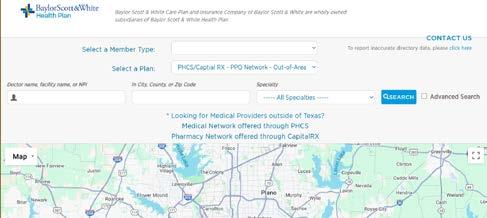
To find the one that’s right for you, go to BSWHealthPlan.com/Care and:
1. Click on the “Employer Group Networks” tab
2. Choose “PHCS/Capital Rx-PPO Network-Out of Area member plan” from the chart
3. Start your search
▪ Search by name, specialty and/or location
▪ See practice locations, contact information and maps
▪ Get details, including network participation and hospital affiliations
▪ Add filters for gender, board certification, accepting new patients and more Watch this video on how to find a provider.
PHCS provider search For additional options, including providers outside of Texas, click on the link above the map (circled in red) to access the PHCS provider directory.
Skip the waiting room.
Baylor Scott & White Health Plan members have two options for virtual care: BSWHealth and Teladoc.
Baylor Scott & White Health Plan members have options for care anytime. Even bedtime. You can access virtual urgent care 24/7/365, or make an appointment with a therapist or psychiatrist (7 AM to 9 PM)—all from the comfort of home or wherever you are.
Need care now?
If it’s an emergency, call 911 or go to the nearest Emergency Room. If it’s not an emergency something like seasonal allergies, cold and flu, bladder infection (UTI), stomach issues, mental health concerns, and so on—virtual care could be just what the doctor ordered. If you need a prescription, it will be sent to the pharmacy of your choice.
MyBSWHealth
When in Texas, you can get care through your MyBSWHealth member portal. Choose a face-to-face virtual visit (using a camera on your smartphone, tablet or computer) or a questionnaire-based eVisit, both available anytime, day or night.
▪ Online: MyBSWHealth.com
▪ App: Download at MyBSWHealth or text “BETTER” to 88408
Download the MyBSWHealth app today.
You can access urgent care and behavioral health services through Teladoc anywhere in the US (including Texas).
Feeling crummy?
With a same-day virtual visit you can talk to a licensed provider by phone or video for common conditions like sinus problems, allergies, flu symptoms and much more.
Overwhelmed? Anxious? Depressed?
Private therapy is available. You can choose a therapist or psychiatrist who fits your needs. You can also select a time that works best for you. Therapists and psychiatrists are available seven days a week from 7:00 AM to 9:00 PM.*
To register, call 1.800.TELADOC (1.800.835.2362).
Be sure to have your member ID card handy when you call.
After registration, you can access care:
▪ Phone: 1.800.TELADOC
▪ Online: TeladocHealth.com
▪ App: Download the
Pharmacy Benefits
When you need a prescription filled, you can use your pharmacy benefits at pharmacies nationwide, including most national chains and many local pharmacies.
Find an in-network pharmacy near you:
Log in to MyBSWHealth.com and click Find Care OR
Use the Find a Provider link on BSWHealthPlan.com
Prescription drug benefit questions:
844.633.5325 7 AM – 7 PM, M - F
View your list of covered prescription drugs (formulary) , access all pharmacy resources and learn more about your drug plan at BSWHealthPlan.com/Pharmacy
To have your prescriptions delivered to your home:
Costco Mail Order Pharmacy
▪ 833.502.3339 and select the prompts for mail order.
▪ pharmacy.costco.com
To fill your specialty prescriptions:
BSW Specialty Pharmacy: 844.288.3179
Costco Specialty Pharmacy:
▪ 833.502.3339 and select the prompts for specialty pharmacy.
▪ lumicera.com/costco-specialtypharmacy/
Costco membership is NOT required to use these services.
Prescription Drug Tools and Cost Calculator
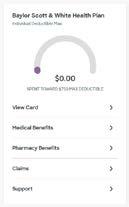
Log in to your MyBSWHealth member portal at MyBSWHealth.com and select “Pharmacy Benefits” under the Baylor Scott & White Health Plan menu.
In the prescription drug tools you can:
▪ View your pharmacy claims history
▪ Check the costs of your medications
▪ Look up drug coverage (formulary)
▪ Find in-network pharmacies
▪ Get started with Costco Home Delivery and Costco Specialty pharmacy
Do generic drugs really work as
well as name brands?
Yes. Even though they may look different, generics have the same key ingredients as their brand-name counterparts, and often cost less. Many generic drugs are even made in the same manufacturing plants as the brand-name version. The FDA’s Office of Generic Drugs follows a rigorous review process to make sure that a brand-name medication and its proposed generic equivalent:
▪ Contain the same active/key ingredient;
▪ Have the same strength;
▪ Use the same dosage form (for instance, a tablet, capsule, or liquid); and
▪ Use the same route of administration (for instance, oral, topical, or injectable).
Talk to your doctor about whether a generic medication is right for you.
Source: FDA.gov/GenericDrugs
MyBSWHealth member portal
Whether you need care now, need a prescription refilled or want to see information on your claims or deductible, you can use MyBSWHealth to connect with the resources you need to stay well—24 hours a day, 7 days a week. Inside the portal, you can:
▪ Get help finding care
▪ View or print your ID card
▪ See benefit plan documents
▪ Communicate with your care team
▪ View lab results and past visit summaries
▪ Review and pay bills
▪ Complete a telehealth visit, get a diagnosis and a prescription
▪ View deductible, out-of-pocket max, and claims information
▪ Transfer or refill prescriptions at BSW pharmacies
▪ Upload health data, like vaccination and medication records
Your MyBSWHealth account is secure, and only you can access your private information. Sign up for an account or sign in at MyBSWHealth.com.
Questions?
See the MyBSWHealth FAQ for answers.
OR chat live with Customer Service directly from your Portal! This video shows you how.
Link your health plan account to your member portal
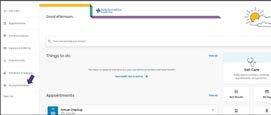
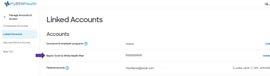
Step 1. Click ACCOUNT SETTINGS in the left menu
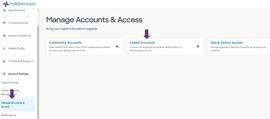
Step 2. Click MANAGE ACCOUNTS & ACCESS in the dropdown menu, then click LINK ACCOUNT in the middle box on the screen
Step 3. Select BAYLOR SCOTT & WHITE HEALTH PLAN from the dropdown list, then click VERIFY AND LINK
Step 4. YOU’RE ALL DONE! You should see 1 linked, Baylor Scott & White Health Plan and your member ID.
Your MyBSWHealth account is secure, and only you can access your private information.
The power to manage your whole family’s healthcare.
MyBSWHealth makes it easy to schedule and keep track of appointments, prescriptions, bills and more for every member of the family—from young children to elderly parents. It’s called proxy access.
With proxy access, you can manage care needs for the whole family, all in one place and all conveniently on your favorite mobile device.
Learn more about proxy access and how to set it up
Take your member portal information with you in the MyBSWHealth app. Download it today and take a hands-on approach to your healthcare.
Explanation of benefits
When your provider submits a claim for services you received, an Explanation of Benefits (EOB) is created. An EOB is not a bill; it’s a document designed to help you understand:
▪ The overall cost of your care
▪ What the health plan paid for your care
▪ Any out-of-pocket expenses you are responsible for
Your EOB will also show any remaining balances for deductibles and out-of-pocket expenses for the current month and year to date. (Prescription claims are not included.) If you owe a balance, you may receive a bill for the amount due.
Your EOBs are available in your member portal shortly after your doctor visit. If you’d rather receive your EOBs by mail, log in to the Member Portal and select “Update Preferences.”
Where to find your EOB in your Member Portal
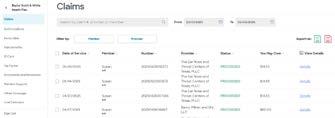
1. Log in at MyBSWHealth.com
2. Scroll down until you see the Baylor Scott & White Health Plan section on the right
3. Choose “Claims”
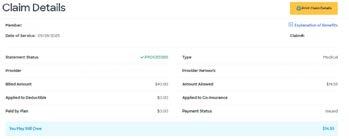
4. Click “Details” for any claim on the list
5. Click “Explanation of Benefits” under the yellow “Print Claim Details” button
When you want to
Take the first step...
Register for WebMD at My.BSWHealth.com/login. (Not available through the MyBSWHealth app.)
Complete a Health Assessment. You’ll answer a few questions about your goals, lifestyle and interests. In about 10 minutes, you’ll get a personal health report and a customized homepage that matches your well-being focus.
And continue on your well-being journey
▪ Daily Habits—Work toward your goals one day at a time. This mobile-first experience makes it simple to set a goal and see your progress.
▪ Content Hub—Receive personalized, easily accessible health information from the WebMD ONE homepage. The all-in-one hub provides multi-media content that supports your well-being journey.
▪ Side Quests—A collection of activities that allow users to choose their own adventure while receiving guidance on how to set SMART goals to stay motivated.
▪ Community—Through online chats, you can connect with like-minded people who are on the same well-being journey as you.
▪ Device and App Connection Center—Automatically track and upload your activity with a fitness device or app.
After registering through the MyBSWHealth website, download the Wellness At Your Side app
1. Visit the Apple App Store or the Google Play Store and search for “Wellness At Your Side.”
2. Download the app and enter your connection code: BSWHP
3. Register a new account using the same username and password as your MyBSWHealth account. Then personalize your experience by answering a few questions about your health goals.
Apple Store
Google Play
#WebinarWednesdays
Tips and information on how to get and stay well, delivered to your inbox every month. If you miss one, you can find the latest version on the Wellness page at BSWHealthPlan.com/wellness.
Free online sessions on the first Wednesday of every month at 11 AM CT. Come to one or all—and if you miss one, they’re available on demand for a limited time. See the Webinars page at BSWHealthPlan.com/wellness.
The power to stop dieting
Wondr has helped millions of people just like you achieve their weight-loss goals— with NO points, plans or restrictions. They’ll teach you how to eat your favorite foods to lose weight, sleep better, stress less and live stronger.
Through short weekly videos, you’ll learn it’s not what you eat but how that can help you improve your health.
The Wondr program is covered 100% by Baylor Scott & White Health Plan so there is no out-of-pocket cost for you.
Members, spouses and adult dependents (ages 18 and older) are eligible to apply.
. Get started today.
*Members, spouses, and adult dependents (ages 18 and older) are eligible to apply.
You can be well, even with diabetes.
If you have Type 2 Diabetes, you should be aware of the risks and take it seriously. Without proper management, diabetes can lead to other serious health issues. In fact, this “silent killer” is the eighth leading cause of death in adults in the United States.*
At Baylor Scott & White Health Plan, our goal is to keep our members healthier. BSW Be Well with Diabetes provides support to help improve your health, better manage your diabetes, and save you money.
What this program can do for you.
If you apply and complete the initial health activities:
▪ Your copays for covered diabetes medications and testing supplies will be waived ($0 copayments) up to a year.
▪ You will be eligible for a free blood glucose monitor and a free app to track your blood sugar.
▪ You will be referred to a BSW Be Well coach and meet with them for eight required virtual sessions.
▪ A clinical pharmacist will review your medications and will be available to meet with you virtually for any questions you may have.
Are you eligible?
As a Baylor Scott & White Health Plan member, you and/or your dependents who are at least 18 years old with Type 2 diabetes, may apply for the program. Exception: Members enrolled in an HSA-eligible High Deductible Health Plan
How it works
First, we learn about you.
Fill out and submit the application at BSWHealthPlan.com/bewell/diabetes. The application includes information about the health activities required to participate:
▪ Provider visit
▪ Hemoglobin A1C test
▪ Lipid panel/cholesterol tests
▪ Urine test for protein
Visits or tests completed in the 12 months prior to program start date will qualify.
Once you’re approved...
▪ You’ll join the next session (January 15 or July 15)
▪ You will be offered a free blood glucose monitor and app to track your blood sugar.
▪ You will be referred to the BSW Be Well Coaching team to schedule your personal coaching visits (part of your required health activities).
▪ Your copays for diabetes medications and supplies will be waived ($0 copayments) for up to 12 months.*
Stay engaged to continue in the program.
During the year, be sure to complete the required program activities. You’ll find a complete list at BSWHealthPlan.com/bewell/diabetes.
*Failure to meet the requirements by the deadline will result in dismissal from the program and your copays will no longer be waived.
Enroll today and be
Disease Management
Six in 10 Americans live with a chronic conditions like high blood pressure, diabetes, or arthritis.*
Our disease management program empowers you to manage chronic conditions and prevent complications. One of our health coaches may contact you with an invitation to join the program. You can also ask to be added by calling the number below.
Opt in or opt out of the program by calling
*cdc.gov/chronic-disease
Case Management
When you’re facing complicated health problems, you don’t have to do it alone. A nurse case manager will work with you, your family and your doctor(s) to create a plan that will meet your care needs.
Case managers:
▪ Advocate for you.
▪ Help you set goals and make a personal plan to improve their health.
▪ Assist with arrangements for necessary services and community support.
▪ Help you better understand your condition and plan of care.
For more information, or to request a Case Manager, please email CaseManagement@BSWHealth.org or call the Customer Service number on the back of your member ID card and ask for a Case Manager.
Disease Management and Case Management are voluntary programs that are available to you and your dependents at no additional cost. They’re part of our commitment to help you get the best possible results and the greatest value from your health plan.
Maternity Care Management
Expecting a little one? Congratulations! We’re here to help. Our Maternity Care Management program will provide tips and support while you’re pregnant and for one year after birth.
For example:
▪ Access to a nurse 24/7 during pregnancy
▪ In-home support for high-risk conditions (like diabetes, hypertension and severe nausea)
▪ Depression screening following delivery
▪ Parental education for newborn health during the first year
▪ Immunization reminders
▪ Planning for returning to work
Send an email to HPMaternityCaseManagement@BSWHealth.org or call the number on the back of your ID card.
What does that mean?
Benefits terminology explained
Behavioral health
A type of care that includes mental health and well-being, suicidal thoughts or attempts, and substance abuse.
Benefits
Healthcare services, products and programs that are covered as part of your health insurance plan. Limitations may apply.
Claim
A request for payment for covered items from an insurance company.
Copay/Coinsurance/Cost share
A fixed amount or percentage the member is required to pay for various covered services. The amount may vary for different services.
Deductible
The amount you pay for covered healthcare services before your insurance plan starts to pay.
Dependent
A member’s spouse, child or other person who is covered under their insurance plan.
Emergency Care
Medical condition that requires immediate medical attention to prevent serious harm to your health.
Explanation of benefits (EOB)
Statement from the health plan describing what costs are covered for care or services you received.
Formulary
A list of selected medications covered by the plan.
High deductible health plan (HDHP)
A medical plan where the member pays out of pocket for majority of the services until a deductible is reached.
Network
A group of providers the health plan has contracted with to provide members with services and supplies at a discounted price.
Out-of-pocket maximum
The maximum amount you will have to pay for covered services in a plan year. Does not include payments for premiums and services the health plan does not cover.
Preventive care
Routine healthcare services such as physicals, screenings, immunizations and more that help detect and prevent illness, disease or other health problems.
Primary care physician (PCP)
Provider specializing in family medicine, general internal medicine or general pediatrics. Your first point of contact for basic medical needs.
Prior authorization
A requirement for some healthcare services to verify medical necessity and obtain authorization before the service is provided.
Provider
A healthcare provider or facility that is paid by the health plan to give service to plan members.
Urgent care - Care for an illness, injury or condition serious enough that a reasonable person would seek care right away, but not so severe it requires emergency room care.
When
Go to BSWHealthPlan.com/Resources
Frequently requested documents and forms can be found in the Tools and Resources section at BSWHealthPlan.com .
Plus, you’ll find information on transition of care (for new members who are in active treatment for medical conditions with non-BSWHP network providers), claims, appeals and grievances, and more.
To request printed copies of documents or provider information, call Customer Service at 844.633.5325
FOR INFORMATION ABOUT… CONTACT AT WHEN
844.633.5325 Secure Message: through MyBSWHealth member portal or MyBSWHealth app 7