Accounting Principles Canadian 10Th Weygandt Solutions Manual
CH01 Collaborative Learning Activity—Solution Handout A Accounting in Action
Scenario A: You have recently received an inheritance of $50,000 and you would like to invest the money to build up a retirement fund. A colleague at work has suggested you purchase shares in a particular company, but you are hesitant because you don’t know much about it. In the 3Ws table below, identify what information you will need in order to make the decision to invest. Also identify where you might find the information, and finally, why the information is important to making the best decision.
What Information you need
Profitability/Dividends: Is the company earning enough to provide a return on investment?
Cash flow: Will the company be able to pay its debts as they come due?
Can the company afford its planned expenditures?
History of accounts receivable
History of accounts payable
Where did the cash come from, and where did the cash go?
Where you might find it Why you need it
Indicates probability that the investment will grow; trend to consistently issue dividends
Suggests if the company may be forced into bankruptcy
Ability of the company to maintain or expand level of operations
Indicates effectiveness of their cash management policy
Suggests effectiveness of cash management
Suggests effectiveness of cash management
What Information you need Where you might find it Why you need it Will the company stay in business in order to provide a reasonable return?
• Market share
• Age of their product
• Service quality
• Employee satisfaction
Management integrity
The Annual Report, company website, statistical databases, Balanced Scorecard if it is made public
Internet: e.g. Google Media: TV News, newspapers, magazines
Non-financial indicators help to assess the stability of the company and the consistency of profits in the future.
Discussion question: Explain why your information requirements may or may not be different from those identified for Scenario B.
The information differs because in this case the user is external and has limited access to detailed information.
CH01 Collaborative Learning Activity—Solution Handout B
Accounting in Action
Scenario B: You are about to approach the Commercial Loan Officer at your Bank to request an expansion loan of $50,000. In the 3Ws table below, identify what information you think the loan manager will want you to provide about your business to support your loan application. Also identify where you might find the information, and finally, why the information is important to secure the loan.
What Information you need
Cost information: What price should we sell our product for to maximize profits?
Profitability: What product is the most profitable?
Cash flow: Is there enough cash to pay the bills?
Ratios, percentages
Profit projections and planned expenditures. How many employees can we afford to hire this year? What new equipment do we need and can we afford to buy it?
Process bottlenecks
Process automation
Employee turnover
Job satisfaction
Training/Learning opportunities
Delivery performance to customer
Quality performance for customer
Customer satisfaction rate
Customer percentage of market
Where you might find it Why you need it
Solid performance is related to keeping costs low
Financial Statements: Balance Sheet, Income Statement, Cash Flow
Internal records, calculations
Budgets
To assess the viability of expansion, or which product to focus on
To know if the company can meet its obligations
To highlight significant trends and relationships
To make financial comparisons of operating alternatives
Annual Reports
Management Reports
Balanced Scorecard
Information based on financial statements is usually focused on past performance; non-financial information tends to be more predictive.
Discussion question: Explain why your information requirements may or may not be different from those identified for Scenario A.
Two main reasons for the requirements to differ:
1. Different type of user—in this case the user could be considered internal although specific information might have to be requested from the company
2. Different access to the information—more detailed information available in this case
CH01 Collaborative Learning Activity—Student Handout A
Accounting in Action
Scenario A: You have recently received an inheritance of $50,000 and you would like to invest the money to build up a retirement fund. A colleague at work has suggested you purchase shares in a particular company, but you are hesitant because you don’t know much about it. In the 3Ws table below, identify what information you will need in order to make the decision to invest. Also identify where you might find the information, and finally, why the information is important to making the best decision.
What Information you need
Where you might find it Why you need it
Discussion question: Explain why your information requirements may or may not be different from those identified for Scenario B.
CH01 Collaborative Learning Activity—Student Handout B
Accounting in Action
Scenario B: You are about to approach the Commercial Loan Officer at your Bank to request an expansion loan of $50,000. In the 3Ws table below, identify what information you think the loan manager will want you to provide to support your loan application. Also identify where you might find the information, and finally, why the information is important to secure the loan.
What Information you need Where you might find it Why you need it
Discussion question: Explain why your information requirements may or may not be different from those identified for Scenario A.
Data Analysis Technology Bootcamp: Instructor Guide
Table of Contents
I. How to Use This Guide
II. How to Get the Technologies for Your Course
III. General Bootcamp Format
IV. Where to Find and How to Assign
a. Preset from Wiley Library
b. Editing
c. A la Carte (customizability of Interactive tutorial)
V. Excel
a. TOC & Estimated time to completion
VI. Power BI
a. TOC & Estimated time to completion
VII. Tableau
a. TOC & Estimated time to completion
VIII. Alteryx
a. TOC & Estimated time to completion
IX. SQL
a. TOC & Estimated time to completion
X. Grading
XI. Use Cases
a. Set it and forget it
b. Module by Module
c. As needed
I. How to Use this Guide
This document has been created to provide information and guidance pertaining to the Data Analysis Technology Bootcamps. We provide instructions on how to view and assign the bootcamps in a few different ways, ideas to consider for how to use the bootcamps, as well as a detailed list of the topics covered for each technology tool and the estimated time it would take a student to complete each module. Additionally, we know that technology is ever-evolving and that there are limitations when it comes to usage on specific device types. Therefore, we have provided a section dedicated to information on how you and your students go about gaining access to these tools. Please note that as a publisher, Wiley cannot provide any technology licenses.
For additional questions about WileyPLUS, please reach out to your local Digital Learning Executive and Customer Success Manager.
II. How to Access these Technologies
We recommend that you consider asking your college’s IT staff for guidance and to know what functionalities are included in their virtual servers as well as when virtual server updates will happen.
A. Excel
Most students have all the functionalities needed through Office 365. To use the Power Query Excel tool, MAC users will need to use the Boot Camp Assistant to install the Microsoft Windows operating system. While operating in the Microsoft Windows operating system, they will have all the Power Query functionality. If they do not have Boot C amp, they will need access to a virtual server or a PC computer in the university computer labs.
Check your virtual server to make sure that it has Excel Pro 2019 or the current Office 365 version. These versions provide the needed Power Query functionality for viewing column statistics.
B. Power BI Desktop
It can be downloaded for free by both instructors and students, no license is required. Power BI Desktop runs in a Microsoft Windows operating system. MAC users will need to use the Boot Camp Assistant to install the Microsoft Windows operating system and then Power BI Desktop. An alternative is to have access to a virtual server or a PC computer in the university computer labs.
C. Tableau
Instructors can apply for a semester license and then pass the codes to their students, or students individually can apply for a license on their own for a year license. Instructors need to clarify which approach will be used in their syllabus. Getting the approval may take a few days, so start early, and work with your IT staff if it will be on a virtual server.
It is a possible solution but has the following significant restrictions: students’ work is publicly shared, and they will not be able to download their solutions (they could take a screenshot which they could submit as evidence of their work). Tableau Online (now called Tableau Cloud) does not have the same functionality as a downloaded Tableau student license or a university server license.
E. Alteryx
Can be downloaded for free by both instructors and students. Like Power BI, Alteryx runs on a Windows Operating system. MAC users will need to have an alternative solution if they do not have Bootcamp to be able to run Alteryx, such as a college server, or a PC computer in a computer lab. Alteryx works great on a virtual server, and they are willing to work with your
IT department to help with the installation. Alteryx is planning to trial a cloud version of their academic access to Alteryx within the next year.
Students can access the website here: https://sqliteonline.com/
G. MS Access
It can be downloaded for free by both instructors and students, no license is required. MS Access runs in a Microsoft Windows operating system.
G. Mac Users
The Power Query functionalities in Excel and using Power BI Desktop may be a challenge if you do not have a dual operating system (both Mac OS and Microsoft Windows). If your college has this software loaded on a virtual server or on PCs in the university labs, you will be able to access both the Power Query tools in Excel and Power BI Desktop. Another option for Mac users is to join Microsoft’s Insider or Beta channel for access to the same Power Query functionality as Windows users.
III. General Bootcamp Format
Each of the data analysis technology bootcamps follow the same general structure:
• Overview Video
• 10+ Topics o 1 How-To Video per Topic o 5-10 Multiple Choice questions per topic o 1 Application Exercise per topic
o 1-2 Follow up Questions to the Application Exercise o 1
Solution Walkthrough video per topic:
The solution walkthrough videos will only automatically appear to students as question feedback to the 1-2 follow up questions of the Application Exercise. If these questions are removed, the solution walkthrough videos will not be available to students wi thout manual grading.
IV. Where to Find and How to Assign
Wiley’s Data Analysis Technology Bootcamps live within WileyPLUS. They can be found in the following US courses (represented below are the latest editions):
• Dzuranin, Data and Analytics in Accounting 1e
• Savage, Accounting Information Systems 1e
• Farmer, Cost Accounting 1e
• Johnson, Auditing 2e
• Kieso, Intermediate Accounting 19e
• Weygandt, Managerial 10e
• Weygandt, Financial 12e
• Weygandt, Financial and Managerial Accounting 5e
• Weygandt, Accounting Principles 15e
• Kimmel, Financial Accounting 10e
• Kimmel, Accounting 8e
• Kimmel, Survey of Accounting 3e
• Kimmel, Financial Accounting for Managers 1e
• Rainer, Introduction to Information Systems 10e They can be found in the following Canadian courses:
• Moroney, Auditing 4CE
• Kieso, Intermediate Accounting 14CE
• Burnley, Financial Accounting 3CE
• Weygandt, Managerial Accounting 6CE
• Kimmel, Financial Accounting 9CE
• Weygandt, Principles 9CE
• Rainer, Introduction to Information Systems 5CE
• Weygandt Managerial 6CE with Burnley, Understanding Financial Accounting 3CE There are three ways you can access and assign the data analysis technology bootcamps. The following sections outline each of the three ways in detail.
A. Preset from Wiley Library
Within the Wiley Library of assignments, you can easily assign the full bootcamp. To access the Wiley Library, follow the steps below.
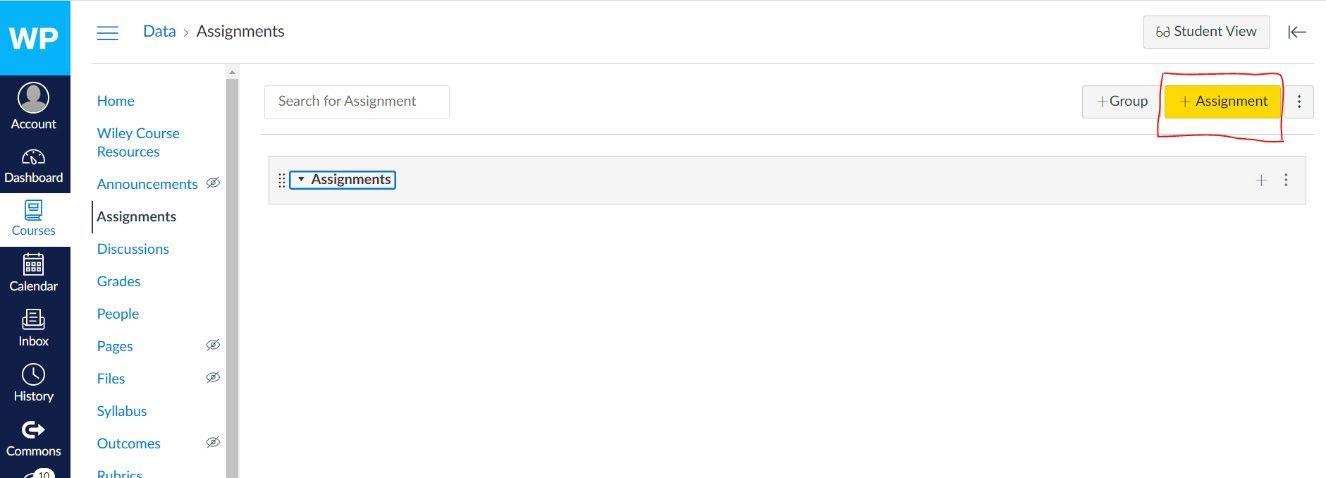
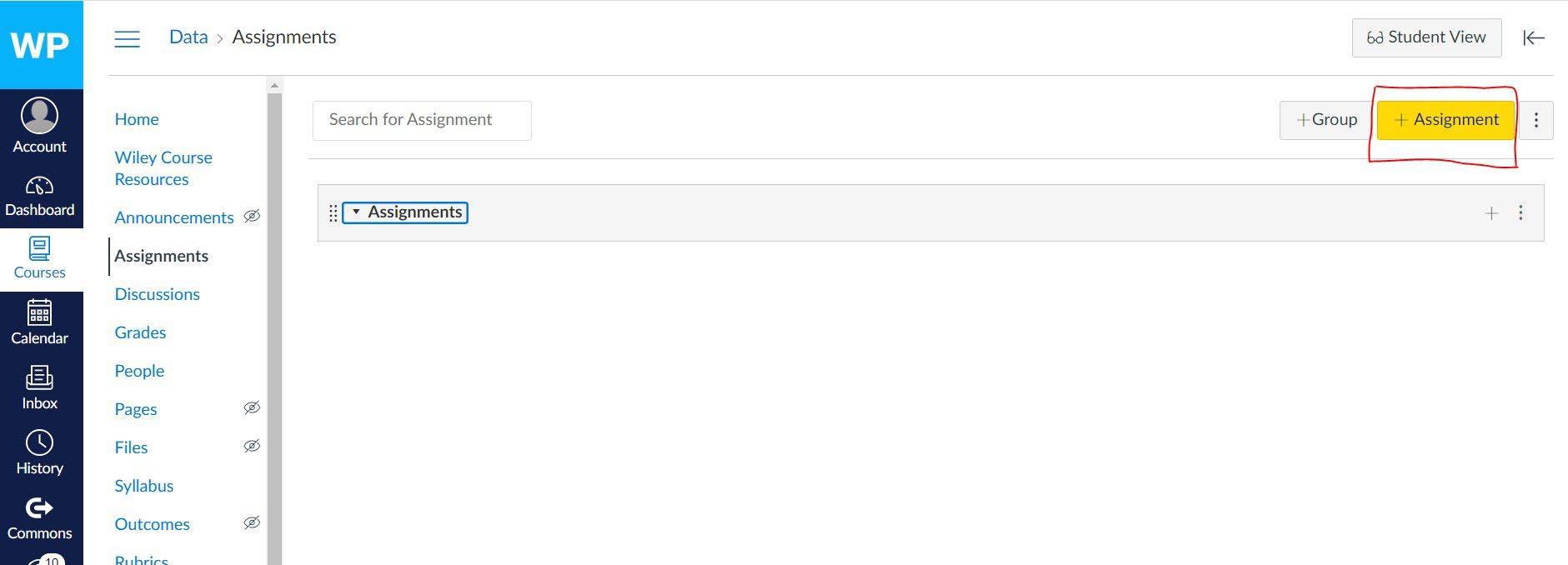
Step 1: Click on the “+ Assignments” button.
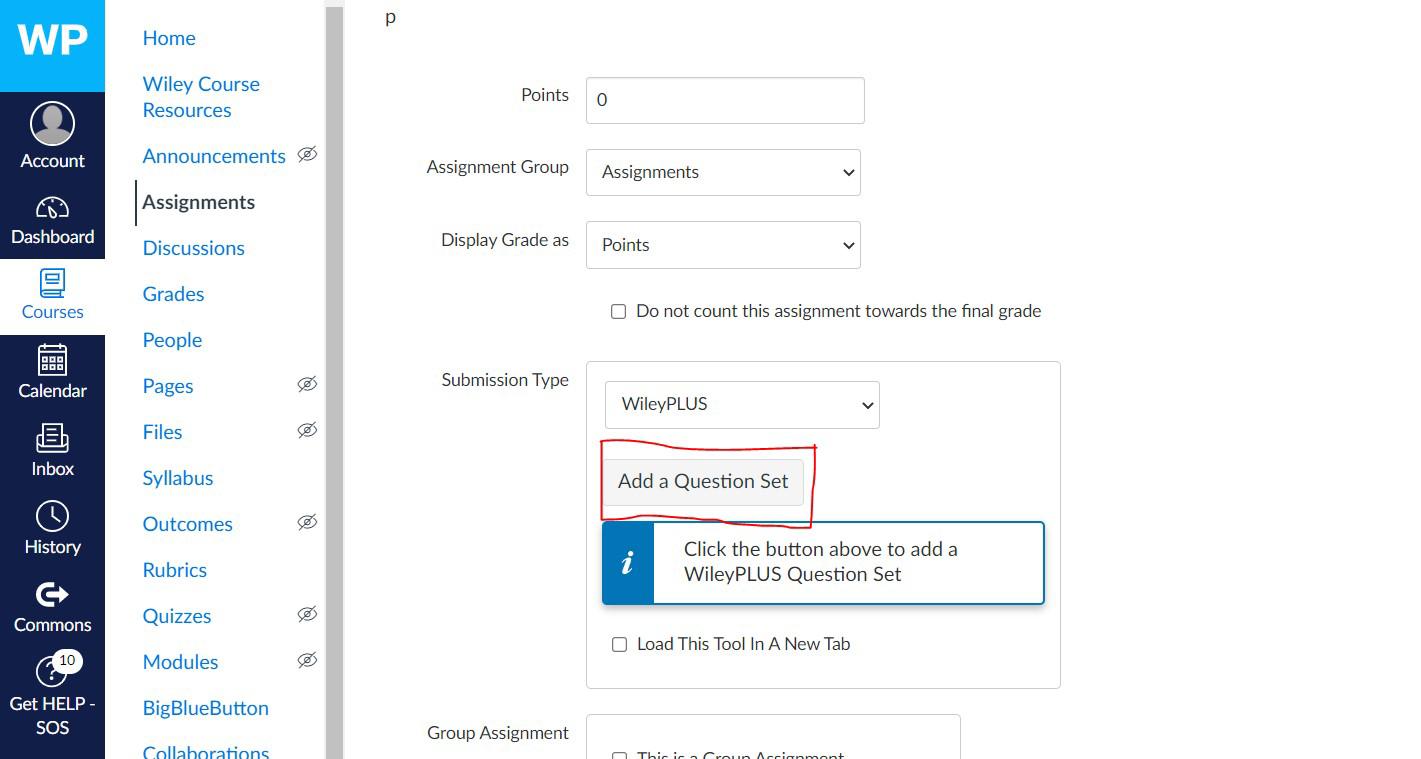
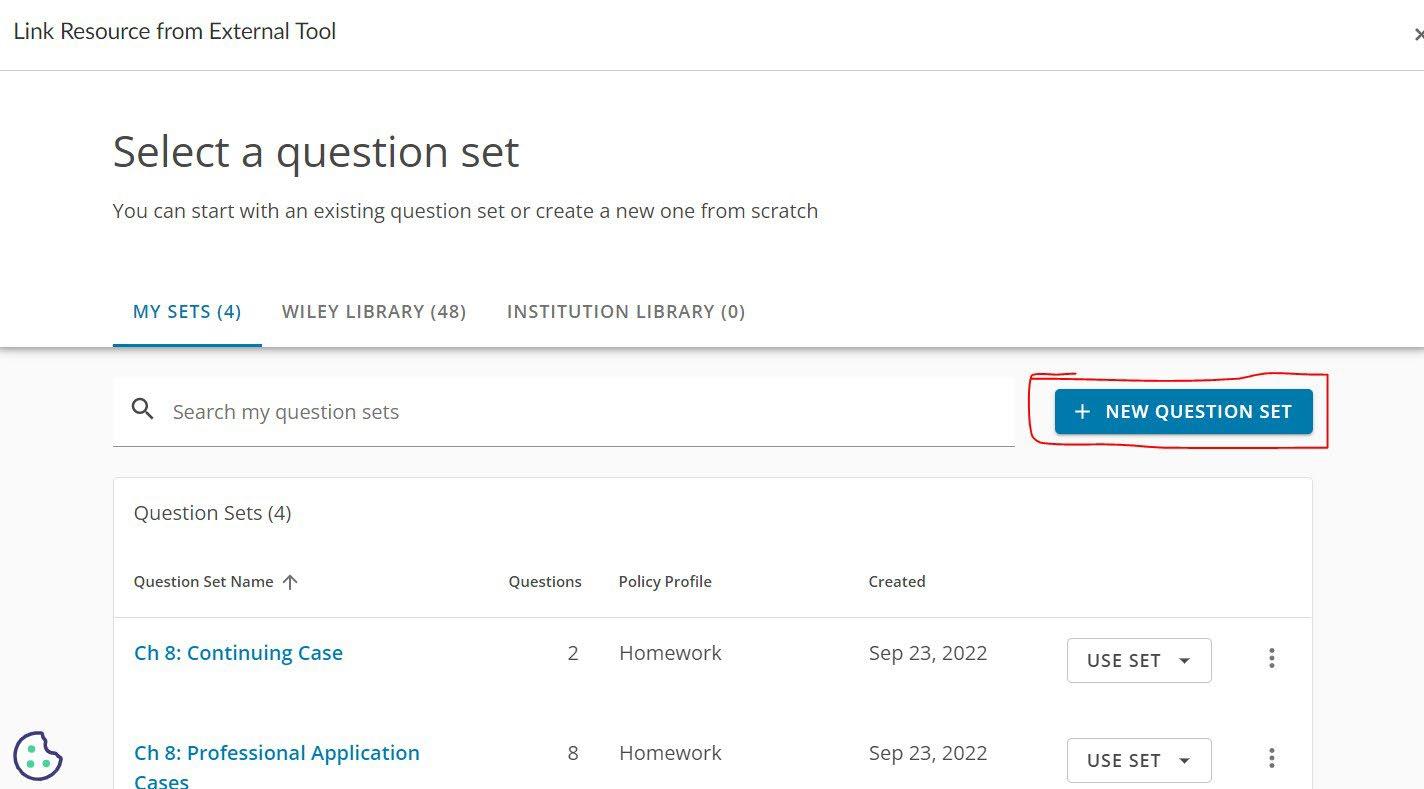
Step 2: Click on “Add a Question Set. “
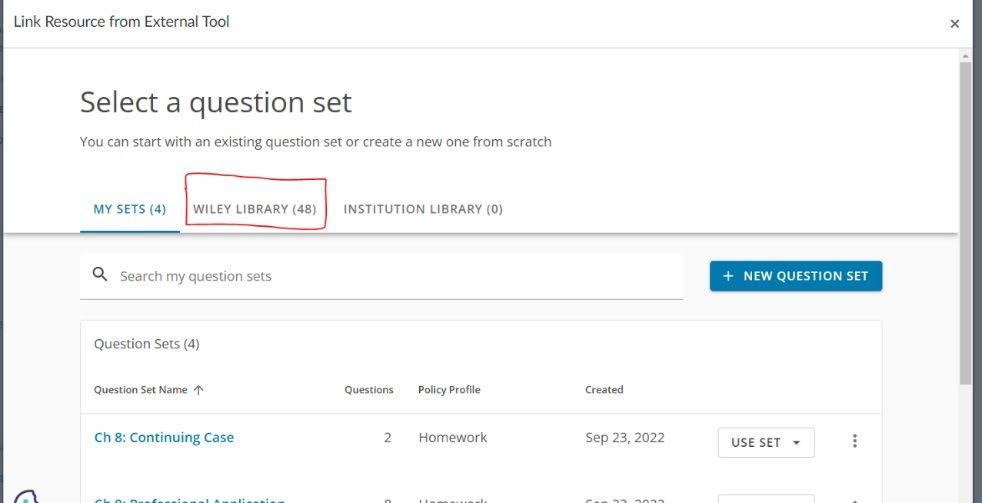
Step 3: Click on “Wiley Library”
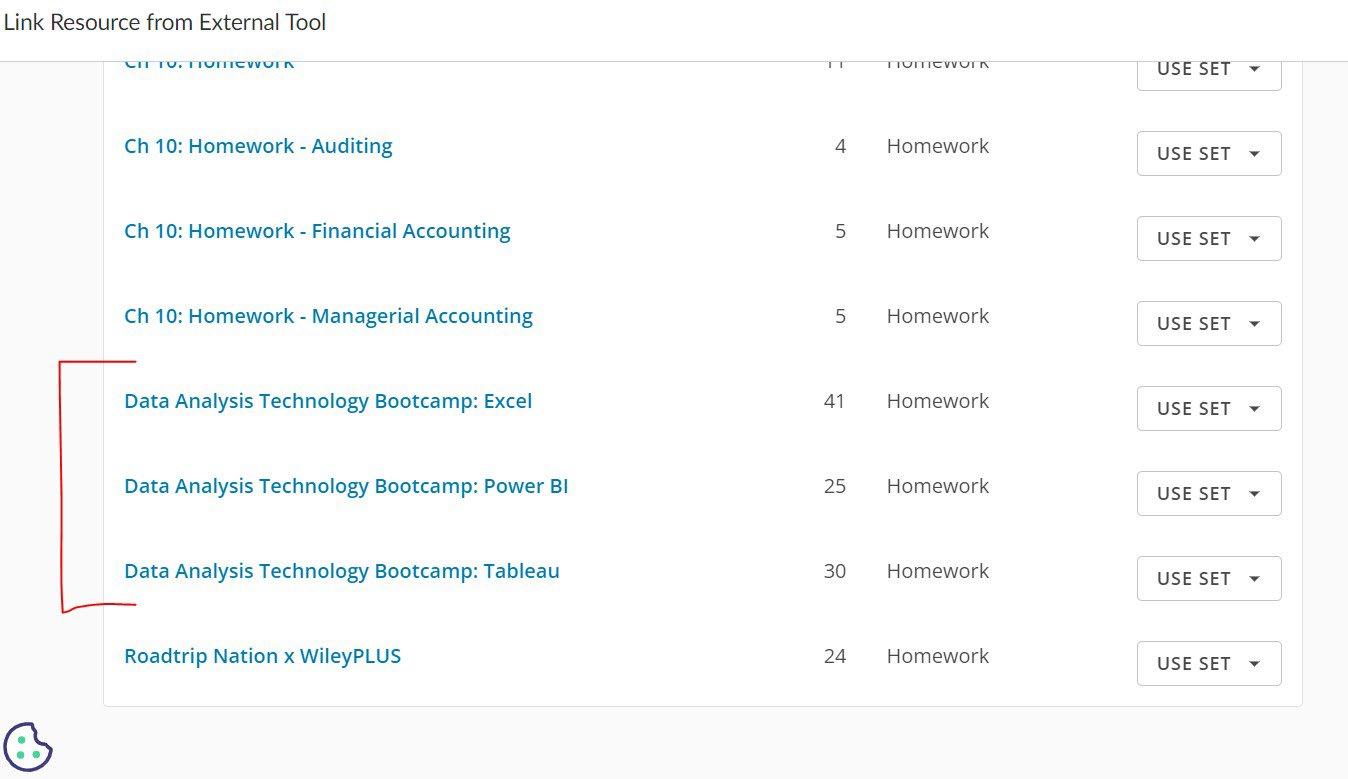
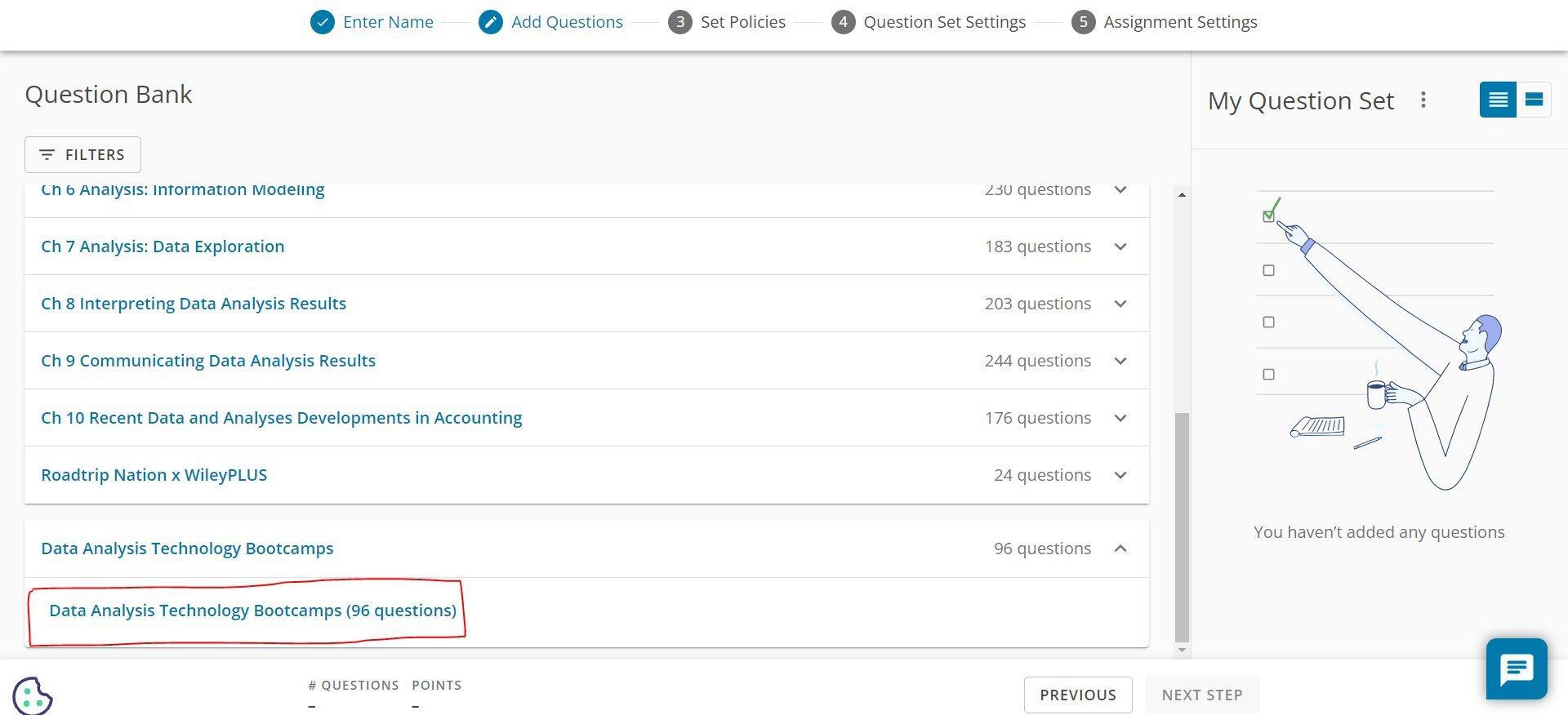
Step 4: Locate the Data Analysis Technology Bootcamps by scrolling all the way to the end of the list.
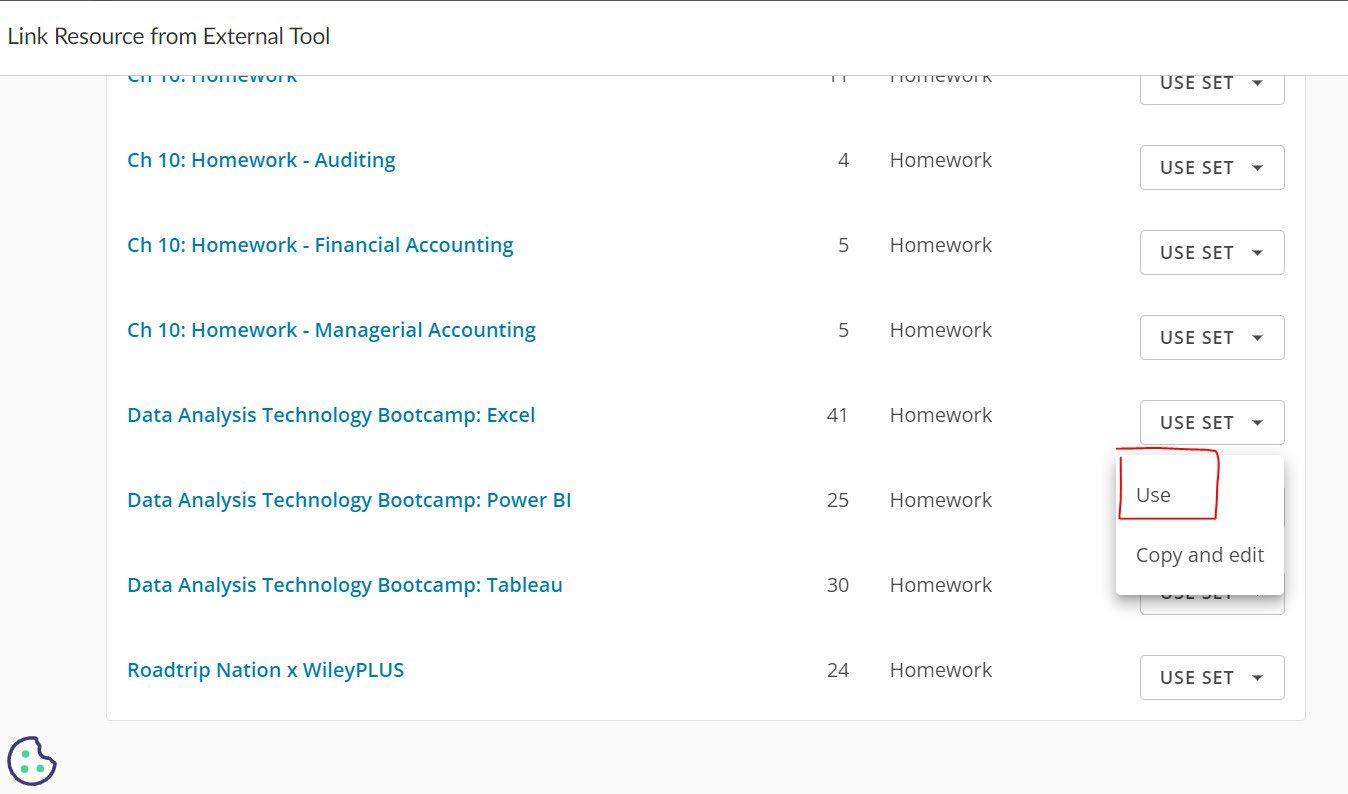
Step 5: Click on “Use Set” and select “Use.” This allows you to assign the full bootcamp and make your typical assignment adjustments like due dates, making it available and visible to your students, etc.
B. Editing
You may also want to use the Data Analysis Technology Bootcamps, but edit portions or parts to more align with your course objectives. Just like any other pre-created assignment in the Wiley Library, you are able to copy and edit the bootcamps as well following the steps below.
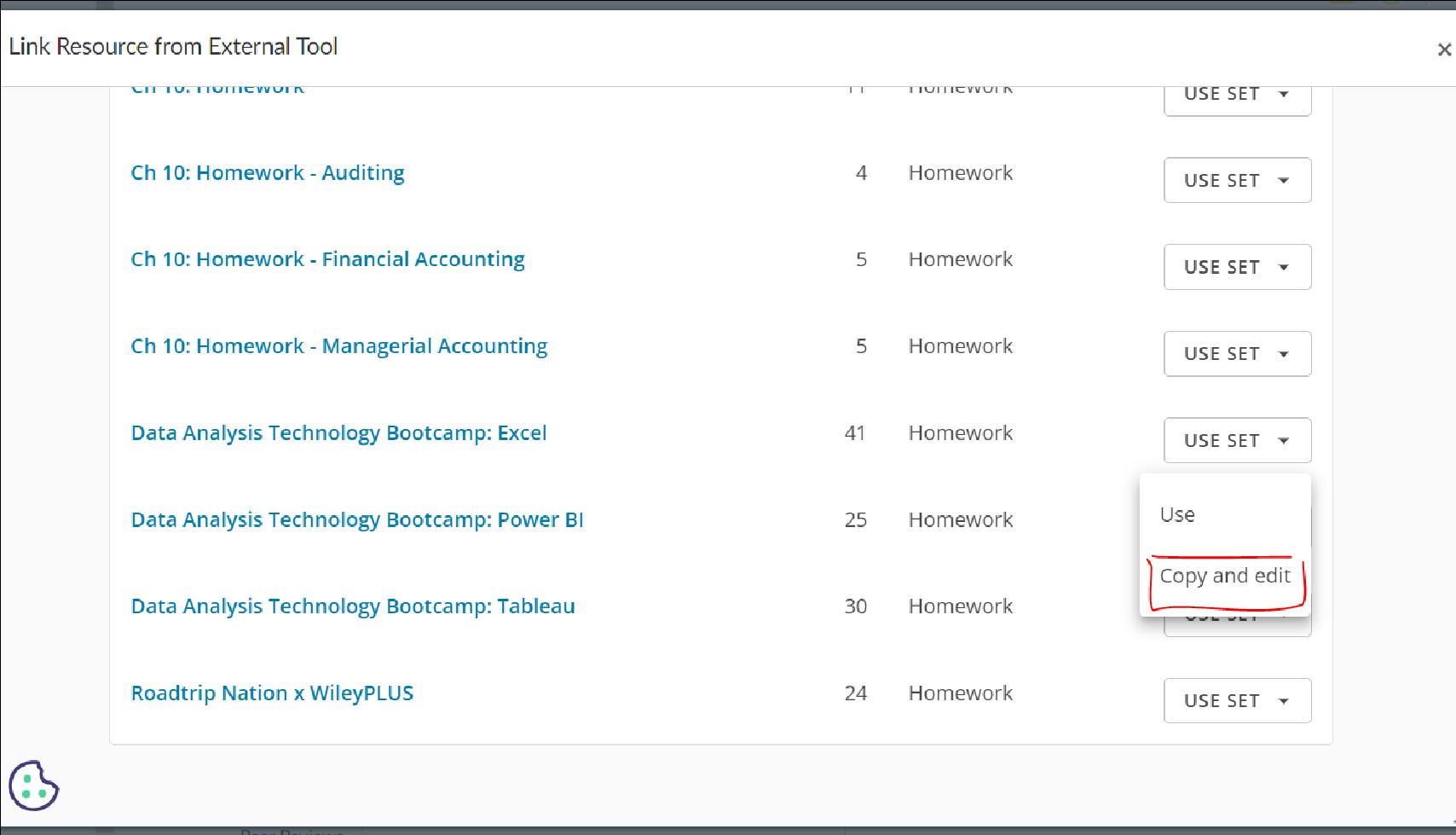
Step 1: When in the Wiley Library, after locating the Data Analysis Technology Bootcamp you want to assign, click on “Use Set” and “Copy and edit.”
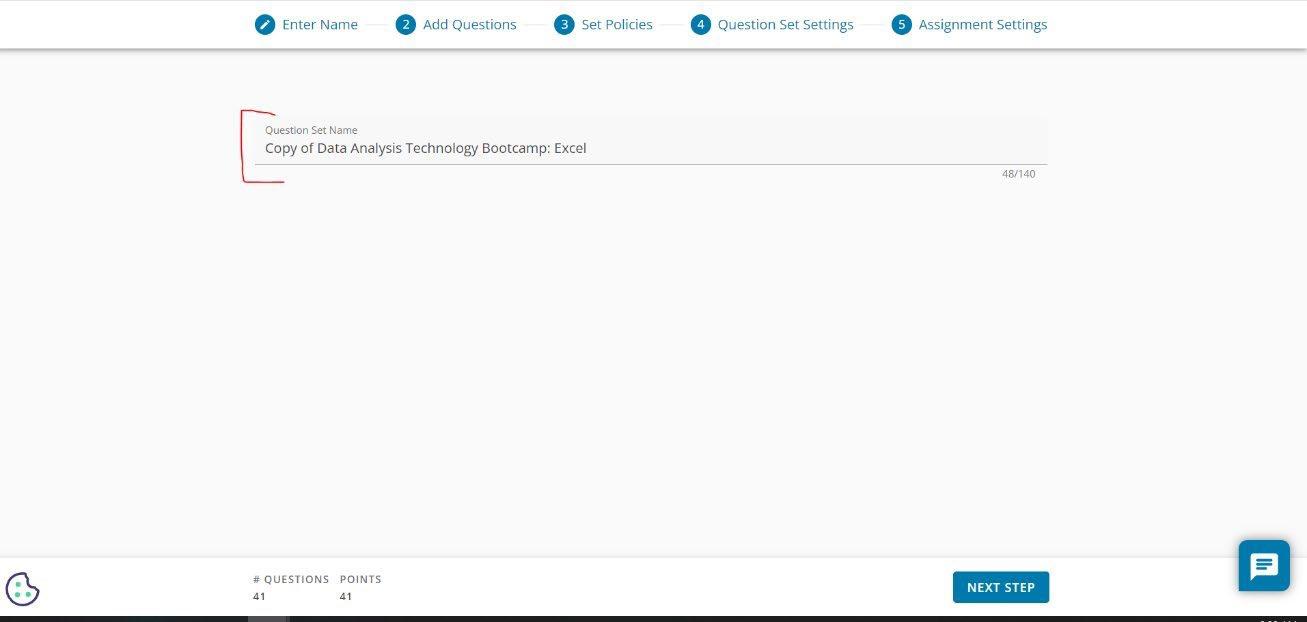
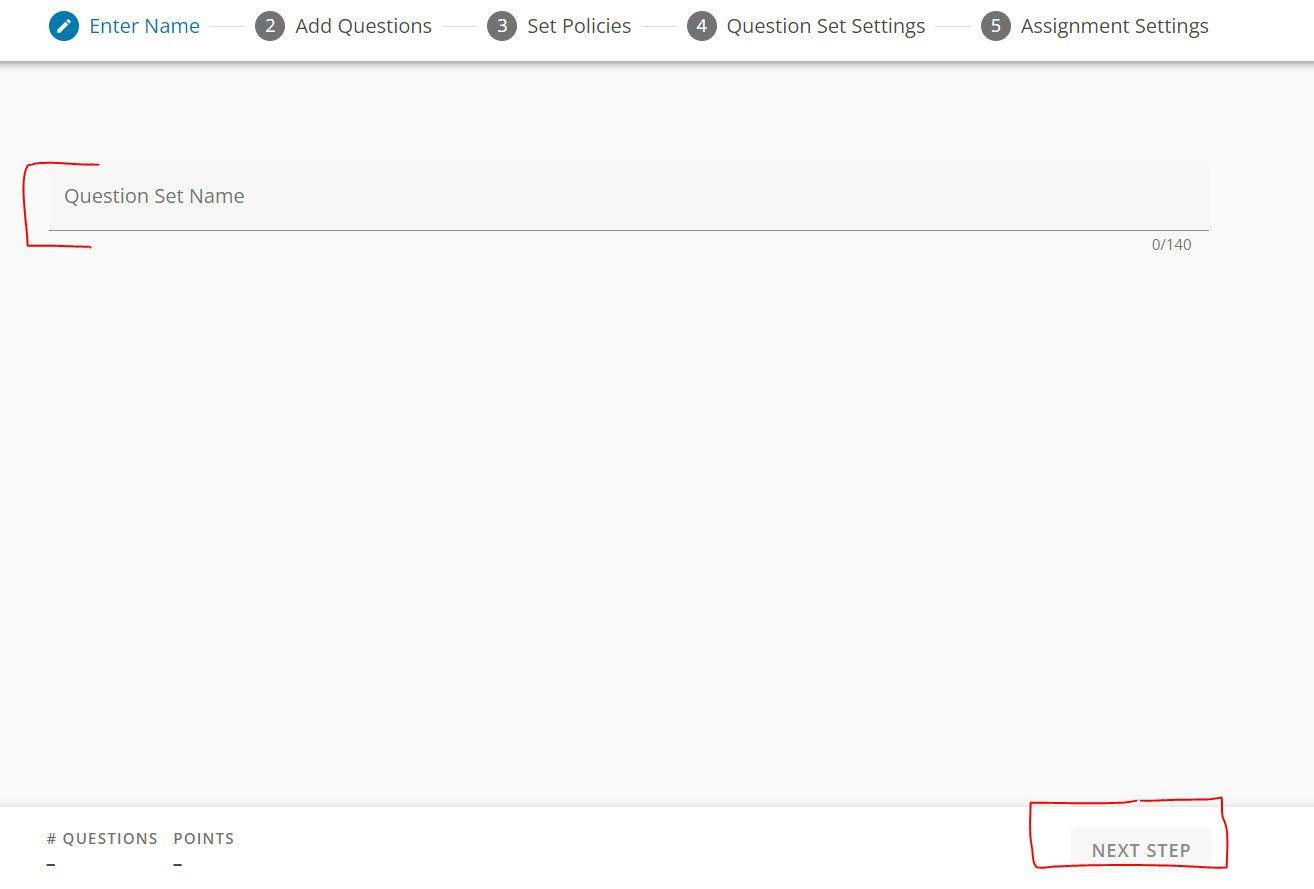
Step 2: You will be prompted to edit the name of the assignment if you choose and then click on “Next Step.”
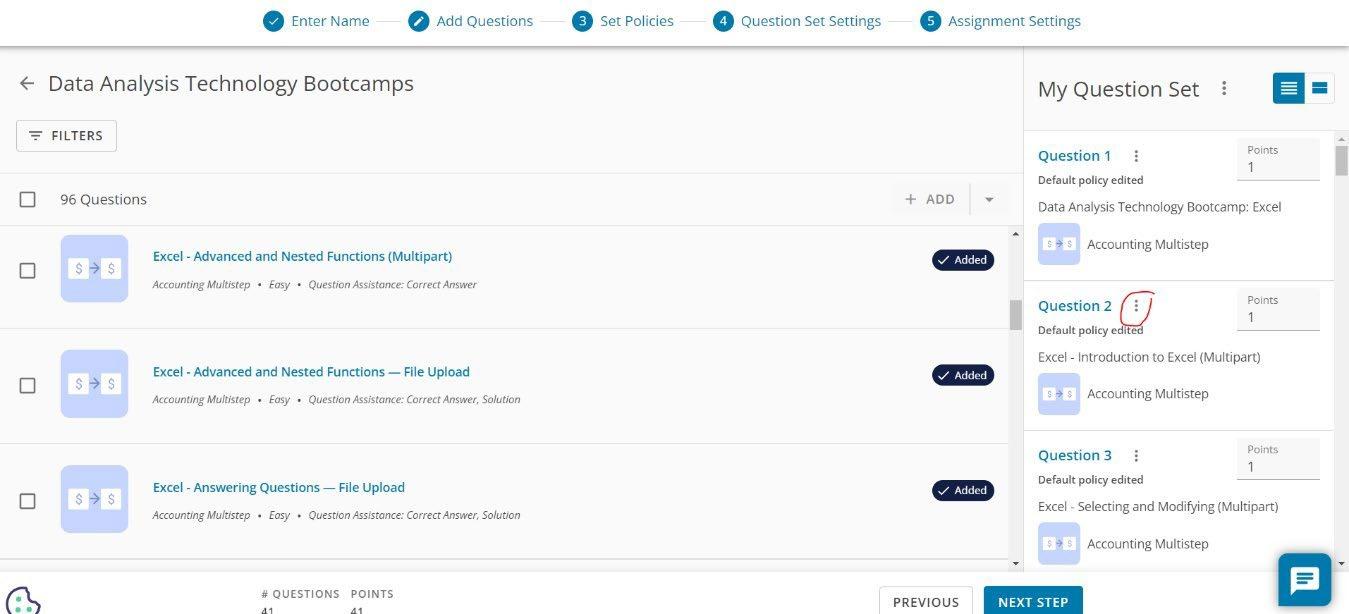
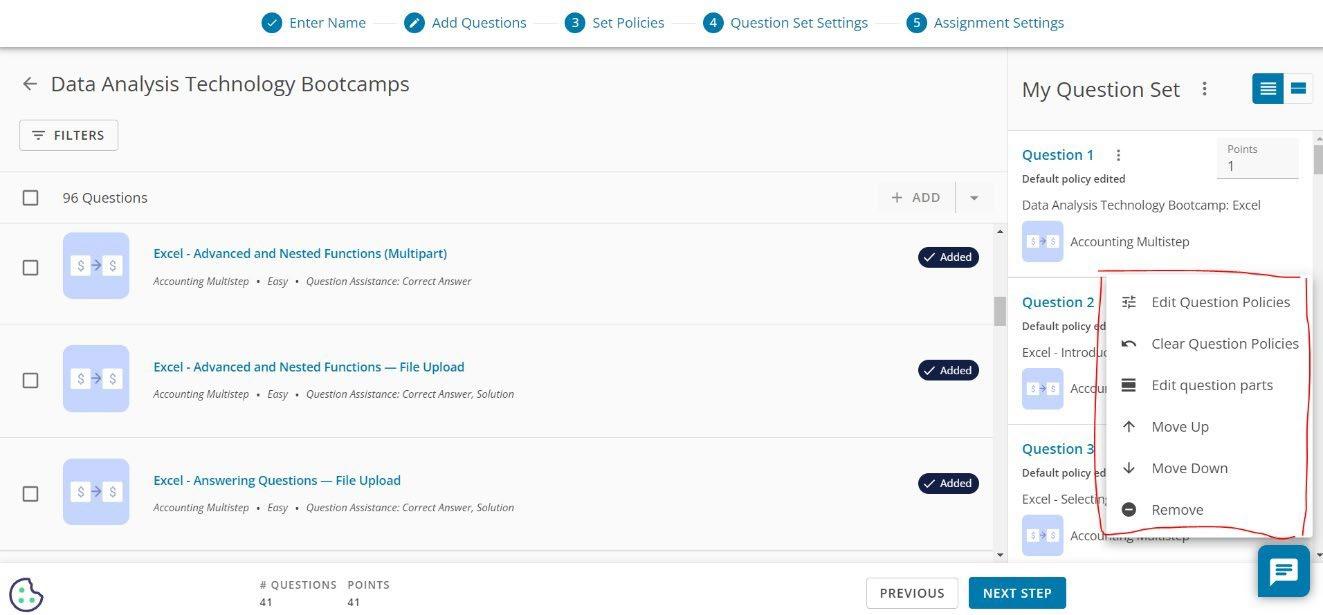
Step 3: Click on the three dots to access the question settings.
Step 4: Upon clicking on the three dots, you will see a menu of options to further edit the question. You can edit question policies, clear policies, edit specific question parts (like removing specific multiple-choice questions within that set), move the questions, or completely remove the question altogether.
C. A la Carte (customizability of Interactive tutorial)
There may be instances where you want to assign a specific module (topic) within the bootcamp as opposed to assigning the full bootcamp. To do this, you would set up the bootcamp like any other assignment. Use the following steps as a guide.
Step 1: Click on the “+ Assignments” button.
Step 2: Click on “Add a Question Set. “
Step 3: Click on “+ New Question Set.”
Step 4: You will be prompted to provide an assignment name. Upon doing so, click on “Next Step.”
Step 5: Scroll all the way to the bottom and locate the “Data Analysis Technology Bootcamps” section and click on the link.
Step 6: In order to see the questions associated to one specific technology, click on the “Filters” button.