FromSearchto Success: YOUR CAREER RESOURCES HANDBOOK

Winter 2026
From Search To Success: Your Career Resources Handbook is a comprehensive resource designed to support students in achieving their career aspirations. This booklet offers practical guidance on resumes, cover letters, job interviews, and networking, equipping students with the tools needed to excel in their professional journeys. We respectfully acknowledge that Columbia College is located on the traditional, ancestral, and unceded territories of the Coast Salish Peoples including xwməθkwəyəm (Musqueam), Skwxwú7mesh (Squamish), and Səlílwətaʔ/Selilwitulh (Tsleil-Waututh) Nations. We also want to acknowledge all non-status peoples and members of other bands who live in Vancouver. As uninvited guests, we are dedicated to fostering a reciprocal, respectful, and meaningful relationship with the Indigenous communities, who are the caretakers of this place since time immemorial.
www.columbiacollege.ca/student-services/career-services studentcareers@columbiacollege.ca cssa@columbiacollege.ca
Writing and Content Development
Audrey Kurniawan (Career Services Student Assistant W26), Richa S. Rathod (Career Services Student Assistant F24 & W25), Ana Albuquerque (Student Career Advisor).
Special Thanks
Ana Albuquerque, Ginny Chien, Shraddha Duggal, Navita Gupta, and Harjot Kaur for their invaluable help in reviewing the booklet.
Cover Photography
Richa Sanjay Rathod.
References
Content for this guide was inspired by and adapted from various trusted sources, including Skilled Immigrant InfoCentre, CERIC, Jump Start Refugee Talent, Centennial College, Princeton University, Indeed, Arrive, City of Burnaby – Careers, Jan Melnik, Tannia Suarez, Thompson Rivers University, WorkBC, and Academia Insider.
Dedicated to our friend and colleague Tim Yernar (S24 CSSA).

Career Services
Columbia College's Career Services supports students by offering tools to develop job-seeking skills, explore career paths, and build professional networks.
Key services include:
1.Personalized resume & cover letter assistance
2.Interview preparation
3.Job search resources
4.Networking opportunities
5.Career events like fairs and workshops.
These resources aim to empower students to succeed in their academic and career goals by enhancing their employability and confidence.
www.columbiacollege.ca/student-services/career-services
Self-Discoveryfor CareerGrowth 05
What skills am I most proud of?
What values are most important to me in a job?
What type of work environment motivates me?
What tasks or projects do I enjoy most?
Ask Yourself
What subjects or fields am I curious to learn more about?
What do I need to improve to reach my career goals?
What career goals do I have in the next 1-5 years?
Reflect on these questions to uncover your strengths and interests. Your answers can guide you toward roles that align with your values and skills, making your career journey clearer and more meaningful.
Transferable Skills
Transferable skills are abilities or talents relevant to all professions and facets of life. It’s the skills that you developed in one situation but can be used in another.
You can gain transferable skills through:
Academic & personal projects
Volunteering at clubs, community groups, or charitable organizations
Participation in sports teams
Family responsibilities
Examples of transferable skills:
Communication
Teamwork
Leadership
Time management
Problem solving
Employers care how you apply these skills and what you achieved, not just where you learned them. Include relevant transferable skills from the job postings on your resume and cover letter.

BINGO: TRANSFERABLESKILLS
Look at the activities below and mark the ones you have experienced. If you complete a row, column, or diagonal, you have Bingo!

Identifying Keywords
Employers often use Applicant Tracking System (ATS) to scan resumes for important keywords before a recruiter actually read your resume.
Keywords
to Look For:
Skills (Hard, Soft and Transferable)
Tools or Software
Responsibilities
Qualifications
Job Posting Example
BrightWave Marketing is looking for a Marketing Assistant to support the digital marketing team by assisting with social media management, creating marketing content, conducting market research, and helping prepare marketing reports. The ideal candidate has strong communication, teamwork, and time management skills, is comfortable using Microsoft Excel and social media platforms, and is currently studying marketing, business or communications.
Answers: The important keywords are highlighted above.
Resume Essentials
What is a Resume?
A one- to two-page document summarizing your skills, experience, education, and accomplishments to demonstrate to employers why you are the ideal candidate for a job.
Recruiters spend an average of only seven seconds scanning a resume, so it’s important to keep yours clear, well-organized and tailored to the job you’re applying for.
Why is a Resume Important?
A resume is a marketing tool for the job seeker. It highlights and prioritizes relevant skills for the job.
Opportunities don’t happen, you create them.
--Chris Grosser
Beforeyou Begin
Review Job Posting & Research the
Company
Review keywords, and identify knowledge, skills, and abilities that match yours.
Use a Computer for Editing
Use a computer for resume editing; avoid formatting on a phone.
Understand ATS (Applicant Tracking Systems)
Opt for ATS-compatible formats and include role-specific keywords to get noticed.
Keep Your Header Consistent & Clean
Use the same header format (name and contact information) for both your resume and cover letter.
Update Your Online Presence
Ensure your LinkedIn and professional profiles align with your resume (see page 29).
Keep Personal Information Private
Only list professional contact info (name, phone, email, city/province). Do not include personal details like birthdate, SIN, or marital status.
WHICH RESUME BULLET POINT IS STRONGER? WHAT TYPE OF EXPERIENCE SHOULD YOU INCLUDE ON YOUR RESUME? WHICH FORMATTING STYLE IS BEST FOR
WHICH EMAIL ADDRESS IS MOST PROFESSIONAL FOR
Contact Information
Include your:
Full name
Active phone number
Professional email address (firstname.lastname@gmail.com)
Location (city and province only)
LinkedIn profile (optional)
Summary
A brief overview of your skills, experience, and career goals. It helps employers quickly understand the value you bring. Focus on specific results rather than general traits.
Include:
Key strengths or expertise relevant to the position
Relevant experience or field of study
Achievements or results that demonstrate your impact
Career interests or goals related to the role
Skills
Highlight your most relevant skills. You should include:
Hard skills (e.g. technical abilities, tools, or software)
Soft skills (e.g. communication, teamwork, or leadership)
Skills name in bold, followed by a short one-sentence explanation of how you developed or applied the skill through project, work or education
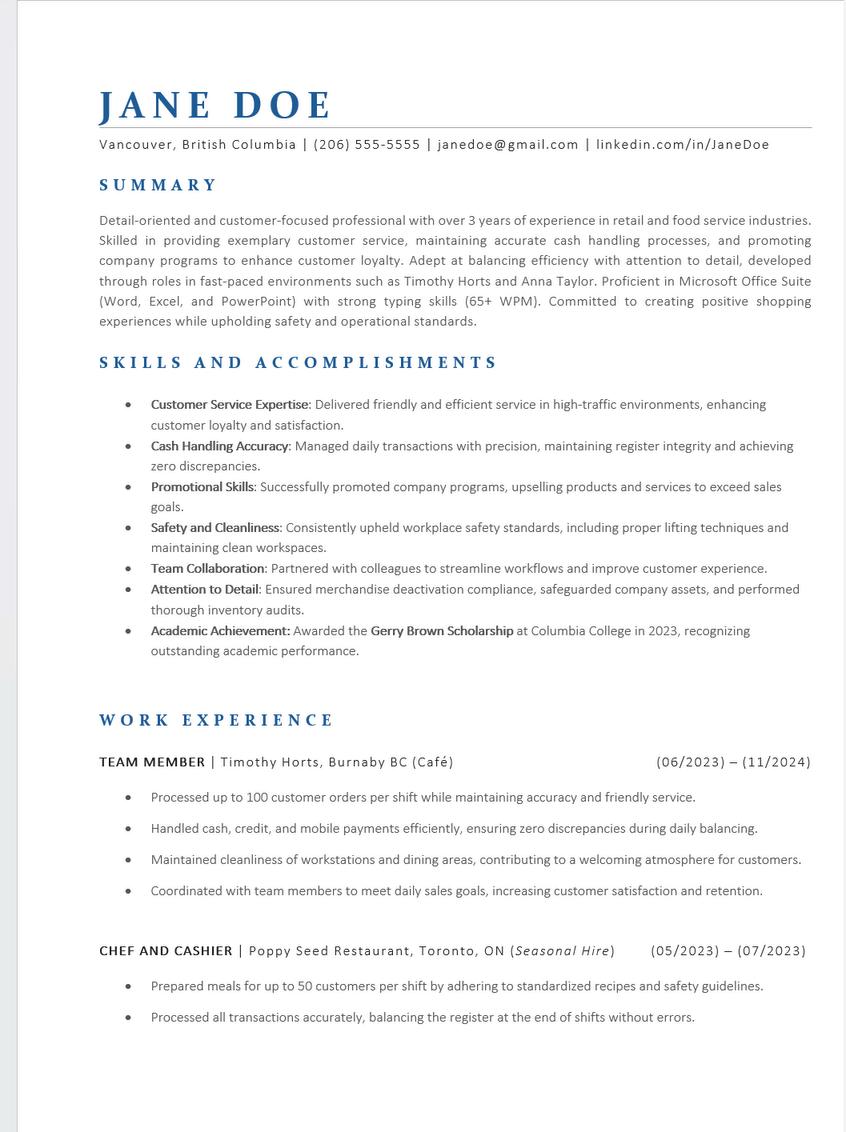
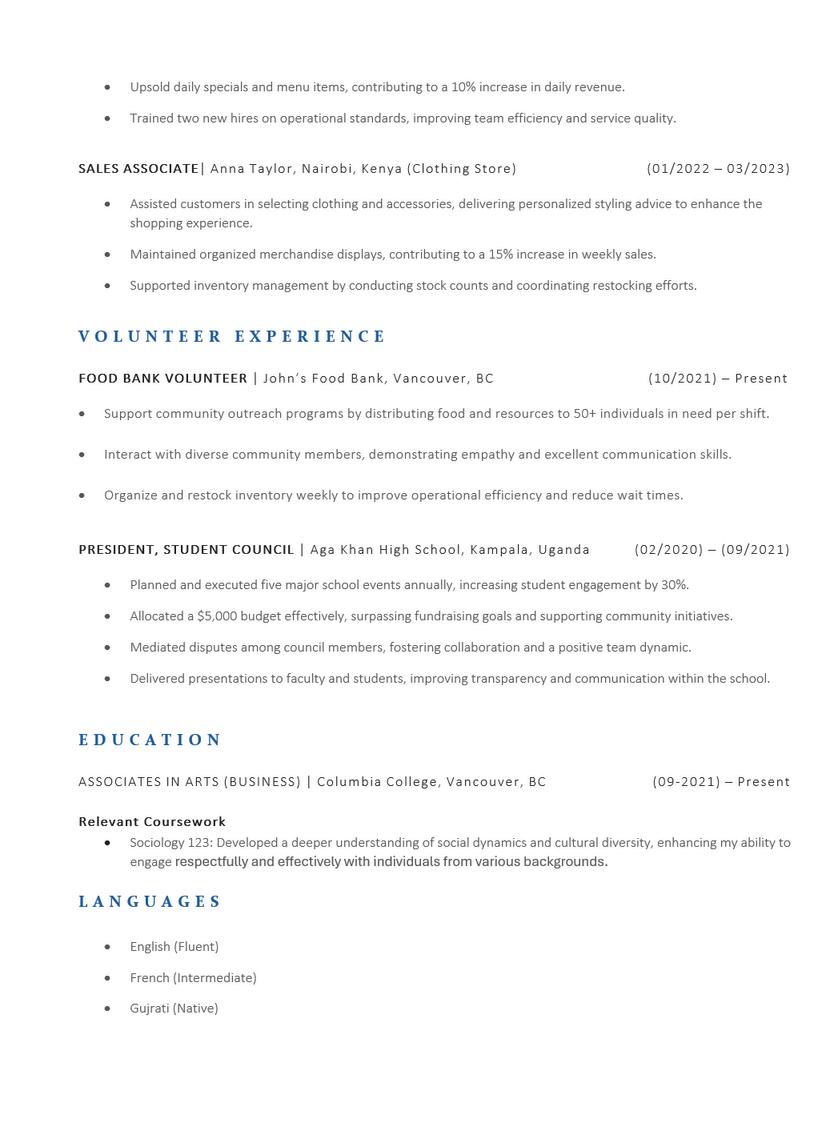
Want some examples? Take a look at the sample resume for guidance (page 15-16).
08QuickResumeTips
Choosing Your Sections
You can choose to include either the Summary or Skills section, or combine both for a comprehensive overview of your qualifications. If you include both, ensure they highlight different points to avoid repetition.
How to use AI?
Disclaimer: Do not enter personal or sensitive information into AI tools, as it may be stored in their database.
Improve wording and clarity by turning responsibilities to strong accomplishment statements
Tailor your resume to match specific job descriptions
Create a first draft of your resume as a starting point, not the final version.
Rule of Thumb: For Resume
Past experience: past tense Current experience: present tense
Write in third person: avoid using “I”
Keep your resume to 1-2 pages
Use standard font: Arial, Calibri
Use font size 10-12
Experience Resume:Experience, Education&Languages

The section is your chance to showcase your relevant work and volunteer achievements rather than just duties. Tailor this section to the role you’re applying for, keep the the content clear and relevant to the job.
Focus on outcomes (result and impact), not generic duties
Quantify results using numbers or percentages whenever possible
Avoid vague phrases like “responsible for” instead focus on specific actions and measurable results
List experiences in reverse chronological order (most recent first)
Clarify company type if unclear. For example: Best Buy (Electronics Retailer).
Indicate if a role is seasonal or short-term to avoid assumption of the job ended prematurely
Tip: Use strong action verbs.
Education
Include:
Institution name, program/degree, location, and expected graduation
Relevant coursework or projects (if applicable)
Academic achievements (awards, honors, scholarship)
Accomplishment Statement
Formula: Action Verb + What You Did + Result/Impact.
Example: Coordinated with team members to meet daily sales goals, increasing customer satisfaction and retention.
Tip: Place Education before Experiences if it is more relevant to the role. Languages
List languages and your fluency level in bracket (e.g. Fluent, Intermediate or Native)
Include certifications (e.g. IELTS, TOEFL, CELPIP) if applicable
Be honest about about your proficiency
Sample Resume (1/2)

QuickGuide: AnsweringResumeFAQs
CAN I INCLUDE MY EXPERIENCE FROM BACK HOME ON MY RESUME?
Absolutely! Highlight relevant experiences from your home country that showcase transferable skills or industry knowledge.
CAN I LIE ABOUT A JOB ON MY RESUME IF I HAVEN’T WORKED BEFORE?
No, honesty is critical. Employers may verify your background, and dishonesty could hurt your chances. Instead, focus on volunteer work, internships, or class projects to demonstrate your skills.
DO I NEED TO PROVIDE REFERENCES IN MY RESUME?
No, you don’t need to list references directly on your resume. If requested, you can provide them separately.
SHOULD I INCLUDE A PHOTO OF MYSELF ON MY RESUME? No, employers prefer to focus on qualifications rather than appearance to avoid bias.
DO I NEED TO LIST ALL MY PAST JOBS?
No, only include roles relevant to the job you’re applying for. Resume should be tailored for every job. Focus on showcasing accomplishments that match the job requirements.
SHOULD I MENTION MY VISA STATUS ON MY RESUME?
No, it’s not necessary unless the employer specifically asks for it in the job posting. Focus on your qualifications and skills instead.
YourPathwayToSuccess
Even if you haven’t had a formal job yet, life is full of moments that have prepared you for success. Let’s embark on a journey to uncover what you already have to offer!
Checkpoint 1: Clubs and Organizations
Have you been part of any clubs or groups? (student council, cultural organizations, hobbies, etc.)
Checkpoint 2: Family Contributions
Have you helped with a family business or household tasks?
Checkpoint 3: Informal Gigs
Have you had informal jobs or gigs? (Babysitting, tutoring)
Checkpoint 4: Creative Adventures
Have you worked on personal projects? ( blogs, designing, coding)
Checkpoint 5: Volunteering Adventures
Have you volunteered at school or in your community? (organizing events, tutoring, local drives)
CoverLetter Writing
What is a Cover Letter?
A cover letter is a one-page document that explains why you are a strong fit for a position. It connects your skills and experience to the employer’s needs and is often submitted alongside your resume.
Why is a Cover Letter important?
A cover letter helps you: Introduce who you are and why you’re applying. Shows how your skills, knowledge and experience match the role Explain what makes you the ideal candidate for their team.
Tips & Tricks
Avoid generic letters. Personalize it to show genuine interest in the role and the organization. Do Your Research: Learn about the company’s mission, vision, recent news, and products/services.
Find Common Ground: Highlight shared values or goals to show you're a cultural fit.
Be Specific: Mention the company name, the role, and why you’re excited to apply.
Important: AI should help you create a first draft, not your final application. Refine the content to ensure your unique voice and experiences shine through

CoverLetter: Format
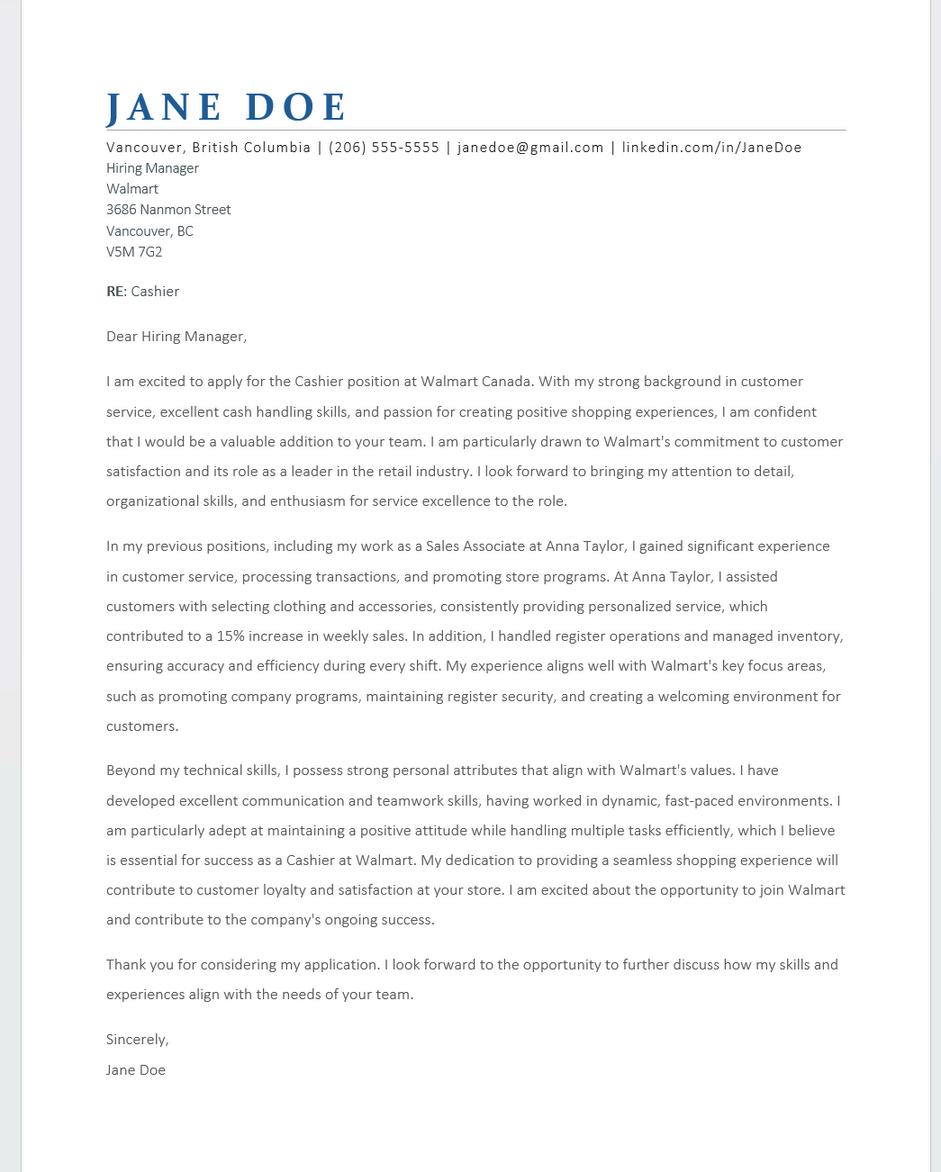
Personal Header
Use the same header as your resume to create a consistent & professional “brand” across documents.
Addressing the Hiring Manager
Research who the cover letter is for:
Use the job posting, LinkedIn, or Google to find the hiring manager's name. Can’t find the name? address it as Dear Hiring Team.
Opening Paragraph
Start strong to engage the reader. Include: The position title. Why you’re interested in the position and company. A brief summary of what you bring to the role.
Middle Paragraph: Highlight Your Skills, erience, and Accomplishments

Use specific examples to demonstrate your skills and how they align with the role’s requirements. Examples of relevant soft skills: communication, teamwork, leadership, and organization
How do these skills contribute to a positive workplace and align with the company’s culture? Incorporate keywords from the job posting.
sing Paragraph: Call to Action
ress your interest in an interview to discuss the e further and thank them for their time and sideration.
n-Off
e a professional closing, such as “Sincerely,” owed by your signature.
Is the cover letter visually interesting? Is it readable?
Do I clearly state why I am interested in the position and organization?
Does it “Talk” to the employer, is it descriptive with an engaging tone and voice but still using professional language?
Does it tell the employer what you can do for the company?
Does it showcase how I fit in at the organization?
Does it address a specific person?
Are there absolutely no errors?
23 ElevatorPitch

WHAT IS AN ELEVATOR PITCH?
An elevator pitch is a 30-second professional introduction that explains who you are, what you offer, and what you are looking for. It’s a great way to start conversation with employers and recruiters.
STEP 1: REFLECT ON YOUR EXPERIENCES
Think about your top 5 work, school, or volunteer experiences.
Use STAR Method:
Situation - What was the context?
Task - What needed to be done?
Action - What did you do?
Result - What was the outcome?
STEP 3: TAILOR YOUR PITCH
Adjust your pitch depending on:
The audience (recruiter, employer, classmate)
The setting (networking event, interview, career fair)
Look for patterns in your experiences: What are you good at? What do you enjoy doing? Are you a problem solver, analytical thinker, or strong communicator?
WHAT TO INCLUDE
Your elevator pitch should answer: Who you are
What you study or your experience What skills you offer
What you are looking for
Tip: End with a question or offer to connect (e.g. “I’d love to learn more about your experience in this field”)



Question 1: Who are you?
What are you studying or your current role?
Question 2: What experience do you have?
Any jobs, projects, or volunteer work?
Question 3: What are your skills?
Communication, teamwork, problem solving?
Question 4: What are you looking for?
Internship, part-time job, career field?
Question 5: How do you want to end?
Ask a question or express an interest in learning more
Interview Essentials
What is an Interview?
An interview is a conversation between you and an employer where they learn more about your skills, experiences, and personality to determine if you are a good fit for the role.
It is also your chance to decide if the company is a good fit for you—its culture, values, and expectations should align with what you are looking for.
Why is Interview Important?
The interview is your opportunity to go beyond your resume and:
Show your communication skills and confidence
Explain your experiences in more detail
Demonstrate how you can contribute to the organization
Make a strong first impression
TypesofInterview Questions
TECHNICAL/ KNOWLEDGE-BASED
Assess specific skills related to the job.
Example: “What steps are involved in cash balancing?”
BEHAVIORAL (STAR TECHNIQUE)
Focus on past experiences.
Example: “Tell us about a time when your cash register didn’t balance. How did you handle it?”
STAR Technique:
Situation: Set the scene.
Task: Describe the challenge or responsibility.
Action: Explain what you did. Result: Share the outcome and learnings.
SITUATIONAL/ HYPOTHETICAL
Test your approach to challenges.
Example: “As a cashier, what would you do if your cash wasn't balancing?”
ILLEGAL
Employers should not ask about:
Religious background
Marital/family status
Place of origin
Age, health, or disabilities
How to Respond: "I prefer to focus on my skills and experience relevant to this role. Could you tell me more about the job's responsibilities?"
BeforetheInterview
Research & Understand
Research the company’s mission, vision, values and products/services. Review the job posting and match your skills to their needs
Interview Preparation
Ask AI to generate possible interview questions based on the job posting Practice through mock interviews
Prepare for Common Questions
Technical: What tools or processes do you use to manage projects?
Situational: How would you prioritize tasks under tight deadlines?
Behavioral: Tell us about a time you resolved a conflict in a team.
Use STAR Method (Situation, Task, Action, Result)
Craft Questions to Ask the Interviewer
What does success look like in this role?
Can you describe the team dynamic? What are the opportunities for growth and development?
Get Ready
Prepare materials (resume, notebook, water)
Dress professionally (even for virtual interviews) Arrive 10–15 minutes early (or log in early online)
First Impressions Matter
Greet everyone warmly, from the receptionist to the interview panel.
Use a firm handshake (in person) or a confident “thank you for meeting with me” (virtually).
DuringtheInterview
1.Engage with confidence
Maintain eye contact and open body language.
Listen carefully—don’t interrupt.
2. Use the STAR Technique for Behavioral Questions
Example:
Q: Tell me about a time you improved a process.
A: In my previous role, I noticed delays in team communication (Situation). I initiated a weekly check-in system (Task), ensuring updates were shared in real time (Action). This reduced project delays by 20% (Result).
3. Handle Tough Questions Gracefully
Take a breath before answering.
Ask for clarification if needed: “Could you please elaborate?”
Post-Interview
1.Send a Thank-You Note
Email a polite and professional message within 24 hours.
Reinforce your enthusiasm for the role.
2. Reflect on Your Performance
What went well?
What could you improve for next time?
Build&GrowYour Network
Why Use LinkedIn?
LinkedIn is a professional networking platform that acts as your online resume. It helps you build meaningful connections, discover job opportunities, and stay informed on industry trends.
What to Post?
Academic, volunteering, or work achievements (e.g., conferences, certifications, or awards). Industry insights or key takeaways from events Share useful resources or professional advice.
Networking Tips
Start With Your Circle: connect with classmates, coworkers, instructors, and mentors.
Expand Strategically: connect with professionals in your field.
Always send a personalized message (mention common interests, how you found them or why you want to connect)
Stay Active: like, comment, and engage regularly
Nurturing Relationships
Congratulate others on milestones. Endorse skills or write recommendations for connections. Stay consistent – log in weekly
30 CreatingaStrong Profile
NetworkingMessageTemplate
Hello ,
My name is and I’m a student at Columbia College studying . I’m interested in learning more about careers in , and I came across your profile. If you are open to it, I would love to hear about your experience in the industry and any advice you might have for someone starting out.
Thank you!
Hello Alex,
My name is Jamie, and I’m a student at Columbia College studying Computer Science. I’m interested in learning more about careers in software development, and I came across your profile. If you’re open to it, I would love to hear about your experience in the industry and any advice you might have for someone starting out.
Thank you!

SkillUpwith atLocalLibraries
Did you know you can access LinkedIn Learning for free through many local libraries? It’s a great way to build new skills, earn certificates, and strengthen your resume—without any cost.
Why You Should Try It
Learn in-demand skills (e.g., Excel, communication, project mangement, coding)
Earn certificates to showcase on your resume and LinkedIn
Learn at your own pace with short, beginner-friendly courses
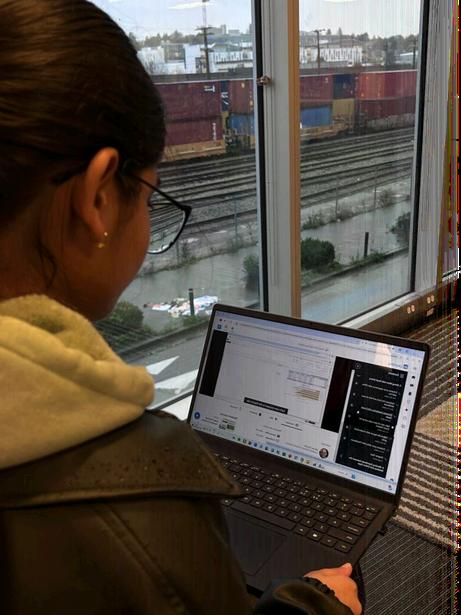
How to Access It
1.Get a library card from your local public library
2.Visit your library’s website
3.Look for LinkedIn Learning under digital resources
4.Log in using your library card number.
Access through:
Vancouver Public Library
Burnaby Public Library
Surrey Libraries
Richmond Public Library
Net nge
DAY 1: Update your LinkedIn headline
DAY 2: Connect with 3 classmates
DAY 3: Follow 5 companies in your field
DAY 4: Comment on one industry post
DAY 5: Message a professional in your field DAY 6: Share something you learned
DAY 7: Reflect - What did you learn from networking?
NavigatingCanadianWorkplace Culture
The Foundation
Workplaces in Canada value collaboration, respect, and balance. You are encouraged to:
Take initiatives and share your ideas
Value everyone’s input, regardless of position
Maintain a healthy work-life balance
Respect and embrace diversity and inclusion
Communication Style in Canada
Communication is generally polite, respectful and indirect.
Ask questions if you need clarification
Engage in small talk (e.g., weather, hobbies) to build relationship
Give and receive constructive, balanced feedback
Keep emails clear, concise and use professional language
Workplace Expectations
Employers expect professionalism and accountability:
Dress in a professional and appropriate manner
Stay focused during work hours and limit personal distractions
Show a positive attitude and support the company’s goals
Complete tasks on time
Speak up and raise concern when they arise
Punctuality & Attendance
Being on time is important in Canadian workplaces:
Arrive on time or 10–15 minutes early for shifts and meetings
Inform your supervisor in advance if you’ll be late or absent (e.g., illness or emergency)
Meet deadlines and communicate early if delays are expected
Schedule meetings in advance; drop-ins are uncommon
JobSearch Strategies
Preparing for Job Search
Before you Begin
Assess Your Skills: Identify your key strengths, technical abilities, and accomplishments.
Define Your Career Goals: What positions align with your experience and future aspirations?
Polish Your Application Materials: Create a tailored Canadian-style resume and a professional cover letter. Build a Strong LinkedIn Profile: Ensure it reflects your skills, experience, and career objectives.
Where to Start Your Search
Company Career Pages: Search “[Company Name] Careers” for openings.
Online Job Boards: Platforms like Indeed and WorkBC. Career/Job Fairs: These provide direct access to employers and recruiters.
Networking: Use your personal and professional contacts to learn about opportunities. Professional Associations: Explore organizations for industry-specific roles.
Tip: Visit the Career Services page to learn more about different online job boards.

Prompt to ask AI: “Create a 4-week job search plan for a student looking for internships in Vancouver.”
Smart JobSearching
Smart Search Strategies
Be Specific: Use focused keywords for better results. Refine Your Search: Use quotation marks (e.g., “marketing specialist”). Use Boolean terms (AND, OR, NOT) to include/exclude keywords.
Set Alerts: Receive email alerts about job postings Apply Smart: Use job boards (e.g., Google, Indeed) to search, but apply directly on company websites
The Hidden Job Market
Did you know? 65–80% of job openings in Canada are never posted online. Employers often rely on referrals to fill these roles.
Why Network Matters?
Discover unadvertised opportunities. Gain insider knowledge about industries and companies. Build strong professional relationships that lead to referrals and recommendations.
How to Network Effectively?
Reconnect with Existing Contacts: Start with friends, family, professors, or previous coworkers. Engage on LinkedIn: Follow companies, engage with posts, and connect with professionals in your field. Attend Events: Look for career fairs, webinars, or networking meetups.
UnlockingHidden Opportunities
How to Tap In
Polish Your LinkedIn Profile: Showcase your skills, projects, and achievements to attract recruiters.
Volunteer or Take Temporary Jobs: Gain valuable experience and grow your professional network.
Ask for Informational Interviews: Schedule informal chats to learn more about industries or companies of interest.
Leverage Referrals: Reach out to people in your network who might refer you for positions.
If opportunity doesn’t knock, build a door.
--Milton Berle
YourJobSearchPlan
Write down two job titles you’re targeting:
Find and list 3 companies you’re interested in:
Research two upcoming events or job fairs to attend:
Choose two skills you want to improve for your target role:
YourCareerToolKit:
On-CampusResources
1.Career Services at Columbia College
To book an appointment with Ana, the Student Career Advisor, visit www.columbiacollege.ca/studentservices/career-services. You can also reach her via email at studentcareers@columbiacollege.ca or visit her in Room 212, Main Campus.
2. Resume & Cover Letter Drop-ins
Career Services offers resume and cover letter reviews every semester. For drop-in hours, check the Career Services website or email cssa@columbiacollege.ca for more details.
3. Employment Preparation Program (EPP) & Community Connections Program (CCP)
These are college-supported programs that help students gain valuable work experience through on-campus (EPP) or off-campus (CCP) work opportunities, allowing them to build skills and prepare for the workforce.
4. Typing Essentials Program
Boost your resume with your improved and certified typing speed and accuracy through comprehensive lessons offered by the TEP program. For more information, email cssa@columbiacollege.ca.
5. Workshops Throughout the Semester
Columbia College offers various workshops each semester, covering everything from resume writing to interview preparation. You can find the full schedule on www.columbiacollege.ca/events/
1.Indeed
A popular job board in Canada where you can find job listings, set job alerts, and apply directly to companies. It also offers a helpful career guide, visit: https://ca.indeed.com/career-advice
2. WorkBC
A provincial resource offering job listings, career exploration tools, and tips for navigating the BC job market.
3. LinkedIn
Build your professional network and explore job opportunities on LinkedIn, a key platform for professionals across all industries.
4. Job Bank
Canada's government-supported job platform, featuring local job openings and career development resources.
5. Eluta
A Canadian job search engine that links directly to employer career pages for the latest job postings. For opportunities tailored to your degree, visit: https://www.canadastop100.com/tcd/
6. GoVolunteer
Explore volunteer opportunities that help you gain skills, expand your network, and give back to your community.
7. Settlement Agencies
Offers programs, workshops, and resources to help immigrants in Vancouver connect to the job market and community. Some agencies: MOSAIC, YWCA, YMCA and PICS
AIRESOURCES
1.Teal
Helps to optimize your resume using job descriptions and track your job applications in one place.
2. Kickresume
An AI-powered resume and cover letter builder with templates, plus options to create a personal portfolio.
3. AIApply
Generates tailored resumes and cover letters based on specific job postings to match employers requirements.
4. Careerflow
Supports your overall job search bny helping you track applications, improve your LinkedIn profile, and stay organized with career tools.
5. Yoodli AI
Provides feedback on your speaking skills (e.g., filler words, pace, confidence) to help you improve interview performance.
5. AI Mock Interview Tools (LLMs)
Stimulate real interview conversations by acting as a recruiter, allowing you to practice answering questions and receive feedback.
Glossary
Action Verbs
Dynamic words used to describe skills and achievements in resumes and cover letters (e.g., "managed," "developed," "led").
Applicant Tracking System (ATS)
Software that screens resumes for keywords. Use ATS-friendly formats like MS Word or Adobe-created PDFs; avoid images.
Chronological Resume
A resume format that lists work experience in reverse chronological order, starting with the most recent.
Endorse (LinkedIn)
A feature where LinkedIn connections validate your listed skills, increasing your credibility on the platform.
Hard Skills
Specific, teachable abilities gained through education and experience that can be measured, such as language proficiency, typing speed, degrees, and programming skills.
Soft Skills
Intangible personal and interpersonal abilities like communication, reliability, and teamwork that are hard to measure but essential in the workplace.
Language Fluency Levels
Fluent: Full command in any setting.
Intermediate: Comfortable in most situations.
Conversational: Basic communication skills.
Networking
Building professional relationships to gain insights, discover opportunities, and advance your career.
References
Individuals who can vouch for your skills, character, and work ethic during the hiring process.


CareerGuideatYour Fingertips
This guide is your go-to resource for navigating the job search process with confidence. Inside, you'll find essential advice on building an effective resume and cover letter, creating a professional LinkedIn profile, and exploring job search strategies. Learn how to network effectively, tap into the hidden job market, and make the most of Columbia College's career services and resources.
Contact Us
Whether you're just starting or looking to enhance your job search, this booklet provides the tools and insights to help you succeed in your career journey. studentcareers@columbiacollege.ca Room 212, Main Campus
For Broader Career Advice, Contact Ana Albuquerque: cssa@columbiacollege.ca Student Services (Drop-In Hours) For Resume & Cover Letter Advice, Contact: Career Services Student Assistant Student Career Advisor