Paulo Trigueiros Departamento de InformĂĄtica Instituto PolitĂŠcnico do Porto, Portugal paulo@trigueiros.org Fernando Ribeiro Departamento de ElectrĂłnica Industrial Universidade do Minho, GuimarĂŁes, Portugal fernando@dei.uminho.pt robĂłtica 98, 1.o Trimestre de 2015
UREĂ‹WLFD
$57,*2 &,(17Ăľ),&2
Vision-based hand wheel-chair control ABSTRACT Several studies have shown that people with disabilities beneďŹ t substantially from access to a means of independent mobility and assistive technology. Researchers are using technology originally developed for mobile robots to create easier to use wheelchairs. With this kind of technology people with disabilities can gain a degree of independence in performing daily life activities. In this work a computer vision system is presented, able to drive a wheelchair with a minimum number of ďŹ nger commands. The user hand is detected and segmented with the use of a kinect camera, and ďŹ ngertips are extracted from depth information, and used as wheelchair commands. Keywords – independent mobility, machine vision, wheelchair control, hand segmentation, ďŹ nger control
I. INTRODUCTION Several studies have shown that people with disabilities beneďŹ t substantially from access to a means of independent mobility and assistive technology [1], being independent mobility an important aspect of self-esteem [2]. Assistive devices such as powered wheelchairs improve one’s quality of life. While the needs of many individuals with disabilities can be satisďŹ ed with traditional manual wheelchairs, some ďŹ nd it diďŹƒcult to use. To accommodate this population and even other segments, several researchers have used technologies originally developed for mobile robots to create user friendly easier to use wheelchairs and “smart wheelchairsâ€?. Smart wheelchairs typically consist of either a standard power wheelchair to which a computer and a collection of sensors have been added or a mobile robot base to which a seat has been attached [2]. This work presents a simple and eective HCI (human computer interface) giving the user the ability to easily control a robotic wheelchair with a minimum number of ďŹ nger commands. The main goal consists of giving the user the capability to control it without touching any physical device. For that purpose, a computer vision interface was developed, able to detect ďŹ ngertips and able to use that information for driving the wheelchair. To extract the hand and ďŹ ngertip localization a kinect [3] camera is mounted on the back of the wheelchair pointing down to the user’s hand. Machine vision is a promising sensor technology. With nowadays cameras, smaller than a lot of other sensors, they can be mounted in multiple locations, giving larger sensor coverage. Also, the cost of machine vision hardware has fallen signiďŹ cantly, and the solutions based on computer vision continue to improve.
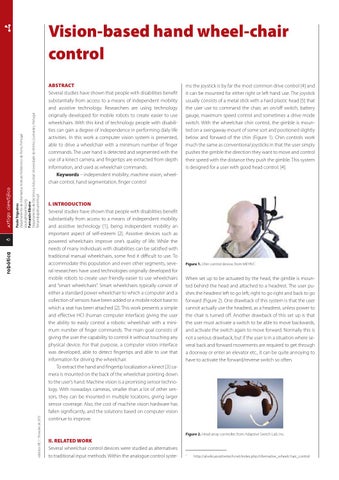
ms the joystick is by far the most common drive control [4] and it can be mounted for either right or left hand use. The joystick usually consists of a metal stick with a hard plastic head [5] that the user use to command the chair, an on/o switch, battery gauge, maximum speed control and sometimes a drive mode switch. With the wheelchair chin control, the gimble is mounted on a swingaway mount of some sort and positioned slightly below and forward of the chin (Figure 1). Chin controls work much the same as conventional joysticks in that the user simply pushes the gimble the direction they want to move and control their speed with the distance they push the gimble. This system is designed for a user with good head control. [4].
Figure 1. Chin control device, from MEYRA1.
When set up to be actuated by the head, the gimble is mounted behind the head and attached to a headrest. The user pushes the headrest left to go left, right to go right and back to go forward (Figure 2). One drawback of this system is that the user cannot actually use the headrest, as a headrest, unless power to the chair is turned o. Another drawback of this set up is that the user must activate a switch to be able to move backwards, and activate the switch again to move forward. Normally this is not a serious drawback, but if the user is in a situation where several back and forward movements are required to get through a doorway or enter an elevator etc., it can be quite annoying to have to activate the forward/reverse switch so often.
Figure 2. Head array controller, from Adaptive Switch Lab. Inc.
II. RELATED WORK Several wheelchair control devices were studied as alternatives to traditional input methods. Within the analogue control syste-
1
http://atwiki.assistivetech.net/index.php/Alternative_wheelc hair_control