Hybridandremoteworking,p1
What is Passkey Authentication?, p2
Tips for Designing Great Data Visualization Reports, p3
What is push-bombing & how can you prevent it?, p4
7 Ways to secure your wireless printer, p5
Our Fresh New Look, p6
StaffHighlight,p8 TechnologyUpdate,p9
Cyberresiliencyplan,p10
Entertainment,p11
FeaturedCustomer-Adiversifiedarchitecturalpracticethatoffers afullrangeofarchitecturalservices,p12
THINKINGOFMOVINGOFFICES… OREVENGOING100%REMOTE?
Hashybridandremoteworkingleftyouand yourteamrattlingaroundanofficethat’stoo big?
Ifyou’renowinthepositionofoverspendingon rent,utilitiesandcleaning,youmightbethinking aboutdownsizingtoanotherlocation–oreven abandoningtheofficecompletely.
That’ssomethingthatwilltakesomeplanningif youwantasmoothtransitionwithminimal, expensivedowntime.
Movesarealwaysstressful,andrelocatingyour ITsystemstakesabitmorethoughtthan manhandlingadeskupthestairs.

Sohereareourtopthreesuggestionstomakeit easiertoshiftyourITsetuptoanewlocation.
Useachecklist
Treatthislikeanyotherproject.Useato-dolist whereyoucheckoffeachstepsothatnothing’s forgotten.Allocateeverytaskonthelistto specificpeople,soeveryoneknowswho’s responsibleforwhat.


Refertoyourchecklistregularlywithprogress reviewsamonthbefore,aweekbefore,aday before,andonthedayofthemove.Have anotherlistforunpackingattheotherend.


Giveyourinternetprovidernotice
Werelyoninternetconnectionsformostof whatwedo,butit’scommontoallowtoolittle
timeforthistobesetup.Itcantakesixweeksto arrange,installandtesttheconnectionsoit’sready forthedayyoumovein.Allowplentyofnoticeto avoidunwantedstressonthedayofthemove.

Ifit’sanewbuildingorarefit,specifyalltheoutlets andconnectionsyouwant–don’tleaveittothe buildertoassumeasitwillcostmoretomake changeslater.
Useaprofessional
Ifit’sjustacoupleofmachinesitcouldbeaDIYjob. Butformostmoves,it’smore involvedthanjustdisconnectingafew cablesandreconnectingthem.It’stooeasyfor everythingtobecomeconfusingandbecomeover complicated.
AgoodITprofessionalwillhavethisprocessdown toafineartandwilldisconnectandreconnectyour wholenetworkefficientlyandwithminimal downtime.
Ifyou’rethinkingaboutamovetonew premisesandneedhelpplanningforit,wecan help…getintouch.

1
2023JUNE VOLUME30
CapitalTekTeknologyInsider 613-227-HELP(4357) help@capitaltek.com capitaltek.com
""YOURMONTHLY YOURMONTHLY NEWSLETTER,WRITTENFOR NEWSLETTER,WRITTENFOR HUMANS HUMANS,NOT,NOTGEEKSGEEKS" "
ISITTIMETODITCHTHEPASSWORDS FORMORESECUREPASSKEYS?
Passwords are the most used method of authentication, but they are also one of the weakest. Passwords are often easy to guess or steal. Also, many people use the same password across several accounts. This makes them vulnerable to cyber-attacks.
The sheer volume of passwords that people need to remember is large. This leads to habits that make it easier for criminals to breach passwords. Such as creating weak passwords and storing passwords in a non-secure way.
61% of all data breaches involve stolen or hacked login credentials.
In recent years a better solution has emerged –passkeys. Passkeys are more secure than passwords. They also provide a more convenient way of logging into your accounts.
enabled to log the user in
What is Passkey Authentication?
Passkeys work by generating a unique code for each login attempt. This code is then validated by the server. This code is created using a combination of information about the user and the device they are using to log in.
You can think of passkeys as a digital credential. A passkey allows someone to authenticate in a web service or a cloud-based account. There is no need to enter a username and password.
This authentication technology leverages Web Authentication (WebAuthn). This is a core component of FIDO2, an authentication protocol. Instead of using a unique password, it uses publickey cryptography for user verification.

The user’s device stores the authentication key. This can be a computer, mobile device, or security
Advantages of Using Passkeys Instead of Passwords
More Secure
One advantage of passkeys is that they are more secure than passwords. Passkeys are more difficult to hack. This is true especially if the key generates from a combination of biometric and device data.
Biometric data can include things like facial recognition or fingerprint scans. Device information can include things like the device’s MAC address or location.
This makes it much harder for hackers to gain access to your accounts.
More Convenient
Another advantage of passkeys over passwords is that
(Continued on next page)
NEWS|MAINSTORIES
2
CapitalTekTeknologyInsider 613-227-HELP(4357) help@capitaltek.com capitaltek.com
(Continued from page 2 )
they are more convenient. With password authentication, users often must remember many complex passwords. This can be difficult and timeconsuming.
Forgetting passwords is common and doing a reset can slow an employee down. Each time a person has to reset their password, it takes an average of three minutes and 46 seconds.
Passkeys erase this problem by providing a single code. You can use that same code across all your accounts. This makes it much easier to log in to your accounts.
It also reduces the likelihood of forgetting or
misplacing your password.
Phishing-Resistant
Credential phishing scams are prevalent. Scammers send emails that tell a user something is wrong with their account.
They click on a link that takes them to a disguised login page created to steal their username and password.
When a user is authenticating with a passkey instead, this won’t work on them. Even if a hacker had a user’s password, it wouldn’t matter. They would need the device passkey authentication to breach the account.
HOWTOCREATEINSIGHTFUL DASHBOARDSINMICROSOFTPOWERBI
Data visualization is a powerful tool for communicating complex data.
But it is not enough to simply create a graph or chart and call it a day. To truly make use of information, it is important to create insightful reports.
Creating holistic and insightful reports requires the use of several data points. One tool that enables this is Microsoft Power BI.
What Is Microsoft Power BI?
Microsoft Power BI is a business intelligence tool. It allows you to connect many data sources to one dashboard. Using Power BI, you can easily model and visualize data holistically.
Tips for Designing Great Data Visualization Reports
Consider Your Audience
You should design reporting dash-boards with the end user in mind. CEOs and CFOs are interested in different aspects of the business, make the information interesting to them.
What is it that this audience wants to see?
Are they looking for bottomline sales numbers?
Or do they want to cover insights that can help target productivity gaps?
Don’t Overcomplicate Things
Many times, less is more. If you
find that your dashboard looks crowded, you may be adding too many reports.
The more you add, the more difficult it is to read the takeaways from the data.
Try Out Different Chart Types
Experiment with presenting your data in different ways.
Flip between bar, pie, and other types of charts to find the one that tells the story the best.
Just don’t go overboard. Keep it simple but interesting.
Get to Know Power Query
Power Query is a data preparation engine.
NEWS|CONTINUATIONOFMAINSTORIES
3 (Continued on next page) CapitalTekTeknologyInsider 613-227-HELP(4357) help@capitaltek.com capitaltek.com
(Continued from page 3)
Take time to learn how to leverage this tool for help with:
Connecting a wide range of data sources to the dashboard
Previewing data queries
Building intuitive queries over many data sources
Defining data size, variety, and velocity
BuildMapswithHintstoBing
Bing and Power BI integrate, allowing you to leverage default map coordinates Use best practices to utilize the mapping power of Bing to improve your geo-coding.
TellPeopleWhatTheyAre LookingAt
A typical comment heard often when presenting executives with a new report is, “What am I looking at?” Tell your audience what the data means by using features like tooltips and text boxes to add context.
UseEmphasisTricks
People usually read left to right and from top to bottom. So put your most important chart at the top, left corner. Follow, with the next most important reports.
WHATIS PUSHBOMBING& HOWCANYOU PREVENTIT?
Cloud account takeover has
become a major problem for organizations.
Between 2019 and 2021, account takeover (ATO) rose by 307%. Many organizations use multifactor authentication (MFA) as a way to stop fraudulent sign-ins
But its effectiveness has spurred workarounds by hackers. One of these is push-bombing
HowDoesPush-Bombing Work?
When a user enables MFA on an account, they typically receive a code or authorization prompt of some type.
The user enters their login credentials.
Then the system sends an authorization request to the user to complete their login.
With push-bombing, hackers start with the user’s credentials and take advantage of that push notification process.
They attempt to log in many times
This sends the legitimate user several push notifications, one after the other
When someone is bombarded with these, it can be easy to mistakenly click to approve access.
Push-bombing is a form of social engineering attack designed to:
Confuse the user
Wear the user down
Trick the user into approving the MFA request to give the hacker access
Ways to Combat Push-Bombing at Your Organization
Educate Employees
Reduce Business App “Sprawl”
Adopt Phishing-Resistant MFA Solutions
Enforce Strong Password Policies
Put in Place an Advanced Identity Management Solution
Additionally, businesses can use identity management solutions to install contextual login policies.
HOWTOUSE CHATGPTAT YOUR BUSINESS RESPONSIBLY
ChatGPT has revolutionized the way businesses interact with their customers. It has also affected how they get things done.
Teams are using it for everything from emails to generating ideas for product names.
The tool’s personalized and informative responses in realtime definitely draw you in. But integrating ChatGPT into your business operations requires careful consideration.
(Continued on next page)
NEWS|FINISHOFMAINSTORIES
4
CapitalTekTeknologyInsider 613-227-HELP(4357) help@capitaltek.com
capitaltek.com
TECHNOLOGY|TOOLSFORYOURBUSINESS
(Continued from page 4)
You want to ensure that things don’t get out of hand with employees using the tool irresponsibly.
Understand ChatGPT’s Weaknesses
Define ChatGPT’s Role
Consider Customer Privacy
Ensure Human Oversight
Integrate ChatGPT Into Your Existing Customer Service

Measure Performance and Optimize
Be Transparent About Using It
7WAYSTO SECURE YOUR WIRELESS PRINTER
Manypeopleworryabout someonehackingtheir computer.Butthey’renotreally thinkingabouttheirwireless printergettingbreached.It’s atoolthatmostindividualsuse sporadically.Forexample,when youwanttoprintouttaxforms ormailinglabels.
Printerstendtobeoutofsight, outofmind.Thatisuntilyou needtoprintsomethingand runoutofink.Well,they’renot outofthemindofhackersIn fact,unsecuredprintersarea classicwayforcriminalstogain accesstoahomenetwork.
1. 2.
KeepPrinterFirmware
Updated
3.Use a Network Firewall
4.Put Your Printer on a Guest Network
5.Disable Unused Ports or Services
6.Unplug It When Not in Use
7.Teach Your Family Cybersecurity Best Practices
6IMMEDIATE STEPSYOU SHOULD TAKE IFYOUR NETFLIX ACCOUNTIS HACKED
Netflix is one of the most popular and well-known streaming services. The platform has become an essential part of many people’s daily entertainment routines. Unfortunately, like any online service, Netflix accounts can be vulnerable to hacking.
Hackers take advantage of “phishing overload.” Once they breach your account, they’re usually quiet for a bit, hoping you’ll mistake the Netflix suspicious login warning for a fake.
Here are some things to do right away if you fear your account is hacked:
1.
2.
Go to the Netflix site & try to log in.
If you can log in, change your
password immediately.
3.If you can log in, remove any strange payment methods
4.Contact Netflix support and let them know that you think you’ve been compromised. (Don’t skip this step)
5.Watch your bank statements.
6.Change the password for other accounts that used the same one as your Netflix account.
ChangetheDefaultLogin Credentials
DID YOU KNOW... Snipping Tool lets you record your desktop? The updated snipping tool in Windows 11 allows you to record your desktop – it’s a great way to produce training id f t k ( CapitalTekTeknologyInsider 613-227-HELP(4357) help@capitaltek.com capitaltek.com
Entertainment Scamsand Techniques
Engagement and Entertainment Scams

Users are more likely to engage with topics they are familiar with or interested in. Let's go over the ways cybercriminals take advantage of this by using these topics to carry out scams.
Clickbait Content
Cybercriminals create dramatic fake news as clickbait This could be celebrity gossip or stories about serious world events AI-generated articles only help to increase the amount of content that can be pushed out Fore mails containing this type of content, use the SLAM method to analyze the sender, links, attachments, and messaging. For websites, stick to news from trusted sources and look for the "lock" symbol.
EntertainmentContent

Manytypesofentertainmentlikestreaming platforms,sportsevents,oronlinecontestsmaybe usedasbaitinphishingmessages Itisalwaysbest togodirectlytoacompany'swebsiteinsteadof clickingonlinksinemails.
Eventticketscamsareontherise,aswell.Tryto buyticketsfromtheoriginalsellerandavoidbuying throughads.Whetheritisaticket,ajersey,ora streamingplatform,ifthepriceseemstoogoodto betrue,itprobablyis
EntertainmentApplications
Cybercriminalshavetakentoappstorestocreate replicasofpopularentertainmentapplications.This couldbestreamingapps,populargames,ormusic platforms
Whilethird-partyappstoresarethemost susceptibletothesemaliciousapps,itisalways besttocheckthenumberofreviewsandthe developerbeforedownloadinganapp.Ifamalicious appisdownloaded,itcouldinfectadevicewith malwareandallowthecybercriminaltoaccessuser data
CYBERSECURITY|PROTECTYOURSELF 6
CapitalTekTeknologyInsider 613-227-HELP(4357) help@capitaltek.com capitaltek.com
VILLAINOFTHEMONTH
Each month we highlight a scam that demonstrates tactics criminals are using RIGHT NOW, to better prepare you when the next scam hits.
Rachel was looking for a new skincare product. She started searching the web and saw an ad for a skin care cream used by one of her favorite singers. Rachel was excited, she had just been to her concert and thought this skincare cream must be great if the singer was endorsing it. Rachel clicked on the ad and was taken to the company’s website where she was greeted with more pictures of their products and other celebrities that had tried them
She selected a cream and continued to checkout. After a few weeks, Rachel still hadn't received the cream. She started to get suspicious and tried to find a confirmation email. Rachel realized she never received a confirmation.

When she performed an internet search on the brand, she found many reviews from other customers saying it was a scam. When Rachel checked her credit card, she found multiple fraudulent charges. Luckily, she was able to call her credit card company and get the money back.

DIDYOUSPOTTHEREDFLAGS?
Racheltrustedthecompanybecauseofthecelebrity endorsementanddidnotresearchthecompanyfirstbefore buyingtheproduct.
Insteadofstayingonwell-knownwebsites,Rachelclickedonan adtobuytheproduct.
Racheldidnotreceiveaconfirmationemailforherorder,anddid notcheckhercreditcardtransactionsuntilweekslater.
Check the celebrity's social media account to see if they have posted anything about endorsing the product.
Take the time to investigate the company before buying anything. Always use a credit card when making new purchases online.
Takethetimetoinvestigatethecompanybeforebuyinganything Alwaysuse acreditcardwhenmakingnewpurchasesonline.



CYBERSECURITY|PROTECTYOURSELF 7
CapitalTekTeknologyInsider 613-227-HELP(4357) help@capitaltek.com capitaltek.com
FreshNewLook
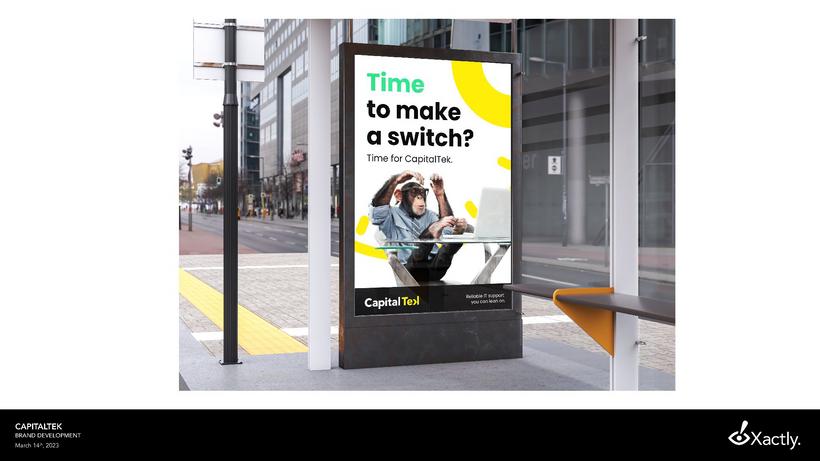
We are delighted to launch our new logo as part of the ongoing evolution of our company’s brand.
Our professional profile has grown and evolved since we first launched and now it is time to refresh it. We have altered our logo to reflect who we are today and to symbolize our dynamic future.
With a lot of creativity sessions, we have chosen a new logo that is modern with key elements that convey our mission to help companies achieve their goals while remaining true to our longstanding reputation.

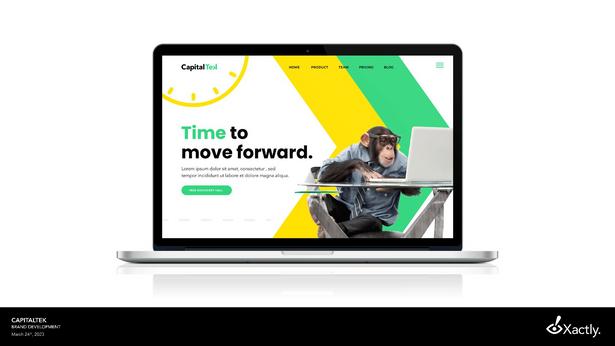
ifitistheirproposal,wehavethe teamin-house Weapproach yourITlikepartnerwithaproactiveplantomanageit,notjust respondtoemergencies.
OURBRAND TRUTH
Thisconceptisabouthelping businessestakethenextstep andreachnewheightsby embracingtheevolutionoftech support.
We,atCAPITALTEK,havecertified andexperiencedPCandMac specialistsonstaff,andoncall 24/7.Wedon’toutsourceanything,
Theconceptfocusesontheidea of“time”inallaspects: downtime,uptime,qualitytime, savingtime,timetoswitch providers,etc.,andwillexplain
Every second counts when it comes to keeping your business up and running. CapitalTek gets you back up and running in no time.

MEDIA&ARTS
|ANNOUNCEMENT
8
CapitalTekTeknologyInsider 613-227-HELP(4357) help@capitaltek.com capitaltek.com
NEWTOMICROSOFT365
Printing gets a security boost
Microsoft 365 is helping to reduce print waste and increase privacy with an update to its printing function. It will hold print jobs until you arrive at the printer. Then

TECHFACTS
youscanaQRcodeonthe MicrosoftOfficemobileapp tostartyourprintjob. Smart,right?It’scalled SecureReleasePrinting, andyoucanaskyourIT partnertogetitsetupfor you.

The Surface Web (the internet visible to search engines) only accounts for 10% of the internet The rest lives in the Deep Web – where pages aren’t indexed, or are encrypted, password protected or behind a paywall. This is normal, legal and very different to the Dark Web… where criminals do business
One of iTunes’ terms and conditions states that you are not to use their devices to create “ … nuclear, missile, chemical or biological weapons”
Only 4.5 billion people around the world have a working toilet. More than 6 billion people have a cell phone
Techn logy update
Are you asking ChatGPT the wrong questions?
ChatGPT is incredible, but it still has its limitations. If you find it frustrating and inaccurate, it’s quite likely you’re doing it wrong. Here’s how to get the best out of it...

Be specific A basic question will generate a basic answer. The more specific your question, the more likely it is to create a good answer
Give it context For instance, if you’re asking it to review an email, tell it whose perspective it’s reading it from – an employee, a frustrated client, and so on.
Watch your language It can cope with a few typos and a little slang, but too much and you won’t get the great responses you want.
TECHNOLOGYUPDATE
|MICROSOFT365
9
“Dataisthepollutionproblem oftheinformationage,and protectingprivacyisthe environmentalchallenge.”
BruceSchneier,Cryptographerand ComputerSecurityProfessional
INSPIRATIONAL QUOTE OF INSPIRATIONAL QUOTE OF THE THE MONTH MONTH
CapitalTekTeknologyInsider 613-227-HELP(4357) help@capitaltek.com capitaltek.com
ISYOURBUSINESSMISSING ACYBERRESILIENCYPLAN?
A recent cyber security report found that just 11% of IT budgets go into incident response, disaster recovery, and infrastructure security. This could be a dangerous underinvestment.
While it’s vital to keep your data and infrastructure protected with a layered, multi-stranded approach, no network can ever be protected from 100% of attacks. Even if it were possible, it would make your systems hard to live with, and would certainly destroy productivity
That means you need a cyber resiliency plan to help you respond to any cyber attack that does get past your defenses. It requires different thinking to your other resilience plans around physical disasters.
In the case of a flood for example, your incident response might be to get cleaned up, find a temporary work location and get your systems online again. But in the case of a ransomware attack, you’d need to investigate how the attack
occurred, locate and patch the holes in your defenses, and remove all traces of the attack from your systems
For a cyber attack, you’ll also have a different RTO – a Recovery Time Objective – which defines how quickly you expect to get back up and running. Your resiliency plan should define that RTO, so that you understand what downtime costs you’ll be facing.
Where do you start? We recommend:
1 Improving your security: Hopefully you’ve already ticked this one off Make it as hard as possible for crooks to access your systems, without creating measures that are so hard to live with that they interfere with the smooth running of your business.

2. Monitoring your systems: The sooner you detect an attack, the faster you can respond, which
will minimize any damage. You should always be monitoring for suspicious activity and staff should be trained to spot warning signs.
3. Responding swiftly: Your response plan should be available to everyone in the business, and should include information on who to report a suspected breach to, and all the steps that should be taken.
4. Making recovery easier: Once an attack is under control it’s time to recover. That means having a good backup in place, and a rehearsed plan for restoring your systems
If you need help with cyber resiliency, or other disaster recovery plans, get in touch today.
OUROFFER|AIHIGHLIGHT
CapitalTekTeknologyInsider 613-227-HELP(4357) help@capitaltek.com capitaltek.com
TheFunnies
DID YOU KN W
Thefirstknown computerprogrammer wasawomannamed ADALOVELACE
NEED A LAUGH?
Why did the computer go to art school?
Because it wanted to learn how to draw better "bytes"!
TECHNOLOGY TRIVIA
Why does your keyboard have that weird QWERTY layout?
" To slow down typing for original typewriters as the letters would get stuck together if you typed too fast."
TechQuiz
What was Google’s name originally a misspelling of? ‘Creeper’ was the name of the first what? What’s the world’s most popular password? What was the first games console to go to space? How much of the world’s currency is now digital?
The answers are below.
Q&As
Q: My employees use WhatsApp to share work info – should I stop this?
A: If you’re already using a communication tool like Teams, your people should keep all work communication there It’s more secure and can save a lot of time hunting for information
Q: I’ve lost my laptop What do I do?
A: You should have a response plan in place for this type of incident. Report it to the correct person so that data can be wiped remotely to avoid a breach If you don’t have a plan or remote management in place, we can help
Businessgadgetofthemonth MoleskineSmartWriting Notebook&PenSet


Classic design for pen and paper fans, with a digital copy of everything
The classic Moleskine notebook includes a Smart Pen and Notes App. It takes an instant digital copy of every page, so you can handwrite your meeting notes but take your doodles to the next level. Widely available $279
Introducing the Insta360 Flow AI Tracking Smartphone Gimbal Stabilizer!



Say goodbye to shaky footage and hello to buttery-smooth cinematic shots with this compact, lightweight stabilizer
Whether you ’ re an adrenaline junkie capturing extreme sports or a filmmaker seeking that perfect steady shot, the Insta360 Flow Stabilizer has got you covered.
Get yours at: https://store.insta360.com/
ENTERTAINMENT|TRIVIAANDGADGETS
1.
2. 3 4. 5.
1)
2)
3)
4)
5)
‘Googol’, a word to express a HUGE number
Computer virus
123456. Please, please, please don’t use this…
A Nintendo Game Boy, taken to the Mir space
station in 1993
More than 92%
11
CapitalTekTeknologyInsider 613-227-HELP(4357) help@capitaltek.com capitaltek.com
the business of design the design of business
bbb architects Ottawa (bbb) is a diversified architectural practice,

offering a full range of architectural services, with a reputation for delivering projects that exceed their clients expectation in all categories: budget, schedule and design.
Since 1985, bbb has been privileged to work for some of the most prestigious public and private sector clients in Canada and abroad. The firm is known
for the diversity of its portfolio, having designed buildings of virtually every typology. The diversity is largely the result of the firm's reputation for exhaustive research into every aspect of their clients' needs. bbb believes that a new client's project should not be a derivative of past projects. Each new client and project should be researched, with respect to the client's specific culture, structure and current precedents in the industry.
This approach has proven to engage their clients, allowing them to participate and enjoy the creation of their project, while
613-227-HELP(4357)
help@capitaltekca capitaltekca

Award-winning managed IT services for small to medium-sized companies in Ottawa. We combine essentials with a comprehensive platform to keep you running worry-free 24/7.
ABOUTFOUNDER&CEO,SERGEYPOLTEV


Founder and CEO Sergey Poltev, has been fixing computers since he was a kid. He immigrated to Canada to seek new opportunities, where he launched CALLGEEK (later renamed to CAPITALTEK) in 2008. Sergey was recognized in 2021 with a Forty Under 40 Awards from the Ottawa Board of Trade & Ottawa Business Journal.

MANAGED ITSERVICES NETWORK MANAGEMENT VOIP SERVICES CLOUD SERVICES DATABACKUP ANDRECOVERY WEBHOSTING ANDDESIGN FEATURE|CUSTOMERHIGHLIGHT CapitalTekTeknologyInsider 613-227-HELP(4357) help@capitaltek.com capitaltek.com We'renowtakingon newclients! Setupa15minutediscoveryvideocallat www.capitaltek.ca/talk-to-an-expert keeping their firm motivated to keeping their firm motivated to ffind ind fresh and innovative fresh and innovative solutions. solutions. 47 Clarence Street, Suite 400 47 Clarence Street, Suite 400 Ottawa, ON K1N 9K1 Ottawa, ON K1N 9K1 Tel. (613) 241-6446 Tel. (613) 241-6446 iinfo@bbbarchitecture.com nfo@bbbarchitecture.com
12
