How to Choose the RIGHT cable. Three things to consider:
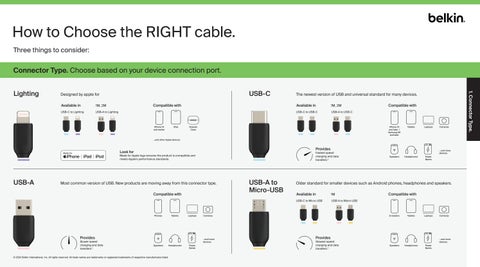
Connector Type. Choose based on your device connection port. USB-C
Designed by apple for Available in
1M, 2M
USB-C to Lighting
USB-A to Lighting
Compatible with
iPhone 14 and earlier
iPad
The newest version of USB and universal standard for many devices. Available in
1M, 2M
USB-C to USB-C
USB-A to USB-C
Airpods Case
Compatible with
iPhone 15 and later / Samsung S8 and later
Tablets
Laptops
Cameras
...and other Apple devices.
Provides
Look for
Fastest speed charging and data transfers.*
Made for Apple logo ensures the product is compatible and meets Apple’s performance standards.
USB-A
Most common version of USB. New products are moving away from this connector type. Compatible with
Phones
Tablets
Laptops
Provides
Slower speed charging and data transfers.*
Headphones
© 2024 Belkin International, Inc. All rights reserved. All trade names are trademarks or registered trademarks of respective manufacturers listed.
Power Banks
Speakers
Headphones
Power Banks
Older standard for smaller devices such as Android phones, headphones and speakers. Available in
1M
USB-C to Micro USB
USB-A to Micro USB
Cameras
...and more devices. Speakers
USB-A to Micro-USB
...and more devices.
Compatible with
E-readers
Tablets
Laptops
Provides
Slowest speed charging and data transfers.*
Cameras
...and more devices. Speakers
Headphones
Power Banks
1. Connector Type.
Lighting