Be Ready For Today ™
Docking Stations to Power your Apple M4 MacBook Pro With the launch of M4, Apple's new base model MacBook Pro now supports two extended displays via Thunderbolt, enhancing desktop optimization. Paired with Belkin's docking stations, users can enjoy multiple displays, ultra-fast data transfer, numerous connection ports, and fast charging. These docking stations ensure seamless connectivity and top performance, unlocking your M4 MacBook Pro's full potential for an optimized workflow. Apple M4 MacBook Pro External Display Compatibility Guide MacBook Model
External Display Support
MacBook Pro M4 / M4 Pro
Up to two external displays at 6K 60Hz each, or one external display at 8K 60Hz
MacBook Pro M4 Max
Up to four external displays at 6K 60Hz each, or up to two external 6K 60Hz displays and one 8K 60Hz display
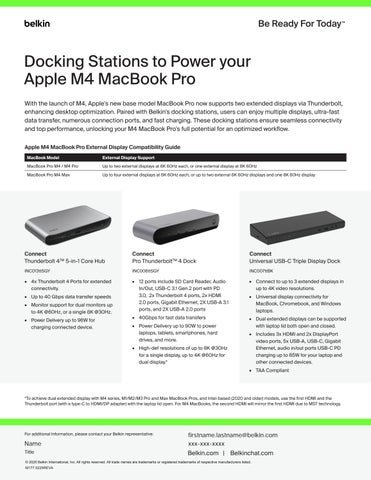
Connect Thunderbolt 4TM 5-in-1 Core Hub
Connect Pro ThunderboltTM 4 Dock
Connect Universal USB-C Triple Display Dock
INC013ttSGY
INC006ttSGY
INC007ttBK
• 4x Thunderbolt 4 Ports for extended connectivity.
• 12 ports include SD Card Reader, Audio In/Out, USB-C 3.1 Gen 2 port with PD 3.0, 2x Thunderbolt 4 ports, 2x HDMI 2.0 ports, Gigabit Ethernet, 2X USB-A 3.1 ports, and 2X USB-A 2.0 ports
• Connect to up to 3 extended displays in up to 4K video resolutions.
• Up to 40 Gbps data transfer speeds
• Monitor support for dual monitors up to 4K @60Hz, or a single 8K @30Hz. • Power Delivery up to 96W for charging connected device.
• 40Gbps for fast data transfers
• Power Delivery up to 90W to power laptops, tablets, smartphones, hard drives, and more.
• High-def resolutions of up to 8K @30Hz for a single display, up to 4K @60Hz for dual display.*
• Universal display connectivity for MacBook, Chromebook, and Windows laptops.
• Dual extended displays can be supported with laptop lid both open and closed. • Includes 3x HDMI and 2x DisplayPort video ports, 5x USB-A, USB-C, Gigabit Ethernet, audio in/out ports USB-C PD charging up to 85W for your laptop and other connected devices. • TAA Compliant
*To achieve dual extended display with M4 series, M1/M2/M3 Pro and Max MacBook Pros, and Intel-based (2020 and older) models, use the first HDMI and the Thunderbolt port (with a type-C to HDMI/DP adapter) with the laptop lid open. For M4 MacBooks, the second HDMI will mirror the first HDMI due to MST technology.
For additional Information, please contact your Belkin representative:
Name Title
firstname.lastname@belkin.com xxx-xxx-xxxx
Belkin.com | Belkinchat.com
© 2025 Belkin International, Inc. All rights reserved. All trade names are trademarks or registered trademarks of respective manufacturers listed. M177 0225REVA