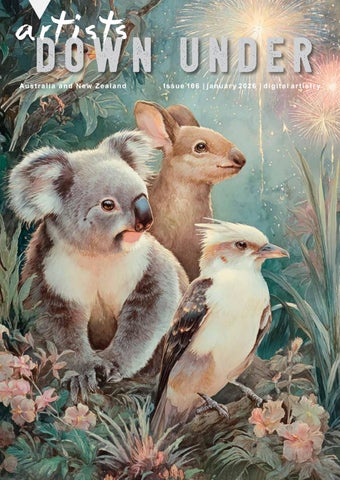
DOWN UNDER Australia and New Zealand
I s s u e 10 6 | j a n u a r y 2 0 2 6 | d i g i t a l a r t i s t r y
04
EDITOR’S REPORT
32-33
A N D R E W H AYS O M
34-35
PENNY DE JONG
By Pam Henderson
05
P H O T O S H O P A R T I S T RY By Sebastian Michaels
06-07
AL BAMASS
36-37
D E N I S E CAU C H I
08-09
S A N D R A DA N N
38-40
PHOTOSHOP I N S P I R AT I O N
10-11
PRUE WRIGHT
12
MICK ROONEY
13-17
A R T I S T S M O N T H LY AC H I E V E M E N T S
18-19 20-21 22-23 24 25--29 30-31
By Andrew Haysom
41
SHARON R ANKMORE
42-43
KEVIN SIMS
44-45
TRISH HOSKIN
46-47
J E N N Y DAV I D S O N
48
CHINESE WHISPERS # 97
B E V T E R AW S K YJ SUE MASTERSON By Maureen Maxwell
R O S A P E R RY 49-54
A R T BY M AU R E E N M A X W E L L
55
KIM RICCI
56-57
MARINA HOBBS
58-59
C O L I N CA M P B E L L
D E N I S E H U N T E R LO G A N A R T BY H E M A N T KO G E K A R HELEN MCLEOD
F R O N T C OV E R by C H R I S T I N A B R U N TO N - NEW YEAR C E L E B R AT I O N S
Julie Powell - Toby Lavender
2
60-61
K A R E N WA A LW Y K
88
LO U I S E S M I T H
62
PA M H E N D E R S O N
89
CHRISTINA BRUNTON
COFFEE AND PIXELS
90-91
G E O R G E KO N C Z
74-75
CAT B E AG L E C R E AT I O N S
92-93
JULIE POWELL
76-77
COLIN KILLICK
94-97
QUOTE CHALLENGE
78-79
JA N E T OV E Y
98-106
80
M E AG H A N P RYO R
63-73
By Maureen Maxwell
A R T BY I LO N A A B O U - Z O LO F
M O N T H LY A R T I S T I C PHOTOSHOP CHALLENGE THEME - CHRISTMAS
107-111 81-87
By Christina Brunton
ARTISTS BUSINESS A DV E R T I S E M E N T S
Hemant Kogekar - Vestrahorn
3
a r t i s t s DOWN UNDER Australia and New Zealand
HAPPY NEW YEAR. Well we have survived the Christmas cheer and food for another year, and have all celebrated bringing the New Year in and made our New Years Resolutions for 2026. And in all this hussle and bustle, our artists have still made time to put together another magazine jam-packed with amazing images for you. I would like to congratulate Andrew Haysom, our beloved Photoshop Guru for celebrating his 100th article this month, what an outstanding achievement and how very lucky does our group feel to have him onboard and so supportive. We have all our regular articles and some awesome art by our artists, so I hope you enjoy what we have put together for you. All of us at Artists Down Under would like to wish you all a Very Happy safe and prosperous New Year Stay safe and enjoy your festivities.
Pam Henderson
Backgrounds: Foxy Squirrel Laitha’s Designs - Jai Johnson - White Lane Studio Copyright 2017 © Artists in this publication are responsible for any rights appertaining to their work.
4
HTTPS://PROPHOTOSHOPARTISTRY.COM
Beginner through Advanced Photoshop OR Adobe Elements Huge Library of Bonus Content 60-Day Guarantee! Image by: Sue Masterson, Photoshop Artistry Student
55
AL BAMASS
( AUSTRALIA )
K A L B A R R I G LO R I O U S C O LO U R S
K A L B A R R I M O R N I N G WA L K
6
K A L B A R R I C OA S TA L C O LO U R S
7
SANDRA DANN
( AUSTRALIA )
https://www.sandradimagery.com/
SAILING
8
T R U E C O LO U R S
9
PRUE WRIGHT
R O B E R T S O N PA R K
10
( AUSTRALIA )
TERR ARIUM
11
MICK ROONEY
( AUSTRALIA )
https://www.artistsdownunder.com.au/artist-3/mick-rooney/
CA N D I DA S A , B A L I N O.1
CA N D I DA S A , B A L I N O. 2
12
artists down under monthly Achievements 13
artists down under facebook page The Artists Down Under Public Facebook page has been set up to allow the artists in the group to showcase their work and to enable them to share promotional information about themselves, e.g. exhibitions, awards etc... You can find the Artists Down Under Public Facebook page at this address; https://www.facebook.com/groups/ArtistsDownUnder/
So, if you are an artist in the group, don’t forget to regularly share your work and information here, and to let your friends and family know about the page if they are interested in viewing the latest art and news from the group. If you are a reader of the magazine who does not have access to the page, please click the link above and request to join. When you request to join you will be asked to answer three simple questions that will allow us to determine if you are an eligible artist who may wish to join the group and therefore be able to post on the page, or a member of the public who can view, comment and like the work on the page. It’s a great place to see some great art from this vibrant group every day!
Three ADU members receive a special gift Our very good Awake friends Teddi Rutschman of Foxey Squirrel and Diane Stafford from WhiteLaneStudio continue to give gifts as a reward for members of the Artists Down Under group who contribute to the ADU Facebook page by regularly posting their artworks and supporting other members with their comments. Teddi, from Virginia, USA, is well known for her fantastic sets of digital designer backgrounds, masks and all kinds of wonderful elements ready for designers to add to or build a wondrous creation. Teddi Rutshman can be found at
http://www.oscraps.com/shop/Foxeysquirrel One artist will receive a Foxey Squirrel Kit Diane Stafford from Chester, UK, designs Photoshop textures and overlays for photo artists and photographers to use in their digital artworks. Diane has created another special kit just for Artists Down Under for the month of JANUARY. Two artists will receive a Diane kit each. Diane Stafford can be found at
https://whitelanestudio.co.uk/biolinks
14
The JANUARY lucky winners are Foxey Squirrel Kit - Marie Helyar Diane Stafford (WhiteLaneStudio) Texture & Overlay Kit - Alison Meier - Paul Neary
LIVING THE PHOTO ARTISTIC LIFE httpshttps://issuu.com/thephotoartisticlife/docs/living_the_photo_artistic_life_-_issue_no._130?fr=sNTA1Yzg0NDE1MDQ
Congratulations to the following artists for having their images chosen to appear in the International magazine “Living The Photo Artistic Life”. Christina Brunton - White Cockatoos - Wombat - Kangaroo And Joey Christmas Maureen Maxwell - The Teal And Gold Ballgown Rosa Perry - Her Christmas Soul - She Is Wearing Christmas Kim Ricci - The Silence Of Hours Sandra Dann - What I Don’t Let You See Sue Masterson - It’s On The Cards Meaghan Pryor - Create 2026 CatBeagle Creations - Bah Humbug - Cats A Caroling Ilona Abou-Zolof - Coastal Christmas - Winter Whimsy Helen McLeod - Regal - In The Forest George Koncz - Burg Rheinstein, Germany Penny de Jong - Nonchalance - Elegance
Christina Brunton - White Cockatoos
Sue Masterson - It’s On The Cards
Christina Brunton - Wombat
Penny de Jong - Elegance
Penny de Jong - Nonchalance CatBeagle Creations - Cats A Caroling
CatBeagle Creations - Bah Humbug
15
LIVING THE PHOTO ARTISTIC LIFE
Ilona Abou-Zolof - Coastal Christmas
Ilona Abou-Zolof - Winter Whimsy
Rosa Perry - Her Christmas Soul
Rosa Perry - She Is Wearing Christmas
Meaghan Pryor - Create 2026
16
George Koncz - Burg Rheinstein, Germany
Maureen Maxwell - The Teal And Gold Ballgown
Christina Brunton - Kangaroo And Joey Christmas
Kim Ricci - The Silence Of Hours
shift art December 2025 Theme
“Dangerous Flowers” https://shiftart.com/shift-art-photoshop-challenge-results-december-2025/
Congratulations goes to
Penny de Jong FIRST PLACE WINNER
Penny de Jong - Battling The Ever Blooming Swordflowers
17
BEV TERAWSKYJ
( AUSTRALIA )
https://artistsdownunder.com.au/artists-1/bev-terawskyj/
CR ABLEGS
18
W E LC O M E
19
SUE MASTERSON
( AUSTRALIA )
https://artistsdownunder.com.au/artist-4/sue-masterson/
BLADE IN SHED
20
FO U N D FLOAT I N G
21
ROSA PERRY
( AUSTRALIA )
https://www.flickr.com/photos/rosa_perry https://rosa-perry.myportfolio.com/artwork
THE BOOK KEEPER
22
T U G AT T H E E D G E
23
DENISE HUNTER LOGAN
B I R D O F PA R A D I S E
WAT T L E B I R D
24
( AUSTRALIA )
art by
HEMANT KOGEKAR LANEWAYS https://photos.kogekar.com/ https://artistsdownunder.com.au/artist-2/hemant-kogekar/
25
E S S AO U R I A # 1
26
E S S AO U R I A # 2
27
E S S AO U R I A # 3
28
LISBON
29
HELEN MCLEOD
( NEW ZEALAND )
https://www.2-galleries.com/
F E E L I N G I N FL AT E D
30
HARES ANOTHER
31
ANDREW HAYSOM
( AUSTRALIA )
https://andrewhaysom.myportfolio.com/ https://artistsdownunder.com.au/artists-1/andrew-haysom/
REBIRTH II
REBIRTH III
32
SMILEY
T WO HEARTS
33
PENNY DE JONG
( AUSTRALIA )
http://www.artistsdownunder.com.au/artist-4/penny-de-jong/
T H I S I S M AG I C
34
M AG I CA L FA I RY L A N D
35
DENISE CAUCHI
( AUSTRALIA )
B I R D I N A G O L D E N CAG E
36
C O U N T RY S K E TC H
37
a Dr t Oi sWt sN U N D E R Australia and New Zealand
SOME PHOTOSHOP INSPIRATION USING ACTIVE VISUALISATION LAYERS By Andrew Haysom
A “visualization layer”, often referred to as a “check layer” is a layer added to Photoshop that temporarily changes the way your image looks so that you can more effectively edit it. When editing an image, we will often not easily see issues that are there, and often it is difficult to tell what the actual issue is. For example, as we are viewing a portrait and there is discolouration or patchiness on the skin, it can be difficult to tell if the problem is the luminosity, the colour (hue) or the saturation, or a mixture of these. Changing the way we view our image (for example only viewing the luminosity data when dodging and burning) can make it easier to identify, isolate and fix the issues. If we can use an adjustment layer (or a combination of adjustment layers) to perform this visualisation we have the added benefit that if we insert our modification/editing layer(s) underneath the visualisation layer we can see the effect of our edits on the visualisation layer as we make them (see Figure 1), the visualisation is “active”.
[Figure 1 – Dodging and Burning with a Visualisation Layer]
38
SOME PHOTOSHOP INSPIRATION (CONT .....) There are many different types of Visualisation Layers, in this article I will show you how to create five different types. Luminosity (Luma) Use a Solid Color adjustment layer set to 50% grey (H = 0, S = 0, B=50%) with the blend mode set to Color. This looks like a black and white version of your image and is your pure Luminosity data, excellent for dodging and burning. Colour (Chroma) Use a Solid Color adjustment layer set to 50% grey (H = 0, S = 0, B=50%) with the Blend Mode set to Luminosity. This shows the colour data (including both hue and saturation) for your image, areas of the image that contain no colour data show in 50% grey. This can be used to identify colour differences. Saturation Create a Selective Colour adjustment layer and set Relative / Absolute to Absolute. For each of the six colors (Reds, Yellows, Greens, Cyans, Blues and Magentas) move the Blacks slider all the way to the left (-100) and for each of the three neutrals (Whites, Neutrals and Blacks) move the Blacks sliders all the way to the right (+100). This adjustment will cause your image to look like a mask, where the most saturated areas are lighter (white) and the least saturated areas are darker (black). Very useful for identifying where issues are due to saturation. Hue Map A hue map shows the actual hues throughout your image. Each pixel’s hue is shown at full saturation and brightness. Great for identifying colour differences, especially in areas of lower saturation. Creating a hue map requires three adjustment layers. Create a Black & White adjustment layer and choose the Maximum Whites preset (this moves all the colour sliders to 100), then change the blend mode to Difference. Duplicate this layer on top of the first one and change the blend mode of this second one to Divide. Now add an Invert adjustment layer on top of the two Black & White adjustment layers. For convenience of turning the hue map on and off it can be handy to place these three adjustment layers in a group.
39
SOME PHOTOSHOP INSPIRATION (CONT .....) Solarization You can create a Solarization effect using a Curves adjustment layer and creating an extreme zig-zag curve (see Figure 2).
This creates an extreme style of contrast with a “negative” look that is often used by retouchers to help identify imperfections that are difficult to see in the original image. To reduce the saturation in the resultant image you can change the blend mode to Luminosity and even add a Black & White adjustment layer to create a monochrome version. For reference the curve points for the curve shown in figure 3 are (0,255); (43,0); (85,255); (128,0); (170,255); (213,0); (255,255), but keep in mind that any zig-zag high-contrast curve will work, there are many different ones in use.
[Fig 2 – A Solarization Curve]
Figure 3 shows an example image along with the results from the various visualisation layers. Visualisation layers are an excellent way to analyse an image, to better see issues or imperfections, and to allow you to break down difficult edits into multiple steps. For things like the Solarization curve settings and the Saturation Selective Color settings it is a good idea to save presets to re-use later. [Figure 3 – Visualisation layer examples]
You could also create Photoshop actions to create these various visualisation layers easily in the future. Don’t forget that if you are using healing/cloning tools in layers underneath your visualisation layers you will have to make sure they are set to “Current and Below” (or Current Layer if working on a Stamp Visible layer) rather than All Layers. If on All Layers you will heal/clone in details from the visualisation layer. If you are as finicky as I am about editing you will find visualisation layers very helpful.
40
SHARON RANKMORE
( AUSTRALIA )
https://artistsdownunder.com.au/artists-4/sharon-rankmore/
I M AG I N E I
41
KEVIN SIMS
( NEW ZEALAND )
https://artistsdownunder.com.au/artist-3/kevin-sims/ www.kevinsims.co.nz
A M A Z I N G A DV E N T U R E
42
SOLITUDE
WHALE RIDER
43
TRISH HOSKIN
( AUSTRALIA )
https://trish-hoskin.myportfolio.com/ http://www.artistsdownunder.com.au/artist-4/trish-hoskin/
H AV E B AG S W I L L T R AV E L
44
T R AV E L J O U R N E YS
45
JENNY DAVIDSON
46
( AUSTRALIA )
CORNUCOPIA
47
artists DOWN UNDER Australia and New Zealand
DIGITAL ARTISTS GROUP A COLLABORATIVE GROUP OF PHOTO ARTISTS
CHINESE WHISPERS #97 “HAPPY NEW YEAR” STAGE 1
STAGE 2
Maureen Maxwell
Pam Henderson
Pam and I would like to wish everyone a Happy, Peaceful and Healthy 2026.
Maureen Maxwell
48
art by
MAUREEN MAXWELL SHAPES AND TEXTURES https://www.flickr.com/photos/rosa_perry https://rosa-perry.myportfolio.com/artwork http://www.artistsdownunder.com.au/artist-3/maureen-maxwell/
49
S H A P E S A N D T E X T U R E S N O.1
50
S H A P E S A N D T E X T U R E S N O. 2
51
S H A P E S A N D T E X T U R E S N O. 3
52
S H A P E S A N D T E X T U R E S N O. 4
53
S H A P E S A N D T E X T U R E S N O. 5
54
KIM RICCI
( AUSTRALIA )
https://artistsdownunder.com.au/artist-3/kim-ricci/
B E YO N D T H E R E A L M O F R E A S O N
55
MARINA HOBBS
56
( AUSTRALIA )
STREAMLINED
57
colin campbell
( AUSTRALIA )
https://colincampbell.myportfolio.com https://artistsdownunder.com.au/artists-1/colin-campbell/
PRIME 2
58
PRIME II
59
KAREN WAALWYK
( AUSTRALIA )
https://www.flickr.com/photos/88165766@N05/ https://www.artistsdownunder.com.au/artist-3/karen-waalwyk/
THE SNOW GOOSE I
60
THE SNOW GOOSE II
61
PAM HENDERSON
( AUSTRALIA )
http://www.artistsdownunder.com.au/artist-4/pam-henderson/
FAVO U R I T E T R AC K
62
‘COFFEE and PIXELS’ by Maureen Maxwell
THIS MONTHS CHALLENGE THEME IS
Machine
63
Christina Brunton - Steampunk Machines
64
Jenny Davidson - Checking The Chicken Plucker
Marie Helyar - Chalk And Steel
65
Denise Cauchi - Space Junk
Karen Waalwyk - Mechanical Lion
66
Penny de Jong - Reconstructing Humanity
67
Julie Powell - Machines
68
Rosa Perry - Procession Of Machines
69
Denise Hunter Logan - A Bygone Era
70
Ilona Abou-Zolof - Robot Romance
Prue Wright - Mind Machinations
71
John Kelly - Machines
72
Msureen Maxwell - Life Used To Be So Simple
73
CATBEAGLE CREATIONS
( AUSTRALIA )
https://artistsdownunder.com.au/artists-3/lynsey-stirland-mitchell/
74
CIT Y BOUND
CA P TA I N BY R O N ’ S B I G DAY O U T
75
COLIN KILLICK
76
( AUSTRALIA )
P I Z Z A D E L I V E RY S T U D I O
77
JANE TOVEY
78
( AUSTRALIA )
M AG I C O F T H E S O L S T I C E
79
MEAGHAN PRYOR artinspiresstudio.com
C R E AT E 2 0 2 6
80
( AUSTRALIA )
art by
ILONA ABOU-ZOLOF FRAGMENTED SOULS 81
82
D UA L A B S T R AC T I O N
83
D UA L I T Y G L I M P S E
84
QUIET CONNECTION
TETHERED THOUGHTS
85
86
WATC H I N G S T I L L N E S S
87
LOUISE SMITH
( AUSTRALIA )
https://www.instagram.com/lksmithphotography/ https://www.facebook.com/lksmithphotography/
F E A R I N G WA N D E R I N G
88
CHRISTINA BRUNTON
( AUSTRALIA )
KOA L A N E W Y E A R S E V E
89
GEORGE KONCZ
( AUSTRALIA )
http://www.artistsdownunder.com.au/artist-2/george-koncz/ http://georgekonczphotography.com/
O R AVA CA S T L E , S LOVA K I A
90
A M I G O I N G T O F I N D M Y P R I N C E U P T H E R E?
91
JULIE POWELL
( AUSTRALIA )
https://www.juliepowellphoto.com/ https://artistsdownunder.com.au/artist-2/julie-powell/
H A P PY N E W Y E A R KOA L A
92
H A P PY N E W Y E A R T O R O O
93
artists DOWN UNDER Australia and New Zealand
A COLLABORATIVE GROUP OF PHOTO ARTISTS
QUOTE CHALLENGE by the Art Buddies
A bit of background first: In our Art Buddies group, we’re a vibrant mix of ADU members from across Australia, each contributing individual talents and viewpoints. Our ‘Art Buddies’ team includes Christina Brunton, Denise Cauchi, Ilona Abou-Zolof, Marie Helyar, Marina Hobbs, Robyn McLauchlan and Ngaire Danvers. At times, some of us are away or can not do the challenge for some reason. We gather regularly on Zoom, taking turns to set our creative challenges.
Challenge: “What you would like for the New Year” This challenge was set by Denise Cauchi. FOR EXAMPLE • Create a symbol of growth you want next year. • Show what a fresh start looks like to you. • Illustrate a goal or dream for the new year. • Express a feeling you want to carry into the year (joy, calm, courage). • Show something you want to let go of. • Create an image of something you want to welcome. • Draw your ideal new year moment or scene.
Our Art Creations: We hope our creations motivate you to share your own interpretation on the Artists Down Under Facebook page. Your artistic expression matters to us, and we are excited to see what you create!
94
Denise Cauchi - World Travellers
Marie Helyar - The Artists Lantern
95
Christina Brunton - Inspirational
Ilona Abou-Zolof - New Start
96
Ngaire Danvers - My 2026
97
98
artists down under monthly artistic photographic challenge theme: australia day with spiders 99
100
Pam Henderson - Australia Day Wedding
101
Christina Brunton - Party Kangaroos
102
Karen Waalwyk - Australia Day Spiders BBQ
103
104
Ilona Abou-Zolof - Australia Day BBQ
105
Bev Terawskyj - Australia Day
106
artists DOWN UNDER Australia and New Zealand
adu artists s s e n i s u b s t n e m e s i t r e v d a 107
Still-Life & Flowers
SELF-PACED & ONLINE
Learn to use the Mixer Brush In this class, you will learn how to effectively use the Mixer Brush tool in Adobe Photoshop to create beautiful and unique still-life & florals.
Learn techniques The class is suitable for both beginners and advanced artists, and I will cover everything from the basics of Mixer Brush to advanced techniques like creating custom brushes and textures.
Master & Create Whether you are looking to explore a new medium, expand your digital art skills, or simply enjoy the process of creating art, my Still-life & Flowers Mixer Brush Art Class is the perfect place to start.
Six band new projects Six brand new projects including three stilllife scenes and three flowers. All base images, bonus practice images, textures, E-Book and custom brushes provided
julie.powell@outlook.com www.juliepowellphotography.com
108
JULIE POWELL PHOTOGRAPHY
EVERY What I do PHOTO HAS A TALE TO TELL LET ME RESTORE ITS VOICE
I believe that every photograph tells a story. Whether it's a tattered family portrait a weathered vacation snapshot or a torn vintage photograph I strive to breathe new life into these treasured pieces of history.
Don't let the passage of time fade your most precious memories
I delicately unravel the effects of time, meticulously repairing cracks, healing discolouration, and erasing years of wear and tear. Through the magic of digital artistry, I restore not only the image but also the emotions and memories encapsulated within it
Don't let time erase the beauty of your memories! Contact me today to give your cherished photos the gift of restoration
bridhie@yahoo.com.au mariehelyar;artist.com.au
109
110
111
WEBSITE:
http://artistsdownunder.com.au/
http://tinyurl.com/artisitsdownunderpublic