The following information has been adapted from articles previously published in Freemason magazine. For the originals, please see Submissions checklist (Jul-Sep 2025), Lodges, phones and photos (September 2021), About that photo ...2! (September 2020) and Tell us your story (June 2019)
Many items are received, most are used, some are not considered suitable. But if a story is not submitted, it cannot be printed!
Here are some guidelines on how to help make sure your story gets printed.
WRITING FOR FREEMASON
Every week, a lodge somewhere does something newsworthy! It may be a meeting with multiple initiations, a father/son/grandfather event, an inspiring speaker or a new program. Your magazine is a good forum to tell others about your success but we want to know as soon as it happens, not months later!
On the Level!
Don’t submit 1,000 words on a social night, a certificate or jewel presentation or an installation. Read On the Level and get an idea of the word length of similar stories.
Feature articles
If you’ve got an idea for a longer story – perhaps your lodge celebrated an important milestone, held a truly unique event or maybe you want to wax lyrical on a masonic idea or concept, we welcome longer stories!
However, in order to ensure timely publication we recommend contacting the Editorial Committee in advance, as without sufficient notice:
R if your feature article is time-sensitive, it may be edited down to fit On the Level
R if it’s not time-sensitive, your feature article may be held until space is available in a later issue
Don’t handwrite!
Handwriting can be impossible to read, especially where names are concerned. Email it to the magazine. Always put your name and contact details with each article in case a check is needed.
The Official Journal of
The United Grand Lodge of New South Wales and Australian Capital Territory of Ancient, Free and Accepted Masons
Editorial Committee
Geoff Williams (Chairman)
Simon Pierce
Derek Robson
Max Katz-Barber
Kim Nielsen
Richard Dawes
Rick Atkinson
Owen Sandry
Peter Stoneman
Tony Maiorana
Nate Mathein
Mrs Lynne Clay
Wordcount
These aren’t set limits, but typical story lengths are: On the Level: 150-500
Article: 500–2,000 Have Your Say: 150+
QUICK TIP
Freemason
Deadlines
Generally speaking, the deadline for submissions is four weeks before the publication date. Specific deadlines vary due to committee meeting dates, but as a rule of thumb, this means:
R January–March issue deadline is around 31 November;
R April–June issue deadline is around 28 February;
R July–September issue deadline is around 31 May; and
R October–December issue deadline is around 31 August
Contact the Editorial Committee, or visit deadlines.freemasonNSW.com for specific deadline dates.
If there’s an important event near a deadline but before publication, let us know before the deadline and we may be able to hold space for it.
Comment
All comment is appreciated, even criticism. Remember, it’s your magazine and your views are important!
PHONE PHOTOGRAPHY FOR FREEMASON
Pictures don’t just come from cameras anymore. The technical wizardry of modern professional cameras is constantly filtering through to everybody’s mobile phone. With every new release, a mobile phone is becoming less and less about making a phone call and more about the myriad of other services it can provide – in particular its ability to capture images. I recently read something that gave a perfect new word for this – phonography rather than photography.
The mobile phone has taken the place of ‘heavy artillery’ cameras. The result is that photos we receive often fall short of the technical specifications required for printing because settings designed for a simple ‘screen shot’ are used for what will become a printed page.
When taking the shot
Don’t use the ‘zoom’ feature. Phones use digital enlargement for zooming in, which means they take the small pixels in the image and enlarge them, giving a picture that looks like it’s been built from small bricks (pixelation).
If you want your subject to be larger in the frame – get closer.
Use the lens on the back of the phone, not the one on the screen side. Use the ‘swap’ feature to make sure you’re using the lens on the opposite side to the screen. Any picture taken like a ‘selfie’ is unlikely to be of sufficient quality.
Camera aspect: If you’re taking a full length portrait – hold the phone upright (portrait aspect). If you’re taking a group of people, hold it sideways (landscape aspect).
Deadlines
We need time to design and edit the magazine! Make sure you email your story at least four weeks before the publishing date.
QUICK TIP
Freemason
Have your phone’s camera set for best quality
You need to set the ‘size’. This isn’t always done by literally saying how big you want the picture to be, but usually by selecting the best option that is offered on the phone. Ensure the image resolution is set to the highest quality.
Select the best format
1. Open ‘Settings’ on your iPhone and select ‘Camera’
2. Select ‘Formats and select ‘Most Compatible’.
Your phone will then save the image as a JPEG, which will give a higher quality result.
Use the phone’s ‘focus’ feature
To set the focus:
R Frame your photo how you want it to be
R Tap the screen on the part of the image you want to be in focus. A yellow box appears to show you the focus point. That part of your image will now be in focus.
Use the phone’s ‘exposure’ feature (lighter or darker shot)
Most phones will set the exposure automatically, but it doesn’t always turn out quite right, leaving the subject of your picture over or under exposed
Top tips to remember for phonography!
Orientation: Pick the right way to hold your phone for your photo! Upright for single or tall subjects, sideways for large groups or landscapes.
Camera choice: Be sure to use the camera on the back of your phone, as they are almost always much better quality than the front-facing camera, which is mainly designed for video chat.
Avoid zooming: Try to avoid using your phone’s zoom! It’s almost always better to be closer to your subject than use digital zoom.
Focus: Most phones attempt to detect where the focus should be. Sometimes they get it wrong! Tapping the part of the screen that you want to be sharp can adjust the focus.
Quality vs quality
A best-quality photo won’t help if it’s blurry! A sharp, well-lit photo of middling quality-setting is better than a max-setting photo that we can’t see.
QUICK TIP
Freemason
To set the exposure for your subject:
R Frame your photo and tap the part of your image you want to expose correctly (exactly the same as in setting the focus – see above)
R When the yellow box appears, swipe your finger up or down on it to either increase or decrease the exposure for that part of your picture.
R When the exposure looks good, tap to take your photo.
Additionally...
The method may vary between iPhone and Android, but further to the above:
R You can control the flash from Auto, always on or never on.
R ‘Picture Size’ can be set to (typically) 2, 3 or 5+ Megapixels. As said before, set to the highest resolution or file size for magazine pictures.
R Ensure the image ratio is as large as possible (e.g., Android 9:16, iPhone 4:3)
Finally... get the picture to us!
This will of course be different from model to model. If your phone is set up for email then you can simply email it to us, but be careful to send the original file –not a reduced file that is so often created by the email software in order to reduce the message size.
Alternatively you can use Bluetooth or Wi-Fi to copy the image from the phone to your computer or tablet.
We see so many great pictures that cannot be used because they are too small. In short, the larger, the better it is reproduced. Learn the photo settings and make sure they are set to the biggest size possible. That way, they will look wonderful when printed.
GENERAL PHOTOGRAPHY TIPS FOR FREEMASON
Resolution and Size
Any quality publication such as Freemason magazine has technical requirements that apply to all images. They must be of a minimum specified resolution at the size they will be printed.
Many people have their cameras set to medium or even low resolution because they’ll get more pictures onto the memory card. But what may look fine on your screen or as a 6x4 print may fall short of meeting the magazine’s printing specifications.
How digital images are made
I’m sure you’ve heard the term ‘pixels’. Imagine a pixel as a single, tiny piece of a jigsaw puzzle. There is no image within the pixel. It is just a small piece of colour. Now imagine that all pixels for all puzzles are the same size, no matter how big or small the puzzle. A small puzzle will therefore have fewer pieces (pixels) than a large one.
If you want to turn a small puzzle into a large one without adding extra pixels, your only option is to enlarge the pixels. A point is reached when each pixel – formerly a tiny dot within the image – is now easily visible as an area of flat colour. The image then clearly shows that it’s made from a lot of different coloured pieces.
Sending us large photos
Some email programs don’t like large files. You can send us a link to your photo using many free services including:
R iCloud (for iPhone users)
R Google Drive
R Microsoft OneDrive
R Dropbox There are many tutorials for photo sharing if you aren’t sure how to use these services.
Photo size
Generally speaking, the high-quality setting on your camera or phone is more than sufficient for publication.
If in doubt, check the file size – the larger the better!
QUICK TIP
Freemason
You may often have heard the term ‘Pixellation’ or ‘Pixellated’. This is where the sharpness and clarity of the image is completely lost because the pixels have become too large. It just looks like a patchwork of different coloured blocks. Digital photographic resolution is governed by how many pixels you have per inch (ppi). Most digital cameras will record images at 72ppi – this is actually not very high if you consider that magazines such as Freemason print at the equivalent of 300 ppi.
So the way a camera records an image in high resolution is by making the image HUGE at 72ppi – often more than a metre for its long edge. That way when you reduce the image to (say) a full page size in Freemason, you also reduce the size of the pixels – thus retaining the high resolution of the image, unlike enlarging the image where you reduce the resolution and get pixellation.
What you can do
When taking pictures you intend to submit to Freemason for any reason, set your camera so that the picture format is ‘large’ and ‘high resolution’ or ‘best quality’.
The editorial staff then have more leeway when working with your picture, while still retaining the required high resolution.
Is my photo okay? It can be hard to know if you just look at your phone or camera’s screen. And while you won’t know for sure until you can review the photo on a larger monitor (or even a tablet), there’s a quick test you can do ‘in the field’. Simply view the photo you’ve taken in your device’s gallery and zoom in a few steps. By looking at it close-up, it will be easier to see if you’ve got a clear image or if it needs to be re-taken!
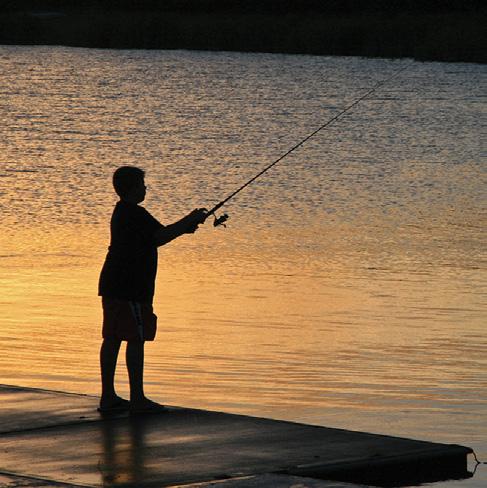
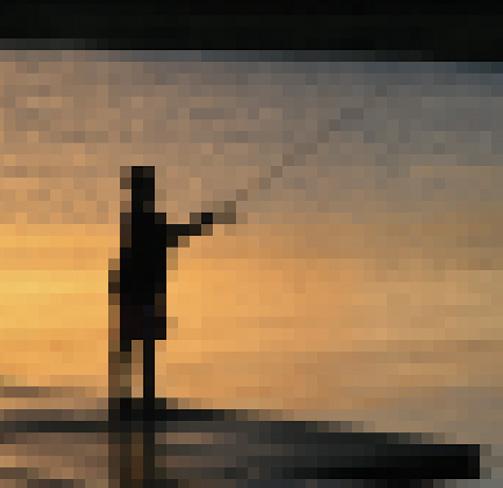
Pixellation: What happens when a small image is enlarged too much.
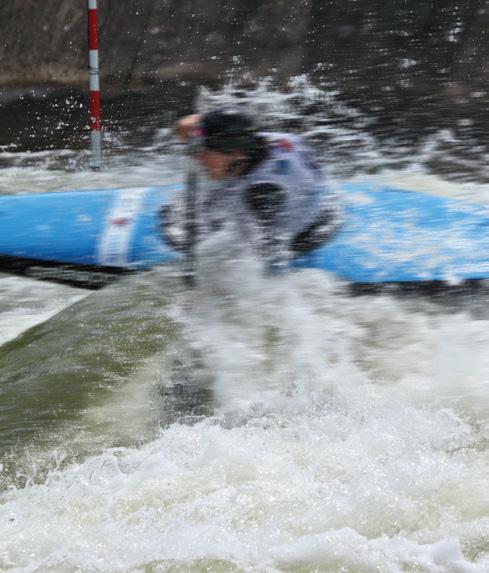
Shutter Speed: When shooting a fast moving subject it may suffer from motion blur (left). Make sure you are using a high shutter speed or ‘Sport’ setting and you will be able to freeze the action (right).
QUICK TIP
Freemason
File Formats
There are many ways of storing/moving the data that makes up your photo. It usually has to be transferred from your camera to your computer, and then onwards to any other recipient as you so desire. The way in which the data is formatted affects:
a. the amount of original data that is retained (file size) and b. the ease of transfer to others (compatibility)
JPEG
The most common format by far for photographs is JPEG, the file extension for whic is usually ‘.jpg’. An image stored as a jpeg is usually of a very manageable size, so is great for emails, websites, etc. But in order to keep the size low, the process usually ‘throws away’ some of the original data. The discarded data is lost forever.
Most digital cameras give you the option of outputting your image from the camera directly as a jpeg.
TIFF
‘Tagged Information File Format’. This usually has a file extension of ‘.tif’. A tiff does not throw away data, usually resulting in quite a large file size. It is one of the favoured formats among professional photographers, who often need all the data to be retained so that more professional prints can be made.
PSD
‘Photoshop Document’. This is an exclusive format used by Adobe for any files using Photoshop. The file can be made up of one or more layers – each layer being used for image sections, filters, etc. A psd file can be huge, because each layer amounts to an image in its own right.
GIFs and PNGs and WEBPs, oh my!
There are several other formats you may encounter that have been developed for use on the web, where efficient file transfer is more highly-prized than quality. For publishing, avoid these file types where possible.
Camera raw
The file extension is usually ‘.CR2’ or .’CR3’ depending on the make and model of camera (some manufacturers use their own formats). Most cameras automatically apply a variety of improvement processes to the image when you take it – for the vast majority of users this is not only convenient, but desirable.
Professional photographers who would rather do these processes themselves will use the RAW setting, to get the photo exactly as captured by the camera’s sensor. Be aware that raw files will look unimpressive and require specialist software to work on, so be sure you want to do the extra work before you use this format!
The law
Photography and privacy is a nuanced subject. As a policy, we require that you gain the consent of all identifiable people in the photograph before sending it in. A simple verbal check is usually sufficient, as some people are happy to have their photo taken but would rather it not be widely shared.
The exception is that if the event is held openly in public, then express permission is not required, but it’s still best practice (and polite!) to ask.
We also require that if a photo includes identifiable minors, that you secure the permission of their parents, or their faces will have to be obscured.