DigitalBeef is Coming to the ACA With the new DigitalBeef system coming online in February members will be able to do more work online. This will include registrations, transfers, entering data, cow herd inventories, pay bills and will add several herd management tools for you. Use this new sysytem to your advantage and track A.I. breeding dates, pasture exposure dates, calving dates as well as semen and embryo inventories. The benefits to this system are seemingly endless. The ACA will try and make this switch as seamless as possible but we know that there will be some complications. So please bare with us as we are upgrading to DigitalBeef. DigitalBeef is currently working with eight breed associations. These getting started steps will hopefully be able to help. If anyone would like a sneak preview please call the office.
Step 1: Login
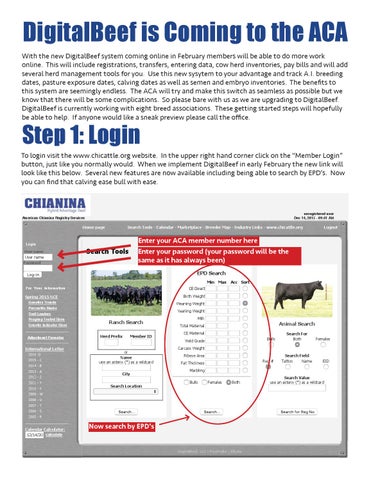
To login visit the www.chicattle.org website. In the upper right hand corner click on the “Member Login” button, just like you normally would. When we implement DigitalBeef in early February the new link will look like this below. Several new features are now available including being able to search by EPD’s. Now you can find that calving ease bull with ease.
12/14/2015
DigitalBeef: ACA :: Information Management for the Chianina Breed in North America
unregistered user Dec 14, 2015 - 09:41 AM
American Chianina Registry Services
Login User name
User name
Search Tools Calendar Marketplace Breeder Map Industry Links www.chicattle.org
Home page
Search Tools
Password
Enter your ACA member number here Enter your password (your password will be the same as it has always been)
Acc Sort
Weaning Weight
Percentile Ranks
Yearling Weight
Trait Leaders
Progeny Tested Sires
Milk
Ranch Search
Total Maternal
International Letter 2016 D 2015 C 2014 B 2013 A 2011 Y
Ribeye Area
Reg #
Fat Thickness Marbling
Search Location
Bulls
Carcass Weight
Bulls
Animal Search
Yield Grade
City
2012 Z
CE Maternal
Herd Prefix Member ID or Name use an asterix (*) as a wildcard
Adjustment Formulas
2008 U
Max
Birth Weight
Genetics Trends
2010 X
Min
CE Direct
Spring 2015 NCE
2009 W
EPD Search
For Your Information
Genetic Indicator Sires
Logout
Females
Search For Both
Females
Search Field Tattoo Name
EID
Search Value use an asterix (*) as a wildcard
Both
2007 T 2006 S
2005 R
Calendar Calculator: 12/14/2015calculate
Now search by EPD’s
DigitalBeef, LLC | PostNuke | Zikula
Step 2: Register Calves
Once you have logged in to your account, a work menu bar will appear down the left side of the screen. To begin registering calves simply click on the “Herd Mgmt” tab in bold Letters, then click on the “Recording” tab and finally click on the “Calves” tab. Now you should see the screen below. Simply fill out the form as normal. If you have entered breeding information on the dam of the calf by entering the dam and the birth date the best choice for the sire will automatically be filled in. You can also enter the transfer, weaning and yearling data on this screen as well. At the end of the line you will see the option to “Add Row” to enter another calf. When you have completed your calving information click “Validate” and the system will make sure that everything is ready to go and the information is complete. After any issues are 12/14/2015 DigitalBeef: ACAbutton :: Information Management the Chianina Breed in North America resolved, you may click the “Commit to Registry” to complete the for registrations.
American Chianina Registry Services
Work Menu
Home page
Birth Data Entry Screen for Work Order #
Search/Find Animal Ranch/Person
Herd Prefix
RE Tattoo
LE Tattoo
Birth Date
mm/dd/yyyy
Work Order Animal View Edit UnDelete Ranch/Person View Account
Herd Mgmt Herd Transfer Animals
Step 1: Herd Mgmt Tab Step 2: Recording Tab
Update Status Recording Calves Weaning Yearling Ultrasound Foundation Foundation Request Commercial Missing Data Breeding DNA Cooperators Private Treaty Consignments Customers Suppliers Reports Tools New Profile Merge DNA Work Queues Birth Recording Weaning Yearling Ultrasound
Step 3: Calves Tab Step 4: Enter calving details Step 5: Add More Rows Step 6: Validate and Correct Step 7: Commit to Registry
Sex
Service Type Natural Service
Member #1 (1 record
Dam
H/
Sire
Step 3: Check your account
If you would like to check your balance and settle your account with the ACA you may now do so at anytime. Click on the “View Account” tab from the menu bar. Then click on the “Account” tab. from here you will be able to view your account statements and your invoice history. Also you will able to pay online from this screen. 12/14/2015 DigitalBeef: ACA :: Information Management for the Chianina Breed in North America Andee Marston Dec 14, 2015 - 03:49 AM
American Chianina Registry Services
Work Menu
Search Tools Calendar Marketplace Breeder Map Industry Links Q & A www.chicattle.org
Home page
General Profile Information
[ edit ] [ lock ] [ Remove Credit Privilege ]
Add Ranch Logo
100
Logout
Event
Profile Type: Member Official Profile ID: 100
Official Profile Name: PONDEROSA RANCH
Search/Find
Date
Last Activity: Last Change:
DBA: J.E. JUMONVILLE SR. & J.E. JR.
Animal
Last Log In:
Ranch/Person
Herd Prefix:
Work Order
Membership Date: 5/15/1972
Hold Brand: Add Brand
Animal
Balance Due: $ 0.00
View Edit UnDelete
Ranch/Person View Account
Addresses
Phones
Contacts
Account
Prefs
Herd Mgmt
Herd
Pastures
Kickouts
CG's
DNA
Work Orders
Memo's
Permissions
Chianina Journal
Change Log
Account Statement Builder
Herd
Begin Date 11/14/2015 End Date 12/14/2015
Transfer Animals
Show Invoice History
Update Status Recording Calves Weaning Yearling
Step 1: View Account Tab
Ultrasound Foundation Foundation Request Commercial Missing Data Breeding
Step 2: Account Tab Step 3: Build Statement
DNA Cooperators Private Treaty Consignments Customers Suppliers Reports Tools New Profile Merge DNA Work Queues
Maps/Mailing Lists Everyone at the ACA is committed to maintaining the highest level of customer satisfaction. If you Association Options experience any problems please let us know and we will help you resolve them. By implementing this new 3rd Party Integration Accounting system we hope to increase our quality of service and give the ACA members more tools to help improve Show Management Chianina cattle. There is much more to DigitalBeef than just registering cattle. It offers lots of tools to Administration benefit every cattleman. Please take the time to explore the site and take advantage of the opportunities Your Information itFor provides. Joe Massey and Jim Bulger at DigitalBeef have been great to work with and can troubleshoot Spring 2015 NCE any issues in a matter of minutes not days. So please be patient with us as we move into DigitalBeef but Genetics Trends Percentile Ranks do not be afraid to call in with any problems, questions or concerns. Trait Leaders
Progeny Tested Sires
Genetic Indicator Sires Adjustment Formulas
International Letter 2016 D 2015 C 2014 B 2013 A 2012 Z 2011 Y
American Chianina Association PO Box 890 :: 1709 Praire View Rd. Platte City, MO 64079 816.431.2808 :: 816.816.431.5381 (fax)