Guide to Relocation Reimbursement
1
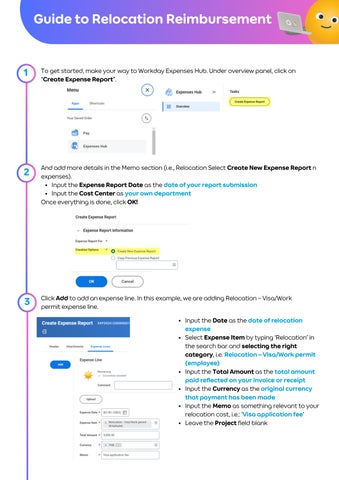
To get started, make your way to Workday Expenses Hub. Under overview panel, click on “Create Expense Report”.
2
And add more details in the Memo section (i.e., Relocation Select Create New Expense Report n expenses). Input the Expense Report Date as the date of your report submission Input the Cost Center as your own department Once everything is done, click OK!
3
Click Add to add an expense line. In this example, we are adding Relocation – Visa/Work permit expense line. Input the Date as the date of relocation expense Select Expense Item by typing ‘Relocation’ in the search bar and selecting the right category, i.e. Relocation – Visa/Work permit (employee) Input the Total Amount as the total amount paid reflected on your invoice or receipt Input the Currency as the original currency that payment has been made Input the Memo as something relevant to your relocation cost, i.e.: ‘Visa application fee’ Leave the Project field blank
4
Add information in the Item Details section. Input the Destination as the location of your service, vendor, or merchant Input the Merchant as your service provider
5
Time to attach your receipt / invoice as evidence of payment! Upload or Click & Drag the file to the following area. Click the Upload button to add more attachment(s) if you have > 1 receipts (see below):
Don’t forget to check the box next to Receipt Included!
6
Click Add to create more expense lines. Repeat Steps 3-5 for all your relocation expenses in different categories.
DONE
Another expense line will show up as per below screenshot. When you’re done, click Submit.
Things to keep in mind: 1.Make sure that all your relocation expenses are filed under the same report. You do not need to create a new report as per Steps 1-2. 2.Please refrain from submitting expenses unrelated to your relocation in the same report.
Got a question? reach out to Global-mobility@agoda.com Track your payment status, please contact PeopleHelpDesk@agoda.com
Guide to Relocation Expense Items Relocation - Accommodations Applicable expenses: Self-selected 30-day temporary accommodation The system prompts you to fill in the following additional details: Attendee(s): Employee(s) who relocated Destination: Where the employee has relocated (City, Country) Merchant: Accommodation service provider From-To Date: Duration of your stay
Relocation – Air Tickets (Employee) Applicable expenses: International relocation flight (within requirements and maximum budget, if any) Domestic relocation flight (within requirements and maximum budget, if any) Selections: Relocation – Air Tickets (Employee): Agoda employee’s flight booking(s) Relocation – Air Tickets (Family): Flight booking for employee’s dependent(s) The system prompts you to fill in the following additional details: Airline: The airline you’ve booked a flight with Departure Date: Date you boarded the flight Arrival Date: Date your flight arrived at the destination Class of Service: Economy, Business, etc. Origination: Enter the departure airport using the 3-letter IATA code (e.g., BKK, DMK, HKT) Destination: Enter the destination airport using the 3-letter IATA code (e.g., BKK, DMK,HKT) Number of Persons: How many people boarded the flight *** Family relocation benefits are not applicable to CEG Agents.***
Relocation – Visa/Work Permit (Employee) Applicable expenses: Visa application fee Work permit application fee Notary fee Health-check fee (if required ; Pre-approved by VISA team ONLY) Selections: Relocation – Visa/Work permit (Employee): Fee-related to the employee’s visa application Relocation – Visa/Work permit (Family): Fee-related to dependent(s)’ visa application *** Family relocation benefits are not applicable to CEG Agents.*** ***The relocation benefits outlined in this guideline are subject to the relocation package offered to you. Please refer to your offer letter to determine the specific benefits applicable to your package***
Guide to Relocation Expense Items Relocation – Pet Transportation Applicable expenses: All fees related to pet relocation (within maximum budget), i.e.: Vaccination fees (incl. obtaining certificate) Microchip certificate Health certificate Import permit application / Pet entry fee (airport customs) Flights This will NOT include anything unrelated to pet relocation, i.e.: Pet clothing Pet carrier Pet food, bedding & litter *** CEG Agents are not eligible for this benefit.***
Relocation – Moving/Shipping Applicable expenses: Shipping or moving service fee Must be included in the relocation package or Pre-approved by the Global Mobility team ONLY *** CEG Agents are not eligible for this benefit.***
Relocation – Extra Baggage Applicable expenses: The two additional baggage or up to 46 kg extra check-in baggage fee Must be included in the relocation package or Pre-approved by the Global Mobility team ONLY
Relocation – Ground Transportation Applicable expenses: All transportation fees related to your relocation (i.e. train, taxi, public bus, parking) Airport transfer: Transport fee from your home (in your hometown) to the airport Transport fee from the airport to your temporary accommodation (if applicable)
****The relocation benefits outlined in this guideline are subject to the relocation package offered to you. Please refer to your offer letter to determine the specific benefits applicable to your package***
Got a question? reach out to global-mobility@agoda.com Track your payment status, please contact PeopleHelpDesk@agoda.com