
Thailand
New Hire's First Day Guide


Guide to your First day
New Hire Orientation

The session will occur on the first working day of the week* starting 9:00 AM sharp, so please be on time! We’ll be exploring the following topics:
✓ Building Connections: Getting to know other Agodans
✓ Breaking the Ice
✓ Discovering Agoda: An introduction to our company and its values
✓ Learn about our systems & employee offerings: An overview of our systems, tools, and employee programs
✓ Gear Up: Setting up your equipment for a productive journey ahead.
*If your start date does not fall on the first working day of the week or there are not enough participants joining, your Orientation will happen in the next coming week.

What to bring
1. National ID or driver’s license card to be presented for office access.
2. Physical copy of your Life Insurance Form, filled and signed with your wet signature. (Except for Intern and Staffing Agent)
Guide to your First day
How to dress
At Agoda, we follow a smart casual dress code:

For example, a T-shirt and jeans are perfectly fine!

Avoid wearing outfits that contain profane language or are too revealing, such as flip-flops, mini-skirts, etc.
Getting to the office
MRT:

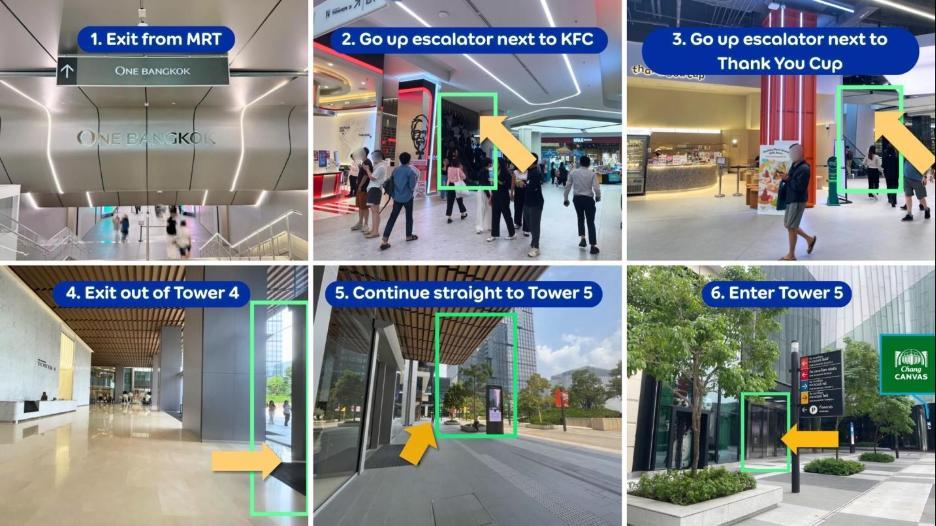
Our office is located at One Bangkok Tower 5. You can directly access One Bangkok from MRT Lumphini, exit 1.
By BTS & Shuttle Bus:


The closest BTS station is Phloen Chit, Exit 2.
A free EV shuttle service is available to One Bangkok, which departs every 15 minutes.
By Private Transport:
From the Sirat Expressway: Take the exit toward Rama IV Road / Witthayu Road, then follow signs to One Bangkok
Getting to the office by MRT
MRT Blue Line: One Bangkok is connected to the Lumphini station via an underground walkway through the mall. From the station, follow the directions below:
Ride Hailing Services
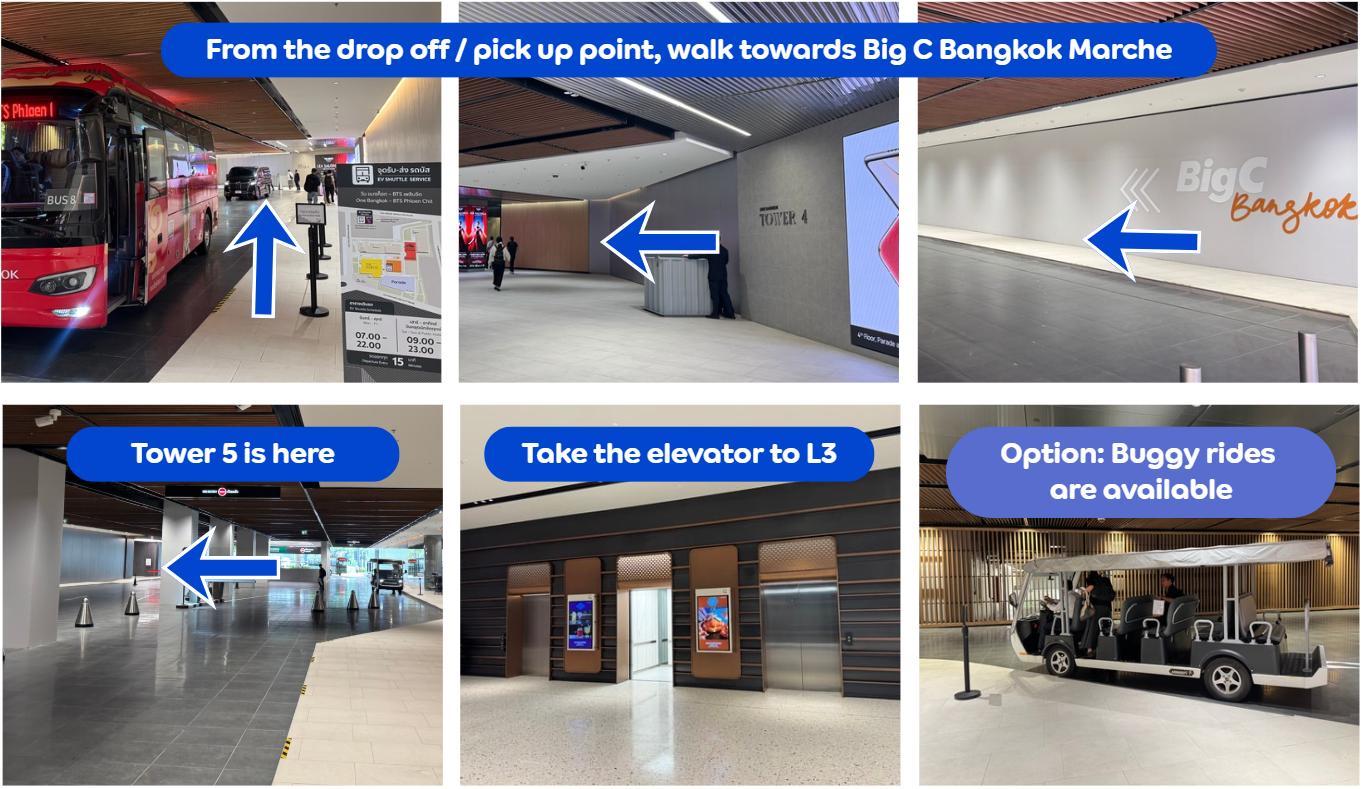
If you're taking Grab, use the following drop-off and pick-up points:
• Forum (Big C Bangkok Marche): https://app.grab.com/s/ZRJVryia
• The Storeys (Starbucks Reserve): https://app.grab.com/s/IzQRNjIn
Guide to your First day
Getting to the office by BTS
BTS Sky Train: If you’re travelling via the BTS, you can take the free shuttle service provided by One Bangkok from the BTS Ploen Chit station, Exit 2.
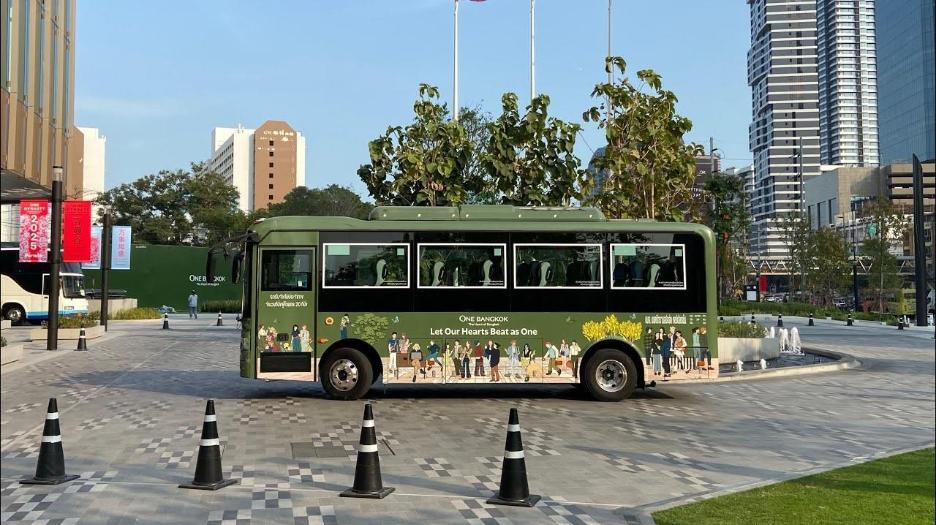
The bus departs every 15 minutes in front of
Mahatun Plaza.
Guide to your First day
Getting to the office by private transport
Office location: 193 Tower 5, One Bangkok, Wireless Road, Lumphini, Patumwan, Bangkok 10330 Thailand (Get Direction)
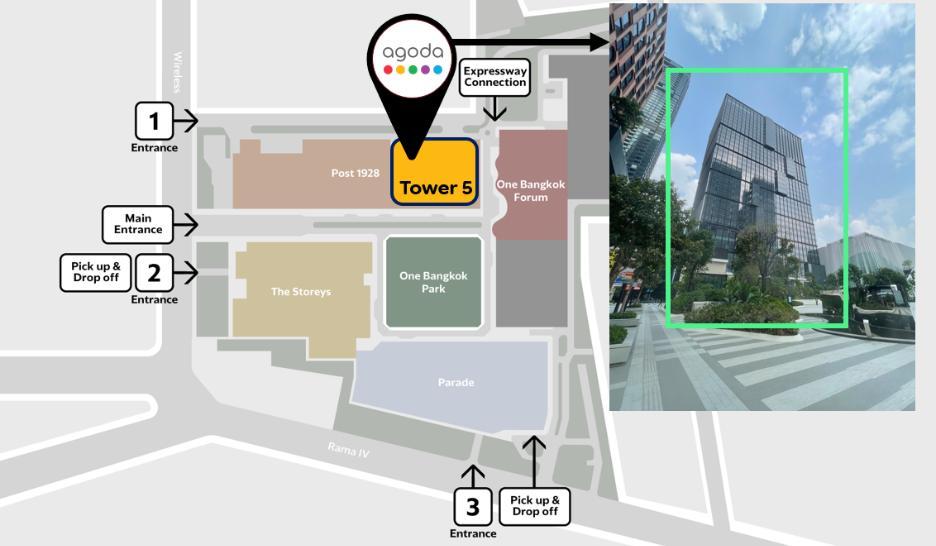
• By car: Enter through any vehicle entrance. You can park at the Red or Green Zones at B2 – B4 for the nearest connection to Tower 5.
• By motorcycle or bicycle: Enter via Entrance 2 and park in the Red Zone (Andaz entrance) on B1M.
• From the parking zones, follow the signs to One Bangkok Forum, Chang Canvas, or One Bangkok Tower 5 on Level 1 (L1).
Guide to your First day
Attending the Orientation (1/2)
Once you arrive at Tower 5, go up to Level 3 to visit the Agoda reception counter.
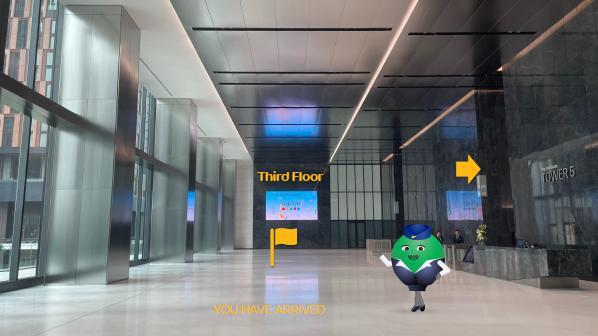
Level 3 Reception
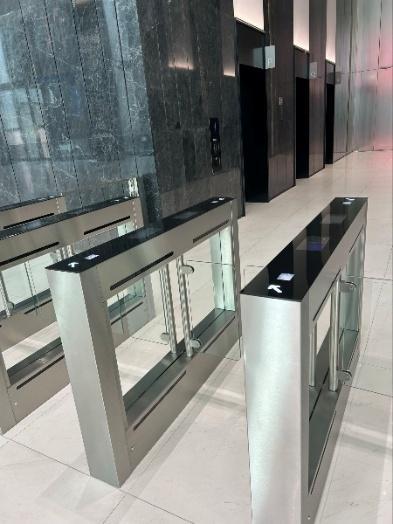
• Present your ID card or passport together with your first day email
• Receive your badge and QR code for office access
Guide to your First day
Attending the Orientation (2/2)
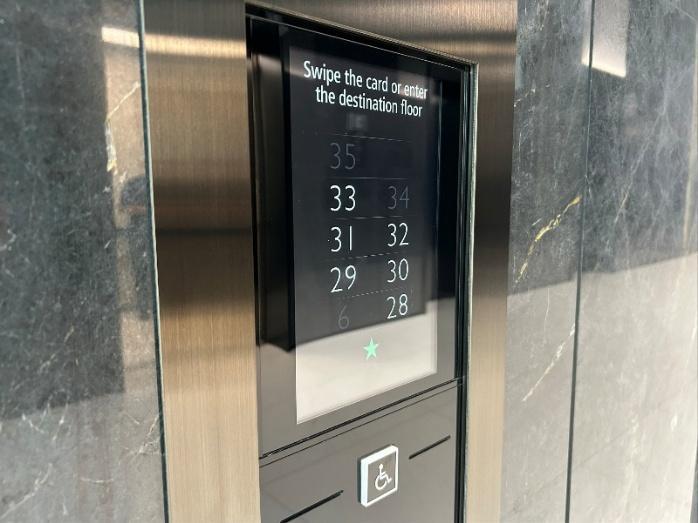
Once you arrive at Level 33, head towards the North entrance. Use your badge to enter, then turn right to the N20 room.
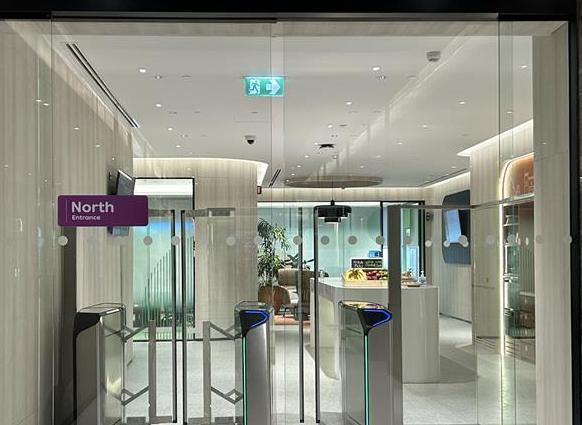
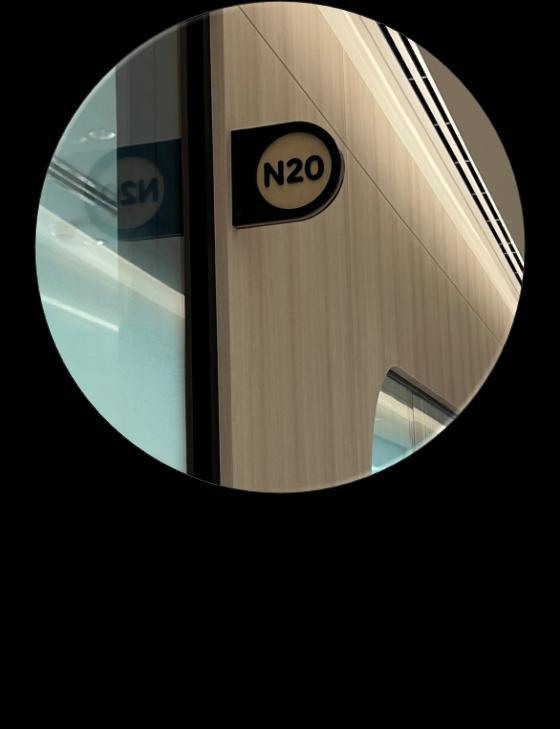
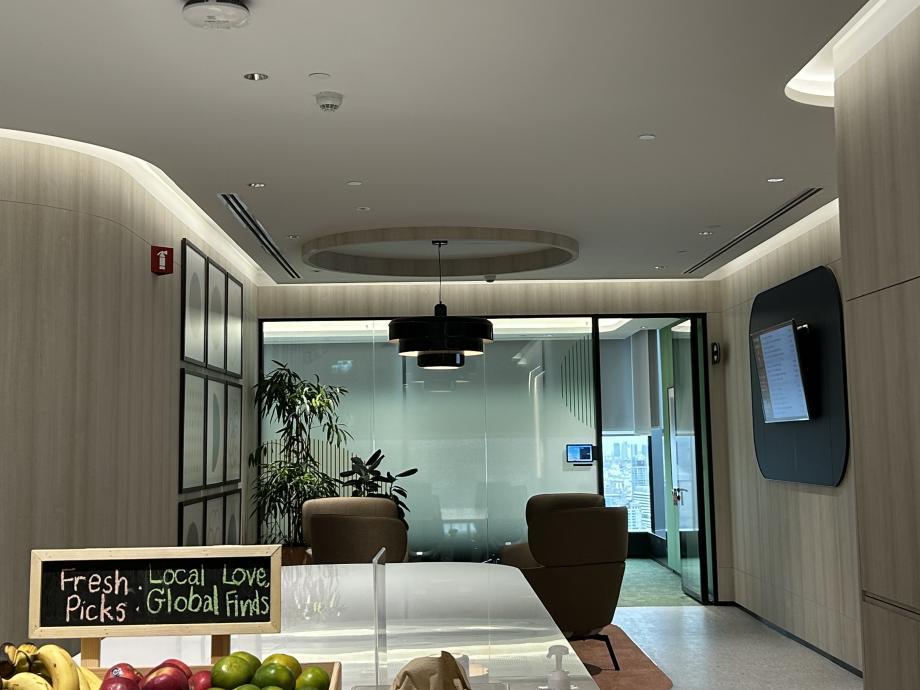
Turn right after passing the pantry
NEW HIRE ONBOARDING TIMELINE
7-14 Days Prior

• Activate your Okta account: you will receive an email to set up your username and password
7 Days Prior
• Browse through our Agoda Starter's Preboarding Guide (Password: AgodaNewHire123)
Day Prior
• If you are working from home, please finish setting up your tech equipment prior to your start date
• If you need any assistance, reach out to IT-Support via:
⚬ Email: IT-Support@agoda com
⚬ Tel (BKK-based): (+66)2-016-4145
⚬ MS Teams Channel
Your Start at Agoda
Days After
• Check if you have all the software, programs, and platforms you’ll need to perform your role
• Complete your mandatory new hire and compliance -related e-Learning Courses
• Kickstart training for your role
• If you have any People team related questions, reach out to PeopleHelpDesk@agoda com
• Get access to Workday and submit all the required information via assigned tasks
3-7 Days Prior
• Received first-day instructions
• If you are working from home, we will reach out to you on the next steps for retrieving your tech equipment
⚬ Please set-up using your Okta username and password upon receiving laptop
• Got questions about your Day 1? Reach out to Onboarding@agoda.com
Your First Day at Agoda
• Attend the New Hire Orientation
• If you are starting in the office, you will receive your IT equipment and be given live guidance on setting up your laptop.
• Meet with your manager and teammates.
*New Hire Orientation occurs every first working day of the week. If your start date does not fall on the first day of the week or there are not enough participants to hold a session, your Orientation will happen in the next coming week.
7-14DaysAfter 7
• Start the 1:1 discussions with your manager. (KPIs, expectations, and your career roadmap)
• Meet up with colleagues to find out more about their role and how their team operates
• Elect your Social Security and Health Insurance and benefits on Workday
• Participate in at least one Agoda social event or activity
• Check out our Viva Engage groups for the latest updates:
⚬ Social at Agoda
⚬ CEO
⚬ Global Events & Happenings
⚬ and more 8
*Remark:
Your First Few Months
Months After
• Attend a New Hire Event (more details to follow soon!)
• Give back to the community by volunteering and using your annual CSR time off: check out our Benevity platform to browse our initiatives!
Upload your
Picture on Workday


Correct
• White background, with your face in clear view
• High-resolution (at least 200 x200 pixels). Can be a clear, well-lit phone photo
• Keep your glasses on if you usually wear them
Incorrect
• A picture of you wearing a mask or dark sunglasses
• A picture with other people or objects
All employees need to complete the task in your Workday inbox within Wednesday (The week before your start date). This is for your picture to be used for your employee badge.
Guideline to
Life Insurance Form
Please print out your Life Insurance Form using the following link and complete it as a hard copy. Fill it out by hand and sign it with your wet signature. For guidance on how to do fill out the form, please refer to the instructions provided below.

Remarks: This task only applies to Full-time and Contract (Temp-fixed term) employees. For Interns and Staffing Agents, you do not need to fill this out.
Page 1
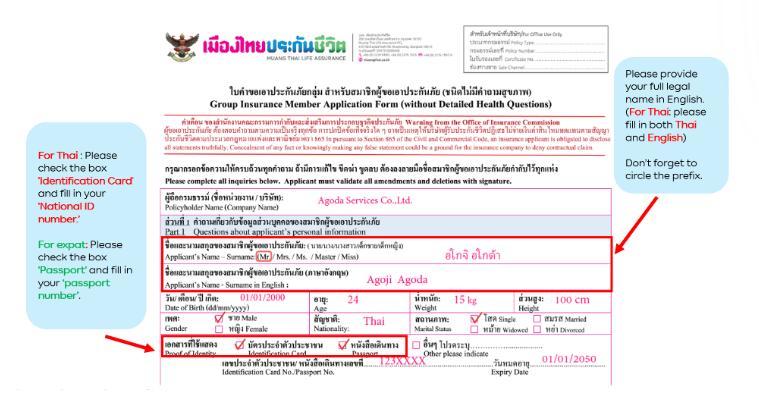
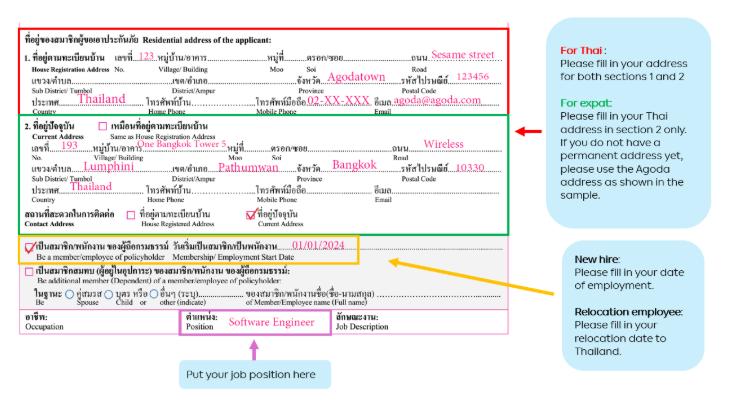
Life Insurance Form Guideline to
2

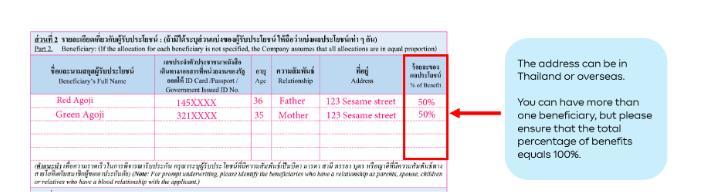
3
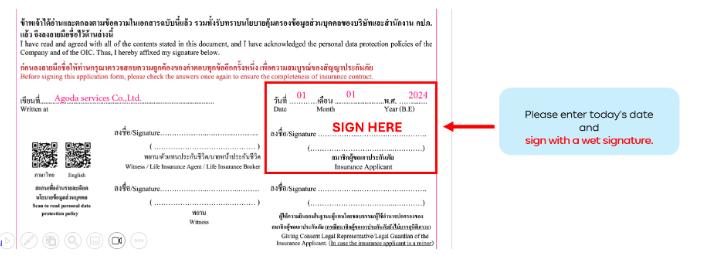
Note: Please print the form out and provide your wet signature
This a standard requirement to guarantee your life insurance enrollment.