SUITE KEY
This key will open your apartment door
ROOM KEY
This key will open your bedroom door
SUITE KEY
This key will open your apartment door
ROOM KEY
This key will open your bedroom door
EVERYONE NEEDS A UCR CARD.
Please get your UCR card as soon as possible as this card allows you access to the buildings and your dining plan. For R’Card information, please visit their website at ucrcard.ucr.edu.
If you do not already have your R’Card please visit the Highlander Service Station located next to the UCR Bookstore in the HUB Upper Plaza. Regular hours are Monday-Friday 9a.m. to 4p.m.
Parking permits are required for all cars and motorcycles parked in Housing Parking Lots. Visit Transportation Services for information on obtaining a parking permits. Permits are linked to your license plate as part of our license
FOR STUDIOS
You will only receive 1 key for your apartment
plate recognition system. Physical permits are not distributed.
All mail and packages will be delivered and stored at the RSO. You will receive an email when your package is ready for pick up. The RSO only accepts mail and packages under your name, and will send back mail and packages received under non-resident or family names.
You will NOT receive an email regarding USPS mail. Please regularly check with the RSO if you are expecting any paper mail from USPS.
Please know that during peak delivery times such as Amazon Prime Day, Black Friday and holidays, there could be a delay in receiving mail and packages. Your patience in receiving notifications for packages during these times is needed and appreciated.
Your Name 3430 Canyon Crest Drive Apt# Riverside, CA 92507

All laundry services at UC Riverside are paid for through the WASHConnect app. The app allows the user to find available machines, pay for washes, and get notified when the laundry is done, all within the secure app. Download the WASH-Connect app to get started.
* Payments on the app can only be made through credit/debit cards. Laundry costs per load are $1.75 to wash and $1.25 to dry.
The Campus Store is open 9am to 4pm (M-F).
Carts will be available for check-out. You must leave a personal identification card as collateral. Only one cart per resident with a 30-minute time limit. We are unable to check out carts within 1-hour of the Resident Services Office closing.
UCR Transportation Services (TAPS) supports an internal bike and scooter registry system and recommends that residents license/register their bikes and scooters. Registration is provided at no cost to all residents. It helps to identify your property in the event your bike is lost, stolen, recovered, or impounded.
Residents in UCR Housing must register their scooters with TAPS to get an approved housing registration sticker allowing the scooter inside campus housing.
Register online and visit TAPS at your convenience to pick up your bicycle license/registration tags.
Switch Paddle (Top):
Press the top to turn lights on.
Switch Paddle (Bottom):
Press the bottom to turn the lights off.
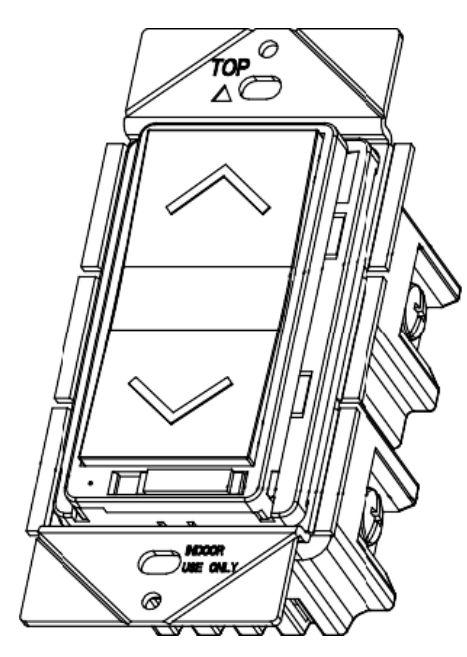
LED Light Indicator:
Blue LED light will turn on when the switch is on, and will turn off when the switch is off.
Air Gap Switch:
The switch must remain switched to the right side at all times. Operating the light with this switch to the left will cause the lights to not function properly.

Operation
1
Cool Set to 74F
2 On/Off
3 Cool Set to 74
4 Cool Set to 74
Press On/Off button
Press ● Mode button several times until the desired mode Cool, Heat, Fan, or Auto mode is selected.
The light will illuminate green and the system will start operating. On/Off
Press ● On/Off button.
Press Mode to cycle through the desired mode: Cool, Heat, Fan or Auto
The Operation lamp will illuminate solid green and the system will start
The setpoint will increase by ● 1°F (or 1°C) when button is pressed and decrease by 1°F (or 1°C) when
Press Up and Down arrows to adjust setpoint.
Adjusting the cooling setpoint will also change the heating setpoint even though only the cooling setpoint is shown if in cooling mode and vice versa in heating mode.
Cooling range is 70F-74F and Heating range is 68F-72F.
There will always be a 2F offset between cooling and heating.
Press Fan Speed to cycle through Low/Medium/High/Auto fan speeds
To change the fan speed, press ● Fan speed control button and select the fan speed from;
Note: If the thermostat is in the same room as a window, that window will be interlocked to the AC unit. If that window is opened, the unit will shut off to conserve energy.
Come to your Resident Services Office
MONDAY-FRIDAY: 8:00 AM - 9:00 PM SATURDAY 10:00 AM - 4:00 PM SUNDAY 2:00 PM - 9:00 PM
3430 Canyon Crest Drive • Riverside, CA 92507 • (951) 827-3980 RA on Duty Numbers: C building (951) 263-0332 • D building (951) 263-0342 If you get sick while on campus, contact Student Health Services at (951) 827-3031 24-Hour NurseLine: (877) 351-3457
Place a service request at housing.ucr.edu
Have an emergency? Call the Auxiliary Services Facilities 24-hour customer service line at (951) 827-8534
4/C ON DARK