Soul.
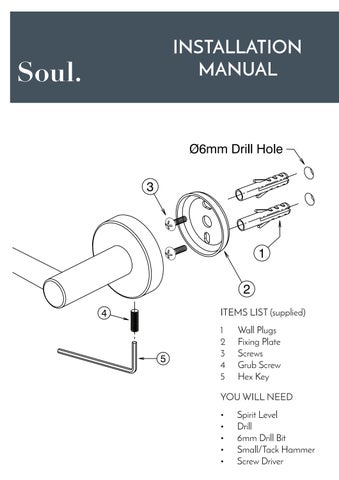
Ø6mm Drill Hole
ITEMS LIST (supplied)
1 Wall Plugs
2 Fixing Plate
3 Screws
4 Grub Screw
5 Hex Key YOU WILL NEED • Spirit Level • Drill • 6mm Drill Bit • Small/Tack Hammer • Screw Driver 1 2
Ø6mm Drill Hole
ITEMS LIST (supplied)
1 Wall Plugs
2 Fixing Plate
3 Screws
4 Grub Screw
5 Hex Key YOU WILL NEED • Spirit Level • Drill • 6mm Drill Bit • Small/Tack Hammer • Screw Driver 1 2
• Wall Plugs supplied with this product are only for the use of installation on solid walls (brick, masonry block, concrete etc).
• To prevent drill from wandering on tiled surfaces it is recommended that masking tape be applied before drilling.
• Mark and drill holes 6mm diameter, 40mm deep.
• IF multiple Fixing Plates (2) in use, use spirit level to ensure level.
• Insert round end of Wall Plugs (1) into drilled holes and tap with hammer until flush with surface.
• Fit screws (3) through slots in Fixing Plate (2) before inserting into Wall Plugs (1).
• Tighten screws (3).
• Install accessory onto Fixing Plate/s (2), making sure that the Grub Screw (4) is located underneath as shown.
• With the accessory in place against the wall surface, tighten Grub Screw (4) using Hex Key (5) provided.
TILED CAVITY WALLS (Plasterboard/tile, Fibre cement sheet/tile)
• Use appropriate Hollow Wall Anchors and M4 screws (not supplied) to replace Wall Plugs (1) and screws (3).
UNTILED CAVITY WALLS (Plasterboard, Fibre cement sheet)
• It is recommended that the accessory be screwed to a stud or noggin into the wall using suitable screws (not supplied).